Salesforce Authenticator
- 1.22K
- 4.5
- Installs
- 1.00M
- Price
- Free

Screenshots

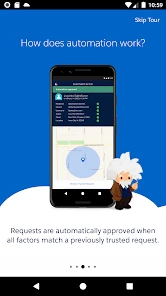
Analysis by Reviewed
I would think about Salesforce Authenticator less as a general-purpose security app and more as a small part of a work routine. Its value depends on whether your Salesforce sign-in is important enough to protect with an extra step, and whether that step is comfortable for you to use when you are busy, away from your desk, or relying on a phone with limited access.
Choosing a workflow that fits
Before making it your everyday sign-in method, I would check how your organization expects people to enroll and what alternatives it allows. An administrator can help clarify how a new phone, a lost phone, or a change in work arrangements affects access. That conversation is especially useful for people who work shifts, share equipment, or cannot keep a personal phone nearby during the day.
It is also worth distinguishing a work-managed Salesforce login from personal accounts. This app is designed around Salesforce, so I would not choose it expecting it to replace a general authenticator for every service. If you already use another authentication app for unrelated accounts, keeping the roles clear can make troubleshooting easier: use the Salesforce-focused approval flow where it is supported, and keep other accounts in the tools intended for them.
A realistic sign-in day
Picture arriving at a client site, opening Salesforce on a computer you are permitted to use, and receiving an approval request on your phone. If the notification is unexpected, the safest response is to pause and confirm that you initiated the login. If it is yours, approving is straightforward; if connectivity is unreliable, knowing the generated-code route ahead of time can prevent a rushed search for another way in.
This routine is helpful precisely because it creates a deliberate checkpoint, but the checkpoint can become easy to overlook when you approve requests repeatedly. I would treat each prompt as a question about a specific sign-in, not as a routine pop-up to clear. That small habit preserves the security value of the extra step without making the app feel like a mindless chore.
What to prepare before relying on it
A phone change is a good example of a situation where preparation matters more than the app’s day-to-day simplicity. If the old device is unavailable, you may need help from your organization to restore the account’s sign-in path. I would sort out the approved recovery process while access is working, rather than waiting until a busy morning when Salesforce is needed immediately.
Likewise, people who work in areas where phones must be stored away should test whether the allowed sign-in options fit that rule. The app can be a poor practical choice if reaching a phone is inconvenient or prohibited, even if its approval screen itself is easy to understand. In that case, ask about another method your Salesforce administrator supports instead of relying on assumptions.
More From Our News Desk

Clash of Clans Is Won Between the Battles

Android Auto Makes the Case for Quieter Car Software

MobiOffice: Transforming Mobile Productivity with Seamless Integration

EA SPORTS FC™ Mobile Soccer: Redefining Mobile Sports Gaming

How Microsoft OneDrive Became a Mobile Productivity Giant

How Google Translate Breaks Language Barriers Effortlessly
Hey there! So, I’ve just spent some quality time with the Salesforce Authenticator app, and let me tell you, it's a nifty little tool if you’re in the Salesforce ecosystem. I know, I know—authentication apps aren’t the most exciting thing in the world, but trust me, this one’s got some neat tricks up its sleeve.
What makes an authenticator useful is not just the security step itself, but whether it fits the way you work and the circumstances in which you need to sign in. I’d consider this app most closely when Salesforce is already part of my daily routine, rather than as a universal login tool for every account I own.
Getting Started with Ease
First off, setting this thing up is a breeze. You just download the app and follow the prompts to link it with your Salesforce account. Easy-peasy. No tech wizardry required. The app is available for both Android and iOS, which is always a plus. It’s like they’re saying, "Hey, we’ve got your back no matter what device you’re glued to."
Readability and Navigation
The main task is easy to understand: connect the app to your account, then respond when a sign-in needs approval. I like that the purpose stays focused instead of burying the security action beneath unrelated tools. If you help a colleague get started, it is worth explaining the approval step before they sign in, so the notification does not feel like an unexpected interruption or a request to approve something blindly.
For people who find small-screen text or unfamiliar menus tiring, a focused app can be less demanding than a complicated account-management interface. Still, I would not assume that every person will find the screens equally comfortable. A quick practice sign-in while setting up is a sensible way to check that the prompts are readable and understandable on your own phone.
A Smooth Operator
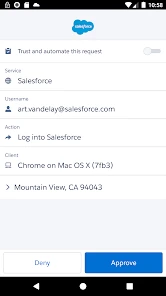
Once you’re all set up, the app seamlessly integrates with your Salesforce account, providing an extra layer of security. Now, I’m sure you’re thinking, "Great, another password to remember," but hold your horses! The Salesforce Authenticator uses two-factor authentication that’s actually really painless. When you log into Salesforce, the app sends you a push notification. You just tap "Approve" on your phone, and bam, you’re in. No more fumbling around trying to remember if your password had a capital letter or a symbol.
In an everyday situation, imagine starting work on a shared office computer and signing in to Salesforce from your phone. The approval gives you a clear moment to check that the request matches an action you just initiated. That pause is useful, but it also creates a responsibility: if a request appears when you are not trying to sign in, do not treat speed as the priority. Stop and investigate rather than approving automatically.
Security with a Dash of Simplicity
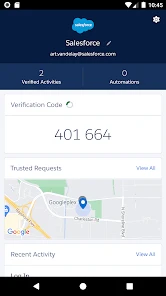
Security is obviously a big deal, and this app doesn’t mess around. Each login attempt needs your approval, which means even if someone gets hold of your password, they still can't access your account without your say-so. That’s a huge relief, especially if you’re handling sensitive data. Plus, it’s got this cool feature where it remembers your trusted locations and devices, so you don’t have to keep approving every single login if you’re logging in from a familiar place.
That trusted-location convenience is a trade-off I would think through rather than switch on casually. It can cut down repeated interruptions in a familiar routine, but a location or device that feels ordinary today may not be appropriate to trust forever. If you regularly work from changing sites, shared spaces, or a borrowed device, approving each sign-in may be a better habit than relying on familiarity.
Motor and Sensory Considerations
A phone-based approval can be practical for someone who can comfortably notice a notification and make a deliberate tap. It may be less convenient for someone whose work keeps their hands occupied, whose phone is stored away, or who has difficulty distinguishing a notification from other alerts. I would test the full sign-in flow in the setting where it will actually be used, not just while sitting at home with the phone in hand.
There is also a useful distinction between reducing password strain and removing all access friction. Approval avoids repeatedly entering another code for a supported sign-in, but it still depends on having the phone available and being able to respond. If tapping a prompt is difficult, or alerts are easy to miss, it is worth checking what sign-in methods your Salesforce administrator permits before making this your only practical route into work.
Where It Shines
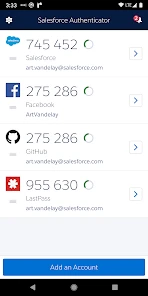
One of the standout features is its ability to work offline. Yup, you heard me right. Even if you’re off the grid, you can still authenticate with a generated code. This is super handy if you’re in a location with spotty internet. It's like having your own personal security guard that doesn’t need a Wi-Fi connection to do its job.
This makes a difference for a worker who travels through buildings with weak reception or needs to sign in while away from reliable connectivity. The key practical point is to know how to use the generated code before you are in a hurry; trying to learn an alternative sign-in step during a time-sensitive login is frustrating. I would also distinguish this from push approval: an offline code is a fallback for a different situation, not a reason to assume every part of the sign-in process works identically without a connection.
Compared with a general-purpose authenticator that can be used across many unrelated services, this one is most compelling when Salesforce is the account you need to protect. A broader app may suit someone who wants one place for logins across a mix of services. By contrast, Salesforce Authenticator keeps the decision centered on Salesforce sign-ins, which can be a benefit for a work-focused setup but a limitation if you expect it to replace every authentication tool you use.
Also, the app is super lightweight and doesn’t eat up your phone’s resources. No lag, no waiting around—it’s quick and efficient. I appreciate that because nobody wants an app that slows down their phone, right?
Situational Access and Remaining Barriers
I would recommend it most to people who sign in to Salesforce regularly, carry their phone during work, and want an approval step that feels more direct than manually entering a fresh code each time. It can also make sense for a small team trying to build a consistent sign-in routine, provided everyone understands that an unexpected prompt should be questioned rather than approved out of habit.
It is less suitable if you cannot reliably keep your phone nearby, need a login method that works comfortably without interacting with a phone screen, or want a single authenticator for a wide range of non-Salesforce accounts. If you lose access to the device or change phones, plan the transition with your Salesforce account administrator rather than assuming the app alone can restore access. That is a useful piece of preparation for anyone who depends on the account for a working day.
Salesforce Authenticator is a free business app from Salesforce.com, inc., and it is rated for everyone. It has an average rating of 4.5 from around 24,000 ratings, with roughly 1,200 written reviews and more than a million installs. Version 4.7.1 is the current version, and the app first appeared on November 4, 2013. Those figures suggest it has a substantial user base, but they do not remove the need to check whether its approval flow suits your own account and workplace.
Inclusive Verdict
In a world where data breaches are becoming all too common, having that extra layer of protection is really invaluable. The Salesforce Authenticator makes securing your Salesforce account a breeze. Whether you’re a Salesforce newbie or a seasoned pro, this app is definitely worth checking out. It’s simple, effective, and just gets the job done without any fuss. So, if you’re looking to beef up your security, give this app a whirl. You might just sleep a little better at night knowing your data is well-guarded.
My recommendation comes with one qualification: make sure the phone-based step works for your abilities, workplace, and backup plan before relying on it every day. For a Salesforce user who can respond to prompts and values a clear approval moment, it is an approachable security companion. If phone access itself is the obstacle, or your priority is managing many different accounts in one place, another permitted sign-in option may be a better fit.
Who benefits most from the focused design
I can see this working particularly well for people whose workday already revolves around Salesforce and who want the second step to stay tied to that account. It is also a reasonable choice for someone who would rather approve a sign-in than copy a short code from one screen to another. That preference is personal, though: a code-entry routine may be easier for people who cannot reliably notice or open notifications.
For a team, the useful part is not simply asking everyone to install the same app. People need to understand what a legitimate sign-in request looks like in their own routine and know whom to contact if an approval arrives unexpectedly. A short practice run can reveal whether the phone is accessible at the right moment, whether notifications are easy to recognize, and whether the team’s normal work rules allow the phone to be used.
Small habits that prevent avoidable friction
I would keep a little space in the setup process for testing both the everyday approval and the code-based fallback. That is more useful than waiting until a network problem forces a change of approach. If your work routinely takes you between buildings or into areas with unreliable reception, learning the alternative while you still have time makes the security step less stressful.
Trusted locations deserve periodic attention too. A familiar place can stop being appropriate when a desk becomes shared, a device is borrowed, or work moves to a different setting. I would review those convenience choices when my routine changes, rather than treating an old trust decision as permanent. The feature is most helpful when it saves needless approvals without encouraging me to approve requests automatically.
Final fit for an inclusive routine
There is no single phone-based sign-in flow that works equally well for everyone. Some people will find the direct approval easier than entering codes; others may struggle with notification timing, small-screen interaction, or workplace rules that keep phones out of reach. The practical test is whether you can complete a sign-in calmly in the environment where you actually work, including the less convenient moments.
For me, the strongest case for Salesforce Authenticator is a Salesforce-centered routine where a person can keep a phone available, recognize a prompt, and has a clear recovery plan. Its focused role is both its appeal and its boundary: it is not a universal account manager, and it cannot make phone access irrelevant. If those limits suit your circumstances, it is a sensible, free business app to consider; if they do not, ask your administrator about an allowed alternative before depending on it.
Salesforce Authenticator Frequently Asked Questions
What does Salesforce Authenticator add to a Salesforce sign-in?
Salesforce Authenticator provides an additional security step through two-step verification. Instead of relying only on the usual sign-in, you can use the app to respond to a verification request associated with your Salesforce account. This makes it a focused security tool for account access, rather than a general-purpose business app or password manager. It is most useful when your organization has enabled this verification method.
Who is Salesforce Authenticator intended for?
Salesforce Authenticator is a business security app for people who need an additional verification step when accessing a Salesforce account. It is most relevant to users whose organization uses Salesforce and has enabled two-step verification. The app is free and rated for Everyone, but its usefulness depends on having a Salesforce sign-in that can be connected to it.
What is Salesforce Authenticator and how does it work?
Salesforce Authenticator is a security app designed to enhance the security of your Salesforce account. It uses two-factor authentication (2FA) to verify your identity by sending a notification to your registered mobile device whenever there's a login attempt. You simply tap to approve or deny access, making it a convenient and secure way to protect your account.
Does Salesforce Authenticator work on both Android and iOS?
Salesforce Authenticator is available for Android and iOS, so users can install it on either type of mobile device. Before downloading, check that your device meets the minimum operating system requirement for the relevant platform. The app is intended to provide an additional verification step for Salesforce sign-ins, so you will also need access to a Salesforce account that can be paired with the app.
Is Salesforce Authenticator free to use?
Yes, Salesforce Authenticator is completely free to download and use. It is available on both Android and iOS platforms, allowing users to enhance their account security without any additional cost. The app's primary function is to provide an extra layer of security for Salesforce users through two-factor authentication.
Pros
- Secure two-factor authentication
- User-friendly interface
- Seamless integration with Salesforce
- Easy account recovery
- Customizable notifications
Cons
- Limited to Salesforce users
- No biometric login option
- Requires internet connection
- Initial setup can be complex
- No offline access for codes
- Category
- Business
- Version
- 4.7.1












