RxSaver – Prescription Coupons
- 3.31K
- 4.5
- Installs
- 1.00M
- Price
- Free

Screenshots


Analysis by Reviewed
If you’ve ever found yourself staring at a prescription bill wondering if there’s a way to cut those costs down, let me introduce you to your new best friend: RxSaver – Prescription Coupons. This app is here to rescue your wallet from the clutches of expensive medications, and let me tell you, it’s quite the lifesaver.
Checking prices before you leave home
The most useful way I’d work RxSaver into a routine is before setting out for a refill. Look up the exact medication and compare the available pharmacy options while you still have time to decide where to go. A nearby location may be convenient, but it is worth weighing its quoted price against a farther choice before making a special trip. That small check can keep a savings search from turning into an unnecessary drive.
I’d also treat the result as a prompt to confirm the details with the pharmacy, rather than assuming every quote will match the final checkout. Medication strength, quantity, and the prescription itself matter when comparing prices. If a result seems unexpectedly different from what you usually pay, pause and check that you selected the right version of the medicine before changing plans.
What kind of shopper benefits most?
RxSaver makes the most sense for someone paying out of pocket, comparing costs between pharmacies, or trying to plan a refill around a tight budget. It can also be handy when a prescription changes and you want to see whether your usual pickup spot still looks like the sensible choice. RxSaver, Inc. develops this free medical app, and its broad audience is reflected in an average rating of 4.6 from around 11,000 ratings, with over 1 million installs.
It is less compelling if you already have a reliable price through insurance or a pharmacy arrangement and do not want to compare alternatives. A coupon price and an insurance price are not automatically the same kind of deal, so I would check which option actually applies to my prescription before relying on a displayed saving. For medical advice, treatment choices, or questions about whether a medicine is appropriate, I would speak with a qualified professional; a price-comparison tool is not a substitute.
Making a useful comparison, not just chasing the lowest figure
When I compare options, I would not let the cheapest-looking result make the decision on its own. A low price is only useful if the pharmacy is practical to reach and the quote matches the prescription I need filled. For someone with limited time, the better choice may be a nearby pharmacy with a slightly higher quoted price rather than a longer trip that costs time and transport. The app is most valuable when it gives me a sensible choice, not when it encourages me to chase every small difference.
A helpful habit is to search with the details already in front of me, such as the medication name and the prescribed strength and quantity. That makes it easier to notice when two results might not be comparable. If I am looking up a medicine for another person, I would avoid guessing at those details from memory; I would check the prescription label or ask the person who manages it. A price tool cannot correct a search built around the wrong version.
More From Our News Desk

 Block Blast!
 Makes Every Clear Feel Like One More Turn
A clean little block puzzle becomes a study in space, risk, and self-control. Its best moments come from one satisfying clear; its toughest test is knowing when to stop.

 Super Stylist Fashion Makeover
Super Stylist Turns Dress-Up into a Runway Career
Its makeover-to-client loop turns quick outfit decisions into shareable style theater. The question is whether the closet keeps giving players a reason to return.

 Block Craft 3D:Building Game
Block Craft 3D Under Pressure: How Well Does It Recover When Building Goes Wrong?
A failure-focused look at Block Craft 3D’s forgiving building loop, its uncertain recovery edges, and the moments that demand more than a cheerful village.

 Woodturning
 Trades Creative Freedom for a Satisfying Carving Loop
If your usual creative game is about building, decorating, or styling, Woodturning trades open-ended projects for a tactile, tightly guided carving loop. Here is what that switch really costs.

 PUBG MOBILE
 Shows What Battle Royale Must Get Right
PUBG MOBILE shows how battle royale has matured: bigger systems matter less than meaningful choices, readable fights, and a reason to return after every loss.

 Braindom: Brain Games Test
Braindom’s Social Life Happens Between Puzzles
Braindom turns quick logic traps into a personal ritual, but its community value is more about comparing answers than building together.
Latest News



I would also keep the search separate from the decision about whether to switch pharmacies. A different location may show a more attractive price, but changing pickup routines can matter if I depend on one pharmacy for convenience or communication. For a one-time purchase, trying another location may be straightforward; for recurring prescriptions, I would consider the extra coordination before changing course. The app helps with the cost comparison, while the user still has to weigh practical continuity.
Unpacking the Magic of RxSaver
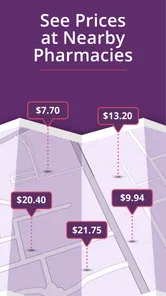
So, what’s the deal with RxSaver? At its core, this app is all about finding the best discounts on prescriptions. You know how sometimes you stumble across a coupon or a deal that makes you feel like you’ve hit the jackpot? That’s basically what RxSaver does, but for your meds. It scans through a ton of pharmacies to find you the best prices, and the whole process feels almost magical.
User Experience: Smooth Sailing
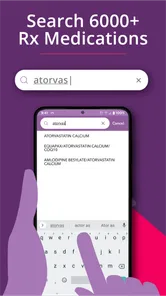
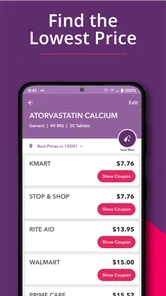
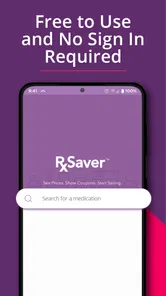
Now, let’s talk about using the app. The interface is as friendly as your favorite barista. You just type in the name of your medication, and boom—you’re presented with a list of prices from different pharmacies. It’s straightforward and doesn’t require a tech-genius to navigate. Plus, the app also tells you which pharmacy is closest to you, which is a nice touch if you’re in a hurry.
Getting through a last-minute pickup
Imagine noticing that your refill is due while you are already out running errands. I would search before choosing a pharmacy, then compare a convenient stop with another nearby option instead of heading straight to the familiar counter. If the phone signal is weak inside a shop or parking garage, I’d do that comparison before arriving and keep the coupon information accessible for the visit. That is a practical reason not to leave the search until the final moment.
Connectivity shapes this kind of tool: price searches and location-aware comparisons are most useful when the phone can reach current information. I would not plan around being able to search without a connection. When service drops, the sensible recovery is to wait until it returns, retry the search, or ask the pharmacy directly what price applies. The app helps with comparison, but the pharmacy remains the place to confirm the transaction details.
Handling interruptions without losing the thread
If a search stalls while I am on the move, I would first check whether the phone has a usable connection instead of repeatedly tapping through the same search. A location result can be less useful when the phone is struggling to establish where I am, so I would enter or verify the pharmacy area deliberately if the app allows it. If the list does not load, switching briefly to a better signal or trying again later is more practical than making a trip based on an old result.
For an urgent pickup, the backup plan should be simple: call the pharmacy and ask what price and coupon information they can accept for the exact prescription. That is not a failure of the app so much as a reminder that a comparison screen does not complete the purchase. I would not delay a needed medicine just to keep searching for a better quote. If timing matters, confirming availability and the price directly can be more important than finding the lowest option on the map.
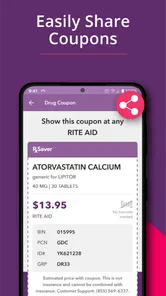
Before leaving home, I would note the pharmacy I intend to visit and make sure I can bring up the relevant coupon details when asked. That small bit of preparation is especially useful if I expect to be in a building with poor reception. I would still treat the displayed information as something to confirm at the counter, rather than assuming that a screenshot or remembered figure guarantees the final amount.
Saving Big Bucks
One of the coolest features is how the app displays the savings you’re about to score. It’s kind of like a game, watching those dollars drop off your total. And trust me, seeing how much you’re saving is a pretty addicting feeling. Whether it’s a few bucks or a significant chunk of change, every little bit helps, right?
For a data-conscious habit, I’d run a search when I have a good connection rather than repeatedly refreshing while moving between weak-signal areas. I’d also avoid entering more information than the price comparison needs. The useful decision is usually straightforward: identify the medication, compare the options, and take the result to the pharmacy to verify before paying. If the list does not give me a clear choice, I would rather call than keep guessing from a screen.
There is a useful trade-off between checking widely and keeping the task simple. Comparing a few practical choices can answer the question without turning a refill into a long research session. If the options are close, distance and convenience may matter more than another round of searching. If the quoted differences are substantial, I would take a little more time to verify that the medication details and pharmacy location line up. That approach keeps the comparison focused and avoids mistaking more screen activity for a better decision.
I would also use the app as a planning aid rather than a record of what I paid. A search result helps me decide where to ask, but the amount charged at the pharmacy is the figure that matters for my budget. If I am tracking medicine costs over time, I would keep my own note of the final payment and the pharmacy, especially when a refill price changes. That gives me a more reliable basis for the next comparison than relying on memory of a previous search.
Why You Should Give It a Try
Alright, so you might be wondering, "Do I really need another app on my phone?" Well, if you’re someone who regularly buys medication, then yes, absolutely! RxSaver is not just another app; it’s a tool that can genuinely make a difference in your budget. Plus, who doesn’t love saving money? It’s like having a secret weapon against high drug prices.
Compared with calling several pharmacies one by one, a single search is a quicker starting point for price shopping. Compared with simply asking at your usual counter, it can surface alternatives you might not think to check. But neither approach removes the need to confirm the exact prescription and coupon terms with the pharmacy. If you prefer to keep all medication costs within one insurance account or avoid installing a separate tool, checking directly with your insurer or pharmacist may fit better.
For a realistic example, imagine I am preparing for a refill and know I will be near two different pharmacy areas during the week. I can search before choosing which stop fits my schedule, then call the leading option to check the exact details. If the price is not what I expected, I can compare the other location before making a special trip. The value is not merely seeing a number; it is having time to make a practical choice before I am standing at the counter.
This makes the app a stronger fit for people who pay cash for at least some prescriptions, have flexibility about where they fill them, or want to check whether a familiar pharmacy remains competitive. It may be less useful for someone whose prescriptions are consistently handled through a fixed insurance arrangement, a designated pharmacy, or a care routine where changing locations creates more hassle than savings. In those cases, asking the insurer or pharmacist about the applicable price can be the cleaner route.
There is also a difference between searching for a one-off prescription and managing a regular medication routine. For a one-time fill, the comparison can help identify a place to ask. For recurring use, I would repeat the check when the prescription changes or when I am already reviewing the next refill, but I would not assume that a previous result remains relevant forever. I would compare again and confirm the current details with the pharmacy before relying on a past price.
The app is free, rated for Everyone, and its current version is 6.4.0; it requires Android 8.0 or later. It has been available since January 20, 2012, and has around 3,300 written reviews. Those details make it easy to see why people consider it, but I’d judge it by whether its comparisons help with the prescriptions I actually fill. The best result is the one that remains useful after the pharmacy confirms it.
Who should keep it in their routine?
I would keep it in mind as a targeted tool, not something I need to open every day. The clearest use is a refill where I have enough time to compare options and the freedom to choose among pharmacies. Someone who makes occasional prescriptions, pays attention to household costs, or helps a family member plan a pickup may find that kind of check worthwhile. The app’s medical focus is narrow in a useful way: it is for comparing prescription costs, not for deciding what treatment to take.
On the other hand, I would skip it if I know I cannot change where I fill a prescription, if my established coverage already gives me a clear cost, or if an urgent need makes comparison a distraction. In those situations, the fastest reliable action is to speak with the pharmacy or the person handling the prescription. A coupon search should support a medication routine, not complicate it or become a reason to postpone care.
A practical verdict on price, signal, and effort
RxSaver is most convincing when I have a stable connection, a little time, and a specific prescription to compare. Its results can give me a useful starting point, but the final check belongs with the pharmacy, where the precise prescription and applicable coupon can be confirmed. If the phone is offline or the search is unclear, I would switch to a direct call rather than assume the screen tells the whole story.
In conclusion, RxSaver – Prescription Coupons is worth the download. It’s easy to use, effective, and most importantly, it saves you money. So next time you’re at the pharmacy, pull up this app and let it work its magic. Your wallet will thank you.
RxSaver – Prescription Coupons Frequently Asked Questions
Is RxSaver suitable for first-time users who want to compare prescription costs?
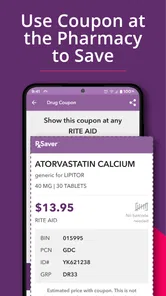
RxSaver is a medical app focused on finding lower prices for prescription medications and accessing free Rx coupons. Its basic process is straightforward: search for a medication, compare pharmacy prices, and show the coupon at a participating pharmacy. It may be useful for someone who wants to check discount options before paying, while the pharmacy remains the place to confirm the final price.
What is RxSaver and how does it work?
RxSaver is a digital platform designed to help users save money on prescription medications. By comparing prices at various pharmacies, it provides coupons and discounts that can be applied at the point of purchase. Users simply need to search for their medication, compare prices, and present the coupon at participating pharmacies to receive the discount.
Is RxSaver free to use?
Yes, RxSaver is completely free to use. Users can access the platform without any subscription fees or hidden charges. The app is designed to make medications more affordable, so there are no costs associated with downloading the app, searching for coupons, or using the discounts at pharmacies.
Do I need a prescription to use RxSaver?
Yes, a valid prescription from a licensed healthcare provider is required to purchase medications using RxSaver discounts. The platform itself does not provide or validate prescriptions. It helps users save on their medications by offering coupons but still requires the user to have a prescription when buying from a pharmacy.
Can I use RxSaver with my health insurance?
RxSaver can be used regardless of your health insurance status. While it is not an insurance plan, it may offer better prices on certain medications than your insurance co-pay. Users should compare the RxSaver price with their insurance copay to determine the best option. However, the discounts from RxSaver cannot be combined with insurance benefits.
Pros
- Saves money on prescriptions
- Easy to use interface
- Supports most major pharmacies
- No membership or fees required
- Provides price comparison
Cons
- Requires internet connection
- Limited to participating pharmacies
- No option for mail-order prescriptions
- Prices may vary by location
- No guarantee of lowest price