RoomGPT AI - Interior Design
- 258.00
- 4.6
- Installs
- 500.00K
- Price
- Free

Screenshots
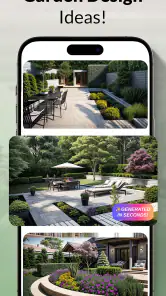
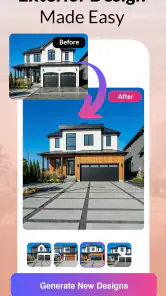
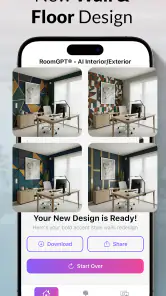
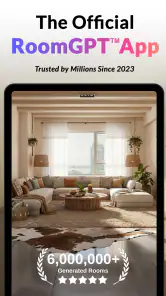
Analysis by Reviewed
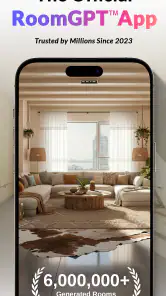
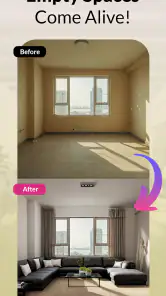
When I’m stuck between decorating ideas, seeing one of them in the room I actually live in can be more useful than saving another batch of inspiration pictures. RoomGPT AI is built around that early visual step: it uses a room image to help me imagine a different interior. I find that appealing when I can’t tell whether a change will feel calmer, brighter, or simply wrong. Its role is narrower than a full design planner, though. I’d use it to explore possibilities, then check measurements, products, and renovation details elsewhere.
Before opening the app, choose one decision
It is tempting to treat a room-design app as a place to browse until something looks perfect. I get more from RoomGPT AI when I decide what I am trying to learn first. Am I looking for a warmer feeling, trying to make a room seem less busy, or wondering whether a stronger color would suit the space? A focused question makes it easier to judge an image instead of simply liking or disliking it.
I’d also start with a room where the decision is still flexible. If I already know exactly which items I’m buying and where they will go, visual experimentation may add little. But when I’m choosing between a few broad directions, an image can reveal preferences I hadn’t put into words. That is a useful first-week test: after trying it, do I have a clearer next step, or only more pictures to browse?
From first-week novelty to a useful habit
A quick way to get unstuck
The first appeal is easy to understand. Instead of collecting reference pictures and trying to picture them in my own space, I can use a room image as the basis for visual experiments. That makes the app particularly handy when I have a room I know needs attention but no clear idea what to do with it. A visual result can prompt a more useful question than “What style do I like?”—for example, whether I want the room to feel brighter, more restful, or less crowded.
That kind of prompt is valuable even when the generated room is not something I would copy. I can react to a visual suggestion: keep the lighter palette, reject the furniture arrangement, or decide that a dramatic style is too much for a small bedroom. In my view, the strongest early use is not finding a finished answer. It is narrowing a broad set of possibilities into a few directions worth exploring.
A practical first session works best when I start with one room and one decision. I might test a living-room image while thinking only about atmosphere, rather than asking the app to solve lighting, storage, furniture, and color all at once. I would save or note the versions that change my mind, then compare them later. This keeps the experience from becoming a scroll through attractive but unrelated makeovers.
Where it fits in a real decorating process
RoomGPT AI is a House & Home app from AZUR APPS FZ-LLC. Its focus is narrower than a full interior-design suite: the useful comparison is with mood boards, room-planning tools, and image searches, not with professional CAD software. A mood board gives me more control over individual references; a floor-plan tool is better when dimensions and circulation matter. This app’s advantage is immediacy: it helps me see a possible direction in the context of a room I already know.
More From Our News Desk

Clash of Clans Is Won Between the Battles

Android Auto Makes the Case for Quieter Car Software

MobiOffice: Transforming Mobile Productivity with Seamless Integration

EA SPORTS FC™ Mobile Soccer: Redefining Mobile Sports Gaming

How Microsoft OneDrive Became a Mobile Productivity Giant

How Google Translate Breaks Language Barriers Effortlessly
That distinction matters before acting on a result. A generated image can make a room feel more spacious or polished without proving that a particular sofa fits, that a shelf can be installed safely, or that a color will look the same under the room’s actual light. I use the image as a conversation starter with myself or someone sharing the space, then verify the practical choices separately. The app is most helpful at the “what might this look like?” stage, not the “how do I build it?” stage.
A realistic use case is a renter deciding whether to refresh a bedroom without replacing everything. I’d use the app to explore a few visual moods, identify a palette or overall feeling that appeals, and then translate that into reversible choices such as textiles or accessories. I would not assume that every visible object in a generated design is available to buy or that the image accounts for rental restrictions. The result can guide a modest plan, but it cannot make those decisions for me.
Making a room image useful to someone else
A visual reference can help when I’m discussing a shared room with a partner, housemate, or family member who interprets words differently from me. Rather than debating what “modern” or “cozy” means, we can point to a specific part of an image and say what feels right or wrong. I’d keep the conversation narrow: agree on the mood first, then separately talk about storage, budget, and which existing items stay. That avoids treating one attractive image as a complete household decision.
For a small refresh, I’d turn the result into a short, practical brief: one feeling to aim for, one color direction to test, and a list of things that must remain. That brief is more useful than trying to reproduce every detail in the generated room. It also makes comparison with alternatives fairer. A mood board can offer more control over exact references, while RoomGPT AI is more useful when I want to see an overall direction in the context of my own space.
Keeping the second and third visit worthwhile
Novelty fades quickly if every session is just another batch of room images. To get lasting value, I would give each visit a specific job: compare two broad styles, revisit a room after deciding on a color direction, or prepare a visual reference before discussing a change with a housemate. A simple note of what I liked and disliked is surprisingly helpful. Otherwise, it is easy to forget which version had the useful idea and keep generating variations without making progress.
For a household, the images can make an abstract disagreement easier to discuss. “I want it warmer” can mean different things to different people; a visual example gives everyone something concrete to react to. I would still separate taste from feasibility: agreeing on an overall look does not settle the budget, dimensions, or maintenance needs of the materials. Used this way, the app can help a conversation move forward without pretending to resolve every part of it.
The app is free to install and has in-app purchases listed from $4.99 to $74.99 per item. I’d begin with the free experience and decide whether I’m returning often enough to justify spending before buying anything. The displayed average is 4.6 from around 18,000 ratings, with roughly 258 written reviews, and it has passed 500,000 installs. Those figures suggest that many people have tried it, but they do not tell me whether its particular workflow suits my room or how often I’ll want to use it.
What can wear thin, and what stays useful
Maintenance is mostly about managing expectations
This is not the sort of home app I would expect to maintain like a detailed inventory or project tracker. Its ongoing value depends more on how thoughtfully I use the visual ideas than on keeping a large collection of outputs. I would keep a small set of references tied to actual decisions and discard the rest from my working process. That prevents inspiration from turning into a pile of attractive images that never changes the room.
The most important “maintenance” is checking an image against reality. Before buying paint or furniture based on a generated look, I would test colors in the room, measure the available space, and check how the existing windows and lighting affect it. I would also ask whether the style fits everyday use: a pristine-looking room may not be a sensible target for a busy family or a home with pets. The app can help me see an aesthetic possibility; I still have to translate it into durable, livable choices.
RoomGPT AI is rated for Everyone, and its current version is 100.1.22, with Android support starting at version 7.0. It was released on March 17, 2023. These details make it straightforward to judge basic compatibility, but the more important decision for me is whether I want a visual idea generator at all. Someone who already knows the exact furniture and layout they need may get more practical value from a measuring or floor-planning tool.
Why repeated use can become tiring
The main risk is sameness. If I repeatedly ask for visual inspiration without changing the question, the results can start to feel like variations on a theme rather than meaningful advice. That is not necessarily a flaw in one image; it is a limitation of using an inspiration tool as if it were a design consultant. I get more from a session when I bring a clear constraint, such as keeping existing furniture or making a room feel less visually busy, rather than browsing without a decision in mind.
There is also a gap between visual coherence and practical accuracy. A polished-looking result may encourage me to focus on style while overlooking storage, walkways, cleaning, or the cost of changing several elements at once. I would be cautious about treating a generated arrangement as a reliable floor plan. When the project involves exact fit, construction, accessibility, or substantial spending, a measured plan or professional advice is the better next step.
Another source of fatigue is expecting every output to match personal taste immediately. Interior style is subjective, and an image can be useful because it reveals what I do not want. I would not judge the app solely by whether each result looks ready to copy. The more revealing test is whether it helps me make a clearer decision after a few focused experiments. If it only produces images I admire for a moment, it may not earn a regular place on my phone.
Who should keep it—and who should move on
I’d recommend giving it a try if you are at the beginning of a room refresh, feel stuck between broad styles, or need a visual aid to explain an idea to another person. It is especially suited to low-stakes exploration: thinking about a bedroom refresh, considering a living-room mood, or deciding whether a lighter or more dramatic direction feels right. The app’s simple premise makes it approachable even if you have never used specialist design software.
I would skip it, or use it only briefly, if you need exact measurements, dependable product recommendations, a buildable floor plan, or professional-level control. It is also not the best choice if you already have a precise plan and mainly need to track purchases or coordinate contractors. In those cases, a room-measurement app, a dedicated planning tool, or a designer’s guidance is more directly useful. I see RoomGPT AI as a complement to those options, not a replacement.
A sensible way to judge its lasting value
After the first burst of curiosity, RoomGPT AI earns space when I use it to answer a real decorating question and then carry that answer into a practical next step. Its lasting value is in making a room idea easier to picture and discuss, not in managing the entire project. I’d keep it for occasional, focused inspiration if visualizing alternatives helps me decide; I would not keep returning just to generate more images. That is a modest role, but for someone facing a blank-room dilemma, it can be a worthwhile one.
My clearest test would be whether a session changes what I do next: perhaps I compare paint samples, measure a walkway, or talk through a realistic update with someone who shares the space. If an image only produces a moment of excitement, I don’t need to make it part of my routine. If it helps me move from indecision to a small, feasible action, occasional use is enough to justify keeping it available.
RoomGPT AI - Interior Design Frequently Asked Questions
What is RoomGPT AI - Interior Design, and what can it do?
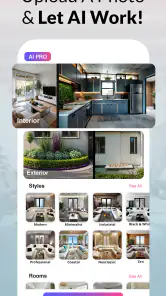
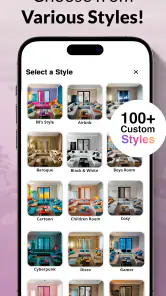
RoomGPT AI - Interior Design is an AI-powered room makeover tool that can generate redesigned versions of a space from a photo. You typically upload or take a picture, choose a room type and a visual style, then let the app create concepts. It is useful for exploring décor directions, colors, and layouts, but its images are design inspiration—not guaranteed plans or exact product recommendations.
How do I create a room design with RoomGPT AI?
Start with a clear photo of the room you want to redesign, making sure the main furniture and walls are visible and the image is well lit. Select the room category and a style or design option, then submit the image for processing. Available choices and steps may vary by app version. Review the generated results and try different styles or photos if the first concept does not match your space.
Is RoomGPT AI free to use, or does it require payment?
Access and pricing can depend on the current version, region, and any promotional offer. Some versions may let you try a limited number of designs, while additional generations or features may require credits, a subscription, or another in-app purchase. Check the app’s store listing and the purchase screen before starting a trial or paying, and review renewal terms so you know how recurring charges can be cancelled.
Does RoomGPT AI provide realistic designs that I can use for renovation?
The app can produce visually appealing concepts, but AI-generated images may alter room dimensions, windows, furniture, or other details and may include objects that are impractical or unavailable. Treat the results as mood-board inspiration rather than construction drawings, measurements, or professional advice. Before buying materials or making structural changes, verify dimensions and costs, and consult a qualified designer or contractor when needed.
What happens to my photos when I upload them to RoomGPT AI?
Room photos may be sent to the service’s servers for AI processing, so check the app’s privacy policy and permissions before uploading. Avoid including people, personal documents, valuable items, or details that identify your home. The policy should explain how images and account information are handled, whether they are retained, and how to request deletion. Privacy practices can change, so consult the latest policy in the app or store listing.
Pros
- Quickly generates room redesign concepts from a photo.
- Offers multiple styles to explore before choosing a look.
- Useful for visualizing changes without moving furniture.
- Simple workflow makes it approachable for first-time users.
- Can spark ideas for color palettes and room layouts.
Cons
- AI may alter room details or produce unrealistic layouts.
- Results can vary in quality depending on the uploaded photo.
- Generated designs are inspiration
- not precise renovation plans.
- Some features or generations may require payment or credits.
- Uploading interior photos may raise privacy considerations.
- Category
- House & Home
- Version
- 100.1.22