RockIn Rock&Meteorite Identify
- 217.00
- 4.4
- Installs
- 100.00K
- Price
- Free

Screenshots

Analysis by Reviewed
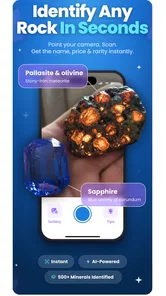
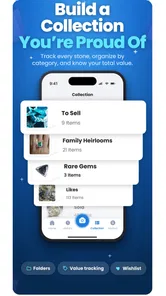
I approached RockIn Rock&Meteorite Identify as someone with a small collection of interesting stones and a lot of uncertainty about what I was looking at. The app is a lifestyle tool from PlantIn, built around identifying, collecting, organizing, exploring, and trading minerals in one place. That makes it more useful than a simple “take a photo and get a name” utility, especially if you want to turn scattered finds into a personal record.
My first impression was that it is aimed at curious beginners rather than only experienced geologists. You can use it after finding a stone outdoors, while sorting a box of inherited specimens, or when you want a more structured way to learn the difference between similar minerals. The important point is to treat its identification as a helpful starting point, not as laboratory proof. A photograph can suggest what a specimen resembles, but it cannot replace careful examination or professional testing when the answer really matters.
What to expect from the mineral collection experience
The app belongs to the Lifestyle category and is free to install, with optional purchases ranging from $4.99 to $99.99 per item. It is rated for Everyone, so its subject matter is approachable for families, casual collectors, and students. I also found the overall concept easy to understand: instead of keeping notes in a separate app, you can use one mineral-focused space to identify objects and build a collection around them.
That focus is its strongest advantage over the usual alternatives. A camera search tool may help you recognize a visual pattern, while a notes app can store your own descriptions, but neither is designed specifically around a growing mineral world. RockIn brings those activities closer together. The result is most valuable when you repeatedly return to the same collection, rather than using it once for a single mystery pebble.
The app has reached over one hundred thousand installs and holds a 4.4 average from around three thousand ratings, with a little over two hundred written reviews. Those figures suggest that it has found an audience, but they should not be read as proof that every identification will be correct. Mineral recognition is an unusually difficult task because lighting, surface damage, camera quality, and look-alike specimens can all influence the result.
I would especially recommend approaching the app with a “record first, verify second” mindset. When you photograph a stone, keep the original context in mind: where you found it, whether it was loose or embedded, how heavy it feels, and whether the surface is polished or naturally broken. Those observations can be more useful than a close-up image alone. The app can organize your curiosity, but your own notes make the collection much more reliable.
Who will get the most from it
RockIn makes sense for a beginner who wants a gentle entry into mineral identification without immediately buying specialist equipment. It is also a good fit for a parent and child exploring stones together, a traveler documenting unusual finds, or a collector who wants a visual inventory instead of a box with no labels.
More From Our News Desk

Weather by Xiaomi Review: Clear at a Glance, Less Clear Up Close

X Under Pressure: Can It Recover When Posting Goes Wrong?

Clash of Clans Is Won Between the Battles

Android Auto Makes the Case for Quieter Car Software

MobiOffice: Transforming Mobile Productivity with Seamless Integration

EA SPORTS FC™ Mobile Soccer: Redefining Mobile Sports Gaming
It is less suitable if you need legally dependable identification, valuation, geological field data, or a scientific report. A dealer checking an expensive specimen should use established testing methods and expert advice. Likewise, someone who only wants a general visual search may prefer a broader image-recognition service if they do not care about maintaining a collection.
Getting started without making the first session harder
After installing the app, I would resist the temptation to photograph every stone immediately. Start with one specimen that has a reasonably clean surface and enough visual character to examine. A plain, dusty pebble is a poor first test because the camera has little useful detail to work with. Wipe the stone gently, place it on a simple background, and use even light rather than a harsh flash.
This small preparation step is one of the most practical improvements a new user can make. Reflections can hide color and texture, while deep shadows can make a pale mineral look much darker. I found that taking a second image from another angle is more useful than repeatedly photographing the same view. If the specimen has a distinctive crystal face, vein, band, or metallic-looking patch, make that feature visible.
Once the image is ready, follow the identification flow and read the result as a suggestion. Do not stop at the first label that sounds familiar. Compare the suggested identity with what you can actually observe. Is the color natural or caused by a coating? Is the surface glassy, dull, fibrous, or granular? Does the stone have visible layers? These questions help prevent a confident-looking but weak match from becoming a permanent mistake in your collection.
A useful beginner workflow is to create a temporary habit around each specimen. Photograph it, review the suggested identity, add a short personal note, and only then decide whether it belongs in your main collection. This is better than filling the app with rushed entries that you later cannot distinguish. It also gives you a simple way to separate “interesting possibility” from “reasonably understood sample.”
The current version is 1.19.1 and supports devices running Android 7.0 or later. That broad compatibility is helpful if you use an older phone for outdoor trips, although image quality still depends heavily on the camera itself. A newer device is not automatically necessary, but a lens that focuses clearly at close range will make the identification process more comfortable.
How to reach the first meaningful result
For a first successful action, I suggest choosing a specimen with obvious visual structure rather than an ordinary gray rock. A quartz-like piece with visible translucency, a banded stone, or a mineral with a strong crystal shape gives the app more to interpret and gives you something concrete to compare afterward. Place it against a neutral surface, avoid colored lighting, and keep the camera steady.
When the app returns a possible match, save the result only if it remains plausible after a quick visual check. This is where the collection side becomes more useful than a one-off search. You can preserve the image and your own description together, then revisit the entry when you learn more. If the result looks doubtful, keep it as an unidentified sample rather than forcing it into a category that may mislead you later.
One non-obvious advantage of this approach is that uncertainty becomes part of the learning process. A specimen you initially label “possible quartz” can later be compared with a confirmed example. Over time, your collection becomes a visual study guide made from your own finds. That is more memorable than reading a list of mineral names without handling real objects.
I also recommend photographing the whole specimen before taking a close-up. The close-up helps with texture, but the wider image preserves shape and context. If a stone has a broken edge, a polished face, or an unusual inclusion, capture each separately. The extra images take a little longer, yet they make your record far more useful when you return to it weeks later.
Where beginners can become confused
The biggest source of confusion is the difference between visual resemblance and confirmed identity. Many minerals share colors, patterns, and surface qualities. A white specimen may be quartz, calcite, feldspar, or something else; a dark glossy surface may suggest several possibilities. The app can narrow your curiosity, but it should not encourage you to ignore physical clues that point in another direction.
Another common mistake is assuming that a meteorite-looking stone is a meteorite because it is dark, heavy, or unusually shaped. Meteorites are a particularly tempting subject for visual identification, but ordinary terrestrial rocks can look dramatic too. If the possibility has serious value or personal importance, use the app as a first screening step and seek specialist confirmation before making claims or spending money.
Lighting creates a second layer of trouble. A warm indoor bulb changes color, while direct sunlight can exaggerate sparkle. Wetting a stone can also make it look more translucent and glossy than it is naturally. For consistent records, photograph specimens dry under neutral, diffuse light. If you do take a wet image for comparison, treat it as a separate observation rather than the main reference picture.
There is also a practical organization issue. Collectors often remember why a stone mattered when they first found it, then forget the location or circumstances later. I would add a brief note immediately after saving an item: “found near a trail,” “from a craft market,” or “gift from a friend.” Even a few words can prevent several similar stones from blending together. This is one of the clearest ways to turn the app from an identification shortcut into a useful personal archive.
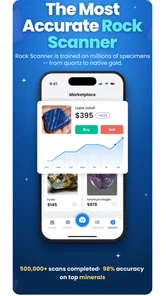
Trading deserves similar caution. A digital record can help you remember what you own and what interests you, but it does not automatically establish authenticity, condition, rarity, or fair value. Before exchanging a specimen, inspect it in person when possible and be clear about whether it is polished, treated, reconstructed, or naturally formed. The app can support the conversation, but it should not be the only basis for a transaction.
A realistic everyday use case
Imagine finding a reddish stone during a weekend walk. You bring it home, remove the dirt, and take a wide photo followed by a close-up of the rough edge. The app suggests a few possibilities. Instead of immediately announcing the most attractive one, you save the image, note where you found it, and compare the surface with examples in your growing collection. Later, you can show the entry to someone more experienced and update your understanding without losing the original observation.
That workflow is where I think the app fits naturally into daily life. It does not require a dedicated collecting room or a complicated cataloging routine. A few minutes after a walk can preserve details that would otherwise disappear. For children, it can turn an ordinary outing into an ongoing project; for adults, it can prevent a drawer of unlabeled stones from becoming impossible to sort.
There is a trade-off, though. The more seriously you use the collection features, the more time you need to spend on consistent photos and notes. If you want instant answers with no follow-up, the organizational side may feel like extra work. I see that as a fair exchange for a record that remains useful beyond the first identification attempt.
Turning a first identification into a better collection
After your first successful entry, the next step should not necessarily be adding dozens more specimens. Build a small comparison set instead. Photograph stones that look similar but differ in texture, transparency, or structure. This teaches you to notice distinctions that a single result cannot explain. It also makes the app more valuable because you are using it to develop visual judgment rather than simply collecting labels.
Another strong workflow is to revisit uncertain entries after a few days. Fresh eyes often reveal that a supposed crystal pattern was only a scratch or that a color was caused by the background. Keep the original image, but add a later note when your interpretation changes. This creates a simple history of your learning and reduces the pressure to be right on the first attempt.
If you plan to trade or display specimens, organize your records around purpose. One group might contain stones you found yourself, another might contain gifts, and another might contain pieces you still need to verify. Even without treating the app as a formal scientific database, this separation helps you remember provenance and avoid presenting guesses as facts.
Families can make the experience more engaging by giving each outing a narrow goal, such as finding different textures or comparing natural and polished surfaces. That keeps the activity from becoming a race to identify the largest number of rocks. In my view, the educational value comes from observing carefully, asking why two stones look alike, and recording what changed your mind.
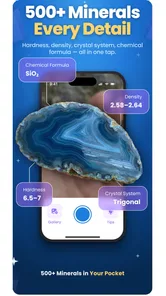
Users who are comfortable with mineral terminology can go further by treating each image as evidence rather than decoration. Record visible cleavage, grain, luster, and inclusions in your own words. The app then becomes a visual index for observations you made yourself. Beginners should not feel obliged to use technical language, however; a clear description such as “pale, layered, dull surface with a sharp broken edge” is already far better than no note at all.
What the free starting point means in practice
Because the app is free to install, it is easy to try without committing money at the beginning. That makes sense for newcomers who are still deciding whether mineral collecting will become a lasting hobby. At the same time, the presence of in-app purchases means you should pay attention to which parts of your routine require extra spending before building your entire workflow around them.
I would begin with a handful of specimens and judge the experience on three questions: Does the identification process help you form a reasonable hypothesis? Does the collection record make your stones easier to remember? And do you enjoy returning to the entries? If the answer is no, paying for additional access is unlikely to solve the underlying problem. If the answer is yes, the purchase decision becomes a personal value judgment rather than an automatic requirement.
The age rating of Everyone also makes the app approachable for shared use, but younger users still benefit from adult guidance around outdoor collecting. Do not handle unknown stones carelessly, disturb protected sites, or assume that an attractive specimen is safe to touch or break. The app can encourage observation without turning every outing into uncontrolled collecting.
My recommendation after using it as a beginner
RockIn Rock&Meteorite Identify works best when you want more than a name. Its real appeal is the combination of visual investigation and personal organization: you can start with a photograph, preserve your observations, explore related possibilities, and gradually create a mineral collection that reflects your own experiences. PlantIn has kept the idea approachable enough for a first-time user, while the collection and trading angle gives the app a reason to remain installed.
I would recommend it to curious beginners, families, casual rockhounds, and collectors who need a more convenient record than paper labels or scattered phone photos. I would skip it if your priority is certified analysis, professional valuation, or a purely scientific field database. In those situations, specialist references and expert testing are the better choice.
The most reassuring way to begin is simple: choose one clean specimen, photograph it in neutral light, save the suggested result as a hypothesis, and write down where the stone came from. That first careful entry will tell you far more about whether the app suits you than a rushed scan of an ordinary pebble. Use it as a thoughtful companion for learning and organizing, not as the final authority on what a stone is.
For me, that balance is what makes the app worthwhile. It turns a vague “What is this?” moment into a repeatable process and gives small discoveries somewhere to go afterward. The experience is not frictionless, and the visual results deserve healthy skepticism, but the combination of identification, collection building, exploration, and trading gives this Lifestyle app a clear purpose. If you enjoy noticing details and keeping track of what you find, it is a friendly place to start.
RockIn Rock&Meteorite Identify Frequently Asked Questions
Is RockIn Rock&Meteorite Identify free to download, and are there optional purchases?
RockIn Rock&Meteorite Identify is free to download, so you can try the app without paying an upfront price. It also offers in-app purchases, with prices ranging from $4.99 to $99.99 per item, so check the purchase details before confirming anything. If you only want to explore its identification and collection features, review the available options in the app first.
What is RockIn Rock&Meteorite Identify used for?
RockIn Rock&Meteorite Identify is designed to help users recognize rocks, minerals, fossils, and possible meteorites from photos. After taking or uploading an image, the app provides a suggested identification and related information. It can be useful for beginners, collectors, students, hikers, and anyone curious about an unusual stone, although results should be treated as guidance rather than a certified scientific analysis.
How accurate is RockIn Rock&Meteorite Identify?
The app can provide helpful suggestions when the photograph is clear and the specimen is shown from several angles, but identification accuracy depends on image quality, lighting, and how distinctive the rock is. Similar minerals may look almost identical, and meteorite identification is particularly difficult. For valuable, rare, or potentially hazardous samples, confirm the result with a geologist, museum, university, or professional laboratory.
How should I photograph a rock for the best identification result?
Before scanning, clean loose dirt from the specimen without damaging it and place it on a simple, contrasting background. Use bright, even natural light and avoid reflections or strong shadows. Take sharp photographs of the front, back, sides, and any visible crystals, texture, or metal-like areas. Including a size reference can also help provide context and improve the usefulness of the app’s suggestions.
Can RockIn Rock&Meteorite Identify reliably confirm that a stone is a meteorite?
No identification app should be considered definitive proof that a rock is a meteorite based only on a photograph. Many terrestrial rocks resemble meteorites, while important clues such as density, magnetic response, fusion crust, internal structure, and chemical composition may require hands-on testing. Use the app as an initial screening tool, then seek expert verification before selling, collecting, or making claims about a suspected meteorite.
Pros
- Identifies many rock and meteorite types from photos.
- Useful reference for beginners
- collectors
- and outdoor enthusiasts.
- Simple interface makes image-based searches quick to start.
- Can help compare visible traits such as color
- texture
- and shape.
- Encourages learning about geology and unusual mineral specimens.
Cons
- Photo results may be inaccurate with poor lighting or unclear specimens.
- Cannot replace laboratory testing for confirming valuable meteorites.
- Some features or identification details may require in-app purchases.
- Similar-looking rocks can produce uncertain or overly broad matches.
- Requires camera access and may need an internet connection for full use.













