PlantIn Plant Identifier, Care
- 8.50K
- 4.0
- Installs
- 10.00M
- Price
- Free

Screenshots
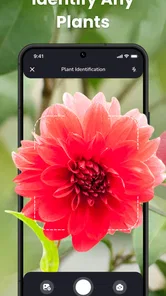
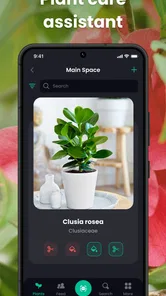
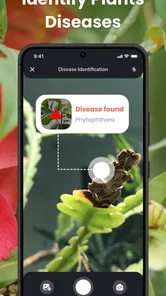
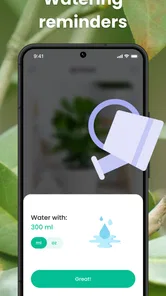

Analysis by Reviewed
I usually open a plant identifier when I’m standing in front of an unfamiliar leaf or trying to work out why a familiar one looks unhappy. With PlantIn Plant Identifier, Care, the useful part is that the photo-based identification leads into care guidance, so I can move from “What might this be?” to “What should I check next?” without starting a separate search. I still treat the result as a clue, not a botanical ruling, but that connected workflow makes sense for everyday plant questions.
Start with the question you actually have
Before taking a picture, I find it helps to decide whether I’m trying to identify a plant, understand its care, or investigate a visible problem. Those goals overlap, but the best photo may differ: a clean view of a leaf can help with identification, while a close look at damaged areas is more relevant when something seems wrong. Keeping the question in mind makes the result easier to judge instead of treating every answer as equally useful.
A realistic example is a plant on a shared office windowsill that has begun to droop. I’d first take a clear picture of the whole plant, then inspect the identification suggestion and its general care information. If the plant is correctly recognized, I have a sensible starting point for checking its needs; if the match seems doubtful, I can avoid making a confident change based on the wrong species. Either way, I’d also note what has changed in its surroundings, such as a move closer to a window or a different watering routine.
Make the photo do more work
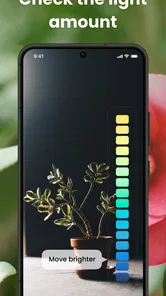
Plant identification is only as useful as the evidence in the image. I try to photograph a healthy-looking leaf in good, even light and keep nearby plants, pots, and labels out of the frame where possible. If the plant has flowers or an unusual stem, I take another picture rather than expecting one image to show every useful feature. This is a small extra step, but it gives me a better basis for comparing the suggested identity with the plant in front of me.
When two likely matches look similar, I pay attention to what the app’s description says and check whether those traits are visible in my plant. I don’t assume that a confident-sounding match means every detail has been settled. A young plant may not yet show the features that make it easy to distinguish from a relative, and a blurry or shadowed photo can conceal important differences. In those cases, taking a better picture or comparing a second part of the plant is more useful than repeatedly accepting the first suggestion.
From a match to a care decision
After identification, I use the care information as a checklist, not a fixed prescription. If I’m unsure about watering, for instance, I consider the plant’s current condition and the soil rather than watering simply because a general reminder feels due. The same caution applies to light: advice can point me toward a suitable range, but the brightness in one home can differ from another, even when both owners describe a spot as sunny.
My preferred approach is to change one thing at a time and give the plant a chance to respond. If a plant appears stressed, I wouldn’t move it, change its watering pattern, and start a treatment all at once; that makes it hard to tell what helped or caused further trouble. I’d use the app to narrow down what to investigate, then observe the plant over time. The practical value is in turning a guess into a more informed next check, not in replacing the attention that living plants need.
More From Our News Desk

Weather by Xiaomi Review: Clear at a Glance, Less Clear Up Close

X Under Pressure: Can It Recover When Posting Goes Wrong?

Clash of Clans Is Won Between the Battles

Android Auto Makes the Case for Quieter Car Software

MobiOffice: Transforming Mobile Productivity with Seamless Integration

EA SPORTS FC™ Mobile Soccer: Redefining Mobile Sports Gaming
Turning identification into plant care
Ever found yourself wandering through a lush garden or a dense forest, marveling at the greenery, and wondering, "What on earth is this plant called?" Well, you're not alone! I recently stumbled upon an app called PlantIn Plant Identifier, Care, and I have to say, it has been a game-changer for my green adventures.
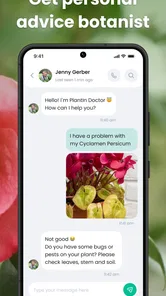
So, let's dive in! The app PlantIn Plant Identifier, Care is like having a botanist in your pocket. It’s available on both Android and iOS, which is super convenient. The app is designed to help you identify plants with just a snap of a picture. Sounds cool, right? But that's not all it does. It also provides you with detailed information on how to care for your green friends. Talk about a comprehensive plant guide!
Simplicity at Its Best
One of the first things I noticed was how user-friendly the interface is. You don’t need to be tech-savvy to navigate through the app. The design is clean and intuitive, making it easy for anyone to use. Whether you’re a seasoned gardener or a curious beginner, this app caters to all levels of plant enthusiasts.
Picture Perfect Identification
Now, let's talk about the main feature – the plant identification. You just take a photo, and voila! The app identifies the plant and gives you all the necessary details. I was amazed at how accurate it was. I’ve tested it on various plants, from common houseplants to rare species I encountered on a hike. Each time, it provided reliable information.
Care and Nurture
But wait, there’s more! The app doesn’t just stop at identification. It also offers personalized care advice. You can get tips on watering, sunlight needs, and even pest control. It’s like having a plant-care expert at your fingertips. I found this particularly useful as I’ve often struggled with keeping my plants healthy.
That advice is easiest to use when I turn it into a small routine. After checking a plant’s identity and care details, I decide what I can verify at home: where the light falls during the day, whether the pot drains, and whether the soil is still damp. This makes the app a starting point for observation rather than a reason to follow every suggestion immediately. It also helps me avoid a common mistake: reacting to a single symptom without checking the plant’s setting.
Community and Learning
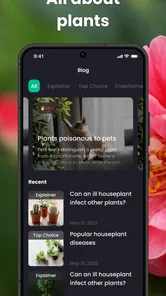
Another fantastic feature is the community aspect. You can connect with other plant lovers, share your plant pics, and exchange tips. It’s a great way to learn more and get inspired by how others are growing their plants. Plus, the app keeps you updated with articles and tips, so you’re continually learning about the plant world.
I’d use the social and learning side for ideas, not as a substitute for checking whether a tip fits my own plant. A suggestion that worked for someone else may depend on their climate, room, pot, or routine. When I come across advice that sounds useful, I compare it with the plant’s condition and the care guidance before trying it. That little pause keeps community inspiration from turning into a string of conflicting experiments.
Where a little caution helps
For a real home-use example, imagine bringing home a plant from a nursery with only a generic label. I would photograph it, compare the suggested identity with its visible features, and then use the care advice as a starting point while watching how it responds in its actual spot. That last step matters: a room’s light, temperature and watering habits can differ from the conditions assumed by general guidance, so I would adjust gradually rather than make several changes at once.
That is also where PlantIn differs from a basic image search. A web search can be better when I want to compare several sources or check a specific botanical detail, while this app is more convenient when I want identification and practical care information together. For a serious plant problem, such as spreading damage or a suspected disease, I would use its diagnosis as an initial clue, then seek a knowledgeable local opinion if the plant keeps declining. A photo alone cannot show every cause.
There’s a useful handoff here: the app can help me frame the question, but a nursery specialist, horticultural reference, or experienced local grower may be better placed to evaluate persistent damage in context. I’d take clear photos of the affected leaves and the whole plant, and explain recent changes in care when asking for help. That gives the person advising me more than a name or a single symptom to work with.
For an isolated spot or a leaf that has naturally aged, I might simply keep watching rather than treating it as an emergency. If the problem is spreading, affects several plants, or could involve pests, I’d avoid moving potentially affected plants close to healthy ones while I investigate. The app can help me look for possibilities, but diagnosis from an image has limits: similar marks can have different causes, and a photograph cannot reveal everything about soil, roots, or the plant’s recent conditions.
Who will get the most from it
I think the app suits beginners, casual houseplant owners and curious walkers who want to put names to unfamiliar greenery. It can also help an experienced gardener keep a quick reference close at hand, but I would not treat it as a substitute for specialist advice on rare species or valuable collections. If you only need an occasional identification and prefer checking multiple references yourself, a browser search or a field guide may be a better fit.
It is especially convenient for someone who encounters plants in different places and wants identification and basic care guidance in one app. A beginner can use it to build familiarity with common houseplants, while a walker can look up a plant encountered on a trail and continue exploring. For a collector who needs high confidence on a rare cultivar, or a gardener making an important treatment decision, I’d compare the suggestion with specialist references rather than rely on a single photo result.
Compared with a field guide, PlantIn is quicker to consult when I have a camera-ready plant and don’t know where to begin. A guide can be better for learning identification systematically, because I can work through visible characteristics and understand why one plant differs from another. A general web search is useful when I want several independent references, but it can take more effort to sort relevant information from similar images and unrelated results. I see the app’s strength as convenience and a joined-up path from recognition to care, not as a replacement for either of those alternatives.
If I were choosing between the app and a notebook, I’d use the notebook to track what I actually did and how the plant responded. A short note such as “moved away from the glass” or “soil still damp” can make later care decisions less dependent on memory. The app helps me identify and learn; my own observations provide the context that a photo cannot. Used together, those habits are more dependable than repeatedly searching the same symptom without recording what has changed.
What to expect before relying on it
PlantIn is an Education app from PlantIn, with a free starting point and in-app purchases ranging from $0.99 to $199.99 per item. Its average rating is 4.0 from around 130,000 ratings, and it has over 10 million installs. The app is rated Mature 17+, so it may not be suitable for younger users. It was released on March 17, 2021, and version 2.46.0 supports devices running Android 7.0 or later. I would check the purchase options carefully before choosing anything paid, particularly if I only want occasional identification.
The free starting point makes it reasonable to see whether the identification-and-care approach suits your routine before spending money. I’d be careful to distinguish between trying the basic workflow and committing to an in-app purchase: the listed purchase range is broad, so I would read the specific offer and its terms on the purchase screen rather than assume every useful tool is included at no cost. If you only want to identify one plant now and then, that distinction matters more than it does for someone who expects to use the app regularly.
The age rating is another practical consideration for a household. If a younger child is curious about plants, I’d explore the app together rather than assume it is designed for unsupervised use by children. For an adult who wants a handy identification reference, the rating is simply something to bear in mind when deciding who should use it on a shared device.
My take after using the workflow
The best way to use PlantIn, in my view, is as a bridge between curiosity and a sensible first care step: take a useful photo, check the identification, then apply advice thoughtfully rather than mechanically. The handoff from camera result to real-world plant care is convenient, but it still depends on your own observation. I like the joined-up approach, and I would recommend it to someone who wants a friendly starting point for learning about plants. I would skip it if I wanted only a rigorous botanical reference or guaranteed diagnosis. For everyday discovery and basic care decisions, it can make a helpful companion without replacing careful attention to the plant itself.
My recommendation comes with one simple boundary: use it to get oriented, then let the plant’s actual condition guide your next move. If you enjoy noticing leaves, comparing possible matches, and learning enough to care for ordinary plants with more confidence, the combined workflow is appealing. If you need a definitive answer for a rare specimen or a diagnosis that could affect a valuable collection, start with a specialist source instead. For the everyday “What is this, and what should I check?” moment, PlantIn offers a practical first stop.
PlantIn Plant Identifier, Care Frequently Asked Questions
Can I use PlantIn to learn about a plant before deciding whether to grow it?
PlantIn is an educational app focused on plant identification and care, so it can be useful when you want to learn more about a plant you have found or are considering growing. Its identification and care guidance can give you a starting point for understanding a plant’s needs. As with any care advice, use the information alongside your own observations of the plant and its growing conditions.
Who develops PlantIn Plant Identifier, Care?
PlantIn Plant Identifier, Care is developed by PlantIn. It is an education app centered on identifying plants and learning how to care for them, including guidance related to watering, sunlight, and common plant issues. If you are choosing an app for plant learning, its focus is practical: you can use it to explore plant information and get care suggestions rather than treating it as a general-purpose gardening reference.
What devices can run PlantIn Plant Identifier, Care?
PlantIn Plant Identifier, Care is available for Android devices running Android 7.0 or later. Before downloading, check your device’s operating system version to make sure it meets that requirement. The app is an educational tool for learning about plants, identification, and care, so it may appeal to both beginners and experienced plant enthusiasts.
Is PlantIn suitable for beginners who know little about plants?
Yes. PlantIn is aimed at plant enthusiasts and gardeners, but its identification and care features can also be useful if you are just getting started. You can photograph a plant to identify it and get guidance on watering, sunlight, and common issues. Treat the suggestions as a helpful starting point, especially while you learn to recognize what different plants need.
What is PlantIn Plant Identifier, Care app and how does it work?
PlantIn Plant Identifier, Care is an app designed for plant enthusiasts and gardeners to help identify plants and provide care instructions. Users can take a photo of a plant, and the app uses AI technology to recognize it and offer detailed information on how to care for it. This includes watering schedules, sunlight needs, and common issues.
Pros
- Accurate plant identification
- Comprehensive care tips
- User-friendly interface
- Offline functionality
- Wide plant database
Cons
- Limited free features
- Occasional slow loading
- Some ads in free version
- Requires internet for updates
- Can drain battery quickly













