Resident Center
- 1.54K
- 4.5
- Installs
- 500.00K
- Price
- Free

Screenshots
Analysis by Reviewed
When rental life is split between a bank app, text messages, paper notices, and a manager’s office, even small tasks can become surprisingly hard to track. I see Resident Center as a practical way to bring some of that property-related activity together, provided your landlord or property manager uses it. It is not a fix for every rental headache, but it can make ordinary communication and tenancy routines easier to follow.
What free access means for renters
Resident Center is a free House & Home app from Buildium, so there is no purchase price to weigh before trying it. That makes the first decision simple: check whether your property supports the platform, then decide whether its resident tools fit your routine. Free access is useful, but it does not mean the app replaces a bank, a personal budget, or every way you might need to contact your landlord.
The app has a 4.5 average from around 21,000 ratings and more than 100,000 installs. Those figures suggest that plenty of people have tried it, but they cannot tell you whether your own manager will use it consistently. For me, that local support matters more than broad popularity: a resident portal only earns a place in my routine when the property team actually responds through it.
Where it can earn a place in your routine
The real value is in reducing the number of places you need to check for housing tasks. If your property makes rent payment, maintenance requests, or resident notices available through the app, you can use one property-focused channel rather than relying entirely on scattered messages. That is a modest convenience, not a promise that every part of renting will be handled automatically.
One useful habit is to treat a maintenance request as a small record, not just a complaint. When reporting a problem, describe what you observed, when it began, and whether it has changed. If the issue is limited to one fixture or room, keep the request focused there. Clear details can help a manager understand what needs attention and give you a more useful history to refer back to if you need to follow up.
A realistic example: you notice a leak under the kitchen sink just before leaving for work. You can send a clear request while the details are fresh, then check back later rather than trying to remember whether you already called or messaged. If water is spreading quickly or the problem creates an immediate safety concern, though, I would contact the property’s urgent-response route directly instead of waiting for an app update.
How it compares with familiar alternatives
Compared with texting a landlord, a resident portal can keep property-related messages in a more focused place. A text thread is easy to start, but it can mix a repair request with unrelated conversation and become difficult to search later. A portal is more appealing when you want routine requests tied to your tenancy; direct calls or emergency contacts remain better when speed matters.
More From Our News Desk

 Block Blast!
 Makes Every Clear Feel Like One More Turn
A clean little block puzzle becomes a study in space, risk, and self-control. Its best moments come from one satisfying clear; its toughest test is knowing when to stop.

 Super Stylist Fashion Makeover
Super Stylist Turns Dress-Up into a Runway Career
Its makeover-to-client loop turns quick outfit decisions into shareable style theater. The question is whether the closet keeps giving players a reason to return.

 Block Craft 3D:Building Game
Block Craft 3D Under Pressure: How Well Does It Recover When Building Goes Wrong?
A failure-focused look at Block Craft 3D’s forgiving building loop, its uncertain recovery edges, and the moments that demand more than a cheerful village.

 Woodturning
 Trades Creative Freedom for a Satisfying Carving Loop
If your usual creative game is about building, decorating, or styling, Woodturning trades open-ended projects for a tactile, tightly guided carving loop. Here is what that switch really costs.

 PUBG MOBILE
 Shows What Battle Royale Must Get Right
PUBG MOBILE shows how battle royale has matured: bigger systems matter less than meaningful choices, readable fights, and a reason to return after every loss.

 Braindom: Brain Games Test
Braindom’s Social Life Happens Between Puzzles
Braindom turns quick logic traps into a personal ritual, but its community value is more about comparing answers than building together.
Latest News



It also has a different job from a banking app or household budget tool. A bank app is the place I would use to review account activity and manage broader finances, while a property app can make it easier to handle tasks associated with a particular home. I would not treat a payment screen as a substitute for checking that a transaction has completed in my bank records, especially until I understand how my property handles its payment process.
Paper notices and a household calendar still have their uses. A paper reminder can be visible to everyone at home, and a calendar can cover bills, appointments, and personal plans that have nothing to do with the building. Resident Center makes more sense as one housing-specific tool among those options, rather than as the single place for every deadline or document in your life.
Small choices that make it more useful
If you share a home, agree on who will submit a request or check a notice before everyone assumes somebody else has done it. That simple division of responsibility can prevent duplicate reports and missed follow-ups. For a recurring household issue, keep a note of when you first reported it and what response you received; the app may help with the communication trail, but your own brief record gives you a useful reference too.
For rent, I would make a routine of checking the payment status and the corresponding bank activity rather than assuming that tapping a button is the end of the process. Keep any confirmation or receipt with your normal financial records. This is not a reason to distrust the app; it is a sensible way to manage an important recurring payment through any digital channel.
Community tools can be convenient when residents and property staff use them constructively, but I would keep expectations grounded. A shared space may help with everyday coordination or building conversations, yet it is not a substitute for formal notices, a manager’s direct response, or a private channel for sensitive matters. I would avoid posting personal details about a repair or tenancy where other residents can see them.
Who benefits, and who may prefer another route
I would consider it if my building already uses Buildium and I wanted a property-focused place for everyday tasks. It is a better fit for residents who value having routine requests and housing communication in one channel than for someone looking for a general-purpose organizer. People who travel, manage a household with another person, or prefer a written trail of routine maintenance messages may find that distinction useful.
On the other hand, if your landlord handles everything by phone and does not use the platform, installing a resident app may add another step without improving communication. If your main need is expense tracking, a banking or budgeting tool is more suitable. And if a concern is urgent, direct contact with the relevant property staff or emergency service is the sensible choice; an app should not be treated as a guaranteed real-time response line.
The app is rated for Everyone and is free to install. Its current version is 1.5, and it requires Android 12 or later. Those details help you judge basic suitability, but the deciding question is still whether your property has made the service part of its routine. I would ask the manager how residents are expected to use it before relying on it for anything time-sensitive.
Using Resident Center in everyday rental life
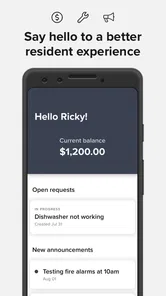
Okay, so imagine not having to chase your landlord for rent receipts or scrambling to find the building manager’s contact info. That’s the magic of the app. It’s like having your very own rental assistant right in your pocket. From paying rent to submitting maintenance requests, the app aims to simplify those mundane yet essential tasks.
Getting Started
First off, downloading and setting up the app is a breeze. You just hop onto the Google Play Store or the Apple App Store, hit download, and you’re on your way. The user interface is super friendly. I mean, even if tech isn’t your thing, you’ll find it pretty intuitive. The app guides you through setting up your profile, and voila, you’re ready to manage your tenancy like a pro.
A Day in the Life with Resident Center
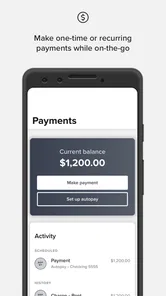
Once you’re all set up, the real fun begins. Picture this: It’s the first of the month, and instead of hunting for your checkbook or logging into your bank’s clunky website, you just open the app and tap a few buttons to pay your rent. Easy peasy! Plus, you get a digital receipt instantly, which is great for keeping those finances in check.
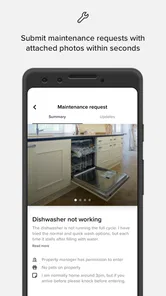
But wait, there’s more! Got a leaky faucet or a noisy neighbor? No need to stress. The app lets you submit maintenance requests directly to your landlord or property manager. You can even track the status of your request, so you’re never left in the dark wondering when that faucet is going to stop dripping.
Community Features
Resident Center doesn’t stop at just rent and maintenance. It’s got this neat community feature where you can connect with other residents in your building. Whether it’s organizing a potluck or discussing building policies, you’ve got a platform to voice your thoughts and stay connected.
And for those of us who are a bit forgetful, the app sends gentle reminders about community events or upcoming rent due dates. It’s like having a little digital nudge to keep you on track.
Cost and Everyday Value
Resident Center is a free House & Home app from Buildium, which makes trying it a low-commitment choice. I see its value less as a replacement for every part of renting and more as a shared route into the tasks a property manager makes available. The app has a 4.5 average from around 21,000 ratings, and more than 100,000 installs. Those figures suggest a substantial user base, though the right fit still depends on whether your property uses it.
For a renter, the practical benefit is having a place to handle routine property communication instead of juggling texts, paper notices, and separate payment steps. A useful habit is to submit a maintenance issue while you are standing near it: describe what is happening clearly, note when you first noticed it, and keep the request focused on one problem. That gives the manager a cleaner starting point than a vague message sent days later.
Where the Convenience Has Limits
The main trade-off is that a resident app can only be useful when the landlord or property manager is part of the process. It is not a general-purpose tenant network that can make an unresponsive manager act, and it should not replace urgent contact methods for a serious leak, safety concern, or outage. I would use the app to keep a routine request documented, but I would contact the appropriate person directly when timing matters.
It also helps to treat digital payment records as convenient receipts, not as a reason to stop checking your own bank account. Before relying on an in-app payment workflow, confirm that the payment has actually completed and keep your usual records until you are comfortable with the process at your property. Compared with texting a landlord, the app may keep routine requests and rent activity more organized; compared with a dedicated banking tool, its purpose is housing communication rather than broad money management.
Who Should Give It a Try?
I’d recommend it most to residents whose building already uses Buildium and who want a single place for common tenancy tasks. It may be especially handy if you travel, share household responsibilities, or tend to forget due dates: you can check the property-related task rather than searching through old conversations. For example, if a faucet starts dripping before work, you can send a concise request, then revisit its status later instead of wondering whether your message got buried.
If your landlord handles everything by phone, does not use the platform, or you mainly need a personal budget tracker, this is probably not the right tool to adopt on your own. A calendar can still be better for reminders that have nothing to do with your property, while direct contact is more suitable for urgent problems. The app is aimed at residents of all ages, with an Everyone content rating, and its current version is 1.5; I would still check that your device meets its minimum OS requirement of 12 before installing.
Final Thoughts
All in all, the app feels like a useful tool for anyone living in a rental property where the manager supports it. It takes some friction out of payments and maintenance while offering a way to stay connected with the community. Whether you’re tech-savvy or just looking for convenience, it offers a little something for residents who want property tasks gathered in one place.
So, if you’re tired of the old-school way of managing your rental life and your property uses the platform, give Resident Center a try. It might make the routine parts of renting easier to keep track of. Happy renting!
Resident Center Frequently Asked Questions
Does my property management need to use Resident Center for the app to be useful?
Yes. Resident Center is intended for residents whose property management uses the app to support resident services. If your property management does not use it, the app may not help you manage housing-related tasks or stay connected through this channel. It is worth checking with your property management before downloading so you know whether Resident Center is part of the services available to you.
What devices and operating systems can run Resident Center?
Resident Center is available for Android and iOS devices. The iOS version requires iOS 12 or later, so check your device’s operating system before installing it. Once installed, the app is designed to give residents a mobile way to handle housing-related tasks and connect with property management. The app’s usefulness still depends on your property management supporting Resident Center.
Who is Resident Center designed for?
Resident Center is a House & Home app from Buildium, designed with simplicity in mind. It is intended for residents who want to handle housing-related tasks and stay connected with their property management through an app. Before downloading, keep in mind that the app’s usefulness depends on whether your property management uses Resident Center to support resident services.
What is Resident Center and what does it offer?
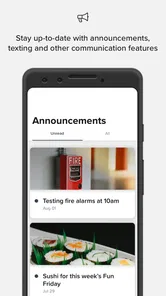
Resident Center is a comprehensive app designed for residents to manage their living space efficiently. It offers features such as rent payment, maintenance requests, and community announcements. Users can easily communicate with property management and access important documents related to their residency directly through the app, making it a one-stop solution for residential needs.
How secure is Resident Center for handling personal and payment information?
Resident Center prioritizes user security by implementing advanced encryption protocols and secure authentication methods to protect personal and payment information. The app complies with industry standards and regulations to ensure that users' data is safeguarded against unauthorized access, providing peace of mind when handling sensitive information.
Pros
- User-friendly interface enhances accessibility.
- Real-time updates for maintenance requests.
- Secure online rent payment options.
- Easy access to lease documents and history.
- Streamlined communication with property management.
Cons
- Limited features for non-residents.
- Occasional glitches in payment processing.
- Requires stable internet for optimal use.
- Limited customization options for notifications.
- Not all properties are enrolled in the app.