Reolink
- 6.11K
- 3.4
- Installs
- 5.00M
- Price
- Free
Screenshots
Analysis by Reviewed
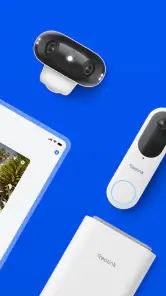
When I want to check what is happening around a home from my phone, I look for an app that makes the camera view easy to reach without turning every check into a technical task. Reolink is built for remote viewing of compatible security cameras, NVRs and DVRs, so it makes the most sense for people already using Reolink equipment or choosing a system around it. It is a free communication app from Reolink Innovation Limited, and its focus is practical: access your security setup when you are away.
What everyday remote viewing feels like
A useful way to judge a camera app is to imagine a normal, slightly busy day. I might be out when a delivery is expected, or want to check that a pet is settled before heading home. In that situation, opening the camera view is more valuable than a long list of clever extras. The key trade-off is that the experience depends on having compatible Reolink hardware set up; this is not a general-purpose camera viewer for any brand.
Speed expectations and busy moments
I would treat remote viewing as a quick check, not as a guaranteed instant response in every situation. A live feed has to travel from the camera system to the phone, so network conditions and the setup at either end can affect how promptly it appears. When several cameras or a recorder are part of the system, it is useful to decide in advance which view matters most. That keeps a simple check simple, especially when I am away from home and do not want to browse through every camera.
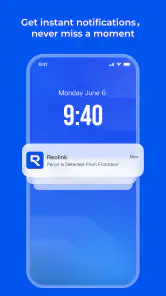
Alerts also work best as prompts to look, rather than proof of what happened. If an alert arrives while I am working, I can use it as a reason to open the relevant view and assess the scene myself. For a delivery, for example, checking the camera shortly after the notification is more useful than assuming the alert alone confirms where a parcel was left.
Reliability, recovery and practical habits
For a security app, reliability is less about a polished first launch and more about whether I can make sense of a view when I actually need it. I would keep the camera names clear and organize the setup around the places I check most often. That small bit of preparation reduces fumbling on a phone screen and makes it easier to distinguish the front entrance from a side area at a glance.
If a feed does not appear as expected, I would first check whether the phone has a usable connection and whether the camera or recorder is reachable, rather than repeatedly tapping the same view. This is a sensible troubleshooting order for remote monitoring: separate a phone-side connection issue from a problem with the equipment at home. I also would not rely on the app as the only part of a security plan; the cameras and recording setup need to be working too.
Who benefits, and who may prefer another option
This is a natural fit for someone who already owns Reolink cameras, an NVR or a DVR and wants to check that system away from home. It is less suitable if you have another camera brand and want one app to gather all your devices, or if you are shopping for a camera service that is independent of particular hardware. In that case, the app from your existing camera maker—or a setup designed to bring different brands together—may be a better match.
Compared with the usual alternatives in home monitoring, the important distinction is the equipment ecosystem. A manufacturer’s own app can offer a direct route to its cameras and recorders, while a broader smart-home app may be more convenient when your priority is controlling mixed-brand devices in one place. I would choose based on what is already installed, not on the assumption that every camera app can manage every system.
Device fit and performance expectations
The app is rated for Everyone and requires Android 8.0 or later, so an older phone may be a practical obstacle even if the camera setup itself is ready. On a supported phone, I would keep the app updated and make sure the device has a stable connection before depending on a live view while travelling. I cannot judge performance solely by the phone’s age: the camera system and network path matter as well.
Its average rating is 3.4 from around 36,000 ratings, alongside more than 5 million installs. I read that as a reminder that a large audience does not guarantee a perfect fit for every household. The current version is 4.56.0.4.20250819, and the app has been available since May 18, 2015; what matters most to me is whether its hardware-specific approach matches the system I want to monitor.
Setting Up: Easier Than Pie
Okay, first things first, let’s talk about the setup. I’m not a tech genius by any means, but Reolink made me feel like one. The app guides you through the installation process with simple, easy-to-follow instructions. It’s almost like having a friendly tech support buddy right there with you. I had my cameras connected and running in no time. Who knew setting up a surveillance system could be this breezy?
Features That Make You Go "Wow"
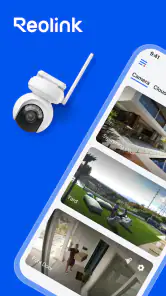
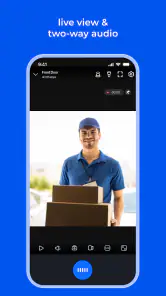
Once you’re all set up, the real fun begins. The app offers a plethora of features that are not just cool but genuinely useful. You can live stream in HD, which is perfect for keeping an eye on your pets or making sure the delivery guy actually leaves your package at the door. And the motion detection alerts? Super handy. I mean, who doesn’t want a little heads-up when someone’s sneaking around your property?
Another neat feature is the two-way audio. It’s like having a walkie-talkie with your house. You can communicate with anyone on the other side of the camera. Imagine telling the delivery guy to leave the package at the back door because you’re in the middle of a Zoom meeting. Yep, it’s that convenient.
Performance That Doesn’t Disappoint
Now, let’s chat about performance. Reolink does a stellar job of delivering smooth, high-quality video. Whether it’s day or night, the clarity is top-notch. The night vision feature is particularly impressive, making it easy to see everything in the dark without any hiccups. It’s like having night vision goggles but way cooler.
For everyday use, I would still treat a live feed as a check-in rather than a substitute for being there. A quick look can help me decide whether a situation needs attention, while a recording system is what I would consult when I need to review what happened earlier. Keeping those jobs separate makes the app more useful: the phone is for checking in, and the security setup is there to support monitoring over time.
Final Thoughts: A Must-Have for Peace of Mind
So, what’s the verdict? If you’re looking for a reliable, user-friendly security app, Reolink is a fantastic choice. It’s packed with features that make home security feel less like a chore and more like something you can actually enjoy. Plus, the peace of mind it offers is priceless. So, why not give it a go and see how it transforms your home security game?
My practical recommendation is to start by confirming that your cameras or recorder are part of the Reolink setup, then arrange the views you check most frequently so they are easy to find. If you need a single place for several manufacturers’ devices, or your phone falls below the supported Android version, I would look elsewhere. For someone with compatible equipment who wants remote access from a phone, this app offers a focused way to keep an eye on home without making the monitoring routine more complicated than it needs to be.
Reolink Frequently Asked Questions
Can I use Reolink without owning a compatible Reolink device?
Reolink is intended for remotely viewing and managing Reolink security cameras, NVRs, and DVRs, so its main purpose depends on having compatible equipment to connect. You can download the app for free and explore its interface, but the remote-monitoring features are designed around those devices. If you are choosing a security system, check that its equipment works with Reolink before relying on the app.
Can I use Reolink on both Android and iOS?
Reolink is offered for Android and iOS, so people using either mobile platform can use the app to access compatible Reolink cameras, NVRs, or DVRs. On Android, the device needs to run version 8.0 or later. Before installing, make sure your phone or tablet meets the platform requirements and that you have compatible Reolink equipment for the app to connect to.
Is Reolink a communication app or a camera-monitoring app?
Reolink is a communication app built around remote viewing and management of security cameras, NVRs, and DVRs. Its practical use is monitoring compatible Reolink equipment through a mobile device rather than general messaging or social networking. The app is intended to make remote access straightforward, whether you want to check a camera feed or manage the equipment connected to your account.
Does Reolink cost anything to download?
Reolink is free to download, so you can install the app without paying an upfront purchase price. The app is for communication and remote viewing of security cameras, NVRs, and DVRs. Keep in mind that the app’s download price is separate from any costs associated with cameras, recording equipment, or optional services.
What is Reolink and what does it offer?
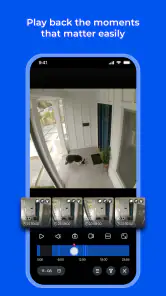
Reolink is a versatile security camera app that provides users with a comprehensive solution for monitoring their home or business premises remotely. The app supports live video streaming, playback, and motion detection alerts, ensuring that users can keep an eye on their property at any time and from anywhere. It is compatible with various Reolink cameras and offers features like two-way audio and night vision.
Articles Related to Reolink
Clash of Clans Is Won Between the Battles
Its raids are quick; its community is a long-term project of coordination, teaching, rivalry, and shared responsibility—with all the friction that entails.
Android Auto Makes the Case for Quieter Car Software
The car interface is no longer judged by how much it can do, but by how quietly it helps. Android Auto shows what drivers now expect—and what still gets in the way.
MobiOffice: Transforming Mobile Productivity with Seamless Integration
MobiOffice: Word, Sheets, PDF is redefining mobile productivity with a surprising blend of functionality and innovation.
EA SPORTS FC™ Mobile Soccer: Redefining Mobile Sports Gaming
Dive into EA SPORTS FC™ Mobile Soccer, where immersive gameplay and strategic depth transform mobile sports gaming.
Pros
- High-quality video resolution
- User-friendly interface
- Wide range of camera options
- Remote access and control
- Affordable pricing
Cons
- Requires strong internet connection
- Limited customer support
- Subscription required for cloud storage
- Occasional app crashes
- Compatibility issues with some devices
- Category
- Communication
- Version
- 4.56.0.4.20250819











