Homes And Rentals
- 1.59K
- 4.8
- Installs
- 500.00K
- Price
- Free

Screenshots




Analysis by Reviewed
When I’m weighing a move or simply trying to understand a Texas housing market, I want a search tool that helps me narrow choices without pretending it can make the decision for me. Real Estate by HAR.com - Texas is built around that local task: browsing homes and land, orienting myself on a map, and deciding which questions are worth asking next. I find it most useful as a starting point for research, not as a substitute for checking a property in person or getting clear answers from the people involved.
A Texas-first starting point
HAR.com is a free House & Home app from the Houston Association of REALTORS®, and its focus makes it most useful when Texas is genuinely part of your search. It has been around since 2011, and the current version is 4.2.9. Its average rating is 4.8 from around 6,300 ratings, while more than 500,000 installs suggest it has found an audience beyond people already working with a local agent. I’d treat those figures as context, not proof that a particular listing or recommendation is right for me.
The main practical question is whether a Texas-focused search is an advantage for you. If I were relocating to Houston, comparing neighborhoods across the state, or keeping an eye on a property market I might enter later, I’d start here rather than in a general home-search app. If I were looking outside Texas, I’d use a broader service instead; a strong local focus is only useful when it matches the place I care about.
Exploring the Features
First off, the Real Estate by HAR.com - Texas app is like having a real estate agent right in your pocket. It offers comprehensive listings of homes, apartments, and land available throughout Texas. What sets it apart is its focus on Texas properties, ensuring you get the most detailed and updated information available.
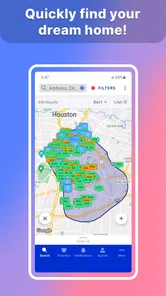
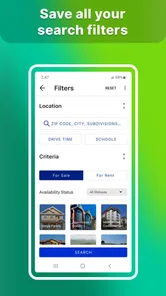
The app's interface is user-friendly, which makes navigating through the listings a breeze. You can filter your search based on your preferences—be it price, location, number of bedrooms, or even the year the house was built. And, let me tell you, the map feature is a game-changer. It allows you to see the exact location of a property, along with nearby schools, grocery stores, and other amenities. This is particularly useful if you're moving to a new city and want to get a feel of the neighborhood before making any decisions.
Making a shortlist that survives real life
I wouldn’t begin by piling on every possible filter. I’d first choose a realistic area and a few must-haves, then loosen one condition at a time if the results are too narrow. That helps me see whether the constraint is the neighborhood, budget, or property type, instead of mistaking an empty result for a lack of suitable homes across an entire city.
The map is most valuable as a planning tool, not a substitute for visiting. I’d use it to compare the location of a promising listing with the places I routinely need to reach, then check the route and neighborhood in person before making a decision. Nearby amenities can look convenient on a screen while still being awkward for a particular commute or daily routine. A listing’s map position is a useful first check, not a guarantee about the lived experience.
More From Our News Desk

 Block Blast!
 Makes Every Clear Feel Like One More Turn
A clean little block puzzle becomes a study in space, risk, and self-control. Its best moments come from one satisfying clear; its toughest test is knowing when to stop.

 Super Stylist Fashion Makeover
Super Stylist Turns Dress-Up into a Runway Career
Its makeover-to-client loop turns quick outfit decisions into shareable style theater. The question is whether the closet keeps giving players a reason to return.

 Block Craft 3D:Building Game
Block Craft 3D Under Pressure: How Well Does It Recover When Building Goes Wrong?
A failure-focused look at Block Craft 3D’s forgiving building loop, its uncertain recovery edges, and the moments that demand more than a cheerful village.

 Woodturning
 Trades Creative Freedom for a Satisfying Carving Loop
If your usual creative game is about building, decorating, or styling, Woodturning trades open-ended projects for a tactile, tightly guided carving loop. Here is what that switch really costs.

 PUBG MOBILE
 Shows What Battle Royale Must Get Right
PUBG MOBILE shows how battle royale has matured: bigger systems matter less than meaningful choices, readable fights, and a reason to return after every loss.

 Braindom: Brain Games Test
Braindom’s Social Life Happens Between Puzzles
Braindom turns quick logic traps into a personal ritual, but its community value is more about comparing answers than building together.
Latest News



Personalized Experience
One of the highlights of this app is its ability to tailor the search results based on your past searches and saved preferences. It’s almost like the app gets to know your taste over time and starts showing you properties you’re more likely to be interested in.
And for those who are always on the go, the app sends notifications about new listings or price changes on properties you’ve shown interest in. It’s like having a little assistant that keeps you in the loop without any extra effort on your part.
Keeping control of the search
Personalization is convenient, but I wouldn’t let a stream of alerts make the decisions for me. A practical approach is to keep a separate shortlist of homes that meet the essentials, then use new-listing and price-change notices as prompts to review—not as a reason to rush into contacting someone or changing a budget. If alerts become distracting, I’d revisit the choices available in the app and on my device rather than assume every notification needs an immediate response.
Real estate searches can involve sensitive decisions even before a person makes an account: location, budget, and the kind of home someone is considering are personal. I’d avoid putting private details into a message unless they’re needed for the conversation, and I’d verify a property’s important terms directly before acting. I can’t judge an app’s privacy practices from its search tools alone, so my cautious habit is to share only what is necessary when reaching out to an agent.
Community and Agent Connect
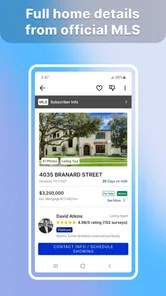
Another cool feature is the community and agent connect options. You can easily get in touch with real estate agents for more detailed inquiries or to schedule a visit. The app also provides user reviews and ratings for agents, ensuring you connect with the best in the business.
Moreover, the app has a community section where you can engage with other users, asking questions or sharing experiences. It’s like a social network for home buyers and sellers, which can be incredibly helpful if you're new to the area or just looking for advice from fellow users.
From browsing to an actual visit
For a realistic weekend search, I’d use a weekday evening to narrow the area and save a small set of candidates, then use the agent contact option to ask focused questions before arranging visits. For example, I’d ask whether a listing’s key details are current and what I should know before making the trip, rather than relying on a community comment as confirmation. This keeps the app useful as an organizer while leaving important decisions to direct checks and an in-person look.
Agent ratings and community comments can help me decide what to ask next, but I would not treat them as a substitute for judging an agent’s fit or verifying a home. Reviews reflect other people’s experiences, which may not match my priorities. For a buyer who already has a trusted agent, the search and map tools may still be worthwhile, while the contact features may add little. Someone who wants a listing browser without social discussion can simply focus on searching and use other channels for advice.
How it fits beside broader property apps
Compared with general real estate apps, HAR.com’s clearest distinction is its Texas orientation and its connection to local real estate professionals. A nationwide service may be more convenient for someone comparing homes across several states or keeping all those searches in one place. For a Texas move, I’d use HAR.com to build a local shortlist, then compare the details with direct conversations and visits instead of assuming any single app tells the whole story.
It is also worth remembering that a property search is only the first stage of a purchase or rental decision. Filters can reduce a large set of options, but they cannot tell me whether a home feels right, whether its condition suits my plans, or whether the full cost fits my finances. I’d use the app to organize questions and possible visits, not to replace independent checks or professional advice when the decision becomes serious.
Choosing a useful level of involvement
This is a better fit for someone who wants to explore before committing than for someone expecting an app to handle the entire transaction. I’d use it while comparing areas, checking whether a property type appears in a target location, or keeping an eye on homes that might merit a visit. A renter can use the same early-stage browsing approach, but should still confirm availability, terms, and any application requirements directly rather than treating a listing as a promise that a home can be secured.
It can also help when two people are searching with different priorities. One person might care most about location, while the other is focused on bedrooms or price. I’d agree on a few shared essentials first, then use the filters and map to see where those preferences overlap. That avoids turning a long scroll through listings into an argument about every individual property. The app can make options easier to compare, but the conversation about trade-offs still belongs to the people who will live with the choice.
Trust, permissions, and what I would verify
When a home search starts to feel personal, I pay attention to what I choose to share. I would review the permission prompts shown by the app and allow only what makes sense for the task I’m doing; I wouldn’t assume that a map or alert feature requires any particular permission without seeing the prompt. Likewise, before creating or using an account, I’d read the choices presented on screen and avoid entering more personal information than the interaction requires.
That cautious approach is not a claim about HAR.com’s data practices; it is a sensible boundary for any housing search. A saved search can reveal the kind of home and area someone is considering, while a message to an agent can reveal a timeline or budget. I’d keep early questions focused on the property, and share more about my circumstances only when I know why it is needed and who will receive it. If I decide to stop using the app, I’d look for the account and notification controls available to me rather than assume uninstalling settles every account-related choice.
What to check before relying on a listing
A polished listing can make an early impression, but it is not the same as a full picture of a property. I’d compare important details across the listing and any direct response I receive, then ask about anything that could change whether a visit is worthwhile. For a house that looks promising on a map, I’d also check the actual route at the times I would travel and visit the surrounding area if possible. Those steps are more useful than treating a pin, photo, or review as a final answer.
There is a practical trade-off here: checking every candidate in depth is too much work, but acting on a thumbnail and a few filters is too little. I’d use the app to reduce the field to a manageable group, then spend verification time only on the strongest candidates. If a listing’s condition, availability, or terms are central to my decision, I’d ask directly and keep the answer in a form I can refer back to. The app is most helpful when it improves that process instead of encouraging me to skip it.
Final Thoughts
Overall, Real Estate by HAR.com - Texas is a solid choice for anyone interested in the Texas real estate market. It’s packed with features that make the home buying process easier and more enjoyable. Whether you’re a first-time homebuyer or a seasoned investor, this app provides the tools you need to make informed decisions.
In conclusion, if you're serious about finding your dream home in Texas or want to stay updated on the real estate trends, downloading this app is a no-brainer. It's your trusty sidekick in the quest for the perfect property. So, why wait? Dive into the world of Texas real estate with this handy app today!
My cautious recommendation
I’d recommend it most to someone actively exploring Texas homes who wants local listings, a map-led way to compare areas, and a path to contact agents. It is free and rated for Everyone, so trying it for browsing is an easy starting point; that rating, of course, describes age suitability rather than the quality of any particular listing. I’d skip it as my main tool if my search is outside Texas, or if I expect an app to replace property inspections, financial planning, and direct verification.
My bottom line is positive but measured: HAR.com can make early research and visit planning more organized, especially when I’m narrowing a Texas search from a phone. I’d use its alerts selectively, treat reviews as perspectives rather than guarantees, and confirm consequential details before taking the next step. That balance is what makes it useful to me—not the idea that an app can make a major housing decision on my behalf.
Homes And Rentals Frequently Asked Questions
Is Real Estate by HAR.com - Texas available for my device?
Real Estate by HAR.com - Texas is available for Android devices running version 7.0 or later, and it is also offered for iOS. It is a House & Home app developed by the Houston Association of REALTORS®. The app is free to download, and its content rating is Everyone, making it suitable for a broad range of users interested in Texas real estate.
What is Real Estate by HAR.com - Texas?
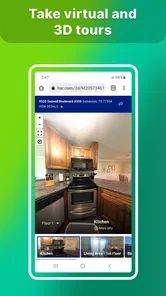
Real Estate by HAR.com - Texas is a comprehensive real estate app that connects users with up-to-date listings and information about properties for sale or rent in Texas. The app provides detailed property descriptions, high-quality photos, and virtual tours, making it easier for buyers, sellers, and renters to make informed decisions. It also offers tools for finding real estate agents, calculating mortgage payments, and staying informed about market trends.
How accurate are the property listings on Real Estate by HAR.com - Texas?
The property listings on Real Estate by HAR.com - Texas are highly accurate and updated frequently. The app is powered by the Houston Association of Realtors (HAR), ensuring that users have access to the latest information straight from the MLS (Multiple Listing Service). This means that users can trust the data's reliability when searching for properties or keeping up with market trends in Texas.
Can I use Real Estate by HAR.com - Texas to find rental properties?
Yes, Real Estate by HAR.com - Texas provides users with a range of rental property listings alongside properties for sale. The app includes filters to refine searches based on preferences like budget, location, and property type, making it a valuable tool not only for homebuyers but also for those looking to rent a property in Texas. The detailed listings help users make informed rental decisions.
What features does Real Estate by HAR.com - Texas offer to help with buying or selling a home?
The app offers a variety of features to assist with buying or selling a home. Users can access detailed property listings, virtual tours, and high-resolution photos. It also provides tools for finding professional real estate agents, calculating mortgage payments, and receiving alerts for new listings. Additionally, users can stay informed about market trends and neighborhood data, which is crucial for making strategic buying or selling decisions.
Pros
- Comprehensive property listings.
- User-friendly interface.
- Accurate property details.
- Regular updates.
- Efficient search filters.
Cons
- Limited to Texas region.
- No rental listings.
- Occasional slow load times.
- Limited customer support.
- No virtual tour features.