rapid! Pay
- 13.77K
- 4.3
- Installs
- 1.00M
- Price
- Free

Screenshots
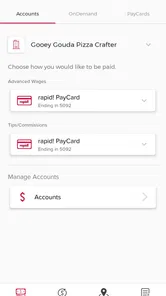

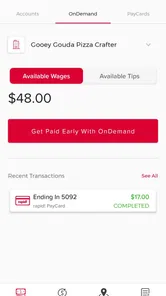
Analysis by Reviewed
I approach rapid! Pay with a practical question: does a dedicated cardholder app make everyday money tasks easier without asking me to take trust on faith? It is a finance app from Green Dot, intended for people registering for the rapid! platform cardholder mobile app. That focus matters. I would judge it less like an all-purpose banking hub and more like a companion to a particular card relationship, where quick access and clear account choices are more useful than a long list of features.
The app is free and rated for Everyone, and its current version is 1.0.101. It has a 4.1 average from around 66,000 ratings, with over a million installs. Those figures suggest plenty of people have tried it, but they don’t tell me whether it fits my own finances. I’d still start by checking that I have the right rapid! card or account details for registration, then make sure I understand what information I’m entering before moving through any financial setup.
Start with the card relationship, not the feature list
For me, the first decision is whether this app matches an account I already use. Its purpose is tied to registering a rapid! platform cardholder account, so it makes the most sense when that card is part of my regular routine. If I’m looking for a new general-purpose way to bank, I would compare other options before spending time on registration. A good first step is to have the card or account information I normally use close by and to stop if the details requested do not seem to match the relationship I expect to manage.
This is also where I would separate convenience from necessity. A dedicated app can be worthwhile if I check the card often, but it may add little if I rarely use it or already have a reliable way to review its activity. Installing it is not a commitment to make it my main financial tool. I can first decide which specific task I want it to handle and judge it against that task, rather than assuming every cardholder needs another app.
Getting Started with rapid! Pay
First things first, downloading rapid! Pay is as straightforward as it gets. Available on both Android and iOS, you can find it on the Play Store and the App Store without any hassle. Once you have it on your device, setting it up is a breeze. The app guides you through a quick registration process where you input your basic details, and voila, you’re in!
User Interface and Experience
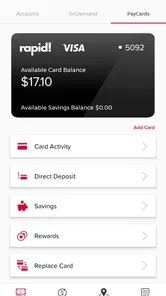
The user interface of rapid! Pay is clean and intuitive. Navigating through the app feels like a walk in the park, even if you aren't tech-savvy. The menu is neatly organized, which makes accessing different features like checking your balance, reviewing transactions, or managing your card easy peasy. I must say, the developers have done a stellar job in ensuring that the app is user-friendly and visually appealing.
That kind of straightforward layout matters most when I’m opening a finance app for one quick check, not when I have time to explore. I’d use a short visit to answer a clear question—such as whether the balance looks sufficient before I pay—then close the app rather than browsing without a purpose. A useful habit is to distinguish what the screen tells me from what I still need to verify: seeing account information is helpful, but for a time-sensitive payment I would check the transaction’s status instead of assuming that starting an action means it has finished.
More From Our News Desk

 Bolt: Request a Ride
Bolt and the Shift from One-Tap Rides to More Legible Trips
Bolt shows how ride-hailing is shifting from a one-tap taxi request toward a more legible, choice-driven trip, while leaving the hardest questions of price and reliability unresolved.

 Farm Land - Farming life game
Farm Land Review: A Small Island Farm with a Satisfying Loop
A bright, breezy island farm turns a few quick chores into a satisfying cycle of planting, harvesting, expanding, and deciding what to build next.

 Android Auto
’s Community Takes Shape in the Passenger Seat
Its most valuable network is not a public feed but a shared set of routes, voice habits, app integrations, and advice that make driving less isolating—and sometimes more complicated.

 My Talking Angela
 Makes the Virtual Pet Feel Personal
A polished pet-raising game built on small rituals, playful customization, and a character who gives everyday screen time a surprisingly personal rhythm.

 Google Translate
 Review: A Pocket Tool for the Small Frictions of Travel
From menus and signs to quick conversations, Google Translate earns its place by cutting the little delays that make unfamiliar language feel like a barrier.

 Shazam: Find Music & Concerts
Shazam’s Best Trick Is Turning a Song Into a Night Out
A few seconds of recognition can settle an argument, rescue a half-remembered chorus, and point toward a live show. Shazam’s real trick is what happens after the match.
Latest News



Features that Stand Out
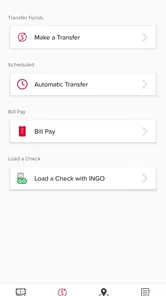
One of the standout features of rapid! Pay is its ability to offer instant access to your funds. Imagine getting paid and having immediate access to your money without the usual wait times. This is particularly beneficial for those of us who like to keep a tight rein on our finances. Plus, the app also allows you to transfer funds, pay bills, and even reload prepaid cards directly from your account. It's like having a mini bank in your pocket!
I would treat those functions as practical options to check, not as a reason to route every financial task through one place. Before depending on a transfer, bill payment, or reload, I’d read the on-screen choices and any confirmation carefully. The key trade-off is that having an action available in a cardholder app does not make it the best route for every deadline or account. For an urgent obligation, I’d use the method I know is appropriate for that payment and verify the result rather than treating convenience as a timing guarantee.
Making the App Fit a Real Routine
For a cardholder, the useful habit is to check the balance before a planned purchase and review recent transactions afterward, rather than opening the app only when something goes wrong. That small routine can help me notice an unfamiliar charge sooner and avoid relying on memory when I’m tracking spending. If I use a prepaid card for a specific purpose, such as setting aside money for routine purchases, I’d treat the app as a way to keep an eye on that pot rather than as a complete picture of every account I own.
A realistic example is a grocery run after work. I might check the balance before leaving, use the card at the till, then look at the activity later when I have a moment. That gives me a more useful record than trying to remember the amount while juggling bags and errands. If I share household expenses, I would still agree with the other person on which transactions belong to the shared budget; the app can help me view card activity, but my household rules have to provide the context.
There is a trade-off in keeping a card-focused app alongside other money tools: it may make card activity easier to follow, but it does not automatically replace a broader budget or banking setup. I would avoid duplicating every transaction by hand unless I had a clear reason; instead, I’d decide which app is my main record and use rapid! Pay for the card tasks it supports. Before depending on a transfer, bill payment, or reload for a time-sensitive need, I’d check the available options and any prompts in the app, then leave room for the task to take longer than expected.
One non-obvious way to keep this manageable is to decide in advance what the app is for. If I use it as the place to check one card’s activity, I don’t need to rebuild my entire monthly budget there or constantly compare it with every other account. That boundary reduces duplicated effort and makes an unexpected card transaction easier to spot. On the other hand, if I need a single overview of savings, bills, and spending across several providers, a broader banking or budgeting tool is likely to be more useful as my main dashboard.
Trust, Controls, and What to Check
Money apps deserve a closer look than ordinary utilities because registration involves account information and the app may be used around sensitive transactions. I would review the screens carefully as I sign up, use a device lock, and avoid entering account details on a shared device. Those are practical precautions, not claims about the app’s permissions or security design. If a permission request appears, I’d ask whether it makes sense for the task I’m trying to do before granting it.
That pause is a simple way to keep control of the setup. I would read each prompt rather than approving requests out of habit, and I would only continue when I understand why the information or access is being requested. If I’m installing the app on a device other people use, I’d consider whether that device is appropriate for financial access in the first place. These choices are not a substitute for the provider’s account process, but they help me make deliberate decisions at the moments when personal information is involved.
For day-to-day control, I’d make a habit of checking the transaction details rather than assuming that a displayed balance explains every change. If something looks unfamiliar, I’d use the account or card support route available to me and keep relevant transaction information handy. I would also check the app’s current account options before expecting a particular card action; the experience can depend on the card relationship, and a feature that suits one cardholder may not suit another.
If I change phones or stop using the card, I would review the account access I still need rather than leaving an old setup unattended. I’d also make sure I know how to reach the relevant account support route before I run into a problem. For an unfamiliar transaction, writing down the date, amount, and any identifying details shown on screen can make the next conversation more precise. That is a practical record-keeping step, not a claim about a particular dispute process.
Choosing It Over a Bank or Budgeting App
Compared with a general banking app, a card-specific tool can keep the relevant card activity closer at hand, but it is a narrower fit if I want to manage several accounts together. Compared with a dedicated budgeting app, it may be more convenient for checking the rapid! card relationship, while the budgeting tool may be better for planning categories or looking at spending across a broader picture. I would choose based on the job I need done most often, not on which app sounds more comprehensive.
I’d recommend considering rapid! Pay if you already use a rapid! card and want a mobile place to handle the related account routine. Someone who prefers a single, general-purpose bank app for several accounts may find a card-specific tool less convenient, while a person who mainly wants long-term spending analysis may prefer a budgeting app built around categories and broader financial views. The sensible comparison is not simply which app has more buttons, but whether it supports the jobs you actually do most often.
A realistic example: before buying groceries, I’d check the card balance, use the card, then look back at the transaction later so I can keep the purchase in context. If I’m short on time or need a payment to clear by a particular deadline, I wouldn’t treat a mobile screen alone as proof that everything is complete; I’d confirm the transaction status and keep a backup payment method where possible. That’s a useful distinction between convenient account access and a guarantee about timing.
Security and Support
Now, let’s talk about something we all care about—security. rapid! Pay employs top-notch security measures to ensure your data and transactions are safe. With robust encryption and multi-factor authentication, you can be assured that your financial information is in good hands. Moreover, if you ever hit a snag, their customer support team is ready to assist you. I had a minor issue once and reached out to them; they were prompt and super helpful.
When I assess trust, I prefer to rely on choices I can actually make: what details I enter, which prompts I approve, and whether I keep financial access on a device I control. I would not treat reassuring wording as a replacement for reading the steps presented during registration. If the app asks me to confirm something about my account, I’d take the time to understand it before proceeding. That is especially important when I’m setting up access in a hurry or handling a transaction I cannot easily redo.
Who Should Give It a Try
The strongest fit is someone who already has the relevant rapid! card, checks its balance or activity regularly, and wants a phone-based way to keep that card routine organized. It may also suit someone who uses a prepaid card for a defined portion of everyday spending and wants to keep that activity mentally separate from other accounts. In either case, I’d begin with ordinary checks before relying on the app for a more consequential task.
I would skip it as my primary money app if my main goal were to see multiple accounts in one place, build a detailed household budget, or replace a broader banking relationship. It is also not a good match if I do not have the relevant cardholder relationship to register. That doesn’t make the app a poor choice; it means the value depends on a specific use case. A person who uses the card only occasionally may be happier checking it through an existing account channel, if that suits their needs, instead of adding another app to maintain.
Final Thoughts
All in all, rapid! Pay is a fantastic app for anyone looking to manage their finances efficiently. Its ease of use, combined with the powerful features it offers, makes it a must-have for those who want quick access to their funds and seamless financial management. Whether you're tech-savvy or not, this app is designed to cater to your needs with simplicity and efficiency. So, if you’re on the lookout for a reliable financial app, give rapid! Pay a shot—you won’t regret it!
My more cautious recommendation is to see it as a focused companion, not an automatic substitute for a bank, a spending plan, or careful account habits. The key question is whether your rapid! card use is frequent enough to justify another finance app on your phone. If it is, a simple check-and-review routine can make it useful; if you need broad account aggregation or detailed budgeting, a different tool may be a better fit. I’d try it with ordinary, low-pressure tasks first and decide from there whether it earns a regular place in my routine.
rapid! Pay Frequently Asked Questions
Does rapid! Pay work with any prepaid or payroll card?
rapid! Pay is intended for rapid! platform cardholders, rather than serving as a universal app for every prepaid or payroll card. If you already have a card, confirm that it belongs to the rapid! platform before downloading and registering. This helps ensure the app is relevant to your account and that you are using the right mobile service for your card.
What should I have ready before registering for rapid! Pay?
The app is described as a way for rapid! platform cardholders to register for and access the mobile service. Before starting, have access to the relevant rapid! platform cardholder account information and use the official app from your device’s app store. Registration is most useful when you are a cardholder or expect to use the platform, rather than simply looking for a general-purpose finance app.
Can I use rapid! Pay without a rapid! platform card?
rapid! Pay is designed for rapid! platform cardholders, so it is most relevant if you already use or expect to use that platform. If you do not have a rapid! platform card or related account, the app may not meet your needs. Check that you are eligible to use the platform before downloading, since the app is focused on accessing its cardholder mobile service.
Is rapid! Pay free to download?
rapid! Pay is a free finance app developed by Green Dot. Its purpose is to help rapid! platform cardholders access the mobile app, so it is most relevant if you already use or expect to use that platform. Before installing, check that your device meets the app’s requirements and that you are downloading the official rapid! Pay app.
Which devices can run rapid! Pay?
The app requires Android 7.0 or later, so check your device’s operating system before downloading. rapid! Pay is also available as a mobile app for iOS users. Compatibility can depend on your device and its software, so use the relevant app store to check whether it can be installed on your particular phone or tablet.
Pros
- User-friendly interface.
- Fast transaction processing.
- Secure payment options.
- Supports multiple currencies.,24/7 customer support.
Cons
- Limited merchant network.
- Occasional app crashes.
- High transaction fees.
- Limited features in free version.
- Requires stable internet connection.