Green Dot - Mobile Banking
- 32.79K
- 3.5
- Installs
- 5.00M
- Price
- Free

Screenshots
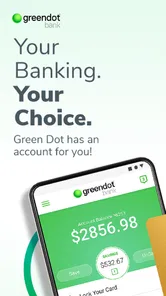
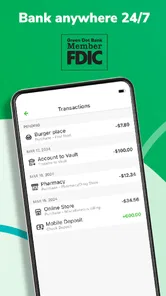

Analysis by Reviewed
I judge a banking app by whether it makes everyday money tasks clearer, not by how many buttons it puts on screen. Green Dot - Mobile Banking is a free finance app from Green Dot, and its appeal is straightforward: it brings account management and common transactions into a phone-friendly routine. I’d consider it if I wanted to handle basic banking while away from a computer, but I would first check that its account options suit the way I actually manage money.
What free access means in practice
The app itself is free to download, so trying it does not require an upfront purchase. That is useful when I’m comparing mobile banking options, but it is not the same as knowing the full cost of using a banking service. I would review the terms for the specific account and transactions I plan to use before relying on it; free access to an app alone does not establish that every banking activity is free.
That distinction matters most if I expect to use the app for regular deposits, payments, or other account activity. I’d treat the app as the mobile interface and make my choice based on the account terms, not on the download price. The listing describes the app as suitable for Everyone, but that age label is not a substitute for checking the requirements that apply to opening or using a financial account.
Using Green Dot for everyday money tasks
What I value in a banking app is being able to check in quickly and take care of a task without turning it into a project. The listing presents Green Dot as a mobile banking option, and I see its strongest potential in everyday account access for people who prefer handling finances from a phone. Its long presence in the app stores—released in 2011—also means this is an established product rather than a brand-new experiment.
A practical routine, not a replacement for every tool
Picture a typical weekday: I want to check my account before a planned purchase, then keep track of spending later. A phone-based banking app can make that routine easier than waiting until I’m at a computer. My useful habit would be to check the account before spending and again after transactions I want to monitor, rather than assuming a quick glance is a complete budget. For broader planning, I’d still use a separate spreadsheet or budgeting service if I needed detailed categories, shared household tracking, or long-term projections.
Compared with a traditional bank’s app, the main question for me is not which one has the longer feature list; it’s whether the account behind the app matches my needs. Compared with a standalone budgeting app, a banking app is more directly tied to account activity, while a dedicated planner may be better for organizing several accounts or setting more detailed goals. I would not switch from an existing bank just for the convenience of having another icon on my phone.
Who is likely to get value
I can see this fitting someone who wants a no-cost app download and prefers managing banking tasks on a phone. Green Dot has an average rating of 3.6 from around 90,000 ratings, with about 32,000 written reviews and more than 5 million installs. Those figures show that it has reached a substantial audience, but they don’t tell me whether the account terms or day-to-day experience will suit a particular person. I’d read recent user feedback for recurring issues that matter to my own routine, rather than treating popularity as a personal recommendation.
More From Our News Desk

 Bolt: Request a Ride
Bolt and the Shift from One-Tap Rides to More Legible Trips
Bolt shows how ride-hailing is shifting from a one-tap taxi request toward a more legible, choice-driven trip, while leaving the hardest questions of price and reliability unresolved.

 Farm Land - Farming life game
Farm Land Review: A Small Island Farm with a Satisfying Loop
A bright, breezy island farm turns a few quick chores into a satisfying cycle of planting, harvesting, expanding, and deciding what to build next.

 Android Auto
’s Community Takes Shape in the Passenger Seat
Its most valuable network is not a public feed but a shared set of routes, voice habits, app integrations, and advice that make driving less isolating—and sometimes more complicated.

 My Talking Angela
 Makes the Virtual Pet Feel Personal
A polished pet-raising game built on small rituals, playful customization, and a character who gives everyday screen time a surprisingly personal rhythm.

 Google Translate
 Review: A Pocket Tool for the Small Frictions of Travel
From menus and signs to quick conversations, Google Translate earns its place by cutting the little delays that make unfamiliar language feel like a barrier.

 Shazam: Find Music & Concerts
Shazam’s Best Trick Is Turning a Song Into a Night Out
A few seconds of recognition can settle an argument, rescue a half-remembered chorus, and point toward a live show. Shazam’s real trick is what happens after the match.
Latest News



I’d be more cautious if I needed a single dashboard for multiple financial institutions, detailed budgeting, or a very specific set of account services. In those cases, I’d compare the available account options and tools before moving money or changing my main banking setup. A familiar interface can save time, but it cannot make an unsuitable account a good fit.
Small checks that prevent bigger hassles
Before making the app part of my regular routine, I’d confirm the account is the one I intend to use, check how to contact support, and learn where the app displays transaction activity and account details. These are practical checks, not reasons to expect a problem: they help me know where to look if a payment or deposit does not appear as I expected. I’d also keep an eye on the phone’s operating-system compatibility; the current version is 4.68.0 and requires Android 6.0 or later.
For day-to-day use, I’d avoid relying on a notification as my only record of a transaction. Notifications are convenient prompts, while the account activity screen is the place I’d check when reconciling what happened. That small distinction is useful with any banking app, especially if I’m tracking a tight spending plan or verifying a payment before assuming it has cleared.
My verdict on the trade-offs
In my view, Green Dot is worth considering when phone access is the main convenience I want and the associated account works for me. The free download lowers the barrier to trying the interface, while the real decision is whether the service fits my banking habits. I would skip it if I were looking for a dedicated, detailed budgeting system or a universal view of several banks; a specialized tool or my existing bank’s app may serve those needs better.
There are 5 million-plus installs, but I’d weigh that reach alongside the mixed average rating rather than treating either as proof of quality. The app is free, is rated for Everyone, and comes from Green Dot; those facts make it easy to identify, not automatically right for every user. If I wanted mobile access to a Green Dot account, I’d compare the account terms first, then decide whether the app’s everyday convenience is worth building into my routine.
Getting Started with Simplicity
First things first, downloading and setting up the Green Dot - Mobile Banking app is a breeze. Available on both Android and iOS, the app ensures a smooth onboarding process. I was up and running in no time, thanks to its intuitive interface that guides you through each step. This app is designed with simplicity in mind, making it accessible even for those who aren’t tech-savvy.
Feature-Packed and User-Friendly
Now, let's talk features. This app is packed with everything you need for hassle-free banking on the go. You can easily manage your accounts, pay bills, deposit checks, and even send money to friends and family. One feature I particularly appreciated is the real-time transaction alerts. It’s like having a personal assistant who keeps an eye on your spending, ensuring you’re always in the loop.
Another highlight is the app's budgeting tools. As someone who tries (and sometimes fails) to stick to a budget, having built-in tools that help track spending habits is a game changer. It’s like having a financial advisor right in your pocket!
A Few Extra Perks
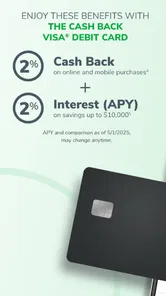
One thing that stood out to me is the cash back rewards. Yes, you heard that right! Eligible purchases through the app can earn you some sweet cash back. It's a nice little perk that adds value to everyday transactions. Plus, the app’s integration with Apple Pay and Google Pay makes it easy to handle transactions without fumbling for your wallet.
Security is another area where this app doesn’t skimp. With features like fingerprint login and advanced encryption, your information stays protected. It's reassuring to know that your financial data is safe from prying eyes.
Final Thoughts
In conclusion, the Green Dot - Mobile Banking app is a solid choice for anyone looking to streamline their financial management. It combines ease of use with a robust set of features, making it suitable for both newcomers to mobile banking and seasoned users. While no app is perfect, this one comes pretty close, offering convenience, security, and a little extra cash back along the way.
If you're in the market for a mobile banking app that covers all the bases, give this one a try. You might just find that it’s exactly what your financial life was missing. Happy banking!
Making a mobile routine work for you
One practical way I’d test whether the app belongs in my routine is to start with a narrow job rather than moving every financial task onto it at once. For example, I could use it to check activity around a recurring bill or to review spending before an errand, then compare what I see with my own records. That gives me a feel for how clearly the account activity is presented without making a new app the only place I keep track of important payments.
A useful habit is to decide what counts as confirmation before sending money or assuming a bill is settled. I’d open the account activity after the action and check the status there, instead of treating a tap, alert, or confirmation screen as the final word. For a payment that matters, keeping the confirmation details until I can verify the activity is a small precaution that costs little time.
Questions I would settle before relying on it
Would I need to open a Green Dot account to get value from the app? I would first establish which account I intend to manage and review its eligibility and terms, because the free download by itself does not tell me whether the underlying service is suitable. If I already bank elsewhere, I’d compare the practical account options before treating this as a replacement rather than simply another mobile tool.
Can it take the place of a full household budget? I would not assume so. The app may help with banking tasks and spending awareness, but anyone coordinating shared expenses, planning bills across several accounts, or tracking longer-term targets may still want a separate budgeting method. I’d try to keep one clear source of truth for the household budget rather than splitting figures across tools and hoping they stay in sync.
Is the free app automatically the least expensive way to bank? No: free access means there is no app purchase price, not that every account service or transaction has no cost. I’d read the applicable account terms and pay particular attention to the activities I expect to use. This is the key distinction for judging value: the download is easy to try, while the account is what determines whether the overall arrangement makes sense.
Where the trade-offs become clearer
For someone who mainly wants a phone-based way to access a Green Dot account, the convenience may be enough to justify a place on the home screen. The balance changes if I already have a bank app that handles my usual payments and account checks well. In that case, adding another service could mean more places to monitor, more terms to understand, and no meaningful improvement in my daily routine.
I would also avoid treating every extra feature as a reason to choose the app. Rewards, payment options, and account tools matter only when they apply to the account I use and fit how I spend. Before counting a perk as real value, I’d check its conditions and whether I would make the same purchase without it. A reward is a bonus, not a reason to spend more or overlook account costs.
Who should pass, and who should try it
I’d point a friend toward Green Dot if they want mobile access to an account connected with the service and are comfortable checking the account terms before making it their main banking setup. It may also suit someone who values quick account reviews more than advanced financial planning. The best test is modest: install it, understand which account it serves, and see whether it makes a task you already do easier.
I’d suggest looking elsewhere if the priority is a combined view of multiple banks, extensive forecasting, or a budgeting workflow shared with other people. A dedicated finance planner is usually the more natural fit for those jobs, while an established bank’s own app may be simpler if it already covers the transactions I need. The right comparison is about the job I need done, not about which app claims the broadest reach.
My closing recommendation
My recommendation is a cautious try, not an automatic switch. The app costs nothing to download, and Green Dot has been available since 2011, so there is a substantial history and audience behind it; still, neither longevity nor installs can tell me whether its account terms work for my situation. I’d begin by checking those terms, then use the app for a small, familiar task before relying on it for regular money management.
That approach gives the app a fair test while keeping the decision grounded in value rather than novelty. If mobile access makes a Green Dot account easier to manage, it can earn a place in my routine. If it adds another login without solving a real problem—or if I need broader planning tools—I’d stay with my current setup or choose a more suitable alternative.
Green Dot - Mobile Banking Frequently Asked Questions
Is Green Dot - Mobile Banking available for iOS as well as Android?
Green Dot - Mobile Banking is a mobile finance app, and its availability depends on the store and device you use. If you are considering it for an iPhone or iPad, check the relevant app store for the current listing and compatibility details. Android users should also confirm their operating system meets the app’s minimum requirement before installing.
What should I consider before opening or using an account through the app?
Think about the banking tasks you want to handle on your phone and whether Green Dot’s available services suit your needs. Read the account terms and any applicable fees before signing up or using a particular feature. Banking products can have conditions that affect how you use them, so review the details carefully rather than assuming every service works the same way for every user.
Does Green Dot - Mobile Banking replace visiting a bank branch?
The app is designed to let users manage banking tasks on a mobile device, including the services described in its feature overview. That can make routine money management more convenient, but whether it replaces branch visits depends on what you need to do. Consider the specific services available to your account and keep another way to get help in mind for situations that require personal assistance.
Can I use Green Dot - Mobile Banking to manage my money and pay bills?
Green Dot - Mobile Banking is a financial app intended to help users manage money from a mobile device. Its described tools include paying bills and transferring money, alongside other banking functions. The exact options available can depend on your account and the service you want to use, so review the app’s terms and feature details before relying on it for a particular payment or transfer.
Is Green Dot - Mobile Banking free to download, and what devices can run it?
Green Dot - Mobile Banking is free to download and is intended for mobile use. Before installing, check that your Android device runs version 6.0 or later, since that is the stated minimum operating system. The app is in the Finance category and is rated for Everyone. Those details can help you decide whether it is suitable for your device and household.
Pros
- User-friendly interface for easy navigation
- No monthly fees with qualifying direct deposits
- Instant transaction alerts for security
- Overdraft protection up to $200
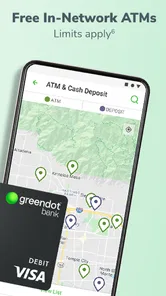
- Strong network of free ATMs nationwide
Cons
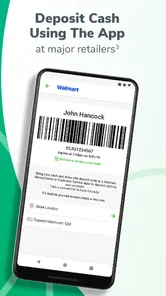
- High fees for cash deposits at retailers
- Limited customer service availability
- No physical bank branches
- Fee for paper statements
- Mobile check deposit can be slow