GO2bank: Mobile banking
- 15.97K
- 4.4
- Installs
- 5.00M
- Price
- Free

Screenshots
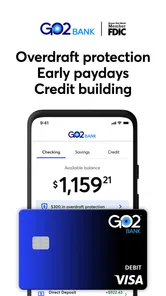
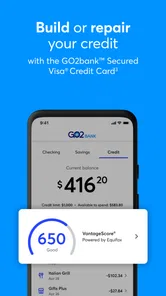
Analysis by Reviewed
When I judge a mobile banking app, I look beyond how quickly I can check a balance. I want to know whether the app makes everyday money decisions clearer, and whether I can tell what I’m choosing when I move or spend money. GO2bank is a free finance app from Green Dot, and it is aimed at people who want to handle routine banking from a phone rather than make every task a branch visit.
That focus can suit someone who receives income electronically, checks spending on the go, and wants account activity close at hand. It is less obviously suited to a person who needs a full-service banking relationship or wants to compare detailed account terms before opening an account. I would treat it as a practical banking tool to assess against my own needs, not assume that a polished mobile experience answers every question about how an account works.
Trust starts with knowing what you are choosing
With any finance app, I would pause before entering personal or account information and read the choices shown during setup. I would also review the app’s current privacy and account terms directly, rather than guessing from its appearance or popularity. Those steps matter because banking involves sensitive decisions, and a convenient interface is not a substitute for understanding the relationship behind it.
GO2bank has an average rating of 4.5 from around 103,000 ratings, and more than five million installs. That is useful context when weighing how widely people use it, but it is not a guarantee that the app or account will fit every person. It is rated for Everyone, and its current version is 3.0.0; I would still check that my device meets the app’s requirements before trying to install it.
What to check before making it your main account
I would separate two decisions that can blur together: whether I like the mobile app, and whether the account behind it suits how I handle money. A smooth screen can make routine tasks feel easy, but the account’s terms, eligibility, and ways to get assistance matter just as much. I would read those details before changing where my income lands or moving bill payments over.
For someone trying a mobile banking service for the first time, a low-risk way to evaluate it is to start by learning the layout and reviewing the available account information. I would note where balances, recent activity, and support options appear, then see whether those details are easy to find without hunting. The useful test is not whether the app looks simple at first glance; it is whether I can answer ordinary questions when I need to make a decision.
The First Impression
Right off the bat, GO2bank greets you with a sleek and user-friendly interface. I mean, nobody wants to navigate through a maze just to check their balance, right? The app is designed with simplicity in mind, making it super intuitive even if you're not the most tech-savvy person out there. I found myself breezing through the setup process without any hiccups.
More From Our News Desk

 Bolt: Request a Ride
Bolt and the Shift from One-Tap Rides to More Legible Trips
Bolt shows how ride-hailing is shifting from a one-tap taxi request toward a more legible, choice-driven trip, while leaving the hardest questions of price and reliability unresolved.

 Farm Land - Farming life game
Farm Land Review: A Small Island Farm with a Satisfying Loop
A bright, breezy island farm turns a few quick chores into a satisfying cycle of planting, harvesting, expanding, and deciding what to build next.

 Android Auto
’s Community Takes Shape in the Passenger Seat
Its most valuable network is not a public feed but a shared set of routes, voice habits, app integrations, and advice that make driving less isolating—and sometimes more complicated.

 My Talking Angela
 Makes the Virtual Pet Feel Personal
A polished pet-raising game built on small rituals, playful customization, and a character who gives everyday screen time a surprisingly personal rhythm.

 Google Translate
 Review: A Pocket Tool for the Small Frictions of Travel
From menus and signs to quick conversations, Google Translate earns its place by cutting the little delays that make unfamiliar language feel like a barrier.

 Shazam: Find Music & Concerts
Shazam’s Best Trick Is Turning a Song Into a Night Out
A few seconds of recognition can settle an argument, rescue a half-remembered chorus, and point toward a live show. Shazam’s real trick is what happens after the match.
Latest News



Features That Caught My Eye
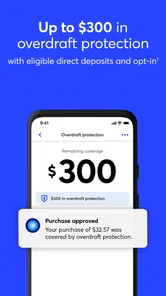
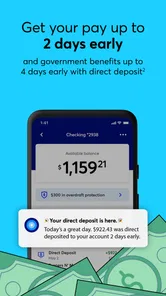
One of the standout features of this app is its early direct deposit option. Imagine getting your paycheck up to two days earlier than usual. That's a game-changer for those of us who like to stay ahead of our bills. Plus, it offers overdraft protection up to $200, which is a lifesaver if you're prone to the occasional financial slip-up.
And let’s talk about its cashback rewards. Who doesn’t love earning a little extra just for spending on things you already need? With GO2bank, you can earn up to 7% cashback on eGift Card purchases made within the app. This feature definitely adds a bit of thrill to my regular shopping spree.
Making the features work for your routine
These perks are most useful when they match a routine you already have. If your pay arrives by direct deposit, an earlier arrival can help with timing, but I would not build a bill schedule around money arriving early every time. Keep due dates and a small cushion in mind; a timing benefit is helpful, not a replacement for planning.
The overdraft protection mentioned above may be a buffer in a tight moment, but it is not the same as extra income. Before relying on it, I would check the account’s current eligibility and terms in the app, then decide whether that safety net suits my habits. Likewise, cashback on an eGift Card only helps if the card is for a merchant you already use and you can spend its full value. Buying a gift card just to chase a reward can tie up money or encourage unnecessary spending.
Choosing between a quick buffer and a better plan
I would treat early pay and overdraft protection as separate tools, not as a single promise that cash will always be available when I want it. If a bill is due before payday, I would check the actual balance and the relevant account terms rather than assume an early deposit or buffer will cover it. That habit matters most when several automatic payments fall close together: one feature may help with timing, but it does not remove the need to know what is leaving the account.
The rewards have a similar practical test. Before buying an eGift Card, I would check that the retailer is already part of my normal spending and that the card’s value fits a purchase I expect to make. A reward can be less useful than keeping the same money flexible, especially if my plans change. I see it as a possible bonus for a purchase I was already going to make, not a reason to spend differently.
Security and Support
Now, I know what you're thinking—how safe is it? Well, the app doesn’t skimp on security features. It comes with a bank-level encryption and FDIC insurance up to $250,000 through its partner bank. So, you can rest easy knowing your money is in safe hands. And if you're ever in a pickle, their customer support is pretty responsive, offering help through various channels.
Data-sensitive moments and account access
Banking apps handle information I would not enter casually, so I would pay attention to each screen that asks me to provide details or make a choice. I would read the wording rather than tap through setup on autopilot, and revisit the app’s privacy and account terms when deciding how much of my day-to-day banking to bring into it. That is a more useful trust check than assuming a familiar interface tells me everything about data handling.
I would also make a simple access plan before the app becomes essential: know how I would seek support if I could not get into my account, and keep important account details somewhere safe rather than relying on memory or a single device. For any mobile bank, that preparation is especially worthwhile before travel, a phone replacement, or a change in how I receive pay. It turns a hypothetical problem into a routine I can handle calmly.
Everyday checks and sensitive moments
A realistic use is checking your balance before a grocery run, then looking over recent activity after a purchase or paycheck arrives. I find that sort of quick check more valuable than opening an app only when something goes wrong. If a transaction looks unfamiliar, I would use the account’s available controls and contact support promptly rather than wait for the next routine review.
That habit also gives alerts a useful role: they can prompt a closer look, but I would not treat a notification as a complete account audit. For a shared household budget, I would agree on who checks transactions and how bills are covered before relying on one person’s phone as the only view of the money. Small routines like these make mobile access useful without handing every financial decision over to an app.
A practical paycheck-to-bills routine
Picture a week when pay arrives and rent, a phone bill, and groceries all need attention. I would first check the available balance and recent activity, then list the payments that must clear before I spend on anything optional. If early direct deposit arrives, I would treat it as breathing room rather than move every due date to the earliest possible day. That leaves me less exposed if deposit timing varies.
After the essential payments, I would decide whether an eGift Card reward fits an already-planned purchase. I would not use a card balance as a substitute for checking the account’s cash available for bills. This order—verify deposits, account for commitments, then consider rewards—keeps the app’s conveniences from nudging me into treating a promotional perk as part of my budget.
Where it sits among banking choices
Compared with a traditional bank’s app, a mobile-first service can feel more direct for quick checks and routine account tasks. A local bank may still be a better fit if you rely on in-person help or want a broader relationship with a branch. Compared with a budgeting app layered over an existing account, GO2bank is positioned as banking itself, not merely a place to categorize spending; that makes it a different choice, rather than an automatic replacement for budgeting software.
I would especially consider it if I wanted to manage everyday banking from my phone and could verify that its account terms match my needs. I would look elsewhere if I needed branch access, specialized banking services, or a particular feature that I could not confirm before signing up. Before moving regular income, I would read the current terms, check how support can be reached, and make sure I understand the steps for handling a lost phone or a disputed transaction.
Who is likely to feel at home here?
I can see the appeal for someone who prefers phone-based account checks, receives income electronically, and wants to keep routine banking in one mobile place. It may also suit someone who values a simple way to review activity between errands rather than logging in only at bill time. In that situation, the central benefit is convenience and visibility, not a promise that every banking need can be handled in the same way.
I would be more cautious if I often need face-to-face help, want a particular service that is not clearly part of the account, or prefer to keep my spending tools separate from my bank. Someone already happy with a local bank’s support and account setup may not gain enough from switching to justify the work of changing deposits and payments. Likewise, a person who mainly wants expense categories and long-term budgeting insights may be better served by a dedicated budgeting tool alongside their existing account.
My Experience
Using the app daily, I found it really handy for managing my budgeting goals. The budgeting tools are straightforward and help keep track of expenses without any fuss. It's like having a financial advisor sitting right in your pocket. Plus, the real-time alerts are a fantastic way to stay updated on your account activity.
One thing I did notice is that while the app offers a lot of great features, it might feel a bit overwhelming at first due to the sheer number of options available. But once you get the hang of it, it’s smooth sailing.
Getting comfortable without rushing a switch
For a cautious first week, I would make a short list of the tasks I actually need: checking the balance, reviewing recent activity, and seeing how I would get help. I would try those tasks at the times I normally need them, such as before shopping or after income arrives, rather than exploring every option at once. That makes the learning curve easier to judge and shows whether the interface works for my habits.
I would also avoid changing every financial routine on the same day. Keeping existing payment arrangements stable while I learn the account’s terms gives me room to catch confusing steps before they affect a bill. This is not a special feature; it is a sensible way to test any new banking relationship, and it is particularly relevant when a phone becomes the main way to check money.
A measured recommendation
Before relying on it for a paycheck or regular bills, I would test my own workflow: check where to find balances and activity, decide which notifications are useful, and confirm how I would get help if access became difficult. Those checks answer practical questions that a quick install cannot. They also help reveal whether the available account controls feel clear enough for the way I manage money.
GO2bank was released on November 10, 2020, and its minimum operating-system requirement is version 9. The app’s broad reach and free download make it easy to explore, but neither removes the need to review account terms and personal data choices carefully. I would start with the tasks I expect to use most, then decide whether its approach is comfortable before making it central to my finances.
To wrap it up, if you're searching for a mobile banking app that combines convenience, security, and some nifty perks, GO2bank is definitely worth a shot. Whether you're tech-savvy or someone who just wants the basics, this app caters to a variety of needs. Give it a try and see how it fits into your financial lifestyle!
GO2bank: Mobile banking Frequently Asked Questions
Who develops GO2bank, and what is the app intended for?
GO2bank is a finance app developed by Green Dot, designed around managing banking through a mobile app. Its store summary calls it “The mobile bank that works for you,” giving a concise sense of its phone-first purpose. Before downloading, consider whether a mobile banking app fits the way you prefer to handle your finances and review the account terms that apply to you.
Is GO2bank available for iPhone as well as Android?
GO2bank is presented as a mobile banking app, and its availability depends on the app store and device you use. The Android version requires Android 9 or later. If you are using an iPhone, check the Apple App Store for GO2bank and confirm that the app is compatible with your device before installing it. Always use the official app store when downloading financial apps.
Is GO2bank free to download, and which devices can run it?
GO2bank is a free finance app from Green Dot, so downloading it does not require an upfront purchase. It runs on Android devices with version 9 or later. Before installing, check that your device meets this requirement and that you are downloading the official GO2bank app, since banking apps handle sensitive account information.
Is GO2bank suitable for new users who want to manage banking from a phone?
GO2bank’s store summary describes it as “The mobile bank that works for you,” and its focus is mobile banking. It has an Everyone content rating and has been installed more than 5 million times, making it a familiar option for people considering a phone-based banking app. As with any financial service, review the account terms and features that matter to you before signing up.
What features does GO2bank offer to its users?
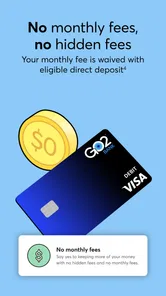
GO2bank provides a range of features designed to simplify mobile banking. Users can access their accounts 24/7, enjoy no monthly fees with eligible direct deposits, and earn up to 7% cash back on eGift Card purchases. The app also includes overdraft protection, early direct deposit, and bank-level security to ensure your financial data is safe.
Pros
- User-friendly interface enhances navigation.
- Quick account setup with minimal requirements.
- Fee-free overdraft protection available.
- Instant digital card access for new accounts.
- Cashback rewards for debit card purchases.
Cons
- Limited physical branch access.
- Monthly fees unless conditions met.
- ATM withdrawal limits can be restrictive.
- Customer service response may be slow.
- Mobile app bugs reported occasionally.