RadarNow! ®
- 27.08K
- 4.9
- Installs
- 5.00M
- Price
- Free
Screenshots
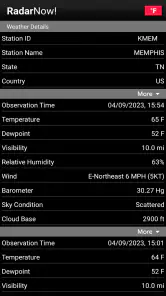
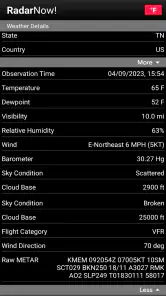
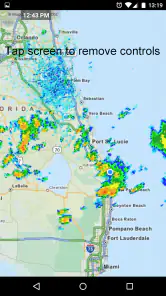
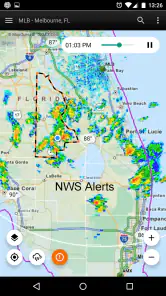
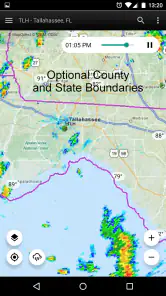
Analysis by Reviewed
When I am deciding whether to walk, drive, or change an outdoor plan, the question is often not “What will the weather be all day?” but “Is that patch of rain heading toward me?” RadarNow! ® is built around answering that narrower, practical question with a radar view. That makes it appealing if you want to inspect what is happening nearby rather than begin with a long forecast screen.
A useful first check before heading out
I would reach for this app when the sky looks unsettled and a quick look could change my next move: taking a jacket, delaying a walk, or moving a garden task indoors. For a more realistic decision, I check the map before leaving and look at the loop rather than judging from one still image. Watching the sequence helps me see whether a rain band appears to be moving toward my area or away from it. It is a useful clue, not a guarantee about exactly what will happen at my doorstep.
That distinction matters. A radar map helps me reason about precipitation and movement; it does not replace a full forecast when I need broader context for the day. If I am planning a long trip or a hike, I would pair the radar check with a forecast source that covers conditions over time. RadarNow! is most convincing as the fast “what is approaching?” part of that routine, not as the only tool for every weather question.
From map check to an actual decision
My simple workflow is to open the map, locate the area I care about, zoom to a useful scale, and let the loop play long enough to understand the motion. Then I decide whether to leave now, wait, or bring rain gear. Zooming too far out can make nearby details hard to judge; zooming in too tightly can hide the wider shape of a system. I get the best read by checking the local view, then widening it briefly to see what is feeding into it.
This is also where a small habit helps: check the map again shortly before a plan that is sensitive to rain. Weather changes, and a useful image from earlier should not be treated as a promise. If I am coordinating with someone else, I would share the practical conclusion—“let’s wait a little” or “bring a coat”—rather than assume they can interpret the radar exactly as I do. The app supports my decision-making; the handoff still depends on clear communication.
Making radar useful for shared plans
A simple example is meeting a friend for a walk. I would check the route area before we leave, then describe what I see in everyday terms instead of forwarding a screenshot without context. A radar image can look obvious to someone who checks it often and confusing to someone who does not. Saying “the rain seems to be moving past us, but let’s take a jacket” gives the other person a decision they can use without requiring them to decode the map.
The same approach works for a household errand. If I am deciding whether to walk to a nearby shop, I can use the map to judge whether a short delay might help, then check again before stepping out. For a longer drive, I would not use a single local view to judge the whole route. I would widen the map to understand the broader precipitation pattern, while still relying on a forecast for conditions beyond what radar alone can tell me.
You May Like

Clash of Clans Is Won Between the Battles

Android Auto Makes the Case for Quieter Car Software

MobiOffice: Transforming Mobile Productivity with Seamless Integration

EA SPORTS FC™ Mobile Soccer: Redefining Mobile Sports Gaming

How Microsoft OneDrive Became a Mobile Productivity Giant

How Google Translate Breaks Language Barriers Effortlessly
That handoff is one of the app’s quiet strengths and limits: it gives me a visual basis for a decision, but it does not make the decision for everyone. If a companion wants a plain-language forecast or a clear warning rather than a map, I would use a forecast-led alternative to explain the plan. I see RadarNow! as the tool I consult first when movement is the question, not necessarily the screen I show to every person involved.
Weather Radar at Your Fingertips
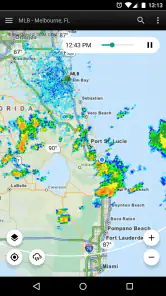
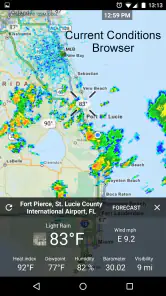
When I first downloaded RadarNow! ®, I was immediately impressed by the simplicity of its interface. I mean, who has the time to scroll through endless menus just to find out if it’s going to rain in the next hour? This app gets straight to the point. As soon as you open it, you’re greeted with a real-time radar map that’s both detailed and easy to read.
The app uses NOAA radar data to provide accurate and up-to-date weather information. I found this particularly useful when planning outdoor activities or just deciding whether I should carry an umbrella on my way to work. There’s something incredibly satisfying about seeing a storm approach on the radar and knowing you’ve got time to take shelter.
Simple Yet Powerful Features
One of the things I love about RadarNow! is its minimalist approach. It doesn’t bombard you with features you’ll never use. Instead, it focuses on what it does best: delivering fast, reliable radar images. You can zoom in and out on the map to see more or less detail, and the loop function allows you to track storm movement over time. This is particularly handy for those of us who like to play amateur meteorologist.
Another thing I noticed is how quickly the app updates. There’s no lag, which is crucial when you’re trying to make decisions based on real-time data. I’ve used other weather apps that took forever to load, but RadarNow! keeps things snappy and efficient.
Reading the map without overreading it
The most useful habit I have developed is to treat the loop as a short sequence to interpret, not as a prediction that will play out exactly as shown. I look for the general direction and shape of precipitation, then ask whether that movement matters to my particular plan. If my errand is brief and nearby, a broad indication may be enough. If I am committing to a long outdoor activity, I want more than a radar impression before deciding.
I also avoid making a call from a single color or isolated patch without considering the surrounding map. A close zoom can make a small area look decisive while hiding the larger weather pattern. Conversely, a wide view can show the pattern but make it harder to judge what is happening near my destination. Switching between those scales is a practical way to keep the map in perspective rather than letting one view dominate my judgment.
There is a trade-off in how much attention this style of app asks from me. A quick glance can answer a narrow question, but interpreting motion takes a little focus. I would not check it while driving or crossing a busy street; I make the call before setting off. If the map leaves me uncertain, that uncertainty is itself a reason to take a jacket, delay, or consult a broader forecast rather than force a confident conclusion.
Why It Stands Out
What really sets RadarNow! apart from other weather apps is its focus on the essentials. It doesn’t try to be something it’s not. Instead, it provides a clear and concise view of the weather with minimal fuss. For someone like me, who just wants to know if I’ll need a raincoat or sunglasses, it’s perfect.
Plus, the app is lightweight and doesn’t take up much space on your phone. It’s designed to be a quick tool you can rely on without having to sacrifice valuable storage.
Who benefits from keeping it close
I think it is a particularly good fit for people whose plans can change quickly: someone walking a dog, tending a garden, cycling a short local route, or deciding whether to carry groceries home before a shower. The shared feature across those situations is not a need for a complete forecast; it is a need to see whether precipitation is nearby and how it appears to be moving. The map gives those users a practical piece of evidence they can act on.
It is less compelling for someone who wants the weather translated into a simple sentence, a full-day summary, or a one-stop planning experience. If you mainly want to know the expected conditions tomorrow morning, the high and low, or how a week is shaping up, a conventional forecast app is likely to feel more direct. I would not ask this radar-first tool to replace those views just because I like its focused map.
For people who are new to radar, the learning curve is manageable, but the app still rewards patience. I would start with a familiar place and compare what the loop suggests with what I see outside, without expecting the two to match perfectly at street level. Over time, that builds a more useful sense of how to interpret movement. The important point is not becoming a meteorologist; it is learning when the map is enough to make a small decision and when it is not.
As a weather app from USNaviguide LLC, RadarNow! is free to install, with in-app purchases listed at $14.99 per item. Its 4.9 average from around 79,000 ratings and more than 5 million installs suggest that plenty of people value its focused approach. It is rated for Everyone, and version 7.2 supports Android 7.0 and later. I would still think of it as a specialist radar tool: the strong user response does not make it a substitute for every forecast feature someone might want.
Choosing between a radar tool and a forecast app
Compared with a typical all-in-one weather app, which often puts temperatures, daily outlooks, alerts, and radar into a single broad experience, RadarNow! keeps the map at the center. That focus saves time when rain is the immediate concern, but it is a trade-off if I want a compact view of several kinds of weather information at once. I would keep a broader forecast app in the mix for planning a whole day, while using this one when the movement of precipitation is the deciding detail.
It suits people who enjoy checking a map and making their own call, including commuters, dog walkers, gardeners, and anyone trying to time a short outdoor errand. It is less suited to someone who wants a single screen to explain every weather risk in plain language, or who does not want to interpret moving radar imagery. In that case, a forecast-led app may be more comfortable, with RadarNow! as an optional second opinion.
For a practical routine, I would not necessarily open the radar for every weather question. I would use a broader forecast to decide whether a day looks suitable for a planned outing, then turn to this app when the timing of rain becomes the deciding issue. That division keeps each tool in its lane: the forecast helps with the overall plan, while the radar view helps me reconsider departure time or whether to pack rain gear.
People often wonder whether a radar map can tell them exactly when rain will reach their doorstep. I would not use it that way. The map is useful for seeing a pattern and its apparent movement, but local timing can be uncertain, and a clear-looking gap should not be treated as a guarantee. For a short, flexible errand, that clue may be all I need; for a hike or a long drive, I would seek broader information and keep a backup plan.
Where the workflow can break down
One practical limitation of a radar view is that it can invite overconfidence. A band’s apparent path is useful for planning, but it cannot guarantee exactly when rain will reach one street or whether a brief gap will last. I avoid treating a clear patch on the map as a firm all-clear for a long outing. For important plans, I combine the visual check with a broader forecast and leave room to change course.
Another useful trade-off is screen size. On a phone, zooming and following the loop is quick, but I may need to pause and inspect the map instead of glancing at it while moving. I check before setting off, not while walking or driving, and make the decision first. That simple workflow keeps the app helpful rather than turning a radar screen into a distraction.
There is also a difference between wanting radar and wanting reassurance. A moving patch of precipitation can answer whether rain is nearby, but it does not tell me everything I may want to know about a day outdoors. When I need a broader sense of changing conditions, I switch to a forecast source rather than trying to extract every answer from the map. That is not a flaw so much as a boundary worth understanding before relying on it.
If you are deciding whether to try it, I would ask one question: do you often change a small plan based on where rain is moving? If yes, this focused view can earn a place beside your usual forecast app. If you prefer weather explained in a single plain-language summary, or you rarely need to track precipitation on a map, a standard forecast app will probably be more convenient on its own.
In a world where apps are increasingly bloated with features, RadarNow! stays true to its mission of providing straightforward weather updates. Whether you’re planning a weekend hike or just want to avoid getting caught in a sudden storm, this app has got your back. So, next time you're unsure about the weather, just check RadarNow! and stay one step ahead.
RadarNow! ® Frequently Asked Questions
Does RadarNow! need an internet connection or location access?
RadarNow! centers on displaying current weather radar on a mobile device, so a working internet connection is important for loading radar imagery and updates. Location access can make it easier to check conditions relevant to where you are, while you may also be able to view a different area by navigating the map. Review the app’s permission prompts and choose settings that suit your privacy preferences.
Can RadarNow! help me prepare for severe weather?
Radar imagery can help you see precipitation and storm patterns, making RadarNow! useful for checking conditions as they develop. It is best treated as one source of weather information rather than a replacement for official emergency alerts, local authorities, or a severe-weather plan. If conditions could become dangerous, follow trusted local guidance and do not rely on a radar display alone to make safety decisions.
Is RadarNow! suitable for casual users as well as weather enthusiasts?
RadarNow! is designed around a straightforward purpose: viewing weather radar, rather than navigating a broad collection of weather tools. That focused approach can suit someone who simply wants a quick look at precipitation, as well as users who regularly follow radar patterns. If you want a wide range of forecasts and related features in one app, consider whether a radar-first experience is the right fit.
What devices and operating systems can run RadarNow!?
RadarNow! is a weather app for mobile devices, and its listed minimum operating-system requirement is version 7.0. Before downloading, check that your device meets that requirement and has enough space for the app. The app is rated Everyone, so its content is intended for a general audience. Keeping your device’s operating system compatible can help you use the app as intended.
What is RadarNow! and how does it work?
RadarNow! is a weather application designed to provide users with real-time radar images directly on their mobile devices. It works by accessing weather radar data from the National Weather Service in the United States, allowing users to see current precipitation and storm patterns in their area. The app focuses on simplicity and speed, making it ideal for quickly checking weather conditions without unnecessary features.
Pros
- Accurate real-time weather updates
- User-friendly interface
- Minimalist design
- easy navigation
- Low battery consumption
- Fast loading times
Cons
- Ads can be intrusive
- Limited customization options
- Requires internet connection
- Basic features in free version
- No detailed forecast features
- Category
- Weather
- Version
- 7.2