Rachio
- 3.12K
- 4.8
- Installs
- 500.00K
- Price
- Free

Screenshots
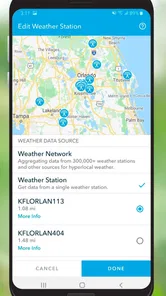
Analysis by Reviewed
When several people share a home, sprinkler decisions can become one more small chore to coordinate: one person notices dry patches, another changes the timer, and someone else wonders why the system ran after rain. I see Rachio as most useful when a household already has a compatible Rachio smart sprinkler controller and wants a single place to manage watering rather than relying on repeated manual adjustments.
One watering setup for a shared home
Picture a busy morning when nobody has time to check the forecast or walk around the yard. A schedule managed through the app can reduce that daily guesswork, while weather-aware adjustments may help avoid watering just before rain. That is a practical benefit for a household, not just a convenience for one keen gardener: fewer spur-of-the-moment changes mean less chance that two people keep undoing each other’s decisions.
I would still agree on who makes schedule changes. Shared access is useful only when everyone understands the plan, and I would not assume the app provides family roles or a special household approval system. If several people use it, a simple conversation about who edits zones and when to pause watering can prevent confusion. The app helps manage irrigation; it does not replace household coordination.
A realistic week in the yard
Imagine leaving for a weekend while a neighbor keeps an eye on the garden. The useful preparation is not simply asking them to watch the plants; it is making sure the person responsible knows the watering routine and who can change it. I would review the schedule before leaving, explain which areas matter most, and agree on how to handle a sudden change in plans. That makes the app a practical reference for the person looking after the property, without assuming it offers a dedicated guest or caretaker mode.
This is also where I would keep expectations grounded. Automated watering can reduce routine adjustments, but it cannot tell you whether a clogged sprinkler head is leaving one patch dry or whether a recently planted bed needs special attention. A quick walk around the yard remains worthwhile after a schedule change or a stretch of unusual weather. The strongest workflow is automation for regular coverage plus occasional human checks for problems the schedule cannot see.
Choosing a sensible starting point
If I were setting up a yard with several zones, I would begin with the existing irrigation layout rather than trying to make every setting precise immediately. I would note which areas receive direct sun, which stay shaded, and where plants differ from the lawn, then adjust one zone at a time. This keeps the cause and effect easier to understand: if a change helps one section but not another, I can revise that section without resetting the whole yard.
That approach matters because more customization is not automatically better. A detailed schedule can reflect the differences in a garden, but it also creates more decisions to maintain. For a simple lawn with uniform exposure, a straightforward schedule may be enough. For a property with beds, shaded corners, and separate lawn areas, the extra zone-by-zone attention is more likely to be worthwhile.
More From Our News Desk

 Block Blast!
 Makes Every Clear Feel Like One More Turn
A clean little block puzzle becomes a study in space, risk, and self-control. Its best moments come from one satisfying clear; its toughest test is knowing when to stop.

 Super Stylist Fashion Makeover
Super Stylist Turns Dress-Up into a Runway Career
Its makeover-to-client loop turns quick outfit decisions into shareable style theater. The question is whether the closet keeps giving players a reason to return.

 Block Craft 3D:Building Game
Block Craft 3D Under Pressure: How Well Does It Recover When Building Goes Wrong?
A failure-focused look at Block Craft 3D’s forgiving building loop, its uncertain recovery edges, and the moments that demand more than a cheerful village.

 Woodturning
 Trades Creative Freedom for a Satisfying Carving Loop
If your usual creative game is about building, decorating, or styling, Woodturning trades open-ended projects for a tactile, tightly guided carving loop. Here is what that switch really costs.

 PUBG MOBILE
 Shows What Battle Royale Must Get Right
PUBG MOBILE shows how battle royale has matured: bigger systems matter less than meaningful choices, readable fights, and a reason to return after every loss.

 Braindom: Brain Games Test
Braindom’s Social Life Happens Between Puzzles
Braindom turns quick logic traps into a personal ritual, but its community value is more about comparing answers than building together.
Latest News



Smart Watering at Its Best
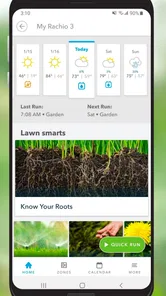
When I first heard about the Rachio app, I was skeptical. Could it really take over the tedious task of watering my garden? But after a few weeks of using it, I was seriously impressed. This app syncs with local weather forecasts to deliver the perfect amount of water your plants need, meaning no more overwatering or underwatering. It's like magic! Just set it up, and let the app do the rest.
Easy Setup and Integration
Setting up the app was a breeze. I simply downloaded it, connected it to my Rachio smart sprinkler controller, and voila! The integration with other smart home devices was seamless. Whether you’re an Alexa enthusiast or a Google Assistant fan, Rachio plays well with others, making it a great addition to your smart home ecosystem.
The key boundary is the controller: this is an app for managing Rachio irrigation hardware, not a standalone way to automate ordinary sprinklers. Before choosing it, I would check that the controller is already installed or that buying into the system makes sense for the yard. If you rent, have no in-ground irrigation, or only water a few pots by hand, a hose timer or a basic manual routine may be cheaper and less involved.
Features That Stand Out
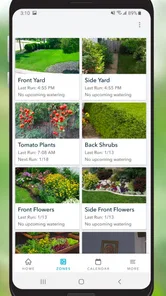
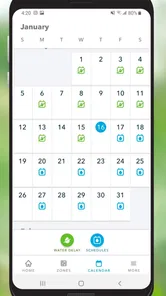
One feature I absolutely loved is the ability to customize watering schedules. You can tweak it to suit different zones in your garden based on plant types, soil, and sun exposure. The app also offers detailed reports, so you can keep track of your water usage and savings. It’s not just environmentally friendly, but also wallet-friendly.
A useful way to approach those settings is to treat each zone as a small experiment rather than trying to perfect the whole yard on day one. A sunny border and a shaded lawn may need different schedules; changing one area at a time makes it easier to notice whether the result is helping. Reports can support that review, but I would not treat a displayed estimate as a guarantee of a particular bill reduction. Weather, the irrigation layout, and local conditions all affect the outcome.
Compared with a basic timer, the appeal here is the combination of zone-level customization and weather-aware scheduling. A simple timer can be easier if your watering needs rarely change and you prefer to set a fixed routine yourself. Rachio makes more sense when the yard has distinct areas or you want fewer manual weather checks; it also asks for more setup and attention than turning a dial once and leaving it alone.
Another nifty feature is the notifications. Forget to turn off your sprinklers due to an unexpected rain? Rachio has got your back with timely alerts. It’s like having an assistant who’s always on top of things.
For coordination, I would use an alert as a prompt to check the schedule rather than assume every household member will see it at the right moment. If someone is changing a zone or doing yard work, a quick message between household members still matters. The practical advantage is having a shared reference point for what the watering plan is, not having to rely on one person’s memory of a timer setting.
When the weather changes the plan
A useful habit is to look at the schedule before making a one-off manual change. If rain is expected, the app’s weather-aware adjustments may already affect watering; changing settings without checking can make it harder to understand what the system will do next. When the forecast shifts, I would check the current plan, then make only the adjustment the yard actually needs. This keeps household members from responding to the same forecast in different ways.
Weather is an input, not a guarantee that every part of a garden needs the same response. A roof overhang can keep a strip dry during rain, while an exposed lawn gets soaked. Likewise, soil and drainage can vary across a property. The practical trade-off is that automation is most helpful for broad routine decisions, while a person still needs to notice local exceptions and correct the schedule accordingly.
Who it suits, and what to weigh
Age-wise, the app is rated for Everyone, but that is not the same as a child-focused design or a reason to hand over account access. I would keep setup and schedule decisions with the adults responsible for the home, especially where changes affect the garden or water use. A household should decide who signs in and manages the controller; I would not count on unverified parental controls or separate permissions.
Rachio is best suited to homeowners with a compatible controller, multiple watering zones, and a genuine interest in reducing routine adjustments. It is less compelling for a small patio, a rarely used garden, or someone who enjoys controlling every watering session manually. It is free to download, but the system itself can involve a hardware purchase, and in-app purchases are listed from about thirty to fifty dollars per item, so I would check the current costs before committing.
Who may prefer a simpler option
If you are deciding between this and a conventional sprinkler timer, the main question is how much your watering needs change. A fixed timer is a reasonable choice when the property has a simple layout, the routine stays stable, and you are comfortable checking weather yourself. It avoids the learning curve of configuring zones in an app. Rachio is more attractive when different parts of the yard need different treatment and you value having those settings in one place.
I would also skip it if the hardware commitment does not fit the property. A renter who cannot install or control an irrigation controller may get little from the app, and a small container garden does not necessarily justify an automated in-ground system. In those cases, a basic hose timer or hand watering can be easier to understand and maintain. The free download is only one part of the decision; the usefulness depends on the controller and the yard.
A few considerations
While the app is a powerhouse for lawn care, there are a few things to keep in mind. The initial cost of setting up a Rachio system might be a bit steep for some, but think of it as an investment in your garden. And while the app is intuitive, it might take a little time to fully explore all its features. But hey, isn’t that the fun part of getting new tech?
Rachio, developed by Rachio, has been available since May 14, 2014, and its current version is 4.21.13, with Android 8.0 as the minimum operating system. Its 4.8 average from around eighteen thousand ratings and more than five hundred thousand installs suggest that many people have found a use for it, though popularity does not remove the need to confirm that the hardware suits your property. The Everyone age rating also makes it broadly accessible, while account decisions should remain a household matter.
Costs, access, and household expectations
The app itself is free, but I would separate that from the cost of owning the irrigation setup. The listed in-app purchases range from about thirty to fifty dollars per item, so I would review the purchase details before relying on any paid option. A sensible way to decide is to first identify what you need the app to do, then check whether that capability is included in your setup or requires an additional purchase. That avoids treating “free to download” as the same thing as a completely cost-free system.
For a shared home, I would also settle account access before several people start making changes. Decide who is responsible for setup, who can adjust the schedule, and how the household will communicate a temporary pause. This is especially useful when someone is mowing, doing repairs, or planting a new bed. Clear expectations prevent an ordinary change from turning into a confusing sequence of edits, without assuming the app itself supplies household roles.
My overall recommendation is for people who already have compatible Rachio hardware and want more thoughtful control than a basic timer offers. It can suit a household that shares yard work, a gardener managing several distinct areas, or anyone who wants weather-aware scheduling to reduce routine checking. I would pass if the garden is small and simple, if you cannot use the controller, or if you prefer to make every watering decision manually.
In conclusion, if you’re serious about maintaining a beautiful garden with minimal effort, the Rachio app is a game-changer. It's smart, efficient, and incredibly user-friendly. Trust me, once you start using it, you’ll wonder how you ever lived without it. So, why not give it a shot and let your garden flourish effortlessly?
Rachio Frequently Asked Questions
What is Rachio’s age rating, and is it suitable for families?
Rachio is rated for Everyone, so its content is suitable for a broad audience. It is a House & Home app focused on managing watering through a smart irrigation system, rather than a game or entertainment service. If you are considering it for a household, the main practical consideration is whether you have a compatible irrigation setup to manage.
What do I need before setting up Rachio?
To use Rachio for irrigation management, you need a compatible mobile device and a smart irrigation system that works with the app. The app is designed to connect with a home's Wi-Fi network and help manage watering schedules, zones, and durations. Check your device’s operating system and your irrigation controller’s compatibility before you begin.
Can I use the Rachio app when I am away from home?
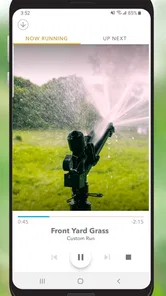
Rachio is designed to let users manage irrigation through a mobile app, including adjusting schedules, zones, and watering durations. Its remote-control approach can be useful when you are away from home, provided your system and connection are set up for app-based control. You can use the app to review and change watering settings without relying only on the controller itself.
Does Rachio work with voice assistants?
Yes, Rachio can be controlled using voice commands through smart home devices like Amazon Alexa and Google Assistant. This feature allows users to start, stop, or adjust watering schedules hands-free, providing an added layer of convenience. Setting up voice control is simple and enhances the overall user experience by integrating with your smart home ecosystem.
Is the Rachio app free to download, and are there optional purchases?
Rachio is free to download, so you can get the app without paying upfront. The app is for managing a smart irrigation system, and optional in-app purchases are listed at around $30 to $50 per item. Those purchases are separate from the free download, so check the purchase details in the app before completing any transaction.
Pros
- User-friendly interface for easy setup
- Integrates with smart home systems
- Saves water with weather-based adjustments
- Mobile notifications for updates
- Supports multiple zones and schedules
Cons
- Requires stable internet connection
- Limited features without subscription
- Initial setup can be time-consuming
- May require professional installation
- Depends on external weather data accuracy