Qibla Compass: Qibla Direction
- 854.00
- 3.7
- Installs
- 10.00M
- Price
- Free
Screenshots

Analysis by Reviewed
When I arrive somewhere unfamiliar, the useful question is often very simple: which way should I face for prayer? Qibla Compass: Qibla Direction is built around answering that question with a phone compass. Its appeal is not that it replaces navigation or local knowledge; it gives me a quick direction reference when I need one, wherever I happen to be.
A focused tool for finding direction
A Qibla finder solves a focused problem: when you know where you are but are unsure which way to face, it gives you a practical point of reference. I find that more useful than opening a general map and trying to work out the direction from the city or street layout. Maps are good for navigating to places; a compass is more direct when the immediate question is the prayer direction.
The app is a free lifestyle tool from 9D Muslim Apps - Quran, Qibla Direction & Prayers. It has an average rating of 3.7 from around 235,000 ratings, with over 10 million installs. That reach makes it a familiar option, though the rating also suggests that experiences are not uniformly glowing. I’d treat it as a convenient aid rather than assume every reading will be perfect in every setting.
What the compass offers—and what it depends on
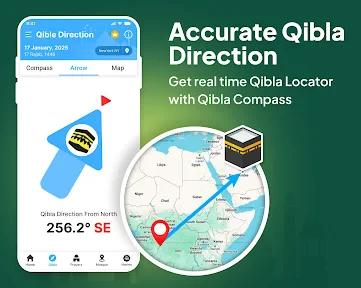
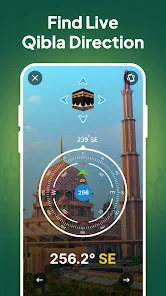
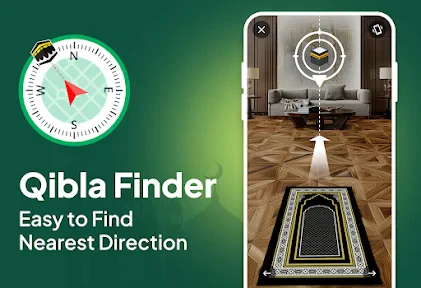
The central capability is straightforward: use the phone’s compass to point toward the Qibla based on your location. That saves the extra steps of opening a map, identifying your position, and estimating a bearing yourself. For a quick check before prayer, having the direction presented in one place is the point.
The app’s description also highlights prayer times, so it can serve as more than a travel-only compass for people who want both kinds of reference in one app. I would still think of the direction finder as its defining use: the prayer-time information is a useful companion, but it does not change the fact that the compass reading relies on the phone’s location and direction sensors.
That distinction matters because a digital compass is not an independent measurement. The phone’s GPS helps establish where you are, while its magnetometer senses direction. Those components make the tool portable and convenient, but they do not remove the influence of the surroundings or the condition of the handset. I get the best results by treating the first reading as a helpful indication and checking again if it looks implausible.
Using the Compass with Confidence
First things first, downloading and setting up the Qibla Compass: Qibla Direction app is as easy as pie. It’s available on both Android and iOS, so it doesn't matter if you're Team iPhone or Team Android. Once downloaded, the app walks you through a simple setup process. No need for a PhD in tech to get this one going, folks!
More From Our News Desk

Weather by Xiaomi Review: Clear at a Glance, Less Clear Up Close

X Under Pressure: Can It Recover When Posting Goes Wrong?

Clash of Clans Is Won Between the Battles

Android Auto Makes the Case for Quieter Car Software

MobiOffice: Transforming Mobile Productivity with Seamless Integration

EA SPORTS FC™ Mobile Soccer: Redefining Mobile Sports Gaming
Features that matter in daily use
Now, let's talk about what makes this app a must-have. The interface is clean and intuitive, which is a breath of fresh air in a world full of cluttered apps. The compass feature is spot-on (pun intended), using your phone's GPS and magnetometer to point you in the right direction with accuracy.
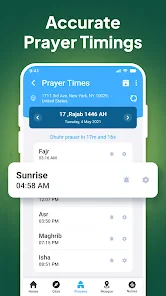
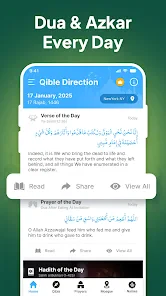
But wait, there’s more! This app doesn’t just stop at showing you the Qibla direction. It also offers Islamic prayer times based on your location. Imagine having your personal prayer reminder that knows exactly where you are and keeps you on track. Neat, right?
A practical check before prayer
In practice, I would open the compass after arriving somewhere unfamiliar, then pause before relying on the first needle position. A phone compass can be affected by nearby metal or electronics, so I’d move away from a car, lift, or large appliance and let the reading settle. If it seems inconsistent, changing where I stand and checking again is a sensible first step, rather than repeatedly turning in place and trusting a jumpy display.
Picture arriving at a hotel shortly before prayer. I’d use the app to establish the direction, then choose a clear spot in the room and keep that orientation in mind. That small routine is more useful than trying to check the phone at the last moment, especially if the room has a lot of furniture or electronics. When travelling, I’d also avoid assuming that a previous reading still applies after moving to another city; the direction should be checked again for the new location.
There is a small workflow improvement here: check the direction when you first settle into a room, not when you are already in a hurry. If the initial reading behaves oddly, you have time to move to another part of the room and compare. Once you are confident about the orientation, you can put the phone away instead of keeping it in your hand during the whole preparation. That makes the compass a quick setup aid, not something you need to stare at continuously.
Sensor limits and sensible alternatives
The word “accurate” is only as helpful as the phone’s conditions and setup. GPS helps establish location, while the magnetometer senses direction, and neither turns the handset into a surveyed instrument. Nearby magnetic interference, a poorly calibrated sensor, or a phone case with magnetic parts can all make a reading less dependable. If a result looks strange, I’d test the phone in a more open area and compare it with another trusted way of finding direction before using it.
That is the main trade-off with a dedicated compass: it is quick and portable, but it still depends on the device’s sensors. A printed Qibla indicator in a mosque or a direction confirmed by someone familiar with the location may be preferable when certainty matters more than convenience. Conversely, a map app can help when I’m planning a route, but it adds steps if I only need to orient myself for prayer.
Another practical point is to distinguish a location problem from a compass problem. If the phone is indoors and surrounded by metal structures or electronics, changing position may help more than restarting the app. If the direction changes dramatically as you turn or move a short distance, I would not keep adjusting until I see the answer I expect; I’d step into a clearer space and verify the result independently. This is a modest habit, but it prevents convenience from being mistaken for certainty.
Compared with a physical compass, the phone-based option is easier to carry because it is already on the device most people bring along. A physical compass may be a better backup for someone who regularly travels through places with unreliable phone access or who wants a tool that does not depend on a handset’s sensors. Compared with a map, this app is more direct for prayer orientation, while a map is the stronger choice for planning where to go. The right alternative depends on whether the task is finding a direction, confirming it locally, or navigating a journey.
Simple by design, with a few trade-offs
One of the things I absolutely love about this app is its simplicity. There are no unnecessary frills – just straightforward functionality. Whether you're at home, in a hotel, or even camping in the wilderness, as long as your phone has battery life, you're sorted.
That simplicity is most valuable when I need one answer quickly, but it also means I would not choose it as a full travel-planning tool. It does not replace a map for routes or a local person for guidance when I cannot trust the phone’s orientation. Someone looking for a broad religious reference app may also want to compare it with alternatives built around a wider set of tools, rather than choosing solely for the compass.
Moreover, it’s super lightweight. It doesn’t hog your phone’s resources, so you don’t have to worry about it slowing down your device. It’s like having a helpful, unobtrusive buddy in your pocket.
There is also a practical distinction between keeping an app available and relying on a phone in every situation. A compass is only useful when the device is charged and its sensors are giving a stable reading. For a trip, I would check the direction before leaving a familiar area if I expect to need it later, and keep a local reference in mind where possible. That is not a reason to avoid the app; it is simply a sensible backup plan for any phone-dependent tool.
Who is likely to find it useful
I think it suits Muslims who travel, move between unfamiliar buildings, or want a quick way to check orientation without switching between several tools. It may also be handy for someone who has recently moved and is still learning the layout around home or work. The prayer-time feature can make it more useful as a regular reference than a compass opened only on trips, while the central appeal remains the direction finder.
A realistic everyday use is a workday spent between different buildings. I might know the neighbourhood but not the layout of a meeting room or shared office, and a quick check can answer the immediate orientation question without turning the moment into a navigation task. The same applies when visiting family in another town: check the new place rather than carrying over an assumption from home, then remember that indoor interference can affect the result.
It is also a reasonable fit for someone who wants a small, specific tool rather than a complicated setup. If you are comfortable checking a phone compass and verifying an unusual reading, the app’s focused purpose can be an advantage. If you rarely travel and already have a dependable direction marker at home, however, installing another app may add little to your routine.
I would skip it if you need a dedicated navigation system, or if you already have a trusted Qibla method that works well and prefer not to rely on a phone sensor. It is also not a substitute for local guidance when you are unsure whether the handset’s compass is behaving properly. The app is free to download, rated for Everyone, and its current version is 2.7.32; in-app purchases range from about 49 cents to about 13 dollars per item. It was released on February 5, 2020, and works on Android 7.0 or later. Those purchase options are worth keeping in mind if you prefer apps with no paid extras at all.
The purchase range does not change my basic recommendation: decide whether you want a focused Qibla compass first, then consider any paid options only if they match something you actually need. People who want a completely free experience with no in-app purchases should factor that into the choice. The Everyone content rating makes it broadly suitable for general audiences, while the minimum Android requirement is worth checking before installing on an older device.
My verdict for travellers and everyday users
So, if you're someone who travels frequently or just wants an easy way to ensure you're facing the right direction for prayers, this app is definitely worth checking out. The app combines practicality with user-friendly design, making it an essential tool for Muslims around the world.
And there you have it! An app that does exactly what it says on the tin, without any unnecessary bells and whistles. Go ahead, give it a whirl, and never worry about finding the Qibla direction again.
I would phrase that last point more cautiously: it can make finding the direction easier, but I would not promise that a phone reading will always be right without regard to conditions. The most dependable routine is to use the compass as a quick guide, give the sensor a fair chance to settle, and seek a trusted local reference if the result remains uncertain.
Overall, I see it as a practical pocket reference for a particular moment, rather than an app everyone needs. Its strongest case is for people who regularly pray away from familiar surroundings and want a direct check on the phone they already carry. If that describes your routine, it is worth trying; if you need route guidance, sensor-independent certainty, or a broader set of tools, another option may suit you better.
Qibla Compass: Qibla Direction Frequently Asked Questions
Can I use Qibla Compass: Qibla Direction while traveling or in a new place?
The app is intended to help you find the Qibla from your current location, which can be useful when traveling or praying somewhere unfamiliar. Its direction reading depends on your phone’s location and compass capabilities, so allow location access and make sure the compass is behaving properly. If the reading seems off, calibrating the device and moving away from magnetic interference can help.
What permissions or phone sensors does Qibla Compass: Qibla Direction use?
Finding a direction from your current position relies on location information and the phone’s compass capabilities. The app may therefore need location permission to identify where you are, while the compass sensor supplies directional information. Review the permission prompts when you install and open it, and enable the relevant access if you want location-based Qibla guidance.
Can I use the app without a built-in compass sensor?
Qibla Compass: Qibla Direction is designed to use your phone’s built-in compass and GPS to calculate the direction of the Kaaba from your location. A phone without a working compass sensor may not provide the same live compass guidance. Before relying on the app, check your device’s sensor capabilities and whether its directional reading responds correctly.
Is Qibla Compass: Qibla Direction free to download, and are there in-app purchases?
Qibla Compass: Qibla Direction is free to download, so you can try its Qibla-finding function without paying upfront. It also offers in-app purchases, with items priced from about 49 cents to nearly $13. Check the purchase details shown in the app before confirming anything, especially if you only need the compass and do not plan to use optional paid content.
What is Qibla Compass: Qibla Direction and how does it work?
Qibla Compass: Qibla Direction is a mobile application designed to help Muslims identify the correct direction to face during prayer, known as the Qibla. Utilizing your phone's built-in GPS and compass, it accurately calculates the direction of the Kaaba in Mecca from your current location. This app is highly useful for travelers and those who find it challenging to determine the Qibla direction manually.
Pros
- Accurate Qibla direction finding
- User-friendly interface
- Compatible with various devices
- Minimal battery consumption
- Supports multiple languages
Cons
- Requires GPS for accuracy
- Contains ads
- Limited offline functionality
- No prayer time notifications
- Infrequent updates
- Category
- Lifestyle
- Version
- 2.7.32












