PS Remote Play
- 11.31K
- 2.9
- Installs
- 10.00M
- Price
- Free

Screenshots
Analysis by Reviewed
I see PS Remote Play as a practical extension of a PlayStation setup, not a way to turn any phone into a console. Its appeal depends on a simple question: do you want to continue playing games you already have on a PS5 or PS4 when the television or room is unavailable? If so, it can solve a real everyday problem. If you are looking for games that run independently on a phone, this is the wrong tool.
Choose it for access, not as a replacement
I’d treat Remote Play as a way to reach a PlayStation you already own, not as a replacement for having a console or a general mobile gaming service. The app is free, comes from PlayStation Mobile Inc., and is rated for Everyone. It has been around since October 27, 2014, and version 8.5.1 lists Android 10 as its minimum operating system. Those details make it straightforward to try, but the practical question is whether your usual places to play have a dependable connection and whether your games feel comfortable on a smaller screen.
That distinction matters when deciding what to install. The app is aimed at people who want to continue a PS5 or PS4 session away from the television; it isn’t the same choice as a catalogue of games designed to run directly on a phone. If you mainly want quick touch-first entertainment, a mobile game will usually be simpler. If your PlayStation is already part of your routine and the TV is often occupied, remote access has a much clearer purpose.
Playing your console from another screen
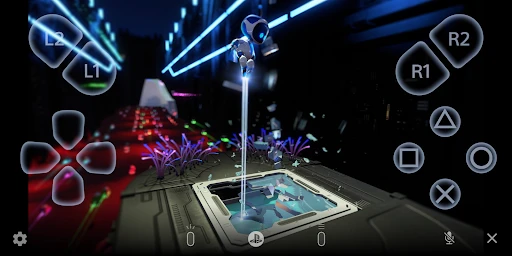
Imagine being able to stream your PlayStation games to your phone, tablet, or even your PC. That’s exactly what PS Remote Play allows you to do. Whether you’re in the next room or the next city, as long as you have a stable internet connection, your gaming adventures are just a tap away. It’s like carrying your console in your pocket without the bulk and wires.
In everyday use, the best test is not a dramatic trip but a normal change of room. I might want to play while someone else uses the living-room TV, or settle into a quieter spot after the console is already set up. Before depending on it away from home, I’d try a short session on the network and device I plan to use. That gives me a real sense of whether controls, image and responsiveness suit the game, rather than discovering a bad fit halfway through a long session.
Set up the whole route before you need it
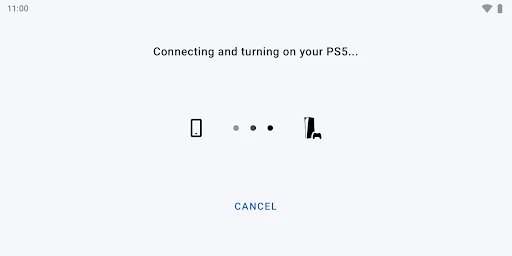
Setting up the app is surprisingly straightforward. You’ll need to make sure your PlayStation is connected to the internet and that the Remote Play feature is enabled. Once that’s set, download the app on your preferred device, and voila! You’re ready to roll. The app guides you through the process with easy-to-follow instructions, so even if tech isn’t your strong suit, you’ll manage just fine.
A useful habit is to check the whole setup before you leave the console behind: confirm the console is online, enable Remote Play, and make sure you can connect from the device you intend to use. A successful test at home is more helpful than assuming that a connection that works beside the console will behave the same way elsewhere. If you share the console, it is also worth agreeing on when it will be available; remote access does not make a busy household’s play schedule disappear.
More From Our News Desk

Weather by Xiaomi Review: Clear at a Glance, Less Clear Up Close

X Under Pressure: Can It Recover When Posting Goes Wrong?

Clash of Clans Is Won Between the Battles

Android Auto Makes the Case for Quieter Car Software

MobiOffice: Transforming Mobile Productivity with Seamless Integration

EA SPORTS FC™ Mobile Soccer: Redefining Mobile Sports Gaming
For a planned trip, I’d make that check part of packing rather than something to troubleshoot at the destination. Open the app and make sure the console is reachable while you still have time to adjust your setup. This is especially useful if you will depend on a device you rarely use for play: signing in and testing controls in advance can prevent a small setup issue from eating into the only free hour you have.
Judge play by the game, not just the signal
So, how does it actually feel to play remotely? Pretty darn good, I’d say. The app delivers smooth graphics and responsive controls, which is crucial for those intense gaming moments. However, keep in mind that a strong Wi-Fi connection is key here. You wouldn’t want any lag when you’re about to make that game-winning move, right?
There is a real trade-off between convenience and precision. A little delay or an unstable connection can matter far more in a timing-heavy action game than in a slower adventure or a game where you can pause and take your time. I’d choose sessions accordingly: use the phone for a relaxed stretch of play or a convenient continuation, and keep demanding competitive moments for the setup that feels most direct and consistent. A stable connection helps, but it cannot make every game equally comfortable to control remotely.
That difference can guide what I launch when I only have a short break. A game with pauses, exploration or menus I already know is easier to pick up remotely than one that expects exact reactions throughout. If I am unsure, I would use the first few minutes to check how movement and button response feel before committing to a difficult encounter. The app may connect successfully while a particular game still feels like the wrong match for that session.
Another cool feature is that you can use your DualShock or DualSense controller with the app. This means you won’t have to compromise on the gaming feel, as you’ll have the familiar grip and control right in your hands.
For longer sessions, I’d decide on the controller before settling in, rather than treating touch controls as an automatic substitute for the familiar physical layout. A controller can make a big difference in comfort and accuracy, but it also means carrying or finding space for another device. If you are just checking in for a brief stretch, playing on the phone may be the more practical compromise; if you expect to stay for a while, familiar controls are easier to live with.
There is a small but useful planning choice here: take the controller when you already know the session will be more than a quick check-in, and leave it behind when portability is the main reason for using a phone. That avoids turning a lightweight, convenient option into a bag of extra equipment. A tablet or another larger screen can also make the streamed picture easier to follow, though it is less pocket-friendly than a phone.
Where the convenience is most convincing
One of the biggest perks of PS Remote Play is the freedom it gives you. No longer are you tethered to your TV. The app is perfect for those moments when the TV is occupied, or when you simply want to change your gaming scenery. Plus, it’s a great way to maximize your PlayStation investment by making it accessible from multiple devices.
The strongest case for it is specific: you own a PS5 or PS4, want access to the games already on that console, and can use a device and connection that make streaming comfortable. It is less compelling if you want games that work independently of a console, or if your usual internet connection is unreliable. In those situations, playing directly on the console or choosing a game built for your phone is the less frustrating option.
Switching between Remote Play and ordinary console play is mainly a change of where and how you connect, not a reason to replace your existing setup. I’d keep the television and console as the dependable choice for demanding sessions, then use the app when the room, schedule or shared screen makes that difficult. That division gives the app a useful role without expecting it to outperform playing directly on the console.
It also works best as a flexible backup for a specific routine, rather than as the centre of every gaming session. For example, if the household television is free most evenings, there may be little reason to use a smaller display every day. But if someone else regularly needs the screen, remote access can turn otherwise idle time into a useful session without requiring a second console or a different set of games.
And let’s not forget the wow factor among friends. Imagine their faces when you casually show them you can continue playing your favorite game on your phone. It’s like having a secret gaming superpower!
There is also a practical side to that flexibility: a phone is easy to have nearby, but a small display can make detailed menus and text harder to enjoy. I’d use a larger compatible screen when the game depends on reading fine details, and save the phone for a convenient session where portability matters more than screen size. The right choice depends on the game, not just on whether the connection works.
A realistic use case is a quiet evening when another person is watching something in the living room. I could move to another room, connect from a phone or tablet, and continue a game without asking for the television back. For that kind of low-pressure play, the trade-off is easy to accept. If the session is a major boss attempt or a competitive match, I would rather wait for the main screen and direct console setup than risk blaming the app for a moment where every input matters.
People often wonder whether they need a separate mobile game library to make this useful. The point here is different: Remote Play gives access to a PS5 or PS4 session, so its value comes from the console and games already in your life. It is not a substitute for a phone game that starts instantly without a console connection. That distinction helps set expectations before installing it.
Another sensible question is whether it suits play away from home. It can be useful when the connection and console setup allow it, but I would not assume that a successful home test guarantees the same experience on every network. Try the actual device and connection you plan to use, ideally with a game that is forgiving of small changes in responsiveness. If reliable access matters for a particular trip, keep a direct console session or an offline mobile game as the safer alternative.
PS Remote Play has an average rating of 2.9 from around 121,000 ratings, with roughly 11,000 written reviews and over 10 million installs. I take that as a reminder to judge it by my own network, device and games rather than expecting one experience to fit everyone. A brief test session is the sensible way to find out whether its convenience outweighs the compromises in your own setup.
Keep the alternative that fits the moment
Compared with playing directly on a television, Remote Play gives up some screen size and the most straightforward control path in exchange for moving the session elsewhere. Compared with mobile games, it offers continuity with a console library rather than games built around phone-first play. Neither alternative is universally better: direct play is my pick for precision and comfort, mobile games are simpler when I want something independent, and Remote Play is the middle ground when access to my PlayStation matters more than ideal conditions.
The cost of switching is mostly practical. You need to have the app ready, make sure the console can be reached, choose a suitable screen and decide whether bringing a controller is worth it. If you already have the console and a compatible device, trying that arrangement does not mean abandoning your usual setup. I would keep Remote Play as an option, then use it only when the room, schedule and connection line up.
As an entertainment app, it has a clear and narrow job, which is a strength when that job matches your needs. PlayStation Mobile Inc. has made a tool for extending access to a PS5 or PS4, not for replacing console ownership or solving every mobile gaming wish. The Everyone age rating makes it broadly accessible, while the real deciding factors are still the console, network, screen and controls in your own setup.
To wrap it up, if you’re a PlayStation enthusiast looking for flexibility and a bit of thrill in your gaming routine, PS Remote Play is definitely worth checking out. Just remember to have a good internet connection and a charged device, and you’re set for some epic gaming sessions, anytime, anywhere.
PS Remote Play Frequently Asked Questions
Can PS Remote Play replace owning a PlayStation console?
No. PS Remote Play is an app for connecting a mobile device to a PlayStation console; it does not provide games or act as a console on its own. You’ll need access to a PS5 or PS4 and the games you want to play. If you’re looking for a way to play without a console, this app will not meet that need.
Can I use a controller with PS Remote Play on my phone or tablet?
PS Remote Play lets you play console games from a mobile device, so consider how you prefer to control games before downloading it. Touch controls may be an option in the app, while using a controller can make some games more comfortable to play. Check that your controller and mobile device work together, then follow the app’s connection and setup steps.
Does PS Remote Play work with both PS5 and PS4?
Yes. PS Remote Play is designed to give you access to your PS5 or PS4 from a compatible device. You’ll need to connect the app to the console you want to use and sign in with the PlayStation account associated with it. Have the console ready for remote access before you begin, and check your internet connection on both ends.
Do I need a PlayStation account to set up PS Remote Play?
PS Remote Play connects your phone or tablet to a PlayStation console, so you’ll need access to the console you want to use and the account associated with it. Sign in using your PlayStation account and follow the app’s connection steps. Having the console and account ready before you begin makes setup more straightforward.
What should I check before downloading PS Remote Play?
Check that your mobile device runs a compatible operating system and that you have a stable internet connection available. PS Remote Play is an entertainment app from PlayStation Mobile Inc., and its minimum operating system requirement is version 10. It is free to download, but you’ll also need a PlayStation console and games to play remotely.
Pros
- Seamless streaming from PS4/PS5.
- Compatible with iOS and Android.
- Supports wireless controller use.
- High-quality game resolution.
- Easy setup process.
Cons
- Requires stable high-speed internet.
- Limited to PlayStation consoles.
- Consumes a lot of mobile data.
- Controller lag on older devices.
- Not all games are supported.
- Category
- Entertainment
- Version
- 8.5.1












