PlayStation App
- 67.27K
- 3.6
- Installs
- 100.00M
- Price
- Free

Screenshots
Analysis by Reviewed
I treat the PlayStation App less like a game in its own right and more like a pocket companion for the times I’m away from my console. Its value comes from making a few familiar PlayStation tasks easier to handle on a phone, rather than trying to replace the console experience. That distinction matters: if you mainly want to play games on your mobile, this is not the app for that.
A routine that earns its place
My most useful habit is checking the app before I sit down to play. I can see which friends are online, catch up on messages, and browse the PlayStation Store without first turning on the console. When I already know what I want to play, arranging a download from my phone can save waiting later, though the console still needs to be able to receive it. I see this as preparation, not a way to make every download happen instantly.
The practical payoff is clearest in small gaps during the day. If a friend asks about playing later, I can reply and make a plan while I’m out, then pick up the conversation on the console when I get home. On a commute, I might browse games or glance through news, but I wouldn’t count on a phone session to replace the richer view and controls of playing at home.
A Gamer's Hub in Your Pocket
One of the first things that struck me about the PlayStation App is how seamlessly it brings the entire PlayStation ecosystem to your smartphone. It's like carrying a mini PlayStation console in your pocket! From checking out the latest game releases to staying connected with your gaming squad, this app is your one-stop-shop for all things PlayStation.
Stay Connected with Friends
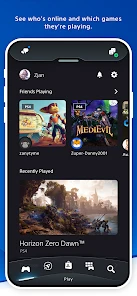
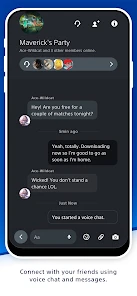
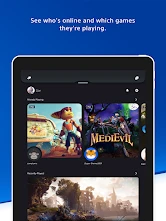
Let's face it, gaming is more fun when you're doing it with friends, and the PlayStation App makes it incredibly easy to stay in touch with your gaming buddies. You can send messages, voice chats, and even see who's online and what they're playing. It's like having your own little social network dedicated to gaming. Plus, the notifications are super handy, ensuring you never miss a beat when your friends invite you for a gaming session.
Make notifications work for you
I’d check notification settings early and keep only the alerts that help me act: messages or invitations I genuinely want to catch. A phone that buzzes for every bit of activity can turn a useful gaming companion into background noise. If I’m taking a break from gaming, muting or trimming alerts is more sensible than letting them interrupt the rest of the day. The best setup depends on whether I’m actively arranging a session or just checking in occasionally.
For a smoother routine, I also keep my account sign-in and console pairing in mind before relying on remote actions. The app is most convenient when it is already connected to the PlayStation account I use and the console is ready for the task. If something doesn’t appear or a download does not start, I first check the account and console status rather than repeatedly tapping the same control. That simple troubleshooting habit saves frustration and avoids treating the phone as if it can override the console’s state.
More From Our News Desk

Clash of Clans Is Won Between the Battles

Android Auto Makes the Case for Quieter Car Software

MobiOffice: Transforming Mobile Productivity with Seamless Integration

EA SPORTS FC™ Mobile Soccer: Redefining Mobile Sports Gaming

How Microsoft OneDrive Became a Mobile Productivity Giant

How Google Translate Breaks Language Barriers Effortlessly
Effortless Game Management
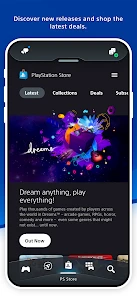
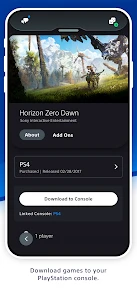
Managing your games has never been easier. With the PlayStation App, you can browse the PlayStation Store, buy new games, and download them directly to your console. No more waiting until you get home to start downloading that new game. Just a few taps on your phone, and you're good to go. It's perfect for those moments when you're stuck in a commute and need to make the most of your time.
When the phone is the better tool
I find store browsing on a phone useful when I have a specific title in mind or want to save time before a planned evening of gaming. I’m less keen to make a purchase while distracted or on a small screen if I’m still comparing editions or deciding what to buy. In that situation, I’d rather take a closer look on the console. The app makes browsing and buying convenient, but convenience is not the same as making a careful choice.
This is also where it differs from general entertainment and messaging apps. Those can keep me chatting or scrolling, but they do not center the PlayStation Store, console downloads, and my PlayStation friends in one place. The trade-off is focus: the app is genuinely useful if I have a PlayStation account and console to manage, but it has little appeal if I don’t play on PlayStation. Someone who only wants broad gaming news may prefer a dedicated news source, while someone who mainly wants to play on a phone should look elsewhere.
Stay Updated with the Latest News
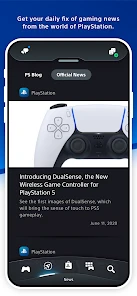
For those who love to stay in the loop with the latest gaming news, the app offers a news feed packed with updates, announcements, and game trailers. It's like having a personal gaming news channel right at your fingertips. I find myself scrolling through the feed whenever I have a spare moment, just to catch up on what's happening in the gaming world.
What to expect from the experience
The app is free, is developed by PlayStation Mobile Inc., and is rated Teen. It has been around since January 11, 2011, and its current version is 25.11.3; it requires Android 8.0 or later. Its average rating is 3.6 from around 1.1 million ratings, with roughly 67,000 written reviews and over 100 million installs. Those figures suggest that it is widely used, but they don’t guarantee a friction-free experience on every phone or for every account. I’d judge it by whether its messaging, store access, and console management fit my own routine.
A useful expectation to set is that this is a companion, not a substitute for the console. It can help me coordinate with friends, browse, and prepare a download, but I still use the console for the actual gaming session and for tasks that are more comfortable on a television. If I don’t own or use a PlayStation, there is little reason to install it just for a feed or a chat app; if I do, it can reduce the number of small chores I put off until I’m home.
In conclusion, the PlayStation App is a fantastic companion for anyone invested in the PlayStation universe. It keeps you connected with friends, lets you manage your games effortlessly, and keeps you updated with the latest news. Whether you're a hardcore gamer or just someone who enjoys a casual game now and then, this app is definitely worth checking out. Don't just take my word for it, give it a try and see how it enhances your gaming experience. Happy gaming!
My verdict after building a habit around it
I’d recommend it to PlayStation players who message friends, browse the Store, or like to get a console ready before they sit down. I’d skip it if I wanted a mobile gaming platform, or if I rarely use PlayStation features away from the console. For me, the best approach is simple: keep useful alerts enabled, check messages when planning a session, and use the phone for quick browsing rather than every decision. With those expectations, it feels like a practical extension of my gaming routine instead of another app demanding attention.
A low-effort plan for a gaming evening
One repeatable workflow I like is to decide what I want to play before opening the Store. I check messages first in case a friend has already suggested a session, then browse for the specific game or add-on I had in mind. That order helps me avoid aimless scrolling and makes it less likely that a quick check turns into an impulsive purchase. If I’m arranging a download, I treat the app as the first step and check the console later rather than assuming the phone has completed the whole job.
For example, if I’m on the way home and a friend asks whether I’m free later, I can answer, agree on a time, and see what they are playing without interrupting whatever I’m doing. If I decide to get a game ready, I can use the app to begin the process while away, then confirm that the console is in a suitable state when I’m home. This is a modest convenience, but it solves a real annoyance: remembering to start setup only after I have settled in for the evening.
Small choices that reduce friction
I’d make the first visit to settings purposeful rather than trying to tune everything at once. Choose the notifications you want to notice promptly, then use the app for a few days and adjust based on what actually distracts you. Messages may matter when you regularly coordinate play, while constant alerts can be unnecessary if you only use the app to browse occasionally. The useful setting is the one that reflects your routine, not the one that makes the phone announce every activity.
It also helps to be deliberate about sign-in. If you use more than one PlayStation account in your household, check which one is active before browsing or trying to manage a console. That simple check can prevent confusion when a game, friend, or device you expect to see is not associated with the account currently open. I would rather verify this once than repeat an action and wonder why the app seems unresponsive.
On a small screen, the Store is strongest for targeted errands: looking up a title you already know, checking what is available, or starting a purchase you have considered. It is less comfortable for slow comparison shopping, especially when several editions or add-ons need careful attention. My practical rule is to use the phone to shorten a known task and move to the console when I need a more considered view. That keeps convenience from turning into a rushed decision.
Where it fits among gaming apps
Compared with a general chat app, this one makes more sense when the conversation is tied to PlayStation friends and play plans. A general messenger remains better for groups that use different platforms or want one place for all their everyday conversations. The PlayStation app’s advantage is that messages sit alongside Store browsing and console-related tasks; its limitation is that it is not a broad social hub for every kind of gaming community.
It also serves a different purpose from a gaming news reader. I can glance at PlayStation-focused updates here, but someone who wants deep coverage across PC, mobile, and several console ecosystems may be better served by a dedicated publication. Likewise, the Store experience is useful for purchases and discovery within PlayStation, not a replacement for comparing games across platforms. I see it as a focused tool, and that focus is precisely why it earns a place for some players and feels unnecessary to others.
What the app cannot take off your hands
Remote convenience depends on the console being available for the action you want to take. A phone can help you prepare, but it cannot make an offline or otherwise unready console behave as though you were sitting beside it. When a download or other remote task does not go through, checking the account and console state is more useful than repeatedly trying the same button. I’d also avoid planning an evening around a download I have not verified on the console.
There is a separate limit in how much I want to do on a phone. Browsing a feed or replying to a quick message suits short breaks, but longer conversations and careful Store decisions can feel cramped. The app complements the console; it does not provide the same large-screen context or replace using the console itself. If I mainly want entertainment on my phone, rather than help managing PlayStation activity, this is the wrong download.
Who will get the most from it
The strongest fit is someone who already plays on PlayStation and has a few recurring off-console tasks: keeping up with friends, checking messages, browsing the Store, or preparing a download. It is especially handy if your schedule is irregular and you often need to coordinate a session before you get home. A casual player can still find value in it, but only if those small tasks come up often enough to justify another app on the phone.
I would not recommend installing it just because you want a general gaming community, mobile games, or a comprehensive source of industry news. Those needs are better met by tools built around them. If your console stays at home and you rarely arrange play or shop from your phone, the app may not change your routine much. Its best role is narrow and practical: make the connection between a player, friends, the Store, and a console easier to manage.
My verdict after building a habit around it
I’d recommend it to PlayStation players who message friends, browse the Store, or like to get a console ready before they sit down. I’d skip it if I wanted a mobile gaming platform, or if I rarely use PlayStation features away from the console. For me, the best approach is simple: keep useful alerts enabled, check messages when planning a session, and use the phone for quick browsing rather than every decision. With those expectations, it feels like a practical extension of my gaming routine instead of another app demanding attention.
PlayStation App Frequently Asked Questions
Does the PlayStation App require a PlayStation account?
The app is designed to connect you with PlayStation friends, community features, and your console experience, so a PlayStation account is central to getting the most from it. If you already use PlayStation services, signing in lets you access the account-related features available in the app. You can still look over the app before deciding whether its connected features fit your needs.
Can I use the PlayStation App when I’m away from home?
Yes. The PlayStation App is made to keep parts of your PlayStation experience within reach on a mobile device, including staying in touch with friends and managing aspects of your account and console experience. You can use its social features while away from your console, and supported console actions can be started remotely. Your experience will depend on having a working internet connection.
What is the PlayStation App, and what can I do with it?
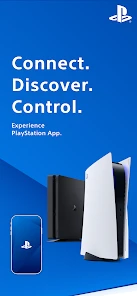
The PlayStation App is an entertainment app from PlayStation Mobile Inc. that brings several PlayStation community and account features to your mobile device. Its store summary, “Connect. Discover. Control.” captures the main idea: you can keep in touch with friends, explore games, and manage aspects of your PlayStation experience while away from your console. It is available for Android and iOS.
What age group is the PlayStation App intended for?
The PlayStation App has a Teen content rating, so it is intended for teen users and older audiences. As with any social app, features involving messages, friends, and community activity may expose users to content or conversations from other people. Parents and guardians may want to review the app together with younger users and discuss appropriate privacy and communication choices.
What features does the PlayStation App offer for connecting with friends?
The PlayStation App allows users to connect with friends, see who's online, and send messages directly from their mobile device. It also offers the ability to join voice chats and parties, view friend activity, and stay updated with game notifications. These features make it easy to stay connected and engage with the PlayStation community, even when you're away from your console.
Pros
- Seamlessly connects to your PS4/PS5
- Easy access to PS Store and game library
- Real-time notifications and updates
- User-friendly interface
- Remote control feature for PS consoles
Cons
- Requires constant internet connection
- Occasional app crashes
- Limited features without PS Plus
- High battery consumption
- No support for older PS consoles

- Category
- Entertainment
- Version
- 25.11.3