PrinterShare Premium Key
- 8.79K
- 4.5
- Installs
- 500.00K
- Price
- $9.99

Screenshots
Analysis by Reviewed
When I decide whether a phone-printing app is worth keeping, I look beyond the promise of convenience. The important questions are whether it works with the printer I actually have, whether it saves steps in the situations I face, and whether the paid unlock makes sense for how often I print. PrinterShare Premium Key is aimed at that practical gap between finding a document on a phone and getting a paper copy, rather than replacing a full desktop printing setup.
It is a business app from Mobile Dynamix, and the premium unlock is listed at $9.99. The app has a 4.5 average from around 42,000 ratings, with over 500,000 installs, which suggests it has found a sizeable audience among people who want printing from a mobile device. It is rated for Everyone; version 5.5 supports Android 5.0 and later. Those details make it a plausible option for an older compatible phone, though I would still check printer compatibility before paying.
What Makes PrinterShare Premium Key Stand Out?
First off, PrinterShare Premium Key isn’t your average printing app. It offers a seamless way to print directly from your smartphone, whether you’re using Android or iOS. What really blew my mind was the sheer number of printers it supports. We’re talking about thousands of printer models from leading manufacturers! This app is like a universal remote but for printers. How cool is that?
The key decision is not whether mobile printing sounds handy; it is whether your printer and your everyday files fit the way you work. Before relying on it for a deadline, try a low-stakes page and check that the selected printer, paper size, and color setting match what you intended. That simple test can catch the most frustrating kind of problem: a job that appears to have been sent but comes out with the wrong layout or settings.
Easy Setup and User-Friendly Interface
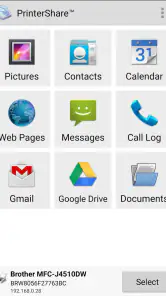
Setting up the app is a breeze, even if you’re not the most tech-savvy person around. Once installed, it connects to your Wi-Fi printer, and voilà, you’re ready to print. The interface is intuitive, making it super easy to navigate through your documents, photos, and even web pages you want to print. Plus, having everything at the tap of a button is incredibly convenient. It’s like having a mini print shop in your pocket.
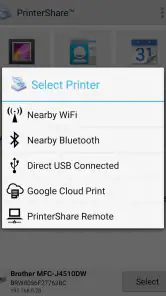
In a shared home or small office, I would treat the first print as a setup check rather than assuming every device will behave alike. Confirm that the phone and printer are reachable on the intended connection, then test a short document before sending a multi-page file. If you use a Bluetooth printer, that connection can be more convenient when Wi-Fi is unavailable, but it is still worth checking that the printer is discoverable and ready before you start a job.
A Wide Range of Features
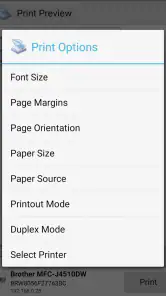
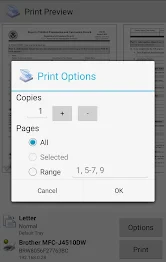
One of the features I found incredibly useful was the ability to print in different formats. Whether it’s PDF, Word documents, or photos, PrinterShare Premium Key handles it all. What’s more, you can choose to print in color or black and white, and even select the paper size. These customization options make it so versatile, catering to both personal and professional printing needs.
More From Our News Desk

Clash of Clans Is Won Between the Battles

Android Auto Makes the Case for Quieter Car Software

MobiOffice: Transforming Mobile Productivity with Seamless Integration

EA SPORTS FC™ Mobile Soccer: Redefining Mobile Sports Gaming

How Microsoft OneDrive Became a Mobile Productivity Giant

How Google Translate Breaks Language Barriers Effortlessly
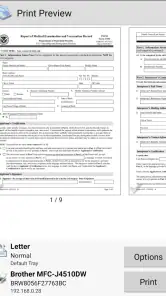
Those choices matter most when a file was prepared for a different purpose. For a form, I would check the paper size and preview the page if available before printing; for a photo, I would decide whether color is essential rather than letting a default setting decide for me. Printing a single test page can be cheaper and quicker than discovering that a whole document was sent in the wrong format. For regular office paperwork, a computer’s print dialog may still offer a more familiar place to fine-tune a complex layout.
Oh, and did I mention you can print directly from your cloud storage services? Yes, it integrates with services like Google Drive and Dropbox, making it even more versatile. This means you can access and print your documents stored in the cloud without breaking a sweat.
A useful everyday case is arriving at a meeting with a revised form saved in cloud storage and needing a paper copy before everyone sits down. Instead of forwarding it to another device, you can reach for the file on your phone and send it to a nearby printer. I would still open the correct version first and check its page count and orientation; cloud folders often contain drafts with similar names, and the convenience of printing from a phone does not remove the need to choose carefully.
Seamless Connectivity
The connectivity is another aspect where this app shines bright. It offers both local and remote printing. Whether your printer is sitting next to you or miles away at your office, you can print with ease. Having the ability to print remotely is something I found incredibly beneficial, especially when you’re traveling or working from different locations.
Remote printing is the feature I would evaluate most cautiously. It is useful when the printer is somewhere you can coordinate with someone, but a print job sent from afar still needs paper, an available printer, and someone to collect the pages. For confidential paperwork, I would avoid sending it to a shared device unless I knew who could access the output. A nearby printer is a simpler fit for quick personal jobs; a staffed print service or office workflow may be better when the document needs controlled handling or a polished, high-volume result.
Security hasn’t been overlooked either. With PrinterShare Premium Key, your documents are transferred securely, ensuring your sensitive information remains confidential.
For sensitive files, I would make the destination part of the decision, not just the connection method. A private printer at home is a different situation from a device used by several people at work, and a printed page can remain visible even after the phone is put away. If your main concern is confidentiality, choose a printer you control and collect the pages promptly. If your main concern is avoiding paper entirely, saving or sharing the digital file may be the better answer.
Compared with the printing option built into a phone or the printer maker’s own app, PrinterShare is most appealing when you want one mobile route to different documents and printer connections. A manufacturer’s app can be a better first choice if you only use one brand’s printer and prefer its own tools. The built-in option may be enough for occasional basic jobs. I would choose PrinterShare when its broader approach solves a real compatibility or workflow problem, not simply because another printing app is available.
The premium price is easiest to justify for someone who prints from a phone often enough to avoid repeated workarounds: a small-business owner handling forms, a student printing a document away from a computer, or a family member who regularly sends photos and paperwork to a home printer. If you print only once in a while, first see whether your printer’s included software or your phone’s existing print controls already do the job. The purchase is less compelling when a laptop is always nearby or when most printing happens through a dedicated office system.
Choosing the Right Printing Routine
One trade-off worth thinking through is where the file begins. A document already stored on your phone is usually a straightforward candidate for a quick print, while a file in cloud storage adds a decision about which account and version to open. I would make the final version easy to recognize before leaving home, especially if several drafts have similar names. That small bit of preparation reduces the chance of printing outdated paperwork when time is tight.
For a small business, the app makes the most sense for occasional, self-contained tasks: printing a form for a client, a receipt copy, or a page needed during an off-site visit. I would not make it the center of a process that depends on batch jobs, carefully controlled layouts, or a predictable queue shared by a team. In those cases, a computer-based office workflow is easier to supervise and less dependent on one person’s phone being available.
Students have a different decision to make. If the printer is nearby and the assignment is a simple document, mobile access can save the detour of opening a laptop. But I would check margins, page breaks, and orientation before sending a long assignment; documents formatted on another device can look different on paper. When a submission must follow strict layout requirements, reviewing it on a computer first is the safer choice, even if the final print is sent from a phone.
Families may value the photo and document mix more than remote access. A phone is often where a picture or a scanned form is already available, so being able to send either to a home printer can remove a few awkward transfer steps. The limitation is that a phone-first workflow does not guarantee a photo will look the way it did on the screen. I would print one image as a check before making multiple copies, and use a dedicated photo workflow if appearance matters more than convenience.
When deciding whether to pay, I would count the effort saved rather than imagine every possible print job. If mobile printing comes up regularly and the current workaround involves emailing files to yourself or moving them to a computer, the unlock can simplify a real annoyance. If you rarely print, or your printer already works smoothly with the built-in controls, paying for another route may not change much. The practical test is whether you can name a recurring task it makes easier.
There is also a small but important habit change: keep files organized before you need them. Giving a final document a clear name, putting it in an easy-to-find location, and confirming the correct printer before sending can make phone printing feel genuinely quick. Without that preparation, searching through several drafts on a small screen can erase much of the time saved by avoiding a computer.
To wrap it up, if you’re someone who’s always on the move and needs reliable printing access, PrinterShare Premium Key is definitely worth considering. It’s efficient, easy to use, and offers a multitude of features that cater to all your printing needs. Trust me, once you start using it, you’ll wonder how you ever managed without it. So, go ahead and give it a try. Your printing tasks will thank you!
My recommendation is more specific: choose it if printing from a phone is a recurring need and your printer works with the connection you plan to use. Test a simple page, then try the documents and locations that matter to you before depending on it for important work. Skip it if your current printer tools already handle your occasional jobs or if you need a full desktop-style layout workflow. For the right person, the paid unlock can remove a familiar hassle; for everyone else, the usual built-in or manufacturer option may be enough.
PrinterShare Premium Key Frequently Asked Questions
Do I need the free PrinterShare app to use PrinterShare Premium Key?
PrinterShare Premium Key is intended to unlock premium printing features, rather than act as a printer or a replacement for the main printing app. Before downloading, check that you have the PrinterShare app or can install it on your device, then confirm that the key is recognized by the version you plan to use. The key’s purpose is to enable premium access for printing documents and photos.
Can I use PrinterShare Premium Key without Wi-Fi or internet access?
The app’s premium features include printing to Wi-Fi and Bluetooth printers, so an internet connection is not the only possible way to connect to a printer. Whether printing works without internet depends on the connection between your device and printer and on how the main PrinterShare app handles that setup. If you plan to print away from home or work, check that your intended printer connection is available first.
Is PrinterShare Premium Key suitable for occasional home printing or mainly for work?
Although PrinterShare Premium Key is categorized as a business app, mobile printing can be useful for both work and everyday tasks. It is worth considering if you regularly need to print documents or photos from a phone or tablet, but a person who rarely prints may not use the premium features often. Think about your printer access and typical printing needs before deciding whether the key is a good fit.
What should I check before downloading PrinterShare Premium Key?
PrinterShare Premium Key is a business app for mobile printing, so it is most useful if you already have access to a printer and want to send documents or photos from a phone or tablet. Check that your device meets the app’s operating-system requirement and that your printer has a connection method the app can use. The premium key is listed at $9.99.
What is PrinterShare Premium Key used for?
PrinterShare Premium Key is an app designed to enhance mobile printing capabilities. It allows users to print documents, emails, photos, and other digital content directly from their Android or iOS devices to a wide range of printers. With the Premium Key, users can unlock advanced features and additional printer support, ensuring a seamless printing experience from nearly any location.
Pros
- Enables wireless printing from your phone.
- Supports a wide range of printer models.
- Offers cloud printing services.
- User-friendly interface and easy setup.
- No ads in the premium version.
Cons
- Requires additional app for full functionality.
- Limited features without premium key.
- May have occasional connectivity issues.
- Some printers require manual setup.
- Not all printers are supported.

- Category
- Business
- Version
- 5.5












