Pillo: Pill Reminder & Alarm
- 5.99K
- 4.8
- Installs
- 500.00K
- Price
- Free

Screenshots



Analysis by Reviewed
Have you ever found yourself forgetting to take your medication on time? Trust me, I've been there too. That's where Pillo: Angry Pill Reminder Box comes in to save the day. This app is like having a personal assistant who never lets you forget your meds, no matter how busy your schedule gets.
When a reminder meets a real day
The practical test for any medication reminder is not whether it looks tidy on a quiet afternoon; it is whether its routine still makes sense when the day changes. Imagine leaving home before breakfast, then having a dose come due while you are commuting or waiting for an appointment. A reminder can help you notice the moment, but you still need a plan for where the medication is and whether it is appropriate to take it then. I’d set up the schedule around the routine I can actually follow, rather than an ideal day that rarely happens.
That distinction matters for people with irregular shifts, changing meal times, or medicines that need specific instructions. Pillo is useful for keeping a routine visible, but it is not a substitute for a clinician’s advice or the directions on a prescription. If a dose is late, I would check those instructions rather than treating a snooze or reminder history as medical guidance.
What is Pillo?
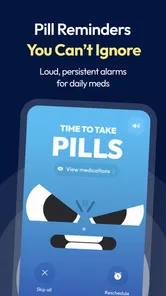
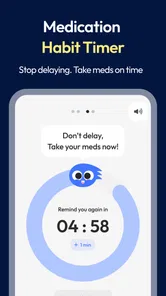
So, what exactly is Pillo: Angry Pill Reminder Box? Well, it's a super handy app designed to help you manage your medications with ease. With its friendly and intuitive interface, you can set up reminders for each dose, ensuring that you never miss taking your meds. The app even gets a little sassy when you ignore it—hence the "angry" part in its name. It's clever, engaging, and honestly, quite fun to use.
Features That Stand Out
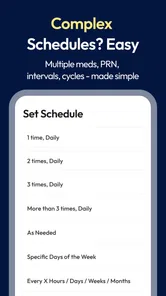
One of the standout features of Pillo is its customizable reminders. You can set different alarms for various medications, tailor notifications to your schedule, and even snooze reminders if you're not quite ready to take your meds. The app's design is simple yet effective, making it accessible to users of all ages.
A useful habit is to treat a snooze as a prompt to make a decision, not as proof that the dose has been taken. If you are interrupted, pause and check the medication history before acting; that small step can help prevent confusion when several medicines have separate schedules. I would also review the routine whenever a prescription changes, so an old reminder does not quietly remain part of the day.
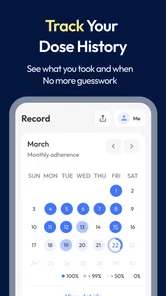
Another cool feature is the medication history tracking. This allows you to keep tabs on what you've taken and when, helping you stay on top of your health. Plus, if you're managing medications for a family member, Pillo makes it easy to switch between profiles without any hassle.
More From Our News Desk

 Block Blast!
 Makes Every Clear Feel Like One More Turn
A clean little block puzzle becomes a study in space, risk, and self-control. Its best moments come from one satisfying clear; its toughest test is knowing when to stop.

 Super Stylist Fashion Makeover
Super Stylist Turns Dress-Up into a Runway Career
Its makeover-to-client loop turns quick outfit decisions into shareable style theater. The question is whether the closet keeps giving players a reason to return.

 Block Craft 3D:Building Game
Block Craft 3D Under Pressure: How Well Does It Recover When Building Goes Wrong?
A failure-focused look at Block Craft 3D’s forgiving building loop, its uncertain recovery edges, and the moments that demand more than a cheerful village.

 Woodturning
 Trades Creative Freedom for a Satisfying Carving Loop
If your usual creative game is about building, decorating, or styling, Woodturning trades open-ended projects for a tactile, tightly guided carving loop. Here is what that switch really costs.

 PUBG MOBILE
 Shows What Battle Royale Must Get Right
PUBG MOBILE shows how battle royale has matured: bigger systems matter less than meaningful choices, readable fights, and a reason to return after every loss.

 Braindom: Brain Games Test
Braindom’s Social Life Happens Between Puzzles
Braindom turns quick logic traps into a personal ritual, but its community value is more about comparing answers than building together.
Latest News



For a caregiver, separate profiles can make it easier to keep routines distinct, but they do not replace careful coordination. Before relying on a shared routine, agree on who records a dose and how you will avoid both people assuming the other handled it. That workflow is especially helpful when more than one person is involved; if one person manages every medication alone, a simpler single-profile setup may be less work.
Why You Might Love It
Let me tell you, the app isn't just about functionality—it's about making medication management a bit more enjoyable. The playful reminders add a touch of humor to your day, making it less of a chore and more of a game. It’s perfect for those of us who need that extra push to stay on track.
The humor is a matter of taste. I can see the animated, insistent style making a repetitive task feel less clinical, but someone who finds alerts stressful may prefer a quieter reminder tool. Likewise, Pillo is aimed at people who want a dedicated place for medication routines and health tracking, rather than someone who only needs a single alarm built into a phone’s clock. The basic clock is quicker to configure; a medication-focused app is more useful when several doses and a record of what happened matter.
Moreover, the app supports multiple languages, so you can use it in the language you're most comfortable with. This feature makes it more inclusive, reaching a broader audience worldwide. It's little touches like these that make Pillo stand out from other medication reminder apps.
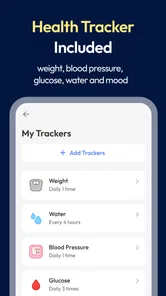
Beyond medication schedules, the app’s medical focus includes trackers for measures such as blood pressure, glucose, weight, and water. Those can be handy for keeping several personal health notes in one place, especially if you already monitor more than one measure. I would enter readings consistently and use them as a record to discuss with a health professional, not as a diagnosis or a reason to change treatment on my own.
Using it on the move
Connectivity shapes how confidently I’d use any health app while away from home. A phone notification is only useful if the device can show it at the right moment, so I would check that reminders are enabled and that the app is allowed to notify me before depending on it for a busy day. If a reminder seems to have been missed, opening the app and checking the history is a sensible recovery step; I would not assume that a notification alone confirms whether a dose was taken.
For travel or a long day out, I’d also keep the actual medication accessible and follow its storage instructions. The app can organize a schedule, but it cannot supply a dose or resolve uncertainty about whether it is safe to take one. These are practical boundaries, not flaws unique to Pillo: digital reminders work best alongside a reliable medication routine.
Price, fit, and practical limits
Pillo is a free medical app from pitcrew Inc., with optional in-app purchases ranging from $2.00 to $47.99 per item. Its average rating is 4.7 from around 12,000 ratings, and it has over 100,000 installs. It is rated for Everyone, was released on September 17, 2022, and version 0.5.46 requires Android 6.0 or later. Those details make it approachable to try, while the in-app purchase range is worth checking if you are considering paid extras; I would not assume that every feature is included at no cost.
For someone who wants medication reminders, a dose history, and several health trackers together, that combination is more compelling than juggling a clock alarm and separate notes. If you prefer minimal notifications, need a specialist clinical record system, or do not want to manage health information on a phone, another approach may fit better. I’d also consider who can access the device and what information is comfortable to keep there before entering personal health details.
Keeping the routine resilient
A useful way to judge whether Pillo suits you is to try a normal week rather than building an elaborate schedule all at once. Add the medicines you currently need reminders for, then notice which alerts arrive at inconvenient moments and whether the app’s tone helps you act or simply adds noise. I would make adjustments based on those real interruptions, not keep adding reminders in the hope that more alerts automatically mean better adherence.
For example, someone who takes a regular dose at home but has a variable lunch break could choose a reminder time that reflects the instruction they have been given and the pattern they can realistically maintain. If the timing depends on food or another condition, the app should not be used to interpret that instruction; the prescription label or a pharmacist is the right reference. This distinction makes the reminder useful without asking it to make a medical decision.
The trackers can also serve a practical purpose when preparing for an appointment. A person monitoring blood pressure or glucose might record readings as they normally do and review the entries before speaking with a clinician. Consistency is more valuable than filling every field: if a measurement was taken under unusual circumstances, I would note that context rather than treating a lone number as a trend. Pillo can help bring these records together, but the interpretation belongs with an appropriate health professional.
Choosing the right setup for your household
Pillo makes the most sense for someone who is comfortable using a phone as a daily organizer and wants medication schedules plus a few personal health logs in one place. It can be particularly useful when a caregiver helps manage more than one person’s routine, provided everyone agrees on how doses are recorded. On the other hand, a person who rarely checks their phone, shares a device without a suitable privacy arrangement, or finds persistent reminders upsetting may be better served by a pill organizer, a quieter alarm, or help from a caregiver.
Compared with a paper chart, an app can put reminders and a running medication record close at hand, while paper remains easy to consult without opening a phone. Compared with a standard alarm, Pillo is more focused on medication routines and health tracking, though that extra structure takes time to set up and maintain. I would choose the simplest option that reliably fits the person’s habits rather than assuming the most feature-rich option is automatically best.
One small but important preparation step is to keep the medication names and schedules accurate when starting out. If a prescription changes, update the routine promptly and check that any outdated entry is no longer guiding your day. If you help someone else, confirm changes with them rather than relying on an old note or memory. This kind of housekeeping is not glamorous, but it is what makes any reminder system trustworthy enough to be useful.
When a notification does not settle the question
What should you do if you see a reminder late or cannot remember whether you took the dose? I would not use the app’s alert as proof either way. Check the medication history and, if uncertainty remains, follow the medicine’s own instructions or contact a pharmacist or clinician for advice. The right response depends on the medicine, so a general reminder app cannot safely supply a universal rule for missed doses.
Connectivity deserves the same practical caution. Before relying on Pillo during a commute, at work, or while travelling, test the notification routine in the kind of setting where you expect to use it and make sure the phone is configured to deliver alerts. If you are in a place where you cannot check the screen, or your phone is unavailable, keep a backup routine that suits your treatment, such as a written schedule or another agreed reminder. I would not assume that access to a network guarantees an alert, or that a lack of signal tells me whether the app’s schedule or history is available.
For privacy, I would use only the health details that genuinely help me manage the routine and protect access to the phone as I normally would. Medication names and readings can be sensitive, especially on a shared device. Before entering information, consider who can see the screen and whether notifications might appear where other people can read them. That is a sensible habit for any health app, not a claim about Pillo’s data practices.
Final Thoughts
In a world where we're all juggling a million things at once, having an app like Pillo: Angry Pill Reminder Box is a game changer. It's not just about reminding you to take your meds; it's about ensuring you maintain a healthy lifestyle without the stress of remembering every little detail. So, if you're like me and need a reliable, fun, and efficient way to manage your medication, give Pillo a shot. You won't regret it.
My recommendation is strongest for someone who benefits from a playful nudge and wants medication routines alongside everyday health tracking. Start with one routine, make sure the reminders suit your actual schedule, and check the history when plans get interrupted. That gives you a realistic sense of whether Pillo’s lively approach helps you stay organized; if you need clinical advice, dependable care, or a solution that works independently of your phone, use the appropriate professional support or a different tool instead.
Pillo: Pill Reminder & Alarm Frequently Asked Questions
What is Pillo: Angry Pill Reminder Box and how does it work?
Pillo: Angry Pill Reminder Box is a mobile app designed to help users manage their medication schedules effectively. It uses a unique, interactive approach by incorporating an 'angry' reminder system that alerts users with humorous, yet insistent notifications. The app allows users to set up personalized medication schedules, ensuring they never miss a dose. Additionally, it offers features like tracking medication history and providing detailed reports on adherence. It’s a perfect tool for anyone who needs a little extra motivation to stay on top of their medication routine.
Who is Pillo designed for, and what can it help me keep track of?
Pillo is a medical app for people who want help organizing medication and everyday health routines. Alongside medication reminders and a medicine list, it offers trackers for blood pressure, glucose, weight, water, and other measures. This makes it useful for someone who wants a single place to keep an eye on several parts of a routine, while the app’s reminders can help make taking medication feel more manageable.
Is the Pillo app available on both Android and iOS platforms?
Yes, the Pillo: Angry Pill Reminder Box app is available for download on both Android and iOS platforms. Users can find the app on Google Play Store for Android devices and the Apple App Store for iOS devices. This cross-platform availability ensures that users can take advantage of its features regardless of the type of smartphone they own. It’s designed to work seamlessly on both operating systems, providing a consistent user experience.
What makes Pillo's reminder system unique compared to other medication apps?
Pillo's reminder system stands out due to its engaging and motivational approach. Unlike traditional reminder apps, Pillo uses an 'angry' notification style that humorously nudges users to take their medication on time. This entertaining twist not only makes pill management less of a chore but also increases adherence rates. Users appreciate the app’s ability to make medication routines more interactive and enjoyable, which can lead to better health outcomes.
Can Pillo help track medication adherence and provide reports?
Absolutely, one of Pillo’s key features is its ability to track medication adherence meticulously. The app records each dose taken and missed, allowing users to see patterns over time. It can generate detailed reports that users can share with healthcare providers, offering insights into their medication routines. This feature is particularly beneficial for individuals with complex medication schedules or those managing chronic conditions, as it provides valuable data for optimizing treatment plans.
Pros
- Customizable reminders
- User-friendly interface
- Tracks medication history
- Multiple reminder tones
- Cloud backup support
Cons
- Limited free features
- Ads in free version
- No integration with fitness apps
- Battery consumption issues
- Requires internet for full features