PillEye – tablet, pill counter
- 322.00
- 3.8
- Installs
- 500.00K
- Price
- Free

Screenshots

Analysis by Reviewed
I judge a pill-counting app by what happens when the task is ordinary but the setting isn’t: a cluttered kitchen counter, a medication refill to sort, or a quick check before leaving home. PillEye – tablet, pill counter is aimed at that practical job, using a phone camera to help count tablets. Its usefulness depends not only on the counting step, but also on whether the process fits your surroundings and whether you’re comfortable relying on a visual estimate that you can check yourself.
When a count depends on your connection
For the main camera-based task, the important question is whether you can take a clear picture and review the result at the moment you need it. I wouldn’t plan a medication routine around an assumption that every part of the app works without a network connection; connection needs can vary by task and version. If you’re in a pharmacy back room or travelling through an area with patchy service, it’s sensible to keep a manual counting method available rather than discover a dependency mid-task.
That doesn’t make the app a poor fit. It means I’d treat it as a convenient counting aid, not as the only link in a medication workflow. If the screen takes longer than expected to respond, pause and recount the tablets by hand before making a decision that affects dispensing or a dose.
Mobile use calls for a careful setup
A phone camera makes the process portable, but a quick snapshot is not automatically a good one. I’d use a plain, well-lit surface, spread tablets so their edges are visible, and hold the phone steady above them. Those small choices are especially useful when tablets are pale, close in color to the surface, or packed tightly together. If the result looks surprising, changing the layout and taking another picture is more prudent than accepting the first count.
At home, that workflow can help when you’re checking the contents of a container before organizing a refill. In a busy pharmacy, it may be less convenient if there’s limited counter space, interruptions, or a need to move quickly. I’d choose a quieter moment for a count that matters, then compare the app’s result with a manual check when accuracy has real consequences.
What to do when the result seems wrong
Camera-based recognition has natural limits: overlapping tablets, shadows, unusual shapes, and a crowded background can all make a picture harder to interpret. A count that misses a tablet or appears inconsistent is a cue to reset the scene, not to keep retaking photos without changing anything. Spread the tablets out, improve the lighting, and check that none are hidden behind another before trying again.
If the app is slow or the picture does not produce a useful result, I’d switch to manual counting instead of letting a technical hiccup hold up a medication task. For a high-stakes quantity, a second person or a conventional recount can offer a useful check. The app’s convenience is best when it complements attention rather than replacing it.
More From Our News Desk

 Block Blast!
 Makes Every Clear Feel Like One More Turn
A clean little block puzzle becomes a study in space, risk, and self-control. Its best moments come from one satisfying clear; its toughest test is knowing when to stop.

 Super Stylist Fashion Makeover
Super Stylist Turns Dress-Up into a Runway Career
Its makeover-to-client loop turns quick outfit decisions into shareable style theater. The question is whether the closet keeps giving players a reason to return.

 Block Craft 3D:Building Game
Block Craft 3D Under Pressure: How Well Does It Recover When Building Goes Wrong?
A failure-focused look at Block Craft 3D’s forgiving building loop, its uncertain recovery edges, and the moments that demand more than a cheerful village.

 Woodturning
 Trades Creative Freedom for a Satisfying Carving Loop
If your usual creative game is about building, decorating, or styling, Woodturning trades open-ended projects for a tactile, tightly guided carving loop. Here is what that switch really costs.

 PUBG MOBILE
 Shows What Battle Royale Must Get Right
PUBG MOBILE shows how battle royale has matured: bigger systems matter less than meaningful choices, readable fights, and a reason to return after every loss.

 Braindom: Brain Games Test
Braindom’s Social Life Happens Between Puzzles
Braindom turns quick logic traps into a personal ritual, but its community value is more about comparing answers than building together.
Latest News



Use medication information thoughtfully
Medication details deserve care on any phone. I’d avoid leaving a device unlocked where other people can browse it, and I’d be deliberate about what information I enter or keep visible. The app is a counting tool, not a substitute for instructions from a pharmacist or clinician, and a visual count cannot confirm that a tablet is the right medication or strength.
That distinction matters most when sorting several similar-looking medicines. Keep original packaging and labels close by, and verify the product before counting. If a reminder or count conflicts with the prescribed directions, follow the professional instructions and resolve the discrepancy with a pharmacist rather than relying on an app screen.
Who will get the most from it?
I can see this being useful for pharmacy staff who regularly handle tablet counts, caregivers who organize supplies, and people who want a quicker way to check a quantity at home. It is less suitable for someone who needs a guaranteed dispensing count without a verification step, or anyone whose work area makes it difficult to take a clear, undisturbed picture. In those situations, a manual count or a dedicated counting tray may be the better primary method.
Compared with counting each tablet by hand, a camera can make a simple, spread-out batch easier to assess. Compared with a dedicated pharmacy counter, though, a phone is more dependent on the scene, camera position, and the app’s interpretation. I’d use the two approaches as checks on each other when the quantity is important, rather than assuming one must always outperform the other.
Practical details before you install
Medility’s free medical app has an average rating of 3.9 from around 1,600 ratings, with over 500,000 installs. It is rated for Everyone and was released on December 9, 2020. Version 3.9.2 requires Android 6.0 or later, and in-app purchases range from $7.49 to $25.99 per item. The free starting point makes it easy to try the basic idea, but I’d check the purchase details in the app before committing to anything beyond that.
For a realistic routine, imagine preparing a refill after dinner: clear a small patch of table, keep the labeled container nearby, place the tablets apart, and take a picture. If the visual count looks plausible, use it as a prompt to verify the quantity; if it doesn’t, recount manually. This workflow adds a few seconds of checking, but it avoids turning a convenient camera feature into an unchecked assumption.
Where a camera count fits in a real routine
The strongest use case is a small, clearly separated batch when you want a quick second look rather than a replacement for a pharmacist’s process. For example, a caregiver sorting a weekly supply can check one medicine at a time, return each batch to its labeled container, and avoid mixing tablets on the work surface. Keeping one medicine out at a time is a practical safeguard: it reduces visual clutter and makes it easier to notice if a tablet has rolled away.
I would also think about the order of work. Confirm the label and strength first, then count, then put the tablets away before opening the next container. That sequence sounds basic, but it prevents the camera task from becoming a source of mix-ups when several similar-looking tablets are on the table. The app can help assess quantity; it cannot establish which bottle a loose tablet came from.
Small workflow choices that improve the check
One useful habit is to take the picture only after arranging the tablets in a single visible layer. A second is to keep the phone’s shadow off the counting area; a hand or device shadow can hide edges even when the room seems bright. If a tablet is chipped or unusually positioned, set it aside and assess it separately rather than letting an awkward shape undermine the rest of the image.
For repeated counts, I’d use roughly the same surface and camera position each time, not because that guarantees a correct result, but because a consistent setup makes odd results easier to spot. If the displayed outcome changes after a minor rearrangement, treat that as a reason to slow down and verify manually. A camera result is most useful when it agrees with what you can plainly see.
Choosing between phone, tray, and hand counting
A counting tray is a more natural fit for a pharmacy bench where staff need a stable, repeatable physical process and room to handle tablets carefully. Hand counting is slower, but it remains straightforward when there are only a few items, the picture is difficult, or you need to inspect each tablet individually. PillEye’s camera approach sits between those options: it can save effort on a visible batch, but the quality of the setup and the need to double-check remain part of the job.
That means I wouldn’t choose it as the sole method for a rushed dispensing task or a quantity where an unnoticed error could have serious consequences. I’d be more comfortable using it for a preliminary count, then confirming the result with the method required by the setting. At home, the balance may be different: a quick visual aid can be convenient, provided you still follow the medicine label and your clinician’s directions.
What to expect from reminders and purchases
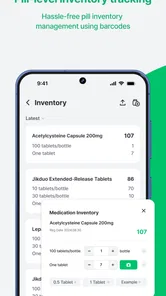
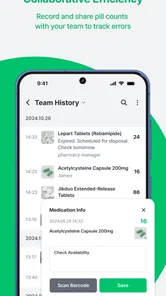
The app’s presentation includes medication reminders, which may suit someone who wants a nudge alongside counting. I’d keep expectations practical: a reminder can prompt you to follow a routine, but it does not verify that the correct medicine is in your hand or that a dose is appropriate. Before relying on any reminder, make sure its timing and details match the instructions you already follow.
The app is free to start, while some in-app items have a listed price range. I’d explore the basic counting workflow before paying for anything, then decide whether the extra purchase is relevant to your own use. If all you need is an occasional visual count, a paid option may not be necessary; if a feature matters to your routine, check its description and terms in the app before buying.
Let me tell you about a nifty little app I stumbled upon recently: PillEye – tablet, pill counter. If you're anything like me, keeping track of medication can sometimes feel like a juggling act. But this app? It might just be the solution you've been looking for. Let’s dive into what makes it tick.
What is PillEye?
At its core, PillEye is a smart and intuitive pill counting app designed to make managing your medication as easy as pie. Whether you’re a caregiver handling multiple prescriptions or someone on a complex medication schedule, this app promises to take the headache out of the equation.
Getting Started
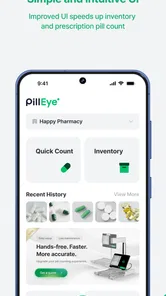
First things first, downloading and setting up PillEye is a breeze. Available on both Android and iOS, just a quick trip to the app store, and you’re ready to roll. Once installed, you’re greeted with a sleek and user-friendly interface that doesn’t overwhelm you with too many bells and whistles.
Features that Stand Out
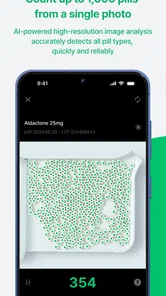
One of the standout features of the app is its ability to accurately count pills using your smartphone camera. Seriously, it’s as easy as snapping a photo. Just lay your pills on a flat surface, take a picture, and let the app do its magic. It’s quite impressive how accurately it counts, saving you the trouble of manual counting.
Another gem is the medication reminder system. We’ve all been there – missing doses because of a busy schedule. PillEye lets you set up reminders, ensuring you never skip a dose again. And the notifications are gentle nudges, not intrusive blares that make you jump out of your skin.
Usability and Interface
The design team behind PillEye clearly focused on making the app as intuitive as possible. The layout is clean, with easy navigation that even my technologically challenged relatives can manage without a hitch. The menus are straightforward, and everything is where you’d expect it to be.
What’s more, the app includes a comprehensive help section. So, if you ever find yourself stuck, there’s no need to panic. A quick perusal usually answers any questions you might have.
Security and Privacy
In today’s digital age, security is paramount, and the developers of PillEye seem to understand that. Your data is your own, and the app takes measures to ensure it stays that way. There’s no need to worry about your medication information being shared without your permission.
Room for Improvement
While PillEye is fantastic, it’s not without its quirks. For instance, the pill recognition feature, while largely accurate, can sometimes have hiccups with very small or odd-shaped pills. It’s not a dealbreaker by any means, but something to be aware of.
Additionally, integration with other health apps could enhance its functionality. Imagine syncing with fitness trackers or health monitors to give you a holistic view of your health. Hopefully, future updates will bring these features to life.
Final Thoughts
All in all, PillEye is a superb tool for anyone needing a reliable way to manage their medication. With its easy-to-use interface and practical features, it takes much of the hassle out of pill counting and scheduling. Though it has minor areas for improvement, the benefits far outweigh any drawbacks.
If you’re on the hunt for a way to streamline your medication routine, give PillEye a try. It might just become your new best friend in medication management. And hey, anything that makes life a little easier is worth a shot, right?
PillEye – tablet, pill counter Frequently Asked Questions
What does PillEye help users do in everyday use?
PillEye is a medical app focused on counting pills and tablets from a picture. Its straightforward purpose may be useful when handling medication at home or in a pharmacy, where counting by hand can take time. It is a counting aid rather than a substitute for careful medication handling, so users should check important counts before relying on them.
What devices can run PillEye?
PillEye is an Android app that supports devices running Android 6.0 or later. Before downloading, check the operating-system version on your phone or tablet to make sure it meets that requirement. The app is free to install, with in-app purchases available. If you use an iPhone or iPad, confirm availability in the relevant app store before planning to use it there.
What is PillEye and how does it work?
PillEye is an innovative app designed to help users accurately count pills and tablets using their smartphone camera. By simply taking a picture of the pills, the app uses image processing to count them quickly and efficiently. This can save time for pharmacists and individuals managing medication, though counts should be checked when accuracy is especially important.
Is PillEye compatible with all types of pills?
PillEye is designed to work with a wide range of pills and tablets, including various shapes and sizes. However, its accuracy may vary with extremely small or unusually shaped pills. It’s recommended to test the app with your specific medication to assess how well it works before relying on it fully.
Does PillEye require an internet connection to function?
No, PillEye does not require a constant internet connection to operate. The app processes images locally on your device, so its counting function can work offline. An internet connection might be needed for initial setup, updates, or accessing additional features and support, so connecting occasionally may still be useful even if you intend to use the counter offline.
Pros
- Accurate pill counting with AI technology.
- User-friendly interface for easy navigation.
- Supports multiple languages for global use.
- Customizable settings to fit user preferences.
- Offline functionality available for convenience.
Cons
- Limited to counting only round pills.
- Occasional miscounts with unusual lighting.
- No integration with health tracking apps.
- Requires camera permission for functionality.
- Free version includes ads.