Photo Collage Maker,Pic Editor
- 153.00
- 4.6
- Installs
- 10.00M
- Price
- Free

Screenshots





Analysis by Reviewed
Ever found yourself scrolling through your gallery, wishing you could magically stitch your favorite moments together into a single picture? Well, say hello to Photo Collage Maker, Pic Editor. It's like having a mini art studio right in your pocket, and trust me, it’s as fun as it sounds!
Creating Memories Made Easy
First off, let's talk about how incredibly easy it is to use this app. You don’t need to be a tech wizard or an art major to navigate through its features. The user interface is intuitive and welcoming, making it super accessible whether you're a newbie or a seasoned photo editor. Just dive in, and you’ll be creating stunning collages in no time.
Features That Stand Out
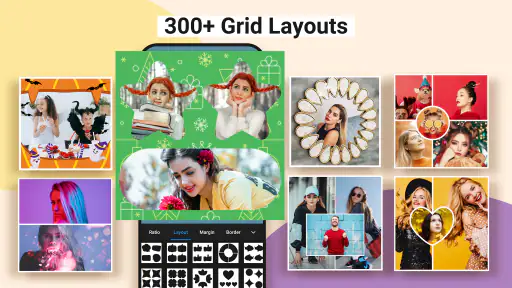
What really sets Photo Collage Maker, Pic Editor apart is its wide array of templates and editing tools. From grids to freestyle, the variety is impressive. You can literally spend hours just playing around with different styles, borders, and backgrounds. And let’s not forget the photo editing tools that allow you to tweak brightness, contrast, and saturation, ensuring your pictures are Insta-ready.
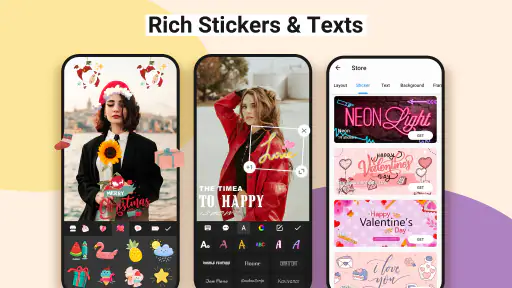
Another cool feature is the text option. You can add quotes, dates, or even cheeky captions to your collages, giving them that personal touch. Plus, the app offers a plethora of fonts and colors to choose from, ensuring your text stands out just the way you want it.
Sharing is Caring
Once you're done creating your masterpiece, sharing it is a breeze. The app makes it simple to post your collages directly to social media platforms like Instagram, Facebook, and Twitter. You can also save them to your device in high resolution, which is perfect for those who love printing their photos.
One of my favorite things about this app is that it doesn’t compromise on quality. Whether you’re sharing digitally or printing, the results are consistently sharp and vibrant. It’s a small detail, but it makes a big difference in how your collages are perceived.
Final Thoughts
In a world where we’re constantly capturing moments, Photo Collage Maker, Pic Editor gives us a creative way to showcase them. It's more than just an app; it's a tool for storytelling. Whether you're documenting a trip, celebrating a special occasion, or just having fun, this app helps you bring your photos to life in a unique and artistic way.
So, if you're looking to add a splash of creativity to your photo collection, give this app a try. It’s like having a scrapbook at your fingertips, minus the glue and scissors. And honestly, who doesn’t love a little extra creativity in their life?
Pros
- User-friendly interface for easy navigation.
- Wide variety of collage templates available.
- High-quality output with sharp images.
- Includes fun stickers and text options.
- Quick sharing to social media platforms.
Cons
- Contains ads that can interrupt usage.
- Limited features in free version.
- Some templates require in-app purchases.
- May lag on older devices.
- Photo editing tools are basic.

- Category
- Photography
- Version
- 2.2.0











