Beauty Camera -Selfie, Sticker
- 791.00
- 4.7
- Installs
- 50.00M
- Price
- Free
Screenshots
Analysis by Reviewed
I choose a selfie camera by asking a simple question: do I want a quick, playful portrait, or careful control over a photo I’ll edit later? Beauty Camera -Selfie, Sticker is aimed at the first kind of moment. It combines a camera, beauty effects and photo editing, so I can try a look while framing a shot instead of moving between separate tools. Leopard V7 makes it as a free photography app, and its 4.7 average from around 119,000 ratings suggests many users find that straightforward approach appealing.
Start with the kind of photo you want
Before opening it, I’d decide whether I want a natural-looking touch-up or a deliberately stylized selfie. The filters and AR stickers make experimentation part of taking the picture, while the editor gives me a route to adjust an image after capture. That is useful for casual portraits and social posts, but it is not the same as a dedicated photo editor built around precise, detailed adjustments.
A practical tip is to compare a few filter previews in the same light before taking a batch of pictures. That makes it easier to keep a consistent look across several shots, rather than choosing a different effect for every photo and ending up with a mismatched set. I’d also try the camera in ordinary indoor light first: a look that feels flattering near a window may appear too strong under warm room lighting.
Transform Your Selfies with Ease
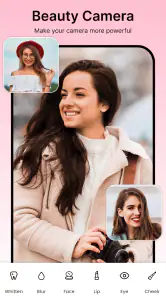
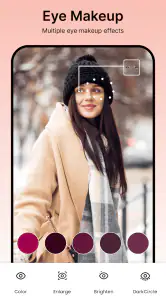
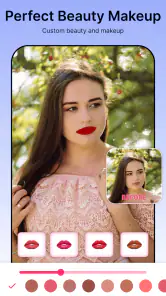
This app is like having a personal glam squad in your pocket. With Beauty Camera - Selfie, Sticker, you can effortlessly enhance your natural beauty or go all out with creative filters and stickers. Whether you’re looking to smooth out your skin, adjust lighting, or add a playful touch with a sticker, this app has got you covered.
Filters and Effects
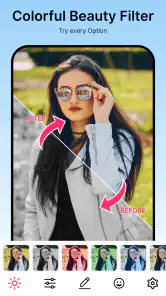
One of my favorite features is the wide array of filters and effects. From subtle enhancements to bold transformations, the choices are endless. The app allows you to preview filters in real-time, which means you can see how each one will look before snapping your photo. Trust me, once you start experimenting, you’ll find it hard to stop!
That live preview is most useful when I’m taking several portraits in one session: I can settle on a look before the first shot and avoid trying to make a whole set match afterward. I’d keep an eye on how much an effect changes the overall appearance, though. A strong filter can be fun for a themed post, but for a work profile, family picture or photo meant to look like me on an ordinary day, a lighter touch is usually the safer choice.
Stickers and More
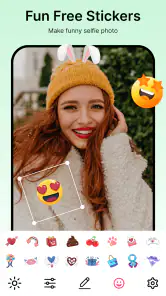
Feeling playful? The sticker feature is where the app truly shines. With a vast collection of stickers ranging from cute to wacky, you can personalize your photos in fun, unique ways. I found the seasonal stickers particularly delightful, adding a festive touch to my snaps.
More From Our News Desk

Weather by Xiaomi Review: Clear at a Glance, Less Clear Up Close

X Under Pressure: Can It Recover When Posting Goes Wrong?

Clash of Clans Is Won Between the Battles

Android Auto Makes the Case for Quieter Car Software

MobiOffice: Transforming Mobile Productivity with Seamless Integration

EA SPORTS FC™ Mobile Soccer: Redefining Mobile Sports Gaming
Stickers suit informal posts, greetings and pictures made just for friends, but they can also distract from a portrait if the face and decoration compete for attention. My small workflow tip is to take a clean version first, then decide whether the sticker adds something. That leaves me with a more versatile photo if I later want to share it somewhere a playful overlay would feel out of place.
User-Friendly Interface
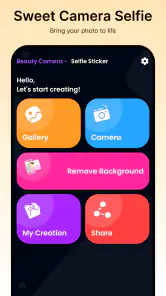
Let’s talk about usability. The app boasts a user-friendly interface that’s perfect for tech-savvy users and beginners alike. Navigating through its features is a breeze, and each tool is clearly labeled, making it easy to find what you need. Whether you’re a selfie novice or a seasoned pro, you’ll find this app incredibly intuitive.
For a realistic everyday use, imagine I’m meeting a friend and want a quick picture before leaving home. I can frame the shot, compare live effects, take a few options and choose one that feels right without planning a separate editing session. That convenience is the strongest reason I’d keep a selfie-focused camera handy. The trade-off is that an app organized around beauty effects may not be the best starting point for landscapes, product photos or careful retouching where accuracy matters more than a ready-made look.
In addition to its ease of use, the app doesn’t bombard you with ads or unnecessary pop-ups, which is a rare blessing in today’s app market. You can focus on capturing the perfect shot without distractions.
When another camera makes more sense
If I want a simple portrait with quick visual polish and playful extras, this is a more direct choice than taking a picture in a basic camera app and searching for effects afterward. On the other hand, someone who prefers restrained edits may be happier with the phone’s built-in camera and a separate editor, where the capture and finishing steps can stay distinct. For detailed color work or a polished portfolio image, I’d choose a photo editor that puts fine control first rather than expecting a selfie app to cover every photographic task.
It is also worth thinking about how often I’ll use beauty effects. If I mainly photograph scenery, meals or documents, the selfie-centered tools may add little to my routine. If I regularly take portraits, the camera-and-editor combination can save a few steps. The app is free, rated for Everyone, and has reached over 50 million installs; it was released on February 6, 2020, and version 5.3.6 requires Android 6.0 or later. Those details make it accessible to many Android users, though I’d still check that my own device meets the minimum system requirement before installing.
Small choices that improve the result
When I’m deciding whether to keep a filter, I look at the whole frame rather than only the face: brightness and color can change the mood of clothing and background too. For a group selfie, I’d preview the effect with everyone in frame, since a setting that works for one face may not feel equally natural on another. And if I’m taking pictures for different purposes, I’d separate playful sticker shots from cleaner portraits instead of trying to make one image serve both.
The switch from a familiar camera app is low-effort if I’m simply curious about a different selfie look: I can try it for a few portraits and see whether its live previews and editing flow suit me. I wouldn’t move my whole photography routine over at once. Keeping the regular camera for everyday scenes and using this one when I want beauty effects or AR stickers is a sensible middle ground, especially if I care about having a straightforward, unembellished original as well.
Who I’d recommend it to
I’d recommend Beauty Camera -Selfie, Sticker to someone who enjoys taking portraits, wants quick filter previews and likes adding a lighthearted detail without learning a complicated editing workflow. Its combination of selfie capture and photo editing is the draw, rather than a promise of professional control. If you dislike beautification effects, want consistent documentary-style images, or need a tool for broad photographic work, I’d skip it and use a standard camera or a more editing-focused alternative instead.
Choosing a workflow you’ll actually use
The useful question is not just whether I like a particular filter, but whether I want that look to be part of taking the picture or something I decide later. This app puts effects close to the capture moment, which can make a quick portrait feel more fun and reduce the temptation to keep reopening an editor. A built-in camera paired with a separate editor is a better fit if I want to preserve a plain capture first and make careful choices afterward.
For a profile photo, I’d start with a neutral expression and simple background, then compare a restrained preview against the unembellished view before choosing. If the result still looks like me at a glance, the effect is doing its job; if it changes the impression more than I want, I’d take the clean version instead. That little check is especially helpful when the picture will be used beyond a casual post, where a playful treatment may not suit the setting.
Make the most of a short photo session
If I’m taking pictures with a friend, I’d agree on one or two looks before we begin rather than scrolling through effects between every shot. That keeps the session moving and gives the photos a more coherent feel. I’d also capture a couple of expressions with the same framing, then review them together; changing pose, lighting and filter all at once makes it harder to tell what improved the picture.
There is a trade-off between immediacy and flexibility. Adding a sticker while I’m in a playful mood is quick, but a decorated image has a narrower use than a clean portrait. I’d keep the decoration for a greeting or informal post and reserve a separate shot for anything that may need a more neutral appearance. This approach avoids trying to undo a creative choice later and makes the camera useful for more than one kind of occasion.
What to expect before installing
The app is aimed at Android users who want a portrait-oriented camera experience rather than a general-purpose photography workspace. Its age rating is Everyone, and its long reach—over 50 million installs—makes it a familiar choice in the selfie-app space. I’d still approach it as one tool in a camera routine, not as a replacement for every camera and editing app on a phone.
One practical point for someone switching is to give the preview a fair test in the lighting they normally use. Effects can feel quite different indoors, outdoors and in mixed light, so a quick trial at home is more informative than judging the app from a single carefully staged selfie. The current version is 5.3.6, and Android 6.0 is the minimum requirement; checking that before downloading saves an avoidable compatibility surprise.
Where its limits matter
For people who want to document an object accurately, keep colors close to life, or make a carefully controlled image, I would reach for a regular camera and an editor designed for deliberate adjustments. Beauty effects can be enjoyable, but they also invite quick decisions based on a flattering preview rather than the purpose of the photograph. That is not a flaw when the goal is a lighthearted selfie; it becomes a mismatch when consistency and faithful detail matter more.
I’d also skip it if I rarely take front-facing portraits or find beauty treatments uncomfortable. A large set of effects has little value when I don’t want to use them, and switching between apps is not much of a burden if I only edit a picture occasionally. Its strongest audience is someone who will genuinely use the live looks, stickers and portrait editing often enough for that all-in-one flow to feel convenient.
Final Thoughts
In a world where a picture is worth a thousand words, having the right tools to capture the moment is crucial. Beauty Camera - Selfie, Sticker is more than just an app; it’s a gateway to expressing yourself and sharing your story through beautiful images. Whether you’re looking to enhance your selfies or just have fun with your photos, this app is definitely worth a try. So, go ahead, download it, and let your creativity run wild!
Beauty Camera -Selfie, Sticker Frequently Asked Questions
Does Beauty Camera - Selfie, Sticker need an internet connection to take or edit photos?
Beauty Camera - Selfie, Sticker is a photography app centered on selfie effects, AR stickers, beauty filters, and photo editing. Whether you plan to use it on the go or at home, check how the app behaves on your device after installation, especially if you expect to use particular features without a connection. For privacy and data use, review the app permissions and your device settings before taking or sharing photos.
Can I use Beauty Camera - Selfie, Sticker to edit photos I have already taken?
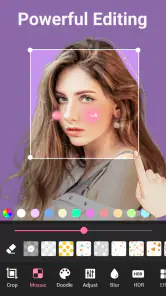
Yes, the app includes photo-editing capabilities as well as selfie camera effects. You can work with photos using tools such as cropping, rotating, and adjusting brightness and contrast, then add filters or stickers to shape the result. This makes it useful not only for taking a new selfie, but also for giving an existing image a quick edit before you save or share it.
What devices can run Beauty Camera - Selfie, Sticker?
Beauty Camera - Selfie, Sticker is a photography app for Android devices running Android 6.0 or later. Before downloading, check your device’s operating system version to make sure it meets that requirement. The app is developed by Leopard V7 and is intended for general audiences, so it may appeal to anyone looking for selfie effects and photo-editing tools.
What features does Beauty Camera - Selfie, Sticker offer?
Beauty Camera - Selfie, Sticker offers a wide range of features to enhance your selfies, including real-time beautification tools, hundreds of fun and cute stickers, and various filters to suit your mood and style. It also supports photo editing capabilities such as cropping, rotating, and adjusting brightness and contrast, making it a versatile app for all your selfie needs.
Is Beauty Camera - Selfie, Sticker free to use?
Yes, Beauty Camera - Selfie, Sticker is free to download and use. However, it offers in-app purchases for additional features and premium content like exclusive stickers and filters. This allows users to customize their experience further, though most of the core functionalities are available at no cost.
Pros
- User-friendly interface
- easy to navigate.
- Wide variety of filters available.
- Real-time beauty effects.
- High-quality photo output.
- Supports sharing to social media directly.
Cons
- Contains in-app ads that can be intrusive.
- Some features require in-app purchases.
- Can drain battery quickly.
- Occasional app crashes reported.
- Limited editing features for free version.
- Category
- Photography
- Version
- 5.3.6












