Music Player for Android
- 11.30K
- 4.6
- Installs
- 50.00M
- Price
- Free

Screenshots
Analysis by Reviewed
I tend to judge a music player by whether it can make familiar tracks sound better without turning a quick listening session into a settings project. That is where Music Player stands out for me: its equalizer and sound controls give local listening more room to adjust than the basic playback tools built into many phones. It is a free Android music and audio app from Leopard V7, and its 4.6 average across around 364,000 ratings suggests it has found a sizeable audience.
Why the sound controls matter
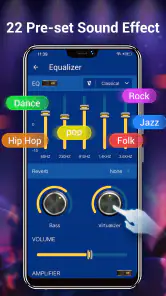
The headline capability is not simply that an equalizer is present, but that it gives me a practical way to shape playback around the music and listening setup I actually have. A track that sounds thin through small speakers may benefit from a different balance than one played through headphones. Bass boost and sound-changing options add further ways to experiment, though I would make small adjustments rather than pushing every effect at once. Heavy processing can make one song feel fuller while making another muddy.
For a useful starting point, I would change one setting at a time and listen to a familiar passage before and after. That makes it easier to tell whether an adjustment helps, instead of mistaking louder or bassier playback for better sound. If I switch between headphones and a car stereo, I would also revisit the balance for each setup rather than assuming one setting works everywhere. The app’s 7.3.2 version is available for Android 6.0 and newer, so it can suit a range of devices that are not running the latest Android release.
Where it fits into an everyday routine
The app is most convincing for people who already keep music files on their phone and want more control over how those tracks play. Imagine heading out for a commute with a playlist saved locally: playback does not depend on mobile data, and a quick equalizer adjustment can help compensate for headphones that make the bass feel weak. That is a straightforward, dependable use case, not a replacement for discovering or streaming new music.
Its offline focus is also useful when reception is unreliable or data use matters. I would prepare the tracks I want before leaving, then treat the player as a library for listening rather than a streaming service. That distinction matters: people who expect subscription catalogs, recommendations, or automatic access to online music may be better served by a dedicated streaming app. A traditional phone player may be simpler, but it can offer less room to alter the sound; this one makes tuning a more central part of the experience.
Seamless Interface and User Experience
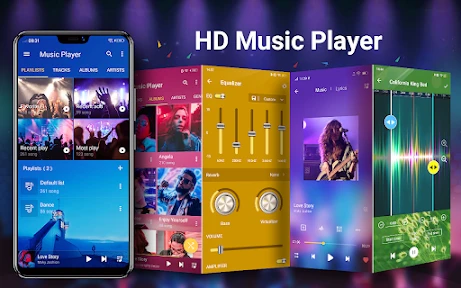
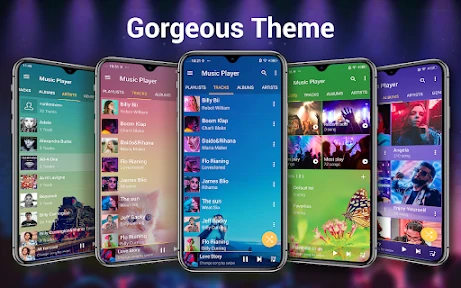
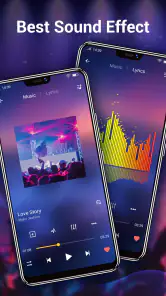
First things first, the user interface. The Music Player app rocks a clean and intuitive design. The moment you open it, you’re greeted with a sleek dashboard. Everything seems to be placed right where it should be, making navigation a breeze. Whether you’re tech-savvy or just getting started with smartphones, you’ll find your way around pretty effortlessly.
Features That Hit the Right Note
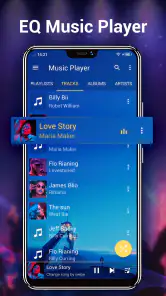
Now, onto the features. This app is packed with cool functionalities. It supports a variety of audio formats, allowing you to play almost any type of music file you have. Plus, the equalizer is a game-changer. It offers a range of presets to enhance your listening experience, and if you’re like me, who loves to tinker with settings, you’ll appreciate the customizability.
More From Our News Desk

Weather by Xiaomi Review: Clear at a Glance, Less Clear Up Close

X Under Pressure: Can It Recover When Posting Goes Wrong?

Clash of Clans Is Won Between the Battles

Android Auto Makes the Case for Quieter Car Software

MobiOffice: Transforming Mobile Productivity with Seamless Integration

EA SPORTS FC™ Mobile Soccer: Redefining Mobile Sports Gaming
One thing that caught my attention is the offline playback. You can download and save your favorite tracks to listen to anytime, anywhere, without worrying about data usage. It’s perfect for those long commutes or flights where Wi-Fi is sketchy at best.
Personalization and Customization
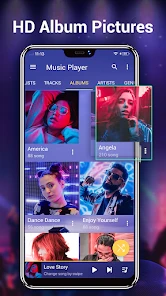
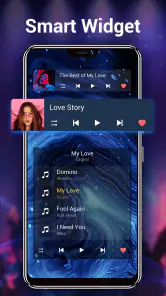
Personalization is key, and Music Player lets you do just that. From changing themes to adjusting the widget styles, you can tailor the app to fit your vibe. And let’s not forget the playlist management. Creating, editing, and organizing playlists is a walk in the park. You can even share your playlists with friends, spreading the musical love.
Moreover, the app integrates seamlessly with other services. Whether you’re pulling tracks from your cloud storage or syncing with your smartwatch, it’s all possible with a few taps. This integration capability makes it a versatile choice for anyone juggling multiple devices.
Final Thoughts
In conclusion, Music Player offers a robust and enjoyable experience for any music lover. Its user-friendly interface, extensive features, and customization options make it a standout choice among the sea of music player apps. While it might not be perfect, it certainly covers all the bases for a comprehensive music listening experience. So, if you're on the hunt for a reliable and feature-rich music player, give this one a shot. You might just find it to be the perfect companion for your musical journey.
Practical limits and a sensible choice
I would not choose this app just because I want a player to do everything. Its strengths are local playback and hands-on sound adjustment; those strengths are less valuable if nearly all my listening happens through online playlists or radio. Nor would I expect an equalizer to repair a poor recording or make every pair of headphones sound alike. It can shape the presentation, but the source and listening equipment still matter.
For a long trip, I would make a playlist in advance and check that the files are actually on the phone before leaving. That small habit avoids the confusion of expecting offline playback to fetch music that has not been saved locally. If I listen to albums as well as mixed playlists, keeping a few purposeful playlists—such as one for a commute and another for quieter listening—makes the library easier to use without constantly changing sound settings.
Who is likely to enjoy it
The app is a good fit if I want a free, adjustable player for music already available on my Android device, particularly if I enjoy comparing equalizer presets and refining the sound for different headphones. It is also approachable for someone who wants playlists and offline listening without making sound tuning a hobby. The Everyone content rating makes it suitable for a broad audience, while optional in-app purchases range from $0.99 to $9.99 per item; I would check the purchase prompt before confirming anything.
With more than 50 million installs and roughly 11,000 written reviews, Music Player has clearly reached well beyond a niche group of audio tinkerers. Still, popularity cannot tell me whether its interface or sound controls suit my habits, so I would start with a couple of familiar tracks and leave the effects modest. The app is free to try, and that makes a short listening test a sensible way to decide whether its extra control is useful in my own routine.
A small listening routine that pays off
When I try a new local player, I do not begin by tuning every song. I pick one track I know well, note how it sounds on the headphones I use most, and make a restrained adjustment. Then I test a second track with a different arrangement. If the change helps one recording but makes the other harsh or boomy, I know I have gone too far or chosen a balance that is too specific. This simple comparison is more useful than judging the equalizer by its sliders alone.
I would also keep a neutral reference in mind. If a preset sounds exciting at first but tires my ears after a few songs, it may not be a good everyday setting. Bass boost can be enjoyable for a short workout or a bass-light headset, but it is not automatically an improvement for spoken-word recordings or music with already prominent low end. Treating the controls as optional fine-tuning, rather than a feature that must always be active, makes the app more pleasant to live with.
Local files versus streaming habits
The practical question for many listeners is whether a local player can replace the app they already use. I would keep a streaming service if I rely on it to find unfamiliar artists, follow curated playlists, or move between a phone and other devices without thinking about where the audio is stored. Music Player is a better fit for tracks I already have and want to hear directly from the phone, especially when I value sound adjustments more than discovery tools.
That difference also affects how I prepare. Before a commute or flight, I would verify that the intended music is stored on the device and that the playlist contains the right files. A local library avoids depending on a connection during playback, but it also puts the preparation on me. If my listening changes constantly and I rarely keep music files, a streaming-first option will feel more convenient. If I have a settled collection, the directness of a player can be a welcome break from browsing online catalogs.
Getting more from playlists and settings
One useful habit is to build playlists around listening situations rather than trying to make one queue serve every mood. A short commute list can be easy to start without searching through a large collection, while a calmer playlist can keep me from reaching for stronger sound effects just to change the feel of a session. This is not about making a complicated library; a few clear groupings can make local playback feel intentional and reduce fiddling when I am already on the move.
I would avoid changing several sound controls between tracks, too. If a playlist jumps between different recordings, a single aggressive setting can make the quieter or more naturally balanced songs sound wrong. Small adjustments and a quick return to a familiar track help me decide whether the change is actually improving the overall queue. This is where the equalizer is most useful: not as a magic fix, but as a way to accommodate a particular pair of headphones or a listening environment.
What to expect from the app
Music Player is a music and audio app, and its central appeal is straightforward: it gives local listening a more hands-on sound option than many basic built-in players. The app is free, carries an Everyone age rating, and has been available since October 7, 2012. Its substantial audience—over 50 million installs—makes it familiar to many Android users, but I would still judge it by how comfortably it handles my own library and whether I like the sound controls.
The main limitation is one of fit rather than a flaw that applies to everyone. A listener who wants one tap to start an online mix may find the local-library approach less convenient, while someone who prefers an untouched, neutral presentation may not care about an equalizer at all. Likewise, the app cannot make a poor source recording clean or remove the character of the headphones being used. I see its processing as a way to adjust preference, not as a promise that every track will sound better.
Who should choose another kind of player
I would skip it if my music life is built around online radio, cloud-based discovery, or subscription catalogs and I do not keep tracks on my device. A streaming app is the more natural choice in that case because it puts browsing and access to a wide online collection first. I would also choose a simpler player if I never adjust audio and want the fewest decisions between opening an app and pressing play.
On the other hand, if I have albums or playlists stored locally and sometimes wish my headphones had a slightly different balance, this app gives me a reason to try more than the default player. Leopard V7 has kept the focus on music playback and sound shaping, and the current 7.3.2 release supports devices running Android 6.0 or later. That makes it a reasonable option for people using older compatible phones as well as newer ones, without asking them to move their listening routine to a streaming service.
A balanced recommendation
My recommendation is to install it when you have a clear use for local playback and want to experiment with the sound, not simply because a player advertises many controls. Start with tracks you know, listen at a comfortable volume, and change one adjustment at a time. If the result feels better across several songs and the library suits your habits, keep it as your everyday player; if you spend more time managing files than listening, a streaming-first alternative will probably serve you better.
There are optional in-app purchases, priced from $0.99 to $9.99 per item, so I would pay attention to any purchase screen and decide whether an extra is worthwhile before confirming it. The free starting point makes it easy to test the central experience first. For me, the strongest case is still a familiar collection, an offline listening routine, and the desire to make modest adjustments for different headphones. In that situation, Music Player feels like a practical tool rather than another service competing for my attention.
Music Player for Android Frequently Asked Questions
What is Music Player for Android?
Music Player is an Android app in the Music & Audio category, developed by Leopard V7. It is designed for listening to music and audio, with its short description simply calling it “Music Player.” Its store summary highlights a powerful equalizer, bass boost, and sound-changing tools, making it worth considering if you want playback and audio adjustments in one app.
What is the current version of Music Player, and when was it released?
Music Player was released on October 7, 2012, and its current version is 7.3.2. If you are deciding whether to install it, checking the version available for your device can help you understand what you will be downloading. The app is intended for Android devices running version 6.0 or later.
Is Music Player free to download, and does it include in-app purchases?
Music Player is free to download, so you can try its music and audio tools without paying upfront. The app also offers in-app purchases priced from $0.99 to $9.99 per item. If you prefer to avoid spending, check the purchase options before confirming any transaction and make sure the app’s free features meet your needs.
Who develops Music Player, and what Android version does it require?
Music Player is developed by Leopard V7 and requires Android 6.0 or later. Before downloading, check that your device meets this minimum requirement, since an older version of Android may not be compatible. The app is listed in the Music & Audio category and is intended for a general audience, with an Everyone content rating.
What are the key features of the Music Player app for Android?
The Music Player app for Android offers a range of impressive features including customizable playlists, an equalizer with multiple presets, support for various audio formats, and offline playback capability. Users can also enjoy gapless playback, lyrics display, and a sleek, user-friendly interface that enhances the overall music listening experience. Its store summary also highlights bass boost and sound-changing tools.
Pros
- User-friendly interface for easy navigation
- Supports all major audio formats
- Includes equalizer with presets
- Offline playback without ads
- Customizable themes and layouts
Cons
- Limited library management features
- No lyrics support for songs
- Occasional app crashes
- Some features require purchase
- Minimal integration with streaming services
- Category
- Music & Audio
- Version
- 7.3.2













