Phone by Grice
- 168.00
- 4.1
- Installs
- 5.00M
- Price
- Free
Screenshots
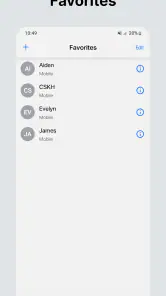
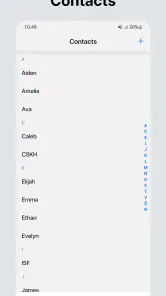
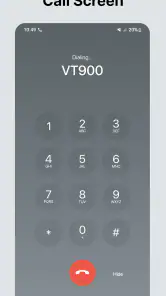
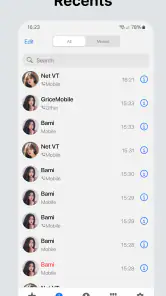
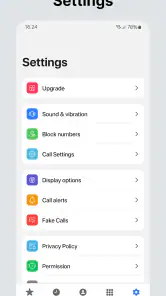
Analysis by Reviewed
I judge a phone app by a simple test: does it make everyday calls easier without making me learn a whole new routine? Phone by Grice is a free communication app from GriceMobile, and its appeal is the idea of keeping the basic calling experience straightforward. It has a 4.1 average from around 125,000 ratings and over 5 million installs, so it has reached plenty of Android users. I’d still treat those figures as context, not a guarantee that it will suit every phone or calling habit.
Cost, convenience, and the everyday call
The app is free to install, with optional in-app purchases listed from $1.49 to $84.99 per item. That makes it possible to try the basic app without paying upfront, but the wide purchase range is worth keeping in mind: I would check what an item includes before buying rather than assume it is necessary for ordinary calling. The app is rated for Everyone, and its current version is 5.11.6; it requires Android 8.0 or later.
What free access is worth
For me, the clearest value is the low-risk chance to see whether another dialer suits my habits. A free install means I can evaluate the everyday interaction before deciding whether it deserves a place on the home screen. The purchase range doesn’t tell me what any particular item adds, so I wouldn’t treat an optional purchase as a requirement or a shortcut to a better calling experience. I’d first use the app for ordinary calls and only consider spending if I could identify a specific benefit I wanted.
That distinction matters because a phone app is not valuable just because it has paid options. If the basic call flow feels awkward on my device, paying more would not fix the mismatch. If it feels comfortable, free access may already be enough. I’d make the decision based on repeated use, not on the assumption that a higher-priced item must unlock something essential.
A familiar approach, with tradeoffs
A dedicated dialer has a different job from messaging apps such as WhatsApp or a video-calling service: it is meant for placing and managing regular phone calls, not replacing every kind of conversation. If you mainly contact people through internet messaging, switching dialers may add little. If you use your phone number throughout the day, a direct calling app can feel more practical than opening a chat app and finding the right conversation first.
One useful way to judge any dialer is to check whether it works with your existing calling routine. Before relying on a new one, try a call to a familiar contact, then check how you reach recent calls and missed-call details. That small test can reveal whether the app feels natural on your device without making a change during an important call. I would also keep the phone’s built-in dialer in mind as a fallback while deciding.
Small checks that make the trial more useful
I’d test more than one kind of call before settling on a dialer: a contact I call often, a number I need to enter manually, and a return call from the recent-call list. Those steps show whether the app fits both planned calls and quick follow-ups. They also help separate a genuine preference for the interface from the novelty of trying something new.
More From Our News Desk

Weather by Xiaomi Review: Clear at a Glance, Less Clear Up Close

X Under Pressure: Can It Recover When Posting Goes Wrong?

Clash of Clans Is Won Between the Battles

Android Auto Makes the Case for Quieter Car Software

MobiOffice: Transforming Mobile Productivity with Seamless Integration

EA SPORTS FC™ Mobile Soccer: Redefining Mobile Sports Gaming
If I’m considering making it my default, I’d do that only after the test calls go smoothly. A practical sequence is to install it, learn where the main call controls are, and keep the familiar dialer available while I build confidence. That is especially useful for anyone who needs to place an urgent call without pausing to search through menus. If the app makes a frequent task slower, I’d switch back rather than force a new routine.
Who is likely to get value
I’d consider it if I wanted a free option to try for everyday calls and preferred a dedicated phone app over handling everything in a messaging service. It is less compelling if my current dialer already fits my needs, or if I’m looking for a full communications hub with messaging and video as its main focus. The best choice depends on which calls I actually make, not just on the promise of a cleaner interface.
It may suit someone who is comfortable comparing dialers and wants to see whether a different calling app feels more natural. It is a weaker fit for a person who wants one place for chats, shared media, and video conversations, because a dialer is not a substitute for those channels. I’d also be cautious if I rely on a familiar setup for work or caregiving: first confirm that the basic tasks I depend on remain easy before changing anything important.
A realistic day-to-day test
For a realistic example, imagine calling a family member while heading home, then later returning a missed call from a service provider. A dialer earns its place when those familiar tasks are easy to find and repeat. I’d test the experience at a quiet moment first, rather than assume the app will behave identically across every Android phone.
I’d add one more check to that routine: after the return call, look at the recent-call history and make sure I can recognize which call I need to follow up on. That is a small detail, but it affects whether the app helps during a busy day, when I may not remember a number or the exact time someone called. A quick practice run with a low-stakes call is more useful than discovering a confusing layout when I’m in a hurry.
My experience with the basics
Have you ever wished for a no-nonsense, efficient calling app that just does what it's supposed to do without any frills? Well, let me introduce you to Phone by Google. This app is all about simplicity with a sprinkle of smart features that make your calling experience just a tad bit better.
When I first downloaded Phone by Google, I was immediately struck by its clean, minimalist interface. It’s like walking into a well-organized room where everything is in its right place. No clutter, no distractions—just a simple, intuitive layout that makes navigating the app a breeze.
Call Quality and Experience
One of the standout features of this app is the call quality. I’ve used a fair number of calling apps, and I must say, the clarity here is top-notch. It feels like Google has really put in the work to ensure that every word comes through crystal clear. Plus, the app's smart features, like call blocking and spam detection, are incredibly handy. It's like having a personal assistant that screens calls for you, ensuring you only answer the ones that matter.
Integration and Usefulness
Another aspect worth mentioning is how seamlessly this app integrates with other Google services. If you’re already in the Google ecosystem, you’ll find Phone by Google a natural extension of your daily digital interactions. The integration with Google Duo is especially nifty, letting you switch between voice and video calls effortlessly.
Oh, and did I mention the visual voicemail? It’s a game-changer. No more dialing in to listen to messages; you can read them directly in the app. This feature alone makes managing missed calls so much easier.
Comparing it with the usual alternatives
When I compare this kind of app with a phone’s built-in dialer, the built-in option has one practical advantage: it is already part of the routine, so there is no learning curve or reason to change defaults unless something feels lacking. A separate dialer is worth trying when I want to compare the calling experience for myself, but familiarity is a real benefit, not a trivial one. If my existing app makes calls and handles follow-ups well, I would need a clear personal reason to switch.
Messaging apps solve a different problem. They are convenient when a conversation includes text, photos, or video, and they can keep those exchanges together. A phone dialer is more direct for ordinary calls to a number, including people or services who may not use the same messaging platform. I would choose based on the conversation: use a messaging service when its extra channels matter, and a dedicated phone app when I simply need to call.
That comparison also helps set expectations. I wouldn’t install a dialer hoping it will replace a full chat app, nor would I expect messaging tools to be the best way to manage every regular phone call. The useful question is whether this app improves the specific part of communication I do most often. If the answer is no after a fair trial, keeping the default is a perfectly good outcome.
Final Thoughts
In a world where apps seem to be in a race to add more and more features, Phone by Google takes a refreshing step back. It focuses on doing one thing and doing it well: making phone calls. Whether you're chatting with family or catching up with friends, this app ensures the experience is smooth and hassle-free.
If you’re on the lookout for a reliable, straightforward calling app, look no further. Phone by Google has got your back, making every call feel like you're just a stone's throw away from the person on the other end.
My verdict: test it on the phone you actually use
My recommendation is cautious rather than automatic. A dialer is closely tied to a phone’s calling setup, so I’d install it only on a compatible Android device and check that its everyday controls suit me before making it my default. The release date, May 23, 2023, gives useful context for the app’s history, but the practical question is still whether it fits the device and habits I have now.
There are also a few points I would verify through hands-on use. Call handling and voicemail can depend on the phone, carrier, and local availability, so I wouldn’t plan around a feature until I had tried it with my own setup. Likewise, spam controls are helpful only if their behavior matches my preferences; I’d review how calls are flagged and blocked before trusting them to screen important numbers. A conservative approach is to keep an eye on missed calls and blocked-call records while learning the app.
That is where a dedicated dialer can differ from the usual alternatives. Messaging services are more useful when I need text, photos, or video in the same thread, while the phone’s existing dialer may be the simpler choice if it already handles contacts and calls well. Phone by Grice makes most sense as a focused alternative, not as a reason to abandon tools that already work. If I need a broader communications app, I’d choose one built around those other channels instead.
The app has 168 reviews alongside its much larger rating count, another reason I’d put more weight on trying it myself than on assuming every user has the same experience. I’d also treat purchases as optional until I understand exactly what they add. For someone who wants a free starting point for regular calls and is comfortable testing a dialer before relying on it, it is reasonable to try. If I depend on a familiar default setup and have no problem with it, skipping the switch is just as sensible.
A sensible buy-or-skip decision
I’d try it if I use standard phone calls often, want to compare a dedicated dialer with the one already on my device, and am willing to check the core routine before relying on it. With a free install, that trial can answer the most important question—whether it feels convenient in my hands—without committing to a purchase. The app is intended for everyone, but that broad age suitability doesn’t mean every dialer will be the right practical choice for every person or phone.
I’d skip it if I’m happy with my current calling setup, if I mainly communicate through internet chats, or if I expect one app to combine calls, messaging, and video into a complete hub. I would also avoid buying an optional item until I had a clear understanding of what it offers and a personal reason to want it. My bottom line is simple: give it a careful try for ordinary calls, keep a fallback while learning, and let daily usefulness—not the promise of a new interface—decide whether it stays.
Phone by Grice Frequently Asked Questions
What is Phone by Grice, and what does it do?
Phone by Grice is a communication app presented as a simple, beautiful phone app for your smartphone. If you are considering it as an alternative to the dialer already on your device, look at its app page and screenshots to understand what it offers and how it fits your needs. Its description is focused on a phone app rather than a broader messaging service.
Who is Phone by Grice intended for?
Phone by Grice is aimed at people looking for a phone app in the communication category. Its content rating is Everyone, making its stated age classification suitable for a broad audience. That rating describes the app’s age suitability; it does not necessarily mean every feature will be useful to every person. Consider whether you want a dedicated phone app before downloading.
Can I install Phone by Grice on my Android device?
Phone by Grice requires Android 8.0 or later. Check your device’s operating system before downloading to make sure it meets this requirement. If your phone runs an older version, you may need to update it before installing. The app’s current version is 5.11.6, so keeping your device and app updated can help maintain compatibility.
Is Phone by Grice free to download, and are there optional purchases?
Phone by Grice is a free communication app, so you can download it without an upfront purchase. It also offers in-app purchases, with items ranging from about $1.49 to $84.99. Consider checking the purchase options in the app before buying anything, especially if you plan to use it mainly for basic calling features.
Who develops Phone by Grice, and what kind of app is it?
Phone by Grice is a communication app developed by GriceMobile. Its store summary presents it as a simple, beautiful phone app for your smartphone, making it relevant to people looking for a calling-focused app. The app is rated for Everyone, so its stated age classification is suitable for a broad audience.
Pros
- User-friendly interface enhances accessibility.
- Efficient call blocking reduces spam.
- Smooth integration with contacts and apps.
- High-quality voice calls ensure clear communication.
- Customizable themes personalize user experience.
Cons
- Limited features on free version.
- Occasional app crashes reported.
- Some users find ads intrusive.
- Compatibility issues with older devices.
- Slow updates on new features.
- Category
- Communication
- Version
- 5.11.6











