Paint
- 548.00
- 3.7
- Installs
- 5.00M
- Price
- Free

Screenshots
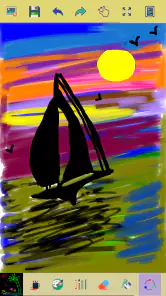
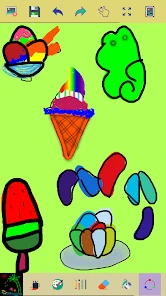
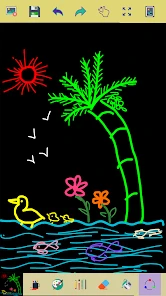

Analysis by Reviewed
When I need to put an idea on screen quickly, I care less about a deep toolkit than whether I can get a line down without a long setup. Paint is aimed at that uncomplicated kind of drawing: a mobile canvas for casual marks, small sketches, and brief bursts of creativity. I see its strongest appeal in being easy to approach, while its limits matter once a drawing calls for careful revisions or a more elaborate finish.
Quick access matters more than a crowded toolkit
On a phone, a drawing app competes with messages, errands, and all the small interruptions of the day. I would use Paint when an idea is easier to show with a sketch than to explain in a text: a rough sign layout, a simple map, or a note about where a piece of furniture might fit. The benefit is not that it replaces a notebook or a dedicated studio; it is that the drawing can begin right when the thought occurs.
That speed is mostly about keeping the task small. I would choose a color, sketch the main outline, and add only the marks that clarify the idea. Zoom is useful for a detail, but it is not a substitute for a larger canvas or more advanced editing. If I were planning a polished poster or a multi-stage illustration, I would start in a tool built for that kind of work instead.
Where a casual sketch can be genuinely useful
A realistic everyday use is planning a change at home. While standing in a room, I might open the canvas and draw a quick rectangle for a shelf, mark a doorway, and note where a lamp could go. I would not treat the result as a measured floor plan; it is a visual prompt that helps me remember the arrangement and talk it through later. Zooming into a corner can help make a small mark legible, but the drawing remains informal.
It can also serve as a low-pressure place to test a color idea or doodle while waiting for an appointment. For a child who wants to make a simple picture, a direct drawing surface can be less intimidating than a large creative suite with many panels and settings. I would still keep an eye on how the child uses any device, but the Everyone content rating makes the app broadly suitable from an age-classification perspective.
One useful habit is to decide what the sketch needs to communicate before drawing. If I am making a quick diagram, I use a few distinct colors to separate objects or steps rather than decorating every shape. That makes the result easier to read and reduces the temptation to keep refining something whose purpose is simply to explain an idea. For a rough visual note, clarity is more valuable than polish.
What the limited undo changes about the workflow
A short undo history affects how I approach a drawing. I would not build a complicated image through dozens of delicate strokes and assume I could later reverse every choice. Instead, I would work from large shapes toward smaller details, pausing after a section looks right. If one mark goes wrong, I would use undo promptly; if the error is already beyond the available history, redrawing a small part may be simpler than trying to rescue the whole picture.
More From Our News Desk

Weather by Xiaomi Review: Clear at a Glance, Less Clear Up Close

X Under Pressure: Can It Recover When Posting Goes Wrong?

Clash of Clans Is Won Between the Battles

Android Auto Makes the Case for Quieter Car Software

MobiOffice: Transforming Mobile Productivity with Seamless Integration

EA SPORTS FC™ Mobile Soccer: Redefining Mobile Sports Gaming
This is a real trade-off rather than a deal-breaker for every task. A limited undo can encourage a light, exploratory style where each stroke is not precious. It becomes frustrating when I am experimenting with fine linework or trying to preserve an earlier version while testing alternatives. For that sort of work, a drawing app with broader revision tools is the safer choice.
I would also avoid using a tiny phone screen as if it were a full-size drafting table. A finger covers part of the canvas, and repeated zooming can make it harder to judge how the whole image reads. I find it more sensible to check the overall composition between detail passes: zoom in to place a mark, then return to the full view before adding more. That simple rhythm can prevent a carefully drawn corner from overwhelming the rest of a sketch.
How it fits beside other art apps
The usual alternatives range from basic note-taking tools with a pen to full-featured illustration apps. A notes app may be more convenient when a drawing needs to sit beside typed information, while a professional art app is better for projects that depend on layers, refined brushes, or detailed adjustments. Paint occupies the simpler end of that spectrum: I would choose it when drawing itself is the point and I do not want a large interface to learn first.
That comparison is about the kind of work, not a claim that one tool is universally better. Someone who sketches for fun or needs a quick visual reminder may find a focused canvas more inviting. Someone who regularly produces finished artwork, edits images, or needs a dependable archive of revisions will likely outgrow it. The right question is whether the task ends with a simple picture or continues into a more demanding creative process.
Before making something important, I would try a small test drawing and check that the available controls match my expectations. That is especially worthwhile if I plan to share the result, because a casual sketch workflow is not automatically the same as a publishing workflow. For a throwaway idea, I can start drawing and judge the app as I go; for work I need to keep, I prefer to understand how I will retain it before investing time.
People often wonder whether a basic drawing app is suitable for a first creative project. In my view, it is a reasonable place to begin when the goal is a sketch, a doodle, or a simple diagram rather than a lesson in advanced illustration. If the first project needs many revisions or a highly controlled finish, beginning in a more capable art tool avoids switching midway through.
Speed, stability, and device expectations
I would expect a lightweight drawing task to feel more immediate than working inside a complicated creative suite, but that is an expectation based on the app’s simple purpose, not a promise about every device or session. Perceived speed also depends on the drawing itself and how comfortably I can use the screen. For quick outlines and color experiments, the appeal is the short path from opening the app to making a mark.
For heavier use, such as filling a canvas with repeated fine details, I would pay attention to whether the controls and screen remain comfortable rather than assuming a particular performance level. If the experience starts to feel awkward, reducing the number of tiny corrections and returning to a broader view can make the task easier. I would not choose it on the assumption that it offers the resource controls or project management of a large studio app.
Paint is made by ng-labs and belongs to the Art & Design category. It is free, has a 3.7 average from around 17,000 ratings, and has passed 5 million installs. Version 3.6.2 supports Android 6.0 and later, so it can suit many Android devices, including older ones that meet that requirement. Those figures provide context for its reach, but they do not tell me how it will feel on a particular phone; I would try a short sketch on my own device before relying on it for a longer session.
Getting Started with Paint
One practical way to use it is for quick visual notes: I might sketch the rough shape of a room layout, mark where a shelf should go, or draw a simple reminder while waiting for coffee. The zoom function is useful when those small marks need to be placed more carefully. I would keep the goal modest, though: this kind of lightweight canvas suits a rough idea better than a polished illustration that needs many layers and precise editing.
Features That Spark Creativity
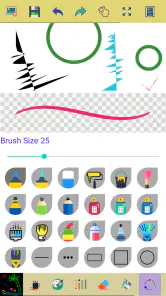
One of the standout features is the extensive range of brushes. From oil and watercolor to pencils and airbrushes, the app offers a plethora of tools that mimic real-life painting techniques. I found myself experimenting with different brushes, layering textures, and creating depth in my digital artwork.
The color palette is another aspect that deserves a mention. With millions of colors at your disposal, you can mix and match shades to your heart's content. The app even allows you to save your favorite color combinations for future projects, which is a nifty feature for those indecisive moments.
Quick sketches, with realistic limits
Paint is a simple drawing app from ng-labs, in the Art & Design category. It is free, rated for Everyone, and has a 3.7 average from around 17,000 ratings; more than 5 million installs suggest that many people use it for casual drawing. The current version is 3.6.2, and it runs on Android 6.0 or later. Those details make it approachable for a broad range of Android users, but they do not turn it into a specialist studio.
For a speedy start, I would decide on the subject before opening the canvas and keep the first pass loose. Zoom in only when a small edge or detail genuinely needs attention; constantly pinching in and out can interrupt the flow of a quick sketch. Since the app is centered on drawing with colors, zoom, and a limited undo history, I would also avoid treating it like a full document editor. If a mistake is several strokes back, it may be easier to redraw that small area than to expect a long chain of edits to be recoverable.
Ease of Use
Paint is designed with simplicity in mind. You can easily zoom in and out of your canvas with a pinch of your fingers, allowing for detailed work on specific areas. The undo and redo buttons are conveniently placed, so any accidental strokes can be corrected without a hitch.
For those who love sharing their work, the app has integrated social media sharing options. With just a tap, you can showcase your masterpiece to friends or the world, gathering likes and comments that fuel your artistic spirit.
In everyday use, I would think of reliability as a workflow question, not a promise of flawless performance. Make broad shapes first, pause to check the composition, then add details; that reduces the chance of relying on undo for every small change. If the device feels sluggish with a drawing open, simplifying the sketch and avoiding unnecessary zooming is a sensible response. I would save or share work at natural stopping points rather than assuming every session will continue uninterrupted.
Choosing the right tool for the job
Compared with a basic sketching alternative, this app’s appeal is its directness: open it, choose a color, and start drawing without first learning a complicated creative suite. That makes it a reasonable pick for doodles, simple diagrams, or a child’s casual drawing session. For detailed digital painting, professional illustration, or a workflow that depends on extensive undo and sophisticated editing controls, I would choose a more capable art app instead. A focused tool can be faster to understand, but its simplicity also sets a ceiling on what is comfortable to produce.
Paint is most suitable for someone who wants an uncomplicated place to make a quick mark, experiment with color, or sketch an idea on an Android phone or tablet. It is less suited to artists who need a carefully managed project from first draft through final export. The Everyone age rating and free price make it easy to try, while the modest rating reminds me that a straightforward drawing experience will not satisfy every user. I would test it with a small, low-stakes sketch first and see whether its controls fit the way I like to draw.
Final Thoughts
In a nutshell, Paint is a must-have app for anyone interested in digital art. It combines powerful features with an easy-to-use interface, making it suitable for beginners and seasoned artists alike. The app not only provides a platform to create but also inspires you to explore the endless possibilities of your imagination.
If you're looking to add a splash of color to your life, give Paint a try. It's more than just an app; it's a gateway to a world of creativity. So, what are you waiting for? Grab your digital brush and start painting your dreams into reality!
Paint Frequently Asked Questions
Can I use Paint for a quick sketch or simple drawing?
Paint is presented as a simple paint app for drawing images, choosing from multiple colors, zooming in, and undoing a few strokes. That makes it a practical option to consider for quick sketches and uncomplicated drawing sessions on a mobile device. Its focus is on basic creative work rather than a large collection of specialist tools.
Who develops Paint, and what kind of app is it?
Paint is an Art & Design app developed by ng-labs. It focuses on mobile painting and drawing, with a straightforward purpose that suits people looking for a simple way to make images on their device. The app is rated for Everyone, so its stated age category is suitable for a broad audience. Its simple drawing focus makes it a straightforward option to consider for mobile creative use.
Does Paint work on older Android devices, and what should I check before downloading?
Paint is an Art & Design app from ng-labs, with a minimum Android requirement of version 6.0. Check your device’s operating system before downloading to make sure it meets that requirement. The app is rated for Everyone, so its stated age category is suitable for a broad audience. Its simple drawing focus makes it a straightforward option to consider for mobile creative use.
What is Paint, and what platforms is it available on?
Paint is a versatile drawing and painting application designed for both amateur and professional artists. It offers a wide array of tools and features that allow users to create stunning digital artwork. Paint is available on both Android and iOS platforms, making it accessible to a large audience. Users can enjoy the flexibility of working on their creative projects from their smartphones or tablets, anytime and anywhere.
What are the key features of Paint that make it stand out?
Paint stands out with its comprehensive set of features, including a variety of brushes, customizable color palettes, layers, and blending modes. These tools allow artists to create intricate and detailed artwork. Additionally, Paint supports high-resolution canvases, enabling artists to produce professional-quality digital paintings. Its user-friendly interface ensures ease of use even for beginners, making it a popular choice among digital art enthusiasts.
Pros
- User-friendly interface for all ages.
- Wide range of drawing tools available.
- Supports multiple file formats.
- No internet connection required.
- Lightweight and fast performance.
Cons
- Limited advanced features for professionals.
- No support for layers or advanced editing.
- Basic color palette options.
- No collaborative features available.
- Limited export options for high-quality prints.
- Category
- Art & Design
- Version
- 3.6.2