OtterAI Transcribe Voice Notes
- 4.31K
- 4.3
- Installs
- 5.00M
- Price
- Free

Screenshots
Analysis by Reviewed
I started using OtterAI as a way to catch details I would otherwise miss while listening, and it works best when I treat the transcript as a draft to review rather than a perfect record. In a meeting or interview, I can stay focused on the conversation instead of trying to write every sentence down. That shift is useful, but it also means I make time afterward to check names, figures and decisions against the audio.
Trust starts with the recording itself
Otter.ai develops this productivity app, which is free to install and available to people of all ages. It has a 4.3 average from around 25,000 ratings, and more than 5 million installs. Those figures suggest it is widely used, but popularity alone is not a reason to record a sensitive conversation. I’d first consider who is speaking, what is being discussed and whether everyone is comfortable with a recording.
The practical question is not only whether transcription is convenient, but whether the situation is appropriate for it. I would avoid capturing confidential conversations unless I had permission and understood the relevant workplace or personal rules. For a private voice memo or a routine planning discussion, the trade-off may feel straightforward; for health, legal, financial or personnel matters, I’d be much more cautious.
Keep control of the workflow
Before relying on a transcript, I recommend checking the app’s current permission prompts and account settings on your own device. I don’t assume that a recording tool needs access to anything beyond what its task requires, and I pay attention when Android or iOS asks for microphone access. If a permission request doesn’t make sense for the action I’m taking, I pause rather than tapping through automatically.
I also decide in advance what I need from each recording. If I only want a reminder, I keep the session focused and review the resulting text soon after. If it is a meeting record, I check the transcript, correct important wording and make sure any shared notes go only to the intended people. These habits give me more agency than simply recording everything and hoping the app sorts it out later.
Where it fits in a real day
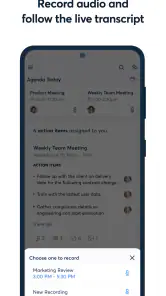
One realistic use is a project meeting where I need to contribute rather than act as the group’s typist. I can record, follow the live transcript when useful, and later search for a term that points me back to a relevant passage. I still verify a decision before treating it as settled: speaker labels and searchable text help me navigate, but they don’t replace listening carefully or confirming an action with the people involved.
What it does well—and where I slow down
The useful distinction is between capturing a conversation and producing polished minutes. OtterAI helps with the first and can make the second easier, but I wouldn’t send an unreviewed transcript as an official record. Several people speaking at once, unfamiliar names, specialist vocabulary or a poor connection can make the text less dependable. I find it safer to mark uncertain passages while the discussion is fresh and check them against the audio before sharing.
More From Our News Desk

Weather by Xiaomi Review: Clear at a Glance, Less Clear Up Close

X Under Pressure: Can It Recover When Posting Goes Wrong?

Clash of Clans Is Won Between the Battles

Android Auto Makes the Case for Quieter Car Software

MobiOffice: Transforming Mobile Productivity with Seamless Integration

EA SPORTS FC™ Mobile Soccer: Redefining Mobile Sports Gaming
That review step is also a good way to decide whether the app suits your routine. Students can use it to revisit a lecture, provided recording is permitted; journalists can use it to locate passages in an interview, while still checking quotations against the recording. It is less suitable when discretion matters more than convenience, or when the task requires a guaranteed verbatim record without human checking.
Choosing the right kind of capture
For a student, the strongest use case is not necessarily transcribing every lecture from beginning to end. I’d record a session where the lecturer moves quickly through unfamiliar material, then use the text to locate a definition or explanation while revising. My own outline still matters: it forces me to decide what is important, while the transcript can help recover a detail I missed. Anyone considering this for class should first check the instructor’s rules and the expectations of other students.
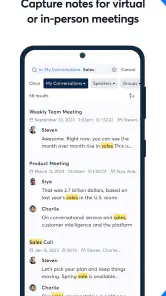
For interviews, the app can make a long recording easier to navigate, especially when I remember a phrase but not when it was said. I would use search to find the passage, then replay it before quoting or publishing. Search is a shortcut to evidence, not evidence by itself. This workflow is useful for research conversations and personal interviews, but it does not remove the need to verify wording or context.
It can also help after a routine work discussion: rather than trying to write a complete transcript into polished minutes, I can search for the topic, check the relevant portion and write a short summary in my own words. That separation keeps the record readable and makes it easier to distinguish what was actually said from what I understood it to mean. For occasional reminders, though, a quick typed note may be faster than setting up a recording and reviewing it later.
What is OtterAI?
Alright, first things first. OtterAI is a voice transcription app available on both Android and iOS. It's designed to help you transcribe voice notes into text. Imagine sitting in a meeting, or maybe you're in a lecture and your brain just can't keep up with the speed of information. That's where OtterAI steps in. It listens, it learns, and it transcribes, all in real-time!
Features that Stand Out
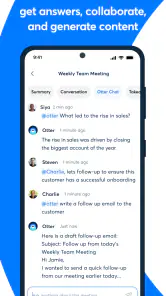
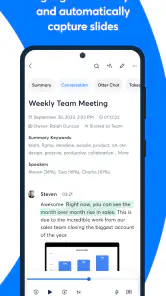
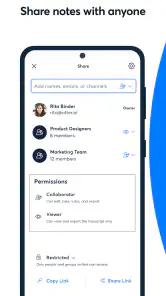
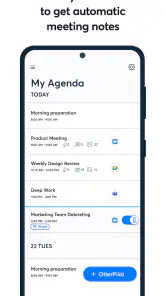
One of the standout features of OtterAI is its ability to provide real-time transcription. You simply start recording, and boom, your words magically appear on the screen. It's almost like having a personal stenographer in your pocket. Besides, it’s not just about transcription. OtterAI offers a collaborative platform where you can share your notes with others and even integrate with platforms like Zoom. Yes, you heard it right, you can transcribe your Zoom meetings! How cool is that?
Another feature I absolutely love is the speaker identification. If you’re in a meeting with multiple people, OtterAI can differentiate and tag speakers. This makes reviewing notes later a breeze because you know exactly who said what. Plus, the app allows you to search through your transcriptions with keywords. Need to find a specific part of a meeting? Just type in a keyword and OtterAI pinpoints the exact moment you need to revisit.
User Experience
Using OtterAI is as simple as it gets. The interface is clean and intuitive which means you don't need to be a tech guru to get the hang of it. The app is designed to be user-friendly with easy navigation that even my grandma could use. It requires an internet connection for the real-time transcription, but it works like a charm when connected to Wi-Fi or mobile data.
There’s also an option to edit and highlight text after the transcription is done. This is super handy for those important points you don’t want to miss. And for those who are always on the go, OtterAI has a mobile app that syncs across all your devices. So, whether you’re using your phone, tablet, or laptop, you’re covered.
A practical routine for better notes
I get more value when I give each recording a clear purpose. For a class, I might name the session by topic and use a few search terms I expect to need later; for an interview, I note the questions or themes I want to revisit. This small bit of structure makes keyword search more useful than relying on a long transcript as one undifferentiated block. I also review soon after recording, while I can still remember the context behind a phrase that looks ambiguous on screen.
For recurring meetings, I’d use the transcript as a navigation aid: search for a project name, jump to the relevant passage, then turn confirmed decisions into a concise summary of my own. That is often quicker than replaying the whole recording, yet safer than assuming a generated transcript has captured every nuance. If several people speak quickly, I’d avoid treating speaker labels as proof of who made a commitment; I’d confirm it with the team.
How it compares with ordinary note-taking
Compared with typing notes into a document, OtterAI can preserve more of the conversation and let me stay present, but it creates a review task that handwritten or selective notes do not. A basic voice recorder is a simpler alternative if I only need audio and prefer to transcribe manually later. A notes app is better when I already know the key points and want a tidy, edited record rather than a searchable conversation. OtterAI makes most sense in the middle: when finding exact moments matters, but I can still spend time checking the result.
One useful trade-off is to combine methods instead of asking the app to do everything. I can keep a short list of decisions or follow-up tasks while the transcript captures surrounding context. That way, if a name or technical term is misheard, the important action is still in my own notes. I would also test the workflow with a low-stakes recording before depending on it for a class, client discussion or important meeting.
Limits that matter in practice
Recording quality and conversation style shape the result, so I would not assume a transcript will be equally useful in every room. A quiet one-to-one conversation is easier to follow than overlapping voices or a discussion full of names and specialist terms. When accuracy matters, I keep the original audio available and check the passages that affect a decision, quotation or task. If I need a legally dependable record, I would choose a process built around the relevant requirements rather than rely on an automated draft alone.
There is also a privacy trade-off in convenience. A searchable transcript can be easier to revisit than a voice file, but that makes it important to consider what the recording contains and who can access any notes I choose to share. I would avoid recording simply because the feature is available. For sensitive material, I would first confirm consent, workplace rules and the app’s current account and privacy choices; if those checks do not fit the situation, ordinary notes or no recording may be the better option.
People who want a quick capture without reviewing text may find this workflow more effort than it is worth. So might anyone who needs every word to be exact, has unreliable connectivity during a session, or would rather keep audio entirely local. A standard recorder gives more direct control over an audio file, while manual notes avoid creating a full conversation record. I see OtterAI as a practical middle ground, not a universal replacement for either approach.
Cost, compatibility and a cautious verdict
The app is free, with in-app purchases ranging from $12.99 to $99.99 per item, so I’d try the basic workflow before paying for anything. The current version is 3.88.0-4661 and it requires Android 6.0 or later. Those details matter if you’re installing it on an older phone or deciding whether its paid options fit a regular workload. I would compare the available purchase choices inside the app with how often I actually record, rather than assuming a subscription or upgrade will save time for occasional use.
My overall view is that OtterAI is most helpful for people who regularly need to revisit spoken information and are willing to proofread it. It is a weaker fit for someone who wants private, offline-first capture, a flawless transcript without editing, or no account-based workflow. I’d start with a short, non-sensitive recording, check how well the text serves my needs, and only then decide whether to make it part of a routine. Used selectively and reviewed carefully, it can reduce the burden of note-taking without asking me to trust every word blindly.
Final Thoughts
In the end, OtterAI is a game-changer for anyone who needs to transcribe audio to text. It’s perfect for students, professionals, journalists, or just about anyone who wants to keep their hands free while capturing important info. The seamless integration with various platforms and the ability to share notes adds a layer of convenience that I didn’t know I needed until now. So, if you’re tired of missing out on important details or just want to make your life a tad bit easier, give OtterAI a try. Trust me, you won’t regret it.
OtterAI Transcribe Voice Notes Frequently Asked Questions
Can I use OtterAI to capture and review spoken information later?
Yes. OtterAI is designed to record audio and turn speech into written notes, which can make spoken information easier to revisit. It is aimed at uses such as meetings, lectures, interviews, and voice memos. The transcript gives you text to review rather than relying only on memory, while the recording can remain useful when you want to check what was said.
Can OtterAI record video calls as well as voice notes?
OtterAI’s store summary describes it as an AI note taker and meeting summarizer that can record audio, voice memos, and video calls. That makes it relevant if you want a single productivity app for spoken material from different settings. Its central purpose is to capture speech and make it available as notes, so it may suit people who regularly revisit conversations.
Does OtterAI help turn meetings into summaries?
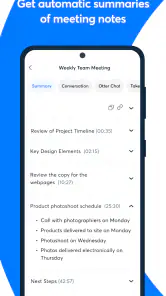
Yes. OtterAI is presented as an AI note taker and meeting summarizer, in addition to its role in recording audio and transcribing speech. This can help when you want a written record of a discussion that is easier to scan later. It is still sensible to review important details in the transcript or summary, especially when decisions or precise wording matter.
Is OtterAI suitable for recording lectures, interviews, and everyday voice notes?
OtterAI is a productivity app built around recording audio and turning speech into written notes, making it relevant for lectures, interviews, meetings, and personal voice memos. Its store summary also describes it as an AI note taker and meeting summarizer. You can use it when you want spoken information captured in text that is easier to review later.
What is OtterAI and how does it work?
OtterAI is a voice transcription app designed to capture and convert spoken language into written text. It uses advanced AI algorithms to transcribe voice notes in real-time, making it easy for users to record meetings, lectures, or personal notes. The app synchronizes audio, text, and speaker identification, allowing users to search and organize transcriptions efficiently.
Pros
- Intuitive user interface
- Accurate transcriptions
- Supports multiple languages
- Real-time transcribing
- Easy sharing options
Cons
- Requires internet connection
- Limited free version
- Privacy concerns over data
- May struggle with accents
- Occasional transcription errors
- Category
- Productivity
- Version
- 3.88.0-4661











