Oticon Companion
- 1.55K
- 4.3
- Installs
- 1.00M
- Price
- Free

Screenshots
Analysis by Reviewed
When I’m choosing a hearing-aid app, the first question is practical: can I make a small adjustment quickly, without turning a normal conversation into a fiddly phone task? Oticon Companion is Oticon A/S’s free medical app for people who use compatible Oticon hearing aids. Its focus is everyday control from a phone, and the app makes most sense when it is treated as a companion to the hearing aids rather than a replacement for professional fitting or advice.
Getting Started with Ease
First things first, downloading the app is a breeze. It's available on both Android and iOS, so no worries about compatibility. Once installed, connecting it to your hearing aids is as simple as pie. The setup wizard is user-friendly, guiding you through each step without any hiccups. It's like having a tech-savvy buddy right there with you!
Before relying on it during a busy day, I’d take a calm moment at home to pair the hearing aids and explore the controls. That gives you time to notice whether the phone recognizes your devices and to learn where the settings sit. If pairing is awkward, or your hearing aids do not appear, the app cannot solve that by itself; checking that you have the right Oticon devices and following the on-screen connection steps is the sensible first move.
Make Setup Part of Your Routine
I’d also try the app from the place where I’m most likely to use it, rather than assuming every adjustment will feel obvious when I’m out. Learn which screen gets you to the controls you actually use, then leave the less familiar options for later. This is a small step, but it can save you from concentrating on the phone at the exact moment you want to listen to someone.
If you are helping a family member set things up, it is worth letting them handle the phone themselves once pairing is done. A helper can guide the first connection, but the wearer benefits from knowing how to check the battery or reach a familiar control without needing someone else each time. That matters particularly when a quick change would otherwise interrupt a conversation or outing.
Your Personal Hearing Assistant
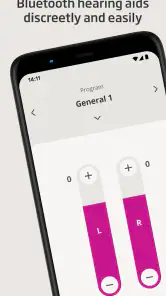
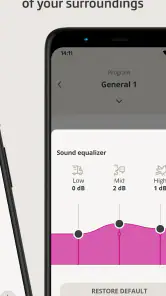
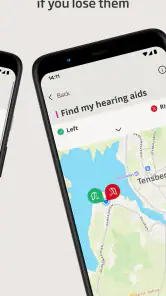
What I absolutely love about this app is how it acts as a personal assistant for your hearing needs. It allows you to customize sound settings according to your environment. Whether you're in a noisy restaurant or a quiet library, you can adjust the settings with a few taps. It’s like having a remote control for your ears—how cool is that?
In practice, I’d make a quick adjustment before the situation becomes difficult rather than trying to navigate menus while someone is speaking. For example, if I’m joining friends in a lively café, I can step aside briefly, use the phone to make a change, then put it away and focus on the conversation. That small bit of preparation is a useful trade-off: phone control is convenient, but it still takes attention away from listening while you operate it.
More From Our News Desk

Weather by Xiaomi Review: Clear at a Glance, Less Clear Up Close

X Under Pressure: Can It Recover When Posting Goes Wrong?

Clash of Clans Is Won Between the Battles

Android Auto Makes the Case for Quieter Car Software

MobiOffice: Transforming Mobile Productivity with Seamless Integration

EA SPORTS FC™ Mobile Soccer: Redefining Mobile Sports Gaming
A realistic day might begin with a battery check at home, followed by a small sound adjustment before a busy lunch, then a phone call on the way back. The benefit is not that the app makes every place sound perfect; it gives you another way to respond when your listening situation changes. I would make one adjustment at a time and give it a moment before changing anything else, so I can tell whether the change actually helped.
This measured approach is more useful than repeatedly tapping through settings whenever a room gets loud. If a change does not improve the situation, return to what felt comfortable rather than treating more adjustment as automatically better. The app is a control surface, not a guarantee that every acoustic setting can be fixed from the phone.
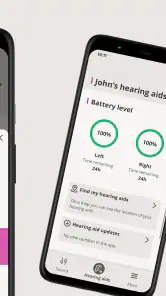
Another stellar feature is the ability to check the battery levels of your hearing aids right from the app. No more guessing games or sudden surprises; you’ll know exactly when it’s time for a recharge. Plus, it sends you notifications for software updates, ensuring your device is always running the latest tech.
A helpful routine is to check battery status when you are already looking at your phone, such as before leaving home, rather than waiting until you need the hearing aids most. Updates are worth noticing, too, but I would handle them when I have a little time instead of in the middle of a trip or appointment. The app can make these checks easier; it does not remove the need to keep the hearing aids charged and ready.
Stay Connected, Stay Informed
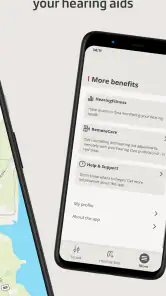
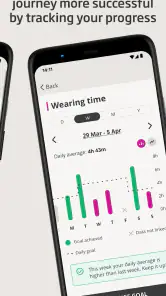
With the app, staying informed about your hearing health has never been easier. The app provides detailed insights into your hearing patterns and even offers tips on how to improve your hearing experience. It’s like having a mini audiologist in your pocket, always ready to offer advice and insights.
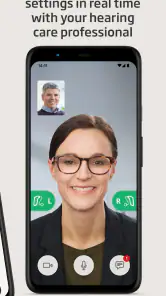
I’d treat those insights as useful prompts for noticing patterns, not as a diagnosis or a substitute for a conversation with an audiologist. If a setting seems consistently unhelpful, or hearing feels different in a way that concerns you, the better next step is to discuss it with a hearing professional instead of endlessly changing options in the app. This distinction matters: a phone can help you manage day-to-day use, but it cannot assess your hearing or make clinical decisions for you.
A practical way to use those prompts is to connect them to a specific situation: perhaps you often struggle to follow a group conversation, or a familiar setting feels less comfortable than it used to. Noticing when a problem occurs gives you a clearer account to bring to your hearing professional. It is more actionable than making many unrelated changes and then trying to remember which one made a difference.
For those who love being on top of things, the app also integrates seamlessly with other Oticon devices, allowing for a more connected experience. You can even stream music or make phone calls directly through your hearing aids. It's a game-changer for tech enthusiasts and anyone who values connectivity.
Streaming can be handy when you want to take a call without switching to a separate listening setup, but it also changes the role of the hearing aids: they are now handling phone audio as well as the sounds around you. I’d try a short call at home first, where it is easy to check that the connection works comfortably. For music, the same idea applies—test it in a familiar setting before depending on it while walking or doing something that needs your full attention.
When the Phone Is Part of the Handoff
The app is most useful when it fits neatly between the hearing aids and the task at hand. For a call, that means getting the connection comfortable before an important conversation, rather than discovering a problem while someone is waiting on the line. For a change in listening conditions, it means using the phone briefly, then returning attention to the people and sounds around you.
That handoff is also where a little friction can show up. The phone has to be nearby, the right hearing aids need to be connected, and you need a moment to use the controls. If you are carrying bags, crossing a street, or already in a fast-moving conversation, reaching for an app may be less convenient than leaving the hearing-aid settings alone. I would not make phone control the only way I know how to manage the devices.
Streaming is not necessarily the best choice for every listening moment, either. A phone call or music can be useful, but there are times when being attentive to the surrounding environment matters more. I’d pause and consider the setting before starting audio, particularly when walking outdoors or doing anything that calls for awareness. Convenience should not turn into distraction.
Who Benefits Most from Phone Control
This app is most useful if you already wear Oticon hearing aids and want a discreet way to make adjustments, check battery status, or use phone audio. It is especially suited to someone who moves between different listening situations during the day: a quiet morning at home, a conversation in a shop, then a call on the way back. If you prefer to leave every setting to your hearing specialist, or you do not use Oticon hearing aids, it is unlikely to add much for you.
Compared with relying only on physical controls on the hearing aids, a phone interface can make status checks and adjustments easier to see and manage. On the other hand, a phone is not always in hand, and opening an app is less immediate than using a control you already know by touch. I would think of the two approaches as complements: the app is convenient when the phone is nearby, while the hearing aids remain the essential part of the setup.
Compared with a general phone audio tool, this is a more focused option because its purpose is managing compatible Oticon hearing aids, not broadly changing how a phone sounds. That focus is an advantage for an Oticon wearer who wants related controls in one place. It is also the reason I would not recommend it to someone shopping for a hearing solution without Oticon devices: it is not a substitute for hearing aids, a professional fitting, or a general-purpose audio app.
It may also be the wrong fit for someone who wants to avoid using a smartphone as part of hearing-aid management. If you rarely carry your phone, prefer physical controls, or do not want to interact with settings during the day, the app’s main convenience matters less. In that case, relying on the hearing aids and getting guidance from a hearing professional may suit you better than adding another screen to your routine.
For a first-time user, I’d judge the app by a few everyday tasks rather than by how many options it appears to offer: can you connect the devices, find the battery information, make a useful adjustment, and handle a short call comfortably? If those tasks fit naturally into your routine, the app is doing its job. If you find yourself repeatedly searching through controls, simplify what you use and ask your hearing professional for help with the underlying listening issue.
A Few Words to Wrap Up
All in all, the app is a must-have for anyone using Oticon hearing aids. Its ease of use, combined with a plethora of features, makes it a standout in the realm of auditory technology. It doesn’t just enhance your hearing; it enriches your life, making everyday interactions more vibrant and engaging.
My recommendation is strongest for Oticon users who want more control over everyday listening and are comfortable using a phone as part of their routine. The app is free, rated for Everyone, and has an average rating of 4.3 from around 12,000 ratings, with over 1 million installs. It was released on January 17, 2023, and version 1.6.1 requires Android 8.0 or later. Those figures give a sense of its reach, but the deciding factor is still whether its controls fit the hearing aids you use and the way you prefer to manage them.
It is a medical app, but I would set expectations around practical assistance rather than medical care. Oticon A/S develops it, and the app’s value comes from giving compatible hearing-aid users a phone-based way to manage parts of daily use. The distinction is important: it can support your routine, but questions about hearing changes, persistent difficulty, or the right fitting belong with a qualified professional.
So, if you're looking to elevate your hearing experience, give this app a whirl. Trust me, your ears will thank you!
Oticon Companion Frequently Asked Questions
Is Oticon Companion free to download, and who is it designed for?
Oticon Companion is a free medical app developed by Oticon A/S. It is intended for people who use compatible Oticon hearing aids and want to manage them from a smartphone. The app is rated for Everyone, but its practical usefulness depends on having hearing aids that can connect with it. If you are considering it for someone else, check that their hearing aids are supported before relying on the app for everyday control.
What is the primary purpose of the Oticon Companion app?
The Oticon Companion app is designed to enhance the hearing experience for users of Oticon hearing aids. It allows users to personalize their hearing aid settings, stream audio directly from their devices, and manage connectivity with other smart devices. The app aims to provide a seamless integration of hearing aids into the user's daily life, making it easier to control and customize their auditory environment.
How can I connect my Oticon hearing aids to the Oticon Companion app?
To connect your Oticon hearing aids to the Oticon Companion app, first ensure your hearing aids are Bluetooth-enabled. Download the app from the App Store or Google Play Store, then open the app and follow the on-screen instructions to pair your hearing aids. Make sure your device’s Bluetooth is turned on during this process. The app will guide you through the steps to ensure a successful connection, allowing you to control your hearing aids directly from your smartphone.
Is the Oticon Companion app compatible with all smartphones?
The Oticon Companion app is compatible with most modern iOS and Android smartphones. However, it is essential to check the specific requirements on the app’s download page to ensure compatibility with your device. Generally, the app supports devices running iOS 13 or later and Android 8 or later. For optimal performance, ensure your smartphone has the latest software updates installed.
What features does the Oticon Companion app offer to users?
The Oticon Companion app offers a variety of features to enhance user experience, including personalized hearing settings, audio streaming, remote control of volume and program settings, and monitoring of battery status. Additionally, it provides connectivity options with other smart devices and offers user support through troubleshooting tips and tutorials. These features are designed to empower users by providing them with full control over their hearing experience.
Pros
- User-friendly interface for easy navigation.
- Real-time hearing aid adjustments.
- Seamless connectivity with multiple devices.
- Customizable sound profiles for different environments.
- Provides hearing loss insights and tips.
Cons
- Limited features for non-Oticon hearing aids.
- Requires smartphone for full functionality.
- Battery consumption can be high.
- Occasional connectivity issues.
- Limited offline capabilities.
- Category
- Medical
- Version
- 1.6.1