Omada
- 8.18K
- 4.4
- Installs
- 500.00K
- Price
- Free

Screenshots
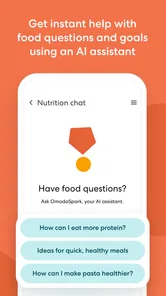
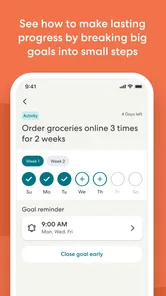
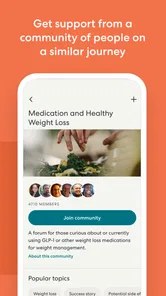
Analysis by Reviewed
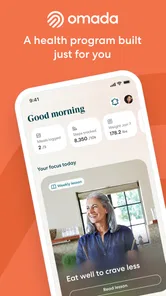
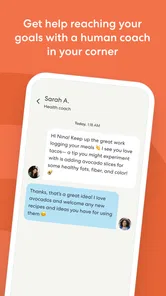
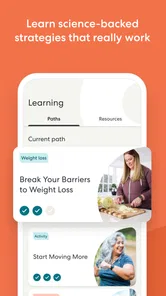
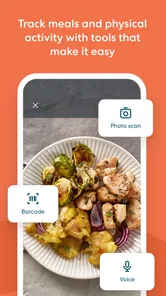
I approached Omada as a health-program companion rather than a general medical reference or a replacement for care from a clinician. That distinction matters: its purpose is to support participation in a program, so its usefulness depends on whether you are already taking part in one and want a place to stay connected with it. As a free medical app from Omada Health, it makes the most sense for people who want their program experience close at hand, not for someone simply looking for a broad library of health information.
What the app is for in everyday use
The clearest way to think about Omada is as a digital extension of a health program. I would open it to keep my participation in view, return to the program when a busy day has distracted me, and make it easier to maintain a routine between other responsibilities. That is a more grounded expectation than treating it as a full medical toolkit: the app is there to help you engage with the program, not to answer every health question you might have.
This focus can be a strength. A general wellness app often asks you to assemble your own plan from trackers, articles, reminders, and goals. A program companion starts from a more defined relationship: you are following a structured experience and need an accessible way to remain involved. If that is your situation, keeping the program on your phone may reduce the effort involved in returning to it.
It is also important to set expectations before installing it. The app’s value is tied to the program you are participating in; simply downloading it does not turn it into a stand-alone source of personalized medical advice. I would use it alongside the guidance and care that apply to me, rather than treating app activity as a substitute for professional judgment.
Who is likely to benefit—and who may not
I can see this being useful for someone who has joined an Omada program and wants a convenient way to stay engaged without relying on memory alone. It may suit people who prefer to check in digitally, who have a day that changes from one week to the next, or who want their program to remain part of their regular routine instead of something they only remember during a scheduled appointment.
It is less compelling if you are only browsing for a general-purpose health app and do not have a reason to participate in an Omada program. In that case, a medical reference app, a basic habit tracker, or a tool recommended by your clinician may be a closer match. Those alternatives serve different purposes: a reference tool helps you look up information, while a tracker can be useful for a personal routine you design yourself. Omada’s specific role is supporting engagement with its program experience.
I would also pause if you expect an app to do the work of building a habit for you. A phone can make it easier to return to a routine, but it cannot guarantee that the routine fits your life or that you will keep using it. The most realistic benefit is reducing small obstacles to participation, not making health decisions or behavior change effortless.
More From Our News Desk

 Block Blast!
 Makes Every Clear Feel Like One More Turn
A clean little block puzzle becomes a study in space, risk, and self-control. Its best moments come from one satisfying clear; its toughest test is knowing when to stop.

 Super Stylist Fashion Makeover
Super Stylist Turns Dress-Up into a Runway Career
Its makeover-to-client loop turns quick outfit decisions into shareable style theater. The question is whether the closet keeps giving players a reason to return.

 Block Craft 3D:Building Game
Block Craft 3D Under Pressure: How Well Does It Recover When Building Goes Wrong?
A failure-focused look at Block Craft 3D’s forgiving building loop, its uncertain recovery edges, and the moments that demand more than a cheerful village.

 Woodturning
 Trades Creative Freedom for a Satisfying Carving Loop
If your usual creative game is about building, decorating, or styling, Woodturning trades open-ended projects for a tactile, tightly guided carving loop. Here is what that switch really costs.

 PUBG MOBILE
 Shows What Battle Royale Must Get Right
PUBG MOBILE shows how battle royale has matured: bigger systems matter less than meaningful choices, readable fights, and a reason to return after every loss.

 Braindom: Brain Games Test
Braindom’s Social Life Happens Between Puzzles
Braindom turns quick logic traps into a personal ritual, but its community value is more about comparing answers than building together.
Latest News



A realistic routine that makes sense
Imagine that your workday runs late, dinner is rushed, and you have already lost track of the health goal you planned to revisit. A program companion can give you a practical way to bring that commitment back into view when you have a moment, rather than requiring you to reconstruct your next step from memory. I would build a small, repeatable habit around checking the app at a time that already exists in my day—for example, during a quiet break or after finishing an evening task.
The useful detail here is the timing, not a complicated system. If I open the app only when I feel motivated, I may use it inconsistently. If I attach it to an existing routine, such as a regular pause in the afternoon, I give myself a better chance of returning to the program even on ordinary days. That is a low-effort way to use a program app without turning phone use into another demanding task.
For someone with a less predictable schedule, I would avoid setting an unrealistic expectation of checking in at the same precise time every day. Instead, choose a broad cue—after a meal, before settling in for the evening, or when reviewing the next day. The point is to make participation easier to remember, not to create another source of guilt when plans change.
How it differs from general health apps
Compared with broad wellness apps, Omada’s appeal is narrower and more program-centered. A general app may offer independent tracking or a wide range of health topics, which can be useful if you want to assemble your own approach. Here, the central question is whether you want support staying involved in an Omada program. If you do, a focused companion can feel more relevant than a collection of unrelated tools; if you do not, its narrower purpose may leave you looking elsewhere.
It is also different from using only a paper planner or a note on your phone. Those can be flexible and simple, but they do not serve the same role as a dedicated companion to a program. I would not assume that a dedicated app is automatically better: if a handwritten reminder is the only nudge you need, that may be enough. The app is worth considering when having the program in a digital space makes it easier for you to return to it and remain engaged.
Nor would I compare it with urgent-care services or symptom checkers as though they were interchangeable. Those tools are intended for different needs. A program companion should not be your first stop for an urgent health concern, and it should not replace medical advice when a health decision requires a clinician. Choosing the right tool starts with identifying the task: program participation, personal tracking, general information, or care.
Small choices that can make it more useful
One practical tip is to decide what “staying engaged” means in your own week before you make the app part of your routine. It could mean returning to the program regularly, keeping its activities visible, or using a familiar time of day to reconnect with it. A clear personal cue makes an app easier to use than a vague intention to “be healthier.” I would keep that cue modest enough to survive a busy week.
A second useful approach is to treat the app as a prompt for reflection rather than a scorecard. If a day goes off track, I would use the next opportunity to rejoin the program instead of assuming that one missed moment has spoiled the whole effort. That mindset is especially helpful for health routines, where work, family, and energy levels can change from day to day.
There is a trade-off in any program-centered app: structure can reduce the effort of deciding what to do next, but it may feel restrictive to someone who wants to build a fully custom system. If you already have a routine that works and only want a simple record of it, a lightweight tracker may be less demanding. If you benefit from having a program to return to, the more focused role here is a better fit.
Questions worth considering before you begin
A common question is whether this is useful without being part of an Omada program. I would not choose it on the assumption that it is a general health app for everyone. Its purpose is connected to program participation, so first consider whether the program itself is relevant to you. If you are unsure, it is sensible to clarify your eligibility and next steps through the appropriate program or care channel before relying on the app.
Another question is whether it can replace a clinician. My answer is no: I would treat it as a companion to a program, not as a source of diagnosis or a replacement for professional care. If you have a concerning symptom, need a treatment decision, or have a question specific to your health, contact a qualified health professional rather than relying on a program app to resolve it.
People also reasonably ask whether it is a good fit for a family member who is not comfortable with smartphones. The interface may be accessible to a range of users, but comfort with everyday phone tasks still matters. I would help that person try the basic routine first and see whether opening and using the app feels manageable; if it creates frustration, another way of participating may be more practical.
Finally, consider how you prefer to stay accountable. If you respond well to having a program experience available digitally, the app may make it easier to reconnect with it. If you find health notifications or phone-based routines distracting, you may prefer fewer digital prompts and a different method of keeping your plans visible. The best choice is the one you can sustain without adding unnecessary stress.
Current state and what the release history tells me
Omada is a medical app developed by Omada Health, with an average rating of 4.5 from around 25,000 ratings and more than 500,000 installs. Those figures suggest that it has reached a substantial audience, but they do not tell me whether it will fit an individual person’s program or routine. I would treat popularity as context, not as a promise of a particular outcome.
The app first appeared on November 18, 2014, and its current version is 25.11.3. That long span and current version number show that the product has continued through multiple releases. They do not, by themselves, reveal exactly which functions changed or how every change affects a particular participant, so I would avoid reading a specific feature story into the version number alone.
For an existing user, a newer version is mainly a reason to keep the app current if updates are available for their device and to check that the experience still suits their routine. I would not expect a version label alone to mean that the program has changed substantially. What matters in practice is whether the app remains a convenient way to take part, and whether any visible changes make that easier or introduce friction.
The app is free, is rated for Everyone, and lists Android 8.0 as its minimum operating-system requirement. That makes the stated age classification broad and gives Android users a clear compatibility point to check before installing. Compatibility and age classification do not establish that a particular program is available to every person, however, so I would keep program access separate from the question of whether the app can run on a device.
Limits I would keep in mind
The biggest limitation is also its defining focus: an app built around program engagement will not be equally useful to someone who wants an independent medical encyclopedia, an all-purpose activity dashboard, or a tool for handling urgent concerns. That is not a defect so much as a boundary. I would rather understand that boundary before relying on it than download it expecting every health need to fit into one place.
Another potential source of friction is that a phone-based companion asks you to make room for one more digital routine. If your day is already crowded with app alerts and check-ins, adding another place to look may not help. I would keep the routine simple and assess whether using the app actually makes participation easier. If it becomes another item to feel behind on, changing the timing or relying on another appropriate program channel may be better.
There is also a difference between convenience and personal suitability. A free app can remove a purchase decision, but it cannot decide whether its program approach matches your needs. I would consider the program itself, my comfort with digital participation, and any advice from my care team before treating the app as a meaningful part of a health plan.
Easy Navigation and User-Friendly Interface
From the moment I launched Omada, I was greeted with a sleek and intuitive interface. Navigating through the app felt like a breeze, and trust me, I've seen my fair share of clunky sports apps. Everything is just where you'd expect it to be. Whether you're a tech-savvy millennial or someone who's just stepping into the digital world, you'll find this app straightforward to use.
Stay Updated with Real-Time Scores
Picture this: You're at a family dinner, but your mind is on the game. With Omada, you won't miss a single play. The app offers real-time scores and updates, so you're always in the loop. I found this feature particularly handy during the last football season. Imagine being able to keep up with multiple games simultaneously and feeling like you're right there in the stadium.
Personalized Sports Experience
One of the standout features of Omada is its ability to tailor content to your preferences. The app learns what sports you follow, what teams you support, and curates news and updates accordingly. I set my preferences to track my favorite soccer and basketball teams, and it felt like the app was speaking my language. It's like having a personal sports assistant who knows exactly what you need.
Engage with a Community of Fans
Omada isn't just about scores and news; it's also about connecting with fellow sports enthusiasts. The app includes a community feature where you can discuss games, share insights, and even make new friends who share your passion. As someone who loves debating about sports strategies and team performances, I found this feature incredibly engaging.
In conclusion, if you're a sports fan looking for a holistic app that keeps you connected, informed, and engaged, Omada is your go-to app. While there are many sports apps out there, Omada stands out with its user-friendly interface, personalized content, and community features. It's more than just an app; it's your window into the exciting world of sports. So, why not give it a try and see for yourself?
Omada Frequently Asked Questions
What should I know before downloading Omada?
Omada is a medical app developed by Omada Health. Its purpose is to enhance the experience of people taking part in an Omada program and help them stay engaged. It is therefore most relevant if you are already participating in one of those programs. The app is free to download and has an Everyone age rating.
Is Omada a general health tracker or a companion to an Omada program?
Omada is designed to support the experience of people taking part in an Omada program, rather than to serve as a general-purpose health tracker. Its stated purpose is to help participants stay engaged with their program. If you are exploring the app before joining a program, keep that focus in mind when deciding whether it matches what you need.
Will Omada work on my phone or tablet?
Omada is available for Android and iOS. On Android, the minimum requirement is Android 8.0, so check your device’s operating system before installing. The app is listed as version 25.11.3, and using a compatible device helps ensure you can install and run it. It is suitable for phone or tablet use when the device meets the platform requirements.
Who is Omada intended for, and what kind of app is it?
Omada is a medical app from Omada Health, designed to enhance the experience of people taking part in an Omada program and help them stay engaged. It is most relevant to users who are already involved in such a program and want to use the app as part of that experience. Its store age rating is Everyone, and the app is free to download.
What operating system does Omada require, and is it available for my device?
Omada is available for Android and iOS, and the Android version requires Android 8.0 or later. Before downloading, check that your device meets that requirement and has enough space for an app. The app is developed by Omada Health, and its current version is 25.11.3. Keeping the app updated can help you use the latest available version.
Pros
- Engaging user interface
- Comprehensive health tracking
- Motivates through team challenges
- Wide range of educational resources
- Supports mental well-being
Cons
- Requires stable internet connection
- Limited free features
- Can be overwhelming for beginners
- Some features hidden behind paywall
- Notifications can be intrusive