Okta Verify
- 2.19K
- 4.7
- Installs
- 10.00M
- Price
- Free

Screenshots
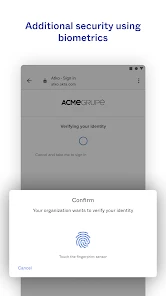
Analysis by Reviewed
I rely on sign-in prompts most when I’m moving quickly between work and personal tasks, so I value an authentication app that feels like a small checkpoint rather than another complicated routine. Okta Verify is designed for that role: it adds a second step when an account asks me to confirm a login. My overall impression is that it is most useful when the service I’m signing into supports Okta’s verification flow and I can keep my phone nearby.
Where it fits in a normal day
A realistic example is opening a work account from a laptop at home. I enter my usual sign-in details, then check my phone for the approval request and respond before continuing. That extra pause is the point: it gives me a chance to notice a sign-in I did not initiate, rather than treating every password entry as sufficient proof. If I’m away from my phone, though, the same step can interrupt an otherwise quick login.
That makes this a particularly sensible choice for people whose employer or organization already uses Okta, and for anyone who wants an extra confirmation step on accounts connected to it. It is less compelling if you only want a general-purpose tool for every unrelated website or service. Authentication apps can look interchangeable from a distance, but compatibility matters more than a familiar interface: I would first check whether the accounts I actually use ask for Okta Verify before making it part of my routine.
Quick in the right circumstances, not a speed shortcut
The app is not meant to make signing in faster than entering a password alone. Its speed depends on the whole chain: the service has to request verification, the phone needs to be available, and the approval step has to reach you. When those pieces line up, the added action can feel brief and straightforward. When they do not, the extra checkpoint is friction, not a shortcut, and I would plan around it for time-sensitive access.
I also think it helps to treat a prompt as a security decision rather than a button to tap automatically. If I am not trying to sign in, I would deny the request and investigate through the account’s normal support or security process. That habit is a small but useful trade-off: the app asks for attention at precisely the moment when a rushed approval could undermine the protection it is there to provide.
What is Okta Verify?
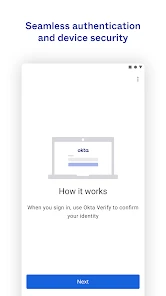
Before diving into my experience, let's talk a bit about what Okta Verify actually is. It's an app designed to bolster your security through multi-factor authentication (MFA). You know how sometimes you need to verify your identity with a code sent to your phone before you can log into an account? That's exactly what Okta Verify aims to streamline and secure.
Easy Setup Process
Setting up Okta Verify was a breeze. After downloading the app from the App Store, I was greeted with a clean and user-friendly interface. The app guided me through the setup process with clear instructions, and within minutes, I was ready to roll. One of the aspects I appreciated was how it seamlessly integrated with my accounts, making the whole process smooth as butter.
You May Like

Clash of Clans Is Won Between the Battles

Android Auto Makes the Case for Quieter Car Software

MobiOffice: Transforming Mobile Productivity with Seamless Integration

EA SPORTS FC™ Mobile Soccer: Redefining Mobile Sports Gaming

How Microsoft OneDrive Became a Mobile Productivity Giant

How Google Translate Breaks Language Barriers Effortlessly
Security Features that Stand Out
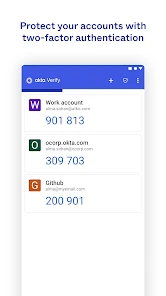
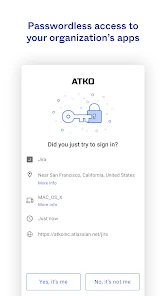
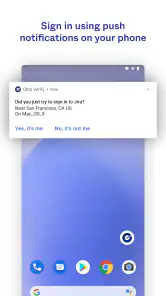
Once you're all set up, Okta Verify provides a robust layer of security. It uses a combination of push notifications and time-based one-time passwords (TOTPs) to ensure that only you can access your accounts. Whenever I tried to log in, a push notification would pop up on my phone, asking me to approve or deny the login attempt. This gave me peace of mind knowing I had control over who accessed my information.
What I found particularly impressive was its adaptability. Whether I'm using it for my email, bank, or social media accounts, Okta Verify had me covered. The app's ability to work across multiple platforms and devices made it a versatile tool in my security arsenal.
User Experience and Interface
In terms of user experience, Okta Verify gets a big thumbs up from me. The interface is intuitive, and the app’s performance was consistently smooth during my use. Navigating through the app was simple, and I never felt overwhelmed, even as someone who isn't the most tech-savvy individual out there.
Furthermore, the app's aesthetic is minimalistic, which I find appealing. It doesn't bombard you with unnecessary information or flashy graphics, keeping everything straightforward and to the point. This focus on simplicity makes it accessible to a broad range of users, regardless of their technical expertise.
Reliability when signing in repeatedly
For ordinary use, an authenticator is a background utility, so stability matters more than a long list of screens. My experience here was smooth, but a phone that is offline, muted, or out of reach can make a push-based check less convenient. If I expect to be in a low-connectivity spot, I would make sure I understand the code option for the account I need before leaving; it is better to prepare than to discover a sign-in dependency at the worst moment.
Heavy use is usually less about opening the app for hours and more about approving several separate logins in a busy day. In that situation, the main demand is attention and access to the device, not a workload that calls for a powerful phone. I would still avoid approving prompts on autopilot. A fast workflow is useful only when I can distinguish my own sign-in from an unexpected request.
Device changes and recovery deserve a plan
The practical drawback of tying a sign-in step to a phone appears when the phone is lost, replaced, or unavailable. Before changing devices, I would check the organization’s account-recovery instructions and make sure I know whom to contact if verification stops working. Recovery is not something I would leave until the moment I am locked out; depending on how an account is managed, an administrator may be part of the process.
This is also where Okta Verify differs from a standalone authenticator chosen independently for personal accounts. A general authenticator may suit someone who wants one place for a broad mix of services, while Okta Verify makes more sense when the account’s sign-in setup specifically supports it. Neither approach is automatically better. I would choose based on compatibility and recovery arrangements, not on how many authentication options an app appears to offer.
Who should choose it?
Okta Verify is a productivity app from Okta Inc., offered free and rated for Everyone. It has a 4.7 average from around 40,000 ratings, with roughly 2,200 written reviews and over 10 million installs. Those figures suggest many people use it, but they do not answer the most important personal question: whether your organization or service relies on Okta. I would check that first, then follow the enrollment steps provided for the account rather than expecting the app alone to connect every login automatically.
If you use an Okta-managed account, the straightforward interface and approval flow can make an extra security step easy to live with. If you do not, or if you need an authenticator that serves a wide collection of unrelated accounts, a compatible alternative may fit better. I would also think carefully before relying on a single phone as the only route to important services; knowing the recovery path is part of using multi-factor authentication responsibly.
Planning for travel, interruptions, and shared routines
One useful habit is to think about verification before the moment you need it. If I know I will be traveling, working somewhere with unreliable reception, or leaving my phone in a bag during a meeting, I would test the normal sign-in route beforehand and learn which fallback the account supports. This is not about creating a complicated checklist for every login; it is about avoiding a preventable lockout when an important task depends on access.
There is also a practical distinction between a personal phone and a device managed by an employer. If an organization requires Okta Verify for work, I would clarify its device and recovery expectations before enrolling, especially if I use one phone for both work and personal life. The app can make the confirmation step simple, but the organization’s policies and account setup determine what happens when the device changes. Keeping that relationship clear is more useful than assuming the app itself controls every part of access.
How it compares with other authentication choices
Compared with approving sign-ins through a text message, an authenticator app can make the verification step feel more deliberate and keep it tied to an enrolled account rather than making every prompt look like an ordinary message. But the better choice depends on what the service supports and how your account is administered. I would not switch methods just because one sounds more convenient; for an Okta-managed login, the configured method is the one to understand first.
Compared with a general-purpose authenticator, Okta Verify is a more focused fit. If my priority were to gather codes for a wide range of unrelated personal services, I would look for an app that explicitly supports that workflow. If the account I need is organized around Okta, the dedicated app avoids treating compatibility as an afterthought. Its strength is not being the universal answer; it is being a straightforward tool in the environment that expects it.
Small checks that make the workflow safer
When a sign-in request arrives, I would pause long enough to connect it to an action I just took: the account, the device I used, and the timing should make sense. A prompt that appears while I am not signing in is a reason to deny it, not a nuisance to clear. This simple mental check is especially valuable when several approvals arrive during a busy stretch, because repetition can make people careless.
I would also avoid treating a successful first setup as proof that recovery is handled. Before relying on the app for a critical work account, I would confirm that I can reach the organization’s support route and know what to do if I replace my phone. That preparation does not make the daily flow faster, but it reduces the chance that a routine device change turns into an urgent access problem.
Final Thoughts
So, what's the final verdict on Okta Verify? If you're looking for an effective, user-friendly way to enhance your online security, this app is definitely worth considering. Its ease of use, combined with robust security features, makes it a standout choice for anyone serious about protecting their digital presence. While there are many security apps out there, Okta Verify strikes a balance between functionality and simplicity, making it a reliable companion in the digital age.
In conclusion, if you're not yet using multi-factor authentication, give Okta Verify a shot. It's a small step that can make a big difference in safeguarding your online world. And trust me, once you have that extra layer of security, you'll wonder how you ever managed without it.
Okta Verify Frequently Asked Questions
Does Okta Verify replace my password when I sign in?
No. Okta Verify is used as an additional identity check during sign-in, rather than as a replacement for your password. Depending on how your organization or service has configured access, you may be asked to approve a push notification or enter a verification code after providing your usual sign-in details. The app is most useful when the account you want to access is set up to use Okta multifactor authentication.
Can I use Okta Verify without an internet connection?
Whether you can complete a sign-in without an internet connection depends on the authentication method and the setup provided by your organization or service. A push approval requires the request to reach your device, while a code-based option may work differently. Check the sign-in instructions for your account before relying on the app when offline, and ask your administrator which verification methods are available.
What permissions or setup should I expect when installing Okta Verify?
The app needs to be enrolled with an account that uses Okta, so downloading it by itself does not protect an account or complete setup. Your organization or service will guide you through enrollment, which may involve following sign-in instructions or scanning a setup code. Review the prompts shown during setup and grant permissions relevant to the verification method you plan to use.
Can Okta Verify still help if I change or replace my phone?
Changing or replacing your phone can affect the verification setup linked to your account. Before moving to a new device, check your organization’s instructions for transferring or re-enrolling Okta Verify, and keep another approved sign-in method available if one is offered. If you have already lost access to the old device, contact your organization’s IT support or the service provider to restore access.
Is Okta Verify free to download, and who is it intended for?
Okta Verify is a free productivity app from Okta Inc. It is intended for people who need to verify their identity when signing in to services that use Okta multifactor authentication. The app is rated for Everyone, but its usefulness depends on whether the organization or service you use supports Okta Verify and has enabled it for your account.
Pros
- Seamless integration with multiple platforms.
- User-friendly interface.
- Strong security features.
- Quick two-step verification.
- Frequent updates and improvements.
Cons
- Requires internet connection.
- Limited offline functionality.
- Setup can be complex for beginners.
- No support for Windows Phone.
- Occasional notification delays.

- Category
- Productivity
- Version
- Varies with device











