NYU Langone Health
- 2.76K
- 4.5
- Installs
- 500.00K
- Price
- Free

Screenshots
Analysis by Reviewed
I look at NYU Langone Health less as a general health app and more as a practical companion for people whose care is already connected to NYU Langone. That distinction matters: its value comes from making the relationship with this health system easier to manage, rather than replacing every medical tool or service you might use. If you want appointments and health information close at hand, it may suit you well; if you need a provider-neutral place to organize care from many organizations, I’d weigh other options first.
Start with the kind of care you need
Before installing it, I’d ask a simple question: do I expect to use NYU Langone for ongoing care, or am I only looking for broad wellness information? The app is a free medical app from NYU Langone Health, and that institutional focus is both its main strength and its main boundary. It has an average rating of 4.6 from around 5.5 thousand ratings, and more than 500 thousand installs, which suggests it has found an audience among people who want a digital route into care from this provider.
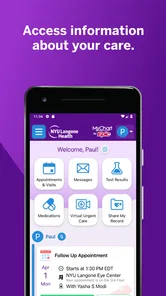
That focus can be especially useful if you have repeat appointments, test results to keep track of, or follow-up questions after a visit. Instead of treating your phone as a replacement for a clinician, I’d use the app as a place to handle routine administrative steps and review available health information between conversations with your care team. It’s rated for Everyone, costs nothing to download, and version 2.17.0 is listed for devices running Android 9 or later.
What I would check before relying on it
I’d think of the app as one part of a care routine rather than the whole routine. Before making it my default, I would check that I can get into my account, locate the information I need, and recognize where to go for help if a screen or appointment detail is confusing. This is a small but useful test: a tool that feels simple during a calm moment is more likely to help when I’m preparing for a visit, while discovering access friction in a hurry can add stress.
For someone who helps a parent or partner keep track of appointments, the useful question is not only whether the app is convenient, but also how the patient wants their health information handled. I would avoid sharing a login casually or leaving an unlocked device open to personal records. If another person needs to help, it is better to follow the health system’s proper process for authorized access than to treat a shared phone as a substitute for it.
I would also separate information that helps me prepare from information that requires a clinician’s interpretation. An appointment time or a result may be easy to find, but deciding what a result means is a different task. My practical approach would be to note questions while reviewing records, then bring those questions to the appropriate care professional rather than using a search result or an app screen to make a medical decision.
Features that Stand Out
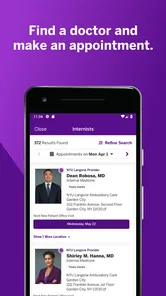
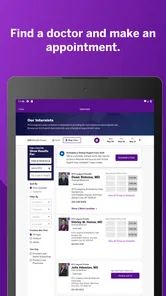
First things first, the NYU Langone Health app offers a comprehensive set of functionalities that cater to various healthcare needs. One of the standout features is the ability to schedule appointments directly through the app. No more waiting on hold with the doctor's office! You can view available slots, book an appointment, and even set reminders so you never miss a visit.
More From Our News Desk

 Block Blast!
 Makes Every Clear Feel Like One More Turn
A clean little block puzzle becomes a study in space, risk, and self-control. Its best moments come from one satisfying clear; its toughest test is knowing when to stop.

 Super Stylist Fashion Makeover
Super Stylist Turns Dress-Up into a Runway Career
Its makeover-to-client loop turns quick outfit decisions into shareable style theater. The question is whether the closet keeps giving players a reason to return.

 Block Craft 3D:Building Game
Block Craft 3D Under Pressure: How Well Does It Recover When Building Goes Wrong?
A failure-focused look at Block Craft 3D’s forgiving building loop, its uncertain recovery edges, and the moments that demand more than a cheerful village.

 Woodturning
 Trades Creative Freedom for a Satisfying Carving Loop
If your usual creative game is about building, decorating, or styling, Woodturning trades open-ended projects for a tactile, tightly guided carving loop. Here is what that switch really costs.

 PUBG MOBILE
 Shows What Battle Royale Must Get Right
PUBG MOBILE shows how battle royale has matured: bigger systems matter less than meaningful choices, readable fights, and a reason to return after every loss.

 Braindom: Brain Games Test
Braindom’s Social Life Happens Between Puzzles
Braindom turns quick logic traps into a personal ritual, but its community value is more about comparing answers than building together.
Latest News



In practice, I’d treat appointment booking as a way to handle straightforward scheduling, not as a guarantee that every kind of visit can be arranged the same way. If you need help deciding what type of appointment to book, or your situation is time-sensitive, contacting a care professional directly is the safer route. A useful habit is to check your appointments before a busy week and make sure reminders are enabled; that small bit of preparation can prevent a routine visit from slipping through the cracks.
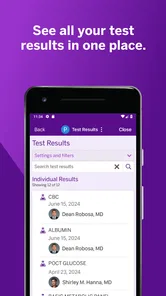
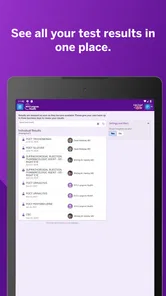
Another nifty feature is the access to your medical records. You can view test results, medications, and even your health history right from your phone. This is particularly useful if you’re someone like me who tends to forget the details of past medical visits. Plus, the app ensures that your data is secure, giving you peace of mind.
One practical use is to review information before a follow-up instead of trying to reconstruct it from memory in the waiting room. I’d jot down questions as they occur to me and bring them to the next conversation with my clinician; seeing past results or medication details can help me ask more specific questions. The app can make information easier to reach, but I wouldn’t interpret a result on my own or treat a screen as a substitute for medical advice.
Ease of Use
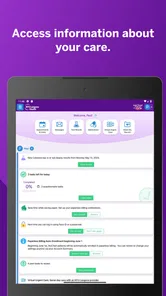
The user interface is intuitive and user-friendly. Even if you’re not tech-savvy, navigating through the app is a breeze. The design is clean, and everything is neatly organized. Whether you’re looking to find a doctor, schedule a visit, or check your lab results, you can do it all with just a few taps.
There is still a real-world trade-off: a health app is most useful when the information you need is available and when you can sign in successfully. I’d set aside a quiet moment to get access arranged before relying on it for an appointment day, rather than trying to solve account or navigation issues while rushing out the door. For shared family responsibilities, I’d also be careful about whose account is open on a device and avoid leaving personal health details visible to others.
For a concrete everyday example, imagine I have a follow-up next week and a busy workday today. I could check the appointment in advance, review the relevant record information when I have time, and write down questions before the visit. That is a better use of the app than opening it in the clinic lobby and trying to remember every detail at once. If a result raises an urgent concern, though, I would contact the appropriate care team instead of waiting for the next scheduled appointment or relying on an app notification to explain it.
Moreover, the app provides resources such as wellness tips and health-related articles, which are great if you’re interested in maintaining a healthy lifestyle. These resources are updated regularly, keeping the content fresh and relevant.
I see those articles as a helpful extra, not the reason to choose this app over a dedicated health reference or advice from a clinician. For example, if I’m trying to build a general habit, a short wellness read may be welcome; if I’m worried about a new symptom, browsing articles is not a reliable way to determine what is happening. The strongest reason to keep the app is its connection to care and records, with general reading in a supporting role.
Virtual Care
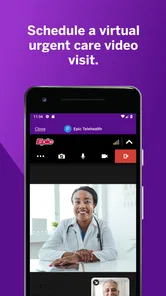
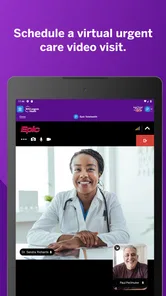
In today’s world, the importance of virtual care cannot be overstated. The app includes a telehealth feature that lets you consult with healthcare professionals from the comfort of your home. Whether it’s a minor health concern or a follow-up visit, virtual appointments are incredibly convenient and save you the hassle of commuting.
A realistic example is a follow-up that does not require an in-person examination: being able to speak from home can spare a trip and make it easier to fit care around work or family responsibilities. It is still worth checking whether a particular concern is suitable for a video visit, since some situations need an in-person assessment. I’d also test the basic setup ahead of time and choose a quiet, private place so the conversation is easier to follow.
Before a virtual appointment, I’d prepare in the same way I would for an in-person conversation: have my questions ready, find a private place, and make sure I can focus without interruptions. That preparation is particularly helpful if I’m discussing a follow-up or trying to describe how something has changed since the last visit. Video can make a remote conversation more personal, but it does not make every concern appropriate for remote care; the clinician’s guidance should determine the next step.
The video quality is impressive, and the connection is usually stable, ensuring that your virtual consultations are as effective as in-person visits. This feature is particularly beneficial during times when visiting a clinic might not be feasible.
Compared with a general video-calling app, a health-system app has the advantage of keeping the virtual visit in the context of care from that provider. Compared with a phone call, video can make a conversation feel more direct, though it cannot reproduce every part of an examination. If the connection or the visit itself is not working for your needs, I would contact the care team about another way to proceed rather than assuming video is right for every appointment.
Choosing between this and other health tools
The main alternative is not necessarily another app with the same role. It may be a provider-neutral health organizer, a separate patient app from another organization, or a focused tool for reminders and wellness habits. Those options can make more sense when care is spread across unrelated providers or when the main goal is tracking routines rather than managing appointments and information connected to NYU Langone.
I would not expect one institution’s app to become a universal home for every record simply because it is convenient. If I receive care from multiple organizations, I’d decide which tasks belong here and which still need another channel. Keeping the NYU Langone app for visits and information tied to that system, while using a broader method for other records, may be more practical than forcing every part of healthcare into a single place.
There is also a difference between this kind of patient app and general medical-search tools. Search can help me learn basic terminology, but it cannot replace details from my own care or answer questions about a specific appointment. Conversely, a patient app is not necessarily the best place to compare broad wellness approaches or track habits unrelated to a provider. I’d choose based on the job I need done, not on the assumption that one health app should cover everything.
When another option makes more sense
If you receive care from several unrelated health systems, a broad record-organizing service or the separate patient apps used by those providers may fit your routine better than relying on one institution’s app. Likewise, people who only want medication reminders or general wellness tracking may prefer a tool built specifically around those tasks. I wouldn’t install this expecting it to manage every part of healthcare everywhere; its clearest role is helping NYU Langone patients reach services and information tied to that organization.
Switching to it is worthwhile when it replaces repeated calls or makes it easier to prepare for visits, but it does not remove the need to keep your own questions, follow clinician instructions, or contact the right office when an issue needs personal attention. I’d start by using one task—such as checking an upcoming appointment—then explore records and virtual care as needed. That gradual approach makes it easier to see whether the app genuinely fits your habits without making it another notification-heavy obligation.
My recommendation
NYU Langone Health has truly embraced technology to enhance patient care, and this app is a testament to their commitment. Whether you’re tech-savvy or not, the app’s ease of use and robust features make it a must-have for anyone looking to manage their healthcare proactively.
In conclusion, if you’re a patient at NYU Langone or planning to be one, downloading this app is a no-brainer. It’s like having a personal healthcare assistant in your pocket, ready to help you manage your health at any time. From booking appointments to accessing medical records, the app makes healthcare management simple and efficient. So why not give it a try? Your health will thank you!
NYU Langone Health Frequently Asked Questions
Who is the NYU Langone Health app intended for?
The NYU Langone Health app is a medical app developed by NYU Langone Health for people who want to access their health information on a mobile device. Its store summary describes that core purpose, making it relevant to patients who use NYU Langone Health services and want a convenient way to manage care-related tasks. The app is free to download and is rated for everyone.
What services does the NYU Langone Health app offer?
The NYU Langone Health app provides a range of services including appointment scheduling, access to medical records, test results viewing, and secure messaging with healthcare providers. It also offers features like virtual urgent care visits and the ability to manage prescriptions. This comprehensive app is designed to enhance the patient experience by providing easy access to essential healthcare services.
Is the NYU Langone Health app available for both Android and iOS devices?
Yes, the NYU Langone Health app is available for both Android and iOS devices. Users can download the app from the Google Play Store for Android devices and the Apple App Store for iOS devices. This accessibility ensures that a wide range of patients can benefit from the app's features regardless of their preferred device.
How secure is my personal information on the NYU Langone Health app?
The NYU Langone Health app prioritizes the security and privacy of user information. It uses advanced encryption technologies to protect sensitive data, ensuring that personal health information and communication with healthcare providers remain confidential. The app complies with HIPAA regulations, providing an additional layer of security and peace of mind to its users.
Can I schedule virtual appointments using the NYU Langone Health app?
Yes, the NYU Langone Health app allows users to schedule virtual appointments, including video visits with healthcare providers. This feature is especially beneficial for those who prefer remote consultations or need quick medical advice without having to visit a clinic in person. It offers convenience and flexibility for managing health care needs from the comfort of home.
Pros
- User-friendly interface.
- Comprehensive health tracking.
- Secure patient data management.
- Easy appointment scheduling.
- Telehealth services available.
Cons
- Limited to NYU Langone patients.
- Requires stable internet connection.
- Some features may require fees.
- App notifications can be intrusive.
- Occasional login issues.