Night Owl Protect
- 6.59K
- 4.6
- Installs
- 1.00M
- Price
- Free
Screenshots
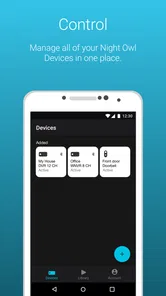
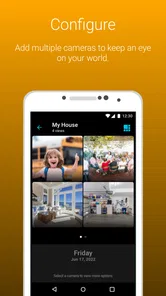
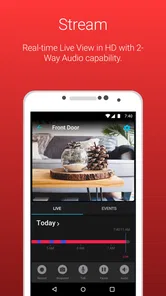
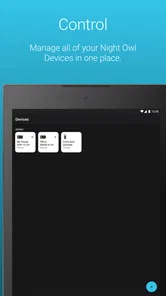
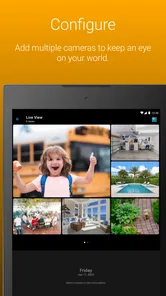
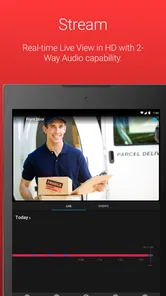
Analysis by Reviewed
When I think about home monitoring, the useful question is not how often I can open a camera feed, but whether I can check the right thing quickly when a real need comes up. Night Owl Protect is built around that kind of remote access for people using Night Owl equipment. I find it most convincing as a practical companion to a compatible system, not as a universal security app that can make unrelated devices work together.
Where it fits in a home-security routine
I see this as a companion for people who already use Night Owl equipment, rather than a general-purpose camera viewer for any brand. If you are choosing a whole security setup, that distinction matters: an app tied to one equipment ecosystem can make day-to-day monitoring feel more joined up, but it is not the flexible choice if you want to mix cameras from several manufacturers. The app is free, and it comes from Night Owl SP, LLC.
A useful routine is to decide what you actually need to check before opening the app. For example, if a delivery is due, I would check the relevant view when I expect it, rather than repeatedly opening a live feed throughout the day. That makes monitoring purposeful and helps keep an alert from turning into background noise. For a household where several people need access, it is also worth agreeing who responds to a notification, so two people do not assume the other has handled it.
Getting Started with Ease
First things first, setting up Night Owl Protect is a breeze! Trust me, I’m no tech guru, but the installation process was as smooth as butter. After downloading the app from the App Store, I was guided step-by-step through the setup process. From connecting to my Night Owl devices to customizing alerts, everything was laid out in an easy-to-understand manner.
Features That Stand Out
The app comes packed with features that will leave you feeling like a tech-savvy pro. One of the coolest things is the real-time video streaming. Whether I’m at work or on vacation, I can watch live footage of my property right from my phone. It’s like having a window into my home from anywhere in the world!
Another nifty feature is the two-way audio. Imagine being able to communicate directly with anyone on your property. Whether it’s telling the delivery guy where to leave a package or scaring off a potential intruder, this feature has got your back.
Make alerts useful, not noisy
Customizing motion alerts is most helpful when I treat it as a small tuning task, not a set-and-forget promise that every notification will matter. If ordinary movement keeps drawing attention, I would adjust the available sensitivity settings and then check whether the changes make alerts more relevant. A practical test is to compare a normal quiet period with a time when people regularly come and go. The goal is not to eliminate every alert, but to make the ones that reach me worth checking.
More From Our News Desk

 Block Blast!
 Makes Every Clear Feel Like One More Turn
A clean little block puzzle becomes a study in space, risk, and self-control. Its best moments come from one satisfying clear; its toughest test is knowing when to stop.

 Super Stylist Fashion Makeover
Super Stylist Turns Dress-Up into a Runway Career
Its makeover-to-client loop turns quick outfit decisions into shareable style theater. The question is whether the closet keeps giving players a reason to return.

 Block Craft 3D:Building Game
Block Craft 3D Under Pressure: How Well Does It Recover When Building Goes Wrong?
A failure-focused look at Block Craft 3D’s forgiving building loop, its uncertain recovery edges, and the moments that demand more than a cheerful village.

 Woodturning
 Trades Creative Freedom for a Satisfying Carving Loop
If your usual creative game is about building, decorating, or styling, Woodturning trades open-ended projects for a tactile, tightly guided carving loop. Here is what that switch really costs.

 PUBG MOBILE
 Shows What Battle Royale Must Get Right
PUBG MOBILE shows how battle royale has matured: bigger systems matter less than meaningful choices, readable fights, and a reason to return after every loss.

 Braindom: Brain Games Test
Braindom’s Social Life Happens Between Puzzles
Braindom turns quick logic traps into a personal ritual, but its community value is more about comparing answers than building together.
Latest News



Likewise, recording schedules work best when they reflect the routine of the property. A home that is busy during the day may call for a different plan from a mostly empty one, while a small business may have predictable opening and closing periods. I would review the schedule after a change in routine instead of assuming last month’s settings still make sense. These habits make the app more useful without pretending that a phone notification replaces a proper response plan.
Security at Its Best
Security is a big deal for me, and I bet it is for you too. With Night Owl Protect, all video feeds are encrypted, ensuring that no prying eyes can access your footage. Plus, the app offers facial recognition, alerting you if someone unfamiliar is lurking around your space.
I would still treat any recognition or motion alert as a prompt to look, not as a final verdict about who is present or what is happening. Lighting, camera placement, and ordinary activity can affect what a camera captures, so checking the live view and using context matters. If a situation looks unsafe, I would not rely on two-way audio as a substitute for getting help or following a sensible safety plan.
User Experience
The user interface is as friendly as a golden retriever! It’s intuitive, responsive, and doesn’t require a degree in rocket science to navigate. I especially appreciate the customizable settings which let me tailor the app to fit my specific needs. Whether it's adjusting the sensitivity of motion alerts or scheduling recording times, everything is just a few taps away.
A realistic day with the app
Picture leaving home for work while expecting a package later. Rather than keeping a live feed open, I would go about my day, check a relevant alert when it arrives, and use the live view to understand what is happening. If someone needs directions for leaving the parcel, two-way audio offers a direct way to communicate. Once the delivery is handled, I can stop monitoring instead of letting a single errand turn into constant screen-checking.
This is where the app’s combination of viewing, alerts, and audio feels more useful than a camera app that only shows a feed. On the other hand, if your priority is a single camera from a different brand, or you want one app to manage a mixed collection of equipment, a brand-neutral option may suit you better. Night Owl Protect makes the most sense when its connected devices are already part of your plan.
Compatibility and expectations
The app is listed for everyone and requires Android 8.0 or later; its current version is 1.5.95. It has been available since March 19, 2020, and has reached over one million installs, with a 4.6 average from around twenty thousand ratings. Those figures suggest that it has found an audience, but they do not guarantee that every feature will fit every home: the connected Night Owl equipment and the way you intend to use it remain the important considerations.
Before relying on it while away, I would complete setup at home, test the views I care about, and check that alerts arrive in a way I can act on. That simple trial can reveal whether the chosen camera angle is useful and whether the notification routine fits my day. It is a better starting point than waiting until a delivery or unexpected visitor makes the first test urgent.
Making the setup easier to live with
One small habit I find valuable is to give each camera a clear purpose in my own mind: for instance, one view might help me understand activity near an entrance, while another is there to check a shared area. That makes choosing a view faster when an alert arrives. It also helps expose a weak camera angle during a calm test, when I can adjust the physical setup rather than trying to interpret an unclear picture in a hurry.
I would also keep notification decisions tied to the people and patterns around the property. If a family member regularly arrives during a particular part of the day, I would account for that when judging whether an alert is unusual. This is not a substitute for any recognition or alert setting; it is a way to avoid treating ordinary activity as an emergency. For a small business, the equivalent is reviewing the routine after hours or staffing changes, rather than leaving yesterday’s expectations in place.
What to check before depending on it
A common practical question is whether I can rely on the app from outside the house. Remote viewing is central to its purpose, but I would still test the exact device and view I plan to use before depending on it away from home. Check that the picture is useful, that the alert path makes sense, and that you know what you will do after seeing an event. A successful test of one camera should not be taken as proof that every connected view is equally helpful.
Another sensible question is whether notifications mean I can stop checking in. I would not make that assumption. Alerts can draw attention to activity, while a live view gives context; neither removes the need for judgment. If you are away for a long stretch, a routine that includes who is available to respond can matter as much as the settings in the app. That distinction is especially important for anyone expecting a camera system to handle a serious incident by itself.
There is also a trade-off between convenience and attention. Keeping every notification active may sound reassuring, but frequent low-value prompts can train me to ignore the phone. I would start with the situations that genuinely matter, observe how the system behaves in normal daily conditions, then refine the available alert settings. That gradual approach is more useful than changing several things at once, because I can tell which adjustment actually improved the experience.
When another kind of app makes more sense
Compared with a basic viewer that only opens a camera feed, this app’s appeal is the combination described here: live video, alerts, schedules, and two-way audio for a Night Owl setup. That can make ordinary checks less fragmented. Compared with a platform designed around multiple camera brands, however, an ecosystem-specific app is naturally a narrower fit. If you are still shopping for hardware and expect to combine devices from different makers over time, I would compare compatibility and the overall system first instead of choosing an app in isolation.
It is also not the right answer for someone who wants monitoring without managing settings or responding to events. The app can put information on a phone, but the owner still needs to decide which views matter, how to handle notifications, and what to do when something looks concerning. If that level of involvement sounds like a burden, a simpler arrangement or another security approach may fit better. I would choose Night Owl Protect because it suits the equipment and habits I already have, not because an app can replace those decisions.
Wrapping It Up
In a world where security and convenience are paramount, Night Owl Protect stands out as a reliable companion. It offers peace of mind, knowing that your home and loved ones are safe, even when you’re not around. The blend of cutting-edge features, user-friendly design, and robust security measures makes it a must-have for anyone serious about safeguarding their property.
If you’re on the fence about getting a surveillance app, I’d say give Night Owl Protect a shot. It’s more than just an app; it’s a commitment to safety and peace of mind.
Who I would recommend it to
I would point a friend toward it if they already have compatible Night Owl devices, want to check their property remotely, and will take a little time to make alerts and schedules fit their routine. It is less compelling for someone who only wants a generic camera viewer, expects alerts to interpret every event perfectly, or does not want to depend on a particular equipment ecosystem. Its House & Home focus is clear, and the free price makes it easy to consider, but the best reason to choose it is how well it fits the hardware and habits you already have.
Overall, I like the idea of using it as one part of a repeatable security routine: keep settings purposeful, check alerts with context, and use live video or audio when there is a practical reason. That approach is more grounded than expecting an app alone to guarantee safety. For Night Owl users who want phone-based access to their system, it is a sensible option; for everyone else, I would compare compatibility first and choose the setup that suits their equipment.
Night Owl Protect Frequently Asked Questions
Who develops Night Owl Protect, and what is the app for?
Night Owl Protect is developed by Night Owl SP, LLC and is listed in the House & Home category. Its stated purpose is to help you secure, protect, and connect your world. It is designed for people who want to use a mobile app as part of their home security setup, so consider whether it fits the devices and security system you already have.
How popular is Night Owl Protect?
Night Owl Protect has more than 1 million installs, with an average rating of 4.6 from around 20,000 ratings and about 5,800 written reviews. Those figures suggest that many people have tried it, though ratings reflect individual experiences and may not predict how well the app will suit your equipment or routine. Check that it meets your needs before installing.
Is Night Owl Protect free to download, and what should I know about its cost?
Night Owl Protect is free to download, making it possible to install the app without an upfront purchase. The app is intended to help you secure, protect, and connect your world, but downloading it is only one part of using a security system. Review any optional services or purchases presented during setup so you can decide what suits your needs before proceeding.
What devices or operating systems can run Night Owl Protect?
Night Owl Protect is available for Android and iOS, so it may suit users who want to manage their security setup from a mobile device. On Android, the app requires version 8.0 or later. Before installing, check the operating system version on your phone or tablet and make sure it meets that requirement.
What is Night Owl Protect and how does it function?
Night Owl Protect is a comprehensive security application designed for monitoring and managing your security cameras remotely. The app allows users to watch live feeds, playback recorded videos, and receive real-time alerts on suspicious activities. Compatible with both Android and iOS, it ensures you stay informed about your property's safety, whether you're at home or on the go.
Pros
- User-friendly interface for all ages
- High-quality video streaming
- Comprehensive security features
- Customizable alert settings
- Remote access via mobile app
Cons
- Requires stable internet connection
- Limited free features
- Occasional app crashes
- Delayed notifications sometimes
- Battery drain on continuous use