myVCA
- 1.40K
- 4.8
- Installs
- 500.00K
- Price
- Free

Screenshots

Analysis by Reviewed
When I’m choosing a pet-health app, I first ask whether it can make routine care easier without pretending to replace a veterinary clinic. That distinction matters: an app can help me stay organized and find guidance, but it should not be my only plan when an animal is seriously unwell. myVCA is aimed at pet owners who want a more connected way to manage care through VCA, Inc., rather than a general-purpose directory or a stand-alone symptom checker.
That focus is the main reason I’d consider it. The practical value is less about having another icon on my phone and more about keeping useful care information close at hand. If you already use VCA for your pet’s care, the app may fit naturally into your routine; if you visit an unrelated clinic, its usefulness will depend on whether the VCA-centered tools match how you work with that provider.
Start with the clinic relationship
Before installing any veterinary app, I’d check what I actually need it to do. Is the immediate problem remembering appointments, finding past care details, getting general guidance, or keeping several caregivers coordinated? Those needs overlap, but they are not interchangeable. A calendar is often enough for dates; a clinic’s own phone or messaging process may be more direct for a question about an existing treatment plan.
For me, the key decision is whether my pet’s care already runs through VCA. When it does, a provider-focused app has a clearer job: connect routine tasks and care information to the clinic I already use. When it does not, I would first ask whether the app’s tools are useful without that relationship rather than assuming a medical app will automatically gather records from any veterinarian.
It also helps to think about who will use it. A single owner who handles every appointment has a different organizational problem from a household where several people share feeding, medication, and transport. The app can be part of a shared routine, but I would still agree on who checks reminders and who contacts the clinic. An alert only helps if someone knows it is their responsibility to act on it.
All Your Pet's Needs in One Place
Imagine having a veterinary clinic right at your fingertips. That's exactly what myVCA offers. This app is not just an appointment scheduler. It goes above and beyond by providing personalized pet care tips, access to your pet's medical records, and even a 24/7 live chat with licensed veterinarians. Gone are the days of flipping through papers or trying to remember the last time your pet got vaccinated.
Easy Peasy Interface
One of the first things I noticed about myVCA is its user-friendly interface. The design is clean, intuitive, and just makes sense. Even if you’re not tech-savvy, navigating through the app is a breeze. Everything you need is just a tap away, whether it's booking appointments or checking your pet's health history.
More From Our News Desk

 Block Blast!
 Makes Every Clear Feel Like One More Turn
A clean little block puzzle becomes a study in space, risk, and self-control. Its best moments come from one satisfying clear; its toughest test is knowing when to stop.

 Super Stylist Fashion Makeover
Super Stylist Turns Dress-Up into a Runway Career
Its makeover-to-client loop turns quick outfit decisions into shareable style theater. The question is whether the closet keeps giving players a reason to return.

 Block Craft 3D:Building Game
Block Craft 3D Under Pressure: How Well Does It Recover When Building Goes Wrong?
A failure-focused look at Block Craft 3D’s forgiving building loop, its uncertain recovery edges, and the moments that demand more than a cheerful village.

 Woodturning
 Trades Creative Freedom for a Satisfying Carving Loop
If your usual creative game is about building, decorating, or styling, Woodturning trades open-ended projects for a tactile, tightly guided carving loop. Here is what that switch really costs.

 PUBG MOBILE
 Shows What Battle Royale Must Get Right
PUBG MOBILE shows how battle royale has matured: bigger systems matter less than meaningful choices, readable fights, and a reason to return after every loss.

 Braindom: Brain Games Test
Braindom’s Social Life Happens Between Puzzles
Braindom turns quick logic traps into a personal ritual, but its community value is more about comparing answers than building together.
Latest News



For a concrete example, imagine you’re booking a checkup while planning the week. Having scheduling and health history together can make it easier to check past care details before contacting the clinic. I’d still keep a separate note for anything I need to discuss in person, especially if a symptom has changed since the last visit. That small habit helps turn an app record into a useful conversation rather than relying on memory.
The 24/7 Vet Chat
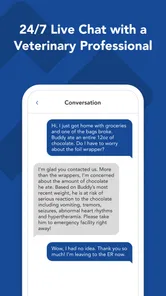
Now, this feature deserves a special mention. We all have those panicky moments at 3 AM when our pet isn’t acting quite right. With the 24/7 vet chat, you can get immediate advice without leaving your home. I tried it out with a simple question about my dog's diet, and the response was not only quick but also incredibly helpful. It's like having a vet on speed dial!
I see chat as a way to ask a focused question and decide what to do next, not as a substitute for an examination or emergency care. If your pet has a worrying or rapidly worsening problem, contact an appropriate veterinary service directly. For a less urgent concern, it can help to write down when the issue began, what changed, and any relevant care history before starting the conversation. That makes the exchange more useful and gives you a clearer record of the advice to follow up on.
A practical way to get more from a chat is to prepare the details you would otherwise struggle to recall under stress. Note the timing, the change you noticed, and the question you want answered; if the issue has already improved or worsened, include that too. This does not make the conversation a diagnosis, but it can keep a short exchange focused on what decision you need to make next. I would also keep any instructions that require follow-up somewhere I can find them later, rather than relying on memory alone.
- Access to medical records
- Appointment scheduling
- 24/7 vet chat
- Personalized care tips
Keeping It All Organized
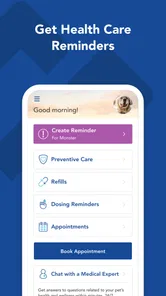
If you’re anything like me, keeping track of vet appointments, vaccinations, and medications can be a real hassle. But with myVCA, everything is neatly organized in one place. You can even set reminders for upcoming appointments or medications, ensuring you never miss a beat.
One useful trade-off to consider is where your pet’s care history lives. If your household visits more than one clinic, an app tied to one veterinary provider may not gather every record automatically. I’d keep outside documents and instructions somewhere reliable, then use the app for the VCA-related details it organizes. That way, a switch of clinic or a shared-care situation is less likely to leave you searching through old messages at an inconvenient moment.
That is especially useful when a pet has a routine that is easy to lose track of during a busy week. I would check the app before leaving for an appointment, rather than trying to reconstruct the timeline in the waiting room: what was already done, what is due next, and what needs clarification. For medication reminders, I would treat an alert as a prompt to check the actual instructions, not as a replacement for the label or the veterinarian’s directions. That small distinction helps prevent a reminder from being mistaken for a dosing guide.
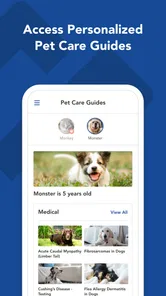
Another cool feature is the personalized pet care tips. These are tailored based on your pet's breed, age, and health condition. So, you’re not just getting generic advice but tips that are relevant to your little buddy's specific needs.
I would use those tips as a way to think of better questions, not as a reason to change a care plan on my own. For example, if a tip makes me wonder whether a routine should be adjusted, I would bring that question to the clinic and explain what applies to my pet. Personalization can make information feel more relevant, but an individual animal’s situation still deserves individual veterinary judgment. That is a useful boundary for any health guidance delivered through an app.
For households with several people caring for one animal, a simple routine can make reminders more effective: decide who checks upcoming appointments and who handles medication prompts, instead of assuming everyone has seen the same notification. If you are comparing it with a paper calendar, a general reminder app, or your clinic’s usual contact methods, the deciding question is whether you value VCA-related records and guidance together. A calendar may be enough for dates alone; myVCA makes more sense when the connected care tools are part of your regular visits.
There is also a useful handoff scenario here. If one person usually takes the pet to appointments and another handles care at home, checking the same available history before a visit can help them agree on what to ask and what details to report. I would not assume that every caregiver automatically sees the same information; instead, I’d establish who is responsible for reviewing it and sharing relevant instructions. That simple household habit is more dependable than expecting technology alone to coordinate care.
When another approach is a better fit
The usual alternatives solve different parts of the problem. A paper folder gives you direct control over documents and can include records from multiple clinics, but it takes effort to keep current and bring along. A general calendar or reminder app is flexible for dates and tasks, yet it does not necessarily connect those reminders to a veterinary relationship or the care details you want nearby. A clinic’s regular contact channels may be preferable when you need to discuss a specific ongoing issue with the people already treating your pet.
I would choose a clinic-neutral record system or a carefully maintained folder if I regularly move between providers and need one place for every document. I would choose a plain calendar if my only frustration is forgetting appointments. And if the situation is urgent, I would contact veterinary care directly rather than waiting for an app conversation. The advantage of myVCA is not that it replaces these options in every circumstance; it is that its connected tools can make sense when VCA is already central to routine care.
Switching to an app also has a small organizational cost. You need to make it part of the habit you are trying to improve, and you may still need another method for records from outside clinics or for household notes. Before moving your routine, I’d decide which details belong in the app, which need to stay in a separate record, and who in the household checks each one. Without that decision, using two systems can create more uncertainty rather than less.
As a medical app, myVCA is free, rated for Everyone, and has a 4.9 average from around 7,000 ratings, with over 500,000 installs. It was released on April 18, 2017, and version 5.10.458 requires Android 7.0 or later. Those figures suggest a well-used option, but they don’t tell you whether it suits your clinic relationship or the way your household shares pet-care tasks. I’d treat fit, rather than popularity, as the deciding factor.
One everyday example makes the fit clearer: say you are getting ready for a routine visit and cannot remember whether a particular care item was discussed last time. Checking the available history before you leave can help you arrive with a specific question instead of trying to piece everything together from memory. Afterward, you can use your own notes to capture anything you need to remember and rely on the app for the VCA-related details it makes available. It is a modest workflow, but it can reduce the small bits of friction that make routine care feel harder than it needs to be.
Who should skip it? I would not make it my main tool if I do not use VCA, if I need a complete record across several unrelated clinics, or if I want a symptom checker to make medical decisions for me. It is also not the right solution for someone who prefers keeping all records offline in a folder and has no trouble maintaining that system. Those are reasonable preferences, not flaws in the app; the best choice is the one that fits how your pet actually receives care.
In conclusion, myVCA is an app that truly puts your pet's health and your peace of mind first. It’s more than just an app; it’s a comprehensive tool for anyone looking to take their pet care to the next level. Whether you’re a new pet owner or a seasoned pro, myVCA is sure to make your life a whole lot easier.
So, if you haven’t already, give myVCA a try. It’s like having a vet in your pocket, ready to assist you whenever you need!
My recommendation is strongest for people whose pets receive care through VCA and who want convenient access to appointments, records, and advice in one place. I’d be more cautious if you mainly want a clinic-neutral record keeper, or if you expect a phone app to handle urgent medical decisions. The app is useful as part of a care routine, not a replacement for a vet’s examination. If that balance matches what you need, it’s a sensible free option to try; if not, your clinic’s own process or a simple personal record may be the better fit.
myVCA Frequently Asked Questions
Is myVCA free to download, and what kind of app is it?
myVCA is a free medical app from VCA, Inc., designed as a guide to raising a healthy and happy pet. It may be useful if you want a convenient place to manage pet-care tasks and keep health information close at hand. The app is rated for Everyone, so its age classification is suitable for a broad audience.
What is myVCA and what does it offer?
myVCA is a comprehensive app designed for pet owners to manage their pet’s healthcare needs efficiently. It offers features like booking veterinary appointments, accessing medical records, and getting reminders for vaccinations and check-ups. Users can also find nearby VCA hospitals and get expert advice through the app, making pet care more convenient and accessible.
How can I book a veterinary appointment through myVCA?
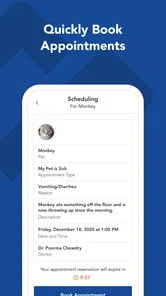
Booking an appointment with myVCA is straightforward. Simply open the app, navigate to the 'Appointments' section, and select a suitable date and time. You can choose your preferred VCA hospital and specify the type of service needed. Confirmation of your appointment is sent via email and in-app notifications, ensuring a seamless booking process.
Is myVCA available for both Android and iOS devices?
Yes, myVCA is available for both Android and iOS platforms. Users can download the app from Google Play Store for Android devices and the Apple App Store for iOS devices. The app ensures compatibility with most smartphones, providing a consistent user experience across different operating systems. Its current version is 5.10.458, and it requires Android 7.0 or later.
Can I access my pet's medical records on myVCA?
Absolutely! myVCA allows you to access your pet's medical records directly from the app. This includes vaccination history, past appointments, and any medical notes from your veterinarian. Having this information at your fingertips helps you keep track of your pet’s health and prepare for future vet visits with ease.
Pros
- User-friendly interface for easy navigation.
- Comprehensive pet health tracking features.
- Access to 24/7 virtual vet consultations.
- Seamless appointment booking and reminders.
- Personalized pet care tips and advice.
Cons
- Limited features in free version.
- Requires stable internet connection.
- Some users report occasional app crashes.
- Not all vet services available in all areas.
- Push notifications can be overwhelming.