MyQuest for Patients
- 15.64K
- 4.4
- Installs
- 1.00M
- Price
- Free

Screenshots
Analysis by Reviewed
Have you ever felt like you’re on a never-ending quest to keep track of your medical information? Well, let me introduce you to MyQuest for Patients, an app that’s aiming to make this journey a whole lot easier. I’ve spent some time exploring this app, and here’s what I’ve found.
Getting Started with MyQuest for Patients
First things first, downloading and setting up MyQuest for Patients is a breeze. Available on both Android and iOS, this app is designed to provide users with easy access to their medical information. The registration process is straightforward – you just need to enter some basic information and verify your account through your email. Once you’re in, the app welcomes you with a clean and intuitive interface.
Features That Stand Out
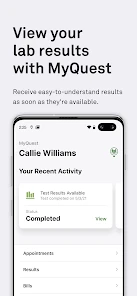
One of the standout features of the app is its ability to keep all your medical test results in one place. Gone are the days of rummaging through piles of paperwork or trying to remember when your last cholesterol test was. The app sends you notifications when new results are ready, so you’re always in the loop.
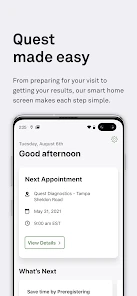
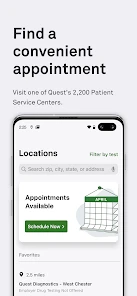
Another feature worth mentioning is the appointment scheduler. This tool helps you keep track of your upcoming medical appointments, and you can even set reminders so you don’t miss them. It’s like having a personal assistant dedicated to your health needs!
Privacy and Security
Obviously, when it comes to health information, privacy is paramount. I was relieved to see that the app uses state-of-the-art security measures to protect user data. It requires a secure login and employs encryption to ensure that your personal health information stays private.
User Experience: Smooth Sailing or Rough Waters?
In terms of user experience, the app generally runs smoothly, though I did notice a couple of minor glitches. Occasionally, the app took a moment longer to load my information than I would have liked. However, these hiccups were few and far between, and they didn’t detract significantly from my overall experience.
The design is user-friendly, with easy navigation and a layout that is pleasing to the eye. Even if you’re not tech-savvy, you’ll find it easy to get around.
Final Thoughts
All in all, MyQuest for Patients is a powerful tool for anyone looking to keep their health information organized. It’s not perfect, but it’s certainly a step in the right direction. Whether you’re managing a chronic condition or just like to stay on top of your health, this app has a lot to offer. So why not give it a try? You might just find it makes your life a little bit easier!
Pros
- User-friendly interface
- Comprehensive health tracking
- Customizable notifications
- Secure data handling
- 24/7 customer support
Cons
- Limited free features
- Requires internet connection
- Occasional app crashes
- Complex initial setup
- Battery draining

- Category
- Medical
- Version
- 5.4