MyHealthONE
- 1.13K
- 4.0
- Installs
- 500.00K
- Price
- Free

Screenshots
Analysis by Reviewed
I’d choose a patient portal by asking one practical question first: does it help me manage the care I already receive, or does it add another place to check? That is the right way to approach MyHealthONE, a free medical app from HCA Healthcare Inc. Its value is less about replacing other health tools and more about making relevant patient tasks easier to reach. I’d consider it when my appointments and care information are connected to the services it supports, not as a universal record of every visit, medicine, or symptom.
Decide what you need the app to do
Before relying on a portal, think about the small jobs that currently cause friction. Do you forget appointment details? Do you want to check for test results without calling? Are you trying to keep track of care for a family member? Those are useful reasons to consider a patient app. If your main goal is logging daily exercise, keeping a broad symptom diary, or gathering records from unrelated providers, a dedicated tracker, a paper notebook, or another provider’s portal may be a better fit.
I would also separate access from interpretation. A portal can make a result easier to find, but a number or flag on a screen does not explain what it means for your symptoms or medical history. When something is unclear, I’d use the app to identify the test and then ask the clinician who ordered it. That distinction matters most when a result arrives before anyone has had a chance to discuss it with you.
Where a patient portal can save effort
In my experience, the best use for this kind of app is reducing small bits of appointment-related admin. Instead of searching through old messages while walking out the door, I can check the appointment information in one place and make a note of anything I want to ask. The benefit is modest but real: less reliance on memory, and fewer details lost between booking and the visit.
MyHealthONE is a medical app with a 4.2 average rating from around 7,300 ratings and over 500,000 installs. It is rated for Everyone, and its current version is 1.9.2. It has been available since March 25, 2020. Those figures provide context about its reach, but they cannot tell me whether it will match a particular person’s clinic arrangements. I’d make that the first thing to check.
Your Health at Your Fingertips
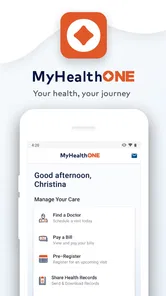
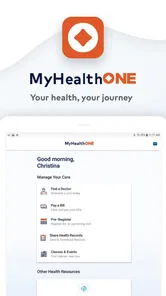
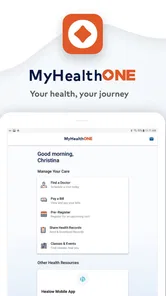
First off, let’s talk about the user interface. When I first opened MyHealthONE, I was greeted with a clean and intuitive dashboard. Everything from my medical records to my upcoming appointments was laid out with simplicity and clarity. It’s like the app developers knew exactly the kind of clutter I despise.
Features That Speak Volumes
One of my favorite features is the appointment scheduling. It’s a breeze to book, reschedule, or cancel appointments directly through the app. No more waiting on hold with the doctor’s office while listening to elevator music! Plus, the app sends you reminders, so there's no excuse for missing a check-up.
More From Our News Desk

 Block Blast!
 Makes Every Clear Feel Like One More Turn
A clean little block puzzle becomes a study in space, risk, and self-control. Its best moments come from one satisfying clear; its toughest test is knowing when to stop.

 Super Stylist Fashion Makeover
Super Stylist Turns Dress-Up into a Runway Career
Its makeover-to-client loop turns quick outfit decisions into shareable style theater. The question is whether the closet keeps giving players a reason to return.

 Block Craft 3D:Building Game
Block Craft 3D Under Pressure: How Well Does It Recover When Building Goes Wrong?
A failure-focused look at Block Craft 3D’s forgiving building loop, its uncertain recovery edges, and the moments that demand more than a cheerful village.

 Woodturning
 Trades Creative Freedom for a Satisfying Carving Loop
If your usual creative game is about building, decorating, or styling, Woodturning trades open-ended projects for a tactile, tightly guided carving loop. Here is what that switch really costs.

 PUBG MOBILE
 Shows What Battle Royale Must Get Right
PUBG MOBILE shows how battle royale has matured: bigger systems matter less than meaningful choices, readable fights, and a reason to return after every loss.

 Braindom: Brain Games Test
Braindom’s Social Life Happens Between Puzzles
Braindom turns quick logic traps into a personal ritual, but its community value is more about comparing answers than building together.
Latest News



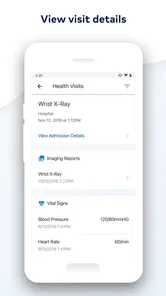
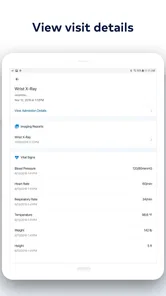
A useful habit is to check the appointment details before you leave home, rather than relying on memory or an old text message. If you are coordinating care for a family member, confirm whose appointment you are viewing and keep any questions you want to raise in a separate note. That small bit of preparation makes a portal more helpful without turning it into a substitute for the conversation itself.
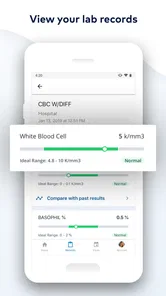
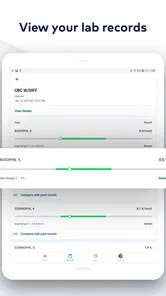
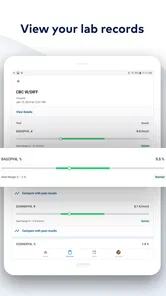
Not to mention, accessing lab results has never been easier. The app notifies you as soon as your results are ready. I can’t tell you how many times I’ve anxiously awaited a phone call or letter in the past. Now, it’s just a matter of tapping a notification and voila, instant peace of mind.
There is a trade-off to quick access: seeing a result before a clinician has explained it can create more questions than answers. I’d avoid treating a notification as a diagnosis, especially if a result looks unfamiliar. Use it as a prompt to follow up, and keep the test name and date handy when you contact the care team; that makes the next step clearer than trying to describe a screen from memory.
A realistic routine for appointments and results
Imagine you have a follow-up appointment later in the week and a lab notification arrives during a busy workday. Rather than trying to interpret it between meetings, I’d open the portal when I have a quiet moment, note the test name and any question it raises, and bring that question to the appointment. If the issue feels urgent, I would contact the care team instead of waiting for the scheduled visit. The app can help me keep the details straight; it cannot decide what action is medically appropriate.
For a caregiver helping a relative, the same routine can prevent a different kind of confusion. Before discussing an appointment, I’d make sure I’m looking at the right person’s information and write down the questions the patient wants answered. That is more reliable than assuming I will remember every detail while speaking with a clinician. It also keeps the patient’s own concerns central rather than letting the app become the focus.
Privacy habits matter as much as convenience
Health information is personal, so I would treat access to any portal with care. I would avoid leaving a health app open on a shared device, use the device’s available screen lock, and be deliberate about notifications if other people can see the screen. These are everyday precautions rather than a reason to avoid digital access. I would not assume that a reassuring interface alone is a substitute for sensible account and device habits.
The original appeal of a portal is that it puts patient information within reach, but convenience changes how often we look at it. Frequent checking can be useful when I am preparing for care; it can also encourage anxious refreshing when I am waiting for an explanation. I’d decide in advance what I will do with a notification—save a question, contact the clinic when appropriate, or wait for the planned discussion—instead of repeatedly opening the app without a next step.
Security You Can Trust
In today’s digital age, security is a biggie. I was pleasantly surprised by how seriously the app takes security. It employs all the fancy tech jargon like encryption and multi-factor authentication to ensure your data stays safe and sound. It’s like having a digital Fort Knox for your health information.
Moreover, the app’s developers seem committed to continuously improving security features. It’s reassuring to know that they’re not just resting on their laurels but are actively seeking ways to fortify your personal data.
Integration and Accessibility
Another aspect worth mentioning is the integration with other health devices and platforms. Whether you’re tracking your steps, monitoring your heart rate, or managing your diet, MyHealthONE syncs effortlessly with your gadgets. It’s a one-stop-shop for everything health-related.
For a decision between this and a standalone fitness or symptom-tracking app, I’d choose based on the job at hand. A patient portal is most valuable for appointments and care-related information; a dedicated tracker is usually the more natural place for daily activity habits. I would not make the portal the central record for information it does not manage, and I would keep a separate note of questions, medicines, or readings I need to discuss at a visit.
How it compares with the usual alternatives
The most useful comparison is not with one particular brand but with three different approaches. A provider portal is the natural alternative when your care is organized somewhere else; a standalone health tracker is better suited to daily habits; and a calendar or paper notebook can be enough if all you need is a reminder and a few questions for a visit. MyHealthONE makes the most sense when its patient-facing tools line up with the care you actually use.
A general-purpose health app may feel more flexible because it can be used regardless of where you receive care, but flexibility is not the same as access to provider-held appointment details or results. Conversely, a patient portal is not automatically the best place to store every personal reading or health observation. I’d keep those jobs separate: use the portal for connected care tasks and a tracker or note for information I want to record independently.
And for those of us who aren’t exactly tech-savvy, the app’s support team is ready to help. They’ve got a friendly crew that’s just a call or email away, which is a nice touch for anyone needing a little extra guidance.
Everyday fit, setup, and trade-offs
Picture a familiar situation: you have an appointment coming up, a result notification arrives while you are at work, and you want to remember what to ask at the visit. The practical workflow is to check the portal when you have a quiet moment, note the result or appointment detail that raised a question, and bring that question to the clinician rather than trying to draw a conclusion on your own. That makes fast access useful without letting an unexplained screen take over your day.
The app is most compelling for someone whose care is already connected to the patient services it supports and who wants a convenient way to keep routine tasks close at hand. If you mainly want a broad personal health diary, need a single place for care across unrelated providers, or prefer to handle every appointment by phone, another approach may suit you better. A paper calendar can still be the simpler option for reminders, while a provider’s own portal may be necessary for records outside this one.
For someone deciding whether to switch from phone calls or paper reminders, I’d start small rather than moving every routine at once. Try checking a single appointment, then see whether the details are easy to find when you need them. If that saves a call or prevents a missed detail, keep using it for that purpose. If signing in and checking another screen becomes more work than the task itself, there is no need to force the change.
One practical question is whether the app can stand in for calling the clinic. I would not assume that every request or situation can be handled inside a portal. For routine scheduling tasks it may be convenient, but if an appointment is time-sensitive, a detail looks wrong, or you need guidance about symptoms, contacting the clinic directly is the safer route. Likewise, a notification tells me that information is available; it does not establish that someone has reviewed it with me.
Switching is not just installing an app: you also have to get comfortable checking it and know which source to trust when information is spread across services. I’d start with one concrete task, such as reviewing an upcoming appointment, then decide whether it genuinely saves effort before making it part of every health routine. MyHealthONE is free, rated for Everyone, and has an average rating of 4.2 from around 7,300 ratings, with over 500,000 installs. It was released on March 25, 2020, and version 1.9.2 is the current version. Those figures suggest an established audience, but the deciding factor for me would still be whether it fits your care arrangements.
A sensible choice for connected care
My bottom line is straightforward: if you already rely on the services this portal supports and want appointments and health information easier to reach, I can see the appeal. If you need a universal record across unrelated providers, a fitness-first tool, or medical advice in place of an appointment, it is not the right answer. The app has 969 written reviews alongside its ratings, but I’d weigh your own care setup more heavily than any overall score. I’d give it a try for a specific recurring task, keep your clinician involved when interpreting results, and continue using another option wherever your care falls outside its reach.
MyHealthONE Frequently Asked Questions
Is MyHealthONE free to download, and who is it intended for?
MyHealthONE is a free medical app from HCA Healthcare Inc, designed as a patient health portal. It is intended for people who want to manage healthcare tasks and access patient services through a mobile app. Its Everyone age rating makes it suitable for a broad audience, though users should consider whether the portal’s services fit their own healthcare needs before downloading.
What is MyHealthONE and what services does it offer?
MyHealthONE is a comprehensive patient portal designed to simplify your healthcare management. It offers a variety of services, including the ability to schedule and manage appointments, access personal health records, view test results, and pay bills online. The app also provides educational resources and tools to help users make informed health decisions.
Is MyHealthONE compatible with both Android and iOS devices?
Yes, MyHealthONE is available for both Android and iOS platforms. Users can download the app from the Google Play Store for Android devices and the Apple App Store for iOS devices. The app is designed to run smoothly on smartphones and tablets, ensuring convenient access to healthcare services on-the-go.
How secure is the personal information stored in MyHealthONE?
MyHealthONE prioritizes the security of your personal information by employing advanced encryption protocols and adhering to strict privacy standards. The app ensures that all data, including medical records and billing information, are protected against unauthorized access, thereby maintaining user confidentiality and trust.
Can I use MyHealthONE to communicate directly with my healthcare provider?
Yes, MyHealthONE facilitates direct communication between patients and their healthcare providers. Users can send secure messages to their doctors, request prescription refills, and receive important notifications regarding their health. This feature enhances patient engagement and ensures timely medical support.
Pros
- User-friendly interface
- Comprehensive health records
- Easy appointment scheduling
- Secure data encryption
- Accessible 24/7
Cons
- Limited customer support
- Requires internet connection
- No offline access
- Occasional app crashes
- Limited customization options