My Work
- 415.00
- 4.2
- Installs
- 500.00K
- Price
- Free
Screenshots
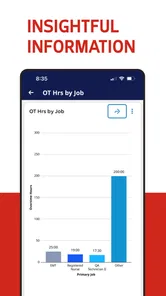
Analysis by Reviewed
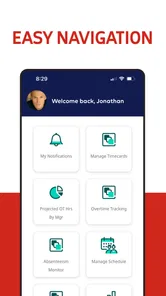
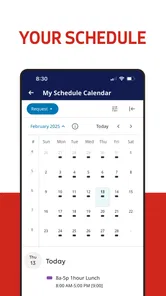
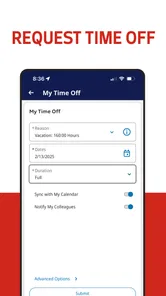
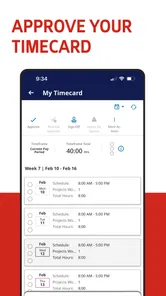
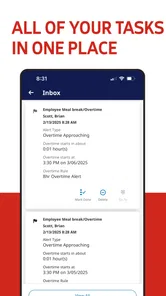
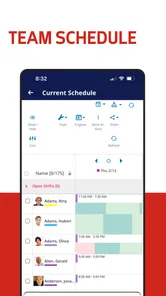
My Work is a business app from ADP, INC. aimed at employees and managers who need a more flexible way to handle workforce tasks from a phone. I approached it as a practical work tool rather than a general productivity app, and that distinction matters: its usefulness depends heavily on whether your employer already uses the ADP Workforce Manager platform.
The app is free to download and carries an Everyone content rating, which makes it easy to consider for a mixed workplace. It has a 4.2 average from around 3.5 thousand ratings, with more than 500 thousand installs. Those figures suggest that it is established enough to be familiar to many employees, while still feeling like a focused workplace companion rather than an app intended for everyone.
How My Work fits into a working day
My first impression is that the app makes the most sense when a company wants employees to deal with routine workforce actions without sitting at a desk. The phone becomes a convenient point of access for work-related information and actions that would otherwise require a supervisor, a shared computer, or a separate conversation with an administrator.
A realistic example would be an employee finishing a shift away from the office. Instead of waiting until the next day to use a workplace terminal, they can open the app and deal with the relevant task while the details are still fresh. A manager could also use the mobile experience while moving between locations, checking what needs attention without being tied to a desktop.
That convenience is the central value here. I would not choose My Work as a personal task manager, calendar, or replacement for a full human-resources system. I would choose it when my employer has connected the workforce process to ADP and expects staff to use a mobile channel.
The developer is ADP, INC., a name closely associated with payroll and workforce services. That background gives the app a clear business purpose, but it also creates a practical limitation: the experience is not entirely independent. Your organization’s setup, permissions, and policies shape what you can actually do after signing in.
The current experience is best for connected employees
The strongest audience is an employee whose work involves changing schedules, moving between locations, or handling routine workforce information outside a traditional office. For that person, a mobile app can remove small points of friction that become surprisingly annoying over a week: finding a terminal, remembering to ask a manager, or postponing a simple action until returning to a computer.
More From Our News Desk

Weather by Xiaomi Review: Clear at a Glance, Less Clear Up Close

X Under Pressure: Can It Recover When Posting Goes Wrong?

Clash of Clans Is Won Between the Battles

Android Auto Makes the Case for Quieter Car Software

MobiOffice: Transforming Mobile Productivity with Seamless Integration

EA SPORTS FC™ Mobile Soccer: Redefining Mobile Sports Gaming
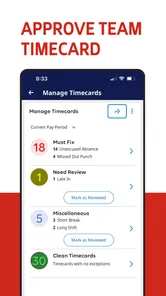
Managers may also find the format useful, particularly when their responsibilities are distributed across a team rather than concentrated at one desk. The benefit is not that a phone suddenly replaces every management workflow. The benefit is that the mobile channel can keep everyday decisions closer to the moment when they happen.
There is a trade-off, though. If your workplace does not use ADP Workforce Manager, My Work is unlikely to have much value to you. Even if you are curious about the app, it is not designed as a standalone tool that can be populated with your own company’s schedules or employee records.
I would also be cautious about recommending it to someone who wants a broad, self-contained business suite. The app’s purpose is narrower. That focus can make it easier to understand in the right environment, but it also means it cannot replace a general office platform, a personal calendar, or a dedicated communication tool.
What the release history tells me
The app was released on July 15, 2019, and the current version is 5.06.06.0060. I see that version information as a sign of an established product rather than a brand-new experiment. A workplace app benefits from that kind of continuity because employees need a familiar route to recurring tasks, while organizations need a product that remains part of their day-to-day systems.
At the same time, a version number alone does not tell me that every part of the experience has been transformed. I would separate the evidence of ongoing maintenance from assumptions about major redesigns. The current release shows that the app continues to be presented as an active product, but I would not promise a particular new feature unless it is visible in the experience provided by your employer.
That distinction is important for existing users. An update can improve compatibility or refine the way an established workflow behaves without changing the basic reason people open the app. If you already use it successfully, the most meaningful question is whether your daily actions remain clear and dependable, not whether the version number sounds dramatically different.
For a new user, the release information is useful in another way. It suggests that you are joining a maintained product with a history, not downloading something that has just appeared and has no established workplace context. Still, the quality you experience will be influenced by how your organization configures the service and communicates its procedures.
Where it can save time in real situations
One non-obvious strength of a mobile workforce app is timing. A task completed immediately is less likely to be forgotten than one left for the end of a busy shift. If I am already carrying my phone while moving between work areas, using that moment can be more practical than finding a workstation later.
Another useful angle is consistency. When a company gives employees one recognized mobile route for workforce actions, it can reduce the number of informal alternatives people invent for themselves. That does not eliminate confusion, especially when local rules differ, but it can make the starting point easier to remember.
There is also a manager-specific trade-off. Mobile access can help a manager respond while away from a desk, but convenience should not become pressure to stay available constantly. I would use the app to handle genuinely time-sensitive work, while keeping boundaries around non-urgent tasks. The app can make access easier; it cannot decide when access is appropriate.
A third practical insight is to treat the app as one part of a process rather than the entire process. Before relying on it for an important workplace action, I would learn what the employer considers the official confirmation. In some organizations, the mobile submission may be only one step, with approval or review happening elsewhere. Understanding that workflow prevents the common mistake of assuming that tapping a button automatically completes every administrative obligation.
Setup, access, and everyday reliability
The first question most people will have is whether they can simply install the app and begin. In practice, the answer depends on their employer’s ADP arrangement and the account details provided for workplace access. The download itself is free, but that does not mean the app independently creates a workforce account for an individual.
I would install it only after confirming the correct sign-in route with the organization. This is especially important in workplaces where employees may have access to more than one ADP service or where a manager distributes specific instructions. A few minutes spent checking the company’s process can prevent repeated failed attempts and unnecessary password confusion.
The minimum operating-system requirement is Android 8.0 or later. That makes the app accessible on a broad range of Android phones, although the age and condition of the device can still affect how comfortable any business app feels. A newer phone is not automatically required, but I would keep the operating system updated and avoid judging the service from a device that struggles with other modern apps.
For regular use, I would pay attention to the difference between app problems and account or company configuration problems. If a particular option is unavailable, that may reflect your role or workplace rules rather than a broken installation. If sign-in repeatedly fails, the fastest solution may be checking employer instructions or contacting the appropriate administrator instead of reinstalling the app several times.
This is one area where My Work differs from a typical consumer app. With a personal finance or notes app, I can usually create my own account and control the content. Here, the organization sits in the middle of the experience. That can feel restrictive, but it is also what allows the app to connect to a real workforce structure instead of offering only personal reminders.
How it compares with familiar alternatives
Compared with a paper schedule or a shared noticeboard, My Work offers a more direct mobile route for employees who are not always near the office. Compared with a general calendar, it is more relevant to employer-managed workforce information because it belongs to a specialized business environment rather than asking the employee to maintain everything manually.
Compared with a desktop browser, the app’s advantage is immediacy. A browser can be more comfortable for long administrative sessions, especially when reviewing a large amount of information, but a phone is often better for a quick check while away from a desk. I see the two formats as complementary rather than competing completely.
Compared with a messaging app, My Work is a better fit for structured workforce actions, while messaging remains better for questions, explanations, and unusual situations. I would not use a chat thread as a substitute for an official work record, and I would not expect a workforce app to replace a conversation when a schedule or policy needs clarification.
There is also a case for choosing another option. If your company already provides a polished employee portal that combines workforce tasks with documents, communication, and broader human-resources support, My Work may feel narrower by comparison. Its value is highest when the ADP connection is central to your job and the mobile workflow is genuinely easier than the alternatives available to you.
Limitations that matter before you depend on it
The biggest limitation is the app’s dependence on organizational setup. Two employees can install the same product and have different experiences because their roles and employer configurations are different. That makes it difficult to judge the app only from its icon or download page; the real test begins after the workplace account is connected.
A second limitation is scope. My Work is not the kind of app I would recommend for someone who wants to organize freelance projects, track personal appointments, or run a small business without an ADP environment. It is a workforce access point, not a blank canvas for building your own system.
Mobile convenience can introduce its own friction as well. Phones are excellent for short actions, but less comfortable for detailed review, repeated data entry, or comparing many pieces of information at once. When a task becomes complicated, I would rather use the organization’s desktop access if available and keep the phone for quick checks and time-sensitive actions.
There is a human limitation too: an app cannot resolve unclear workplace policy. If you do not know which schedule, request, or record is official, the correct next step may be asking a manager or administrator. My Work can make the approved process easier to reach, but it cannot replace the judgment and communication required when circumstances are unusual.
Who should use it and who should skip it
I would recommend My Work to employees whose organizations use ADP Workforce Manager and who regularly need mobile access to work-related information or actions. It is particularly sensible for people who spend much of the day away from a desk, work across locations, or want to deal with routine matters before they become forgotten tasks.
I would also consider it for managers who need a mobile companion to their established workforce process. The key phrase is “companion.” I would not assume that mobile access removes the need for a full administrative view, internal communication, or approval procedures.
I would skip it if I were looking for a standalone scheduling app, a general employee directory, or a personal productivity tool. I would also hesitate if my employer has not clearly explained how the app fits into its process. Installing it without that context may create more uncertainty than convenience.
For families or shared devices, the Everyone rating is reassuring from a content standpoint, but I would still treat the app as private workplace software. A personal phone used by several people should have sensible account separation, and users should avoid leaving a work session open where someone else can access it.
What existing users should expect from the current version
Existing users should approach version 5.06.06.0060 as the current point in an ongoing product rather than as a promise of a completely new experience. I would update through the normal store process, then check the few workflows I use most often before assuming everything behaves exactly as before.
That check is especially worthwhile after any app update in a workplace setting. Try the ordinary path you rely on, confirm that your account still opens correctly, and make sure you understand where a completed action appears in the wider process. This is not about distrusting the app; it is about avoiding surprises when a mobile tool is connected to employment records and schedules.
New users should watch how clearly their employer explains the app’s role. The best experience will come when installation instructions, account support, and workplace policy agree with one another. If those pieces are unclear, even a well-maintained app can feel frustrating because the missing information is outside the phone itself.
I would also watch for improvements that make mobile actions easier to understand without adding unnecessary complexity. In a workforce app, clarity is more valuable than decorative change. A small improvement to navigation, confirmation, or recovery from an error can matter more to an employee than a large visual redesign.
My final view after weighing the trade-offs
My Work succeeds when I judge it by the job it is meant to do: give ADP-connected employees a practical mobile doorway into workforce management. It is free, established, and focused, with a current version that shows continued product maintenance. The 4.2 average and roughly 3.5 thousand ratings also indicate a generally positive reception, though I would still remember that individual experiences depend strongly on employer configuration.
I like the idea of handling routine work matters close to the moment they arise, especially for employees who are rarely seated at a computer. The app can reduce small delays and make an existing ADP process easier to reach. Its strongest advantage is not that it tries to do everything, but that it gives a specific kind of user a mobile option.
My reservation is equally clear: this is not a universal business app. If your organization does not use the connected ADP service, or if you need broad planning and collaboration features, another tool will serve you better. Even for eligible users, complicated cases may still require a browser, a manager, or an administrator.
Overall, I would recommend My Work to the right employee, with one condition: confirm how your workplace uses it before making it part of your routine. Its real value comes from fitting neatly into an existing workforce process, not from replacing every other work tool.
My Work Frequently Asked Questions
Is My Work intended for employees with an ADP workplace account?
My Work is associated with ADP, INC., and its store summary describes workforce management flexibility with ADP Workforce Manager. It is a business app, so it may be most relevant to people whose workplace uses ADP services. Before downloading, check with your employer about whether My Work is part of your organization’s workflow and whether you need workplace account details to use it.
What is My Work, and what can I use it for?
My Work is a productivity-focused application designed to help users organize professional activities, tasks, projects, notes, and daily responsibilities in one place. After exploring its main features, it appears most useful for people who want a clearer overview of pending work and completed activities. Its value depends on the exact tools enabled in your version, so review the app description and permissions before downloading.
Is My Work suitable for personal use, freelancers, and teams?
My Work can be useful for several types of users, including employees managing daily assignments, freelancers tracking client-related work, students organizing responsibilities, and small teams coordinating activities. However, the collaboration experience may vary depending on whether the app supports shared projects, comments, user roles, or synchronization. Users needing advanced business features should confirm those options before relying on it for larger workflows.
Does My Work require an internet connection?
Some features of My Work may function offline, particularly viewing information already stored on the device or adding basic entries. Internet access may still be necessary for account creation, cloud synchronization, backups, sharing, notifications, or updates. If you frequently work while traveling or in areas with poor connectivity, check how offline changes are handled and whether they synchronize correctly once your connection returns.
Which devices can run My Work?
My Work is available for Android and iOS users, with the Android version requiring Android 8.0 or later. Check your device’s operating system before installing so you can avoid compatibility issues. The app is free to download and is rated for Everyone, making it accessible to a broad audience, though workplace requirements may influence whether it is useful for your particular needs.
Pros
- Simple way to organize tasks
- notes
- and work-related information.
- Useful for tracking progress and keeping priorities visible.
- Can help reduce missed deadlines and forgotten responsibilities.
- Suitable for both individual users and small teams.
- A practical tool for creating a more structured daily workflow.
Cons
- Some advanced features may require a paid subscription.
- The interface can feel crowded when managing many projects.
- Limited value if your work process is already highly organized.
- Notifications may become distracting without careful customization.
- Collaboration features may not match those of larger productivity platforms.













