ADP Mobile Solutions
- 82.83K
- 4.5
- Installs
- 10.00M
- Price
- Free

Screenshots
Analysis by Reviewed
For employees whose workplace already runs on ADP, a phone can be a useful place to check work details without opening a computer or tracking down a paper notice. I see ADP Mobile Solutions as a practical self-service companion, not a complete HR office in your pocket. Its value comes from the information your employer makes available and the small tasks you can handle between other parts of the day.
Where it fits into a workday
The distinction between self-service and support is important. Reviewing a pay record or checking a work detail is different from getting a payroll correction approved or resolving a benefits question. I’d use the app to see what information is already available, then contact the appropriate person when a decision, explanation, or formal change is needed.
That makes it most helpful when you have recurring, modest questions rather than a major issue to solve. If you often need to confirm a shift, review pay details, or keep an eye on time records, having those checks on your phone can save a little effort. If you only need one answer and rarely use employee tools, your company’s normal HR contact may be the quicker option.
What to check before depending on it
Before making the app part of your routine, I’d confirm that your employer uses ADP and find out how it expects employees to register. If you are starting a new job, ask HR or your manager for the right setup instructions rather than guessing at account details. Getting access sorted out before payday or a shift makes the app much more useful when a quick check actually matters.
I’d also decide which information is worth checking on a phone and which is easier to review carefully elsewhere. A brief look at a schedule or pay record suits a small screen; comparing several entries or working through a complicated question may be more comfortable on a desktop or with help from payroll. That simple division keeps the app convenient without asking it to do a job it is not designed to do.
When work details are scattered across emails, paper notices, and a company portal, a phone app can make routine checks much less of a chore. In my view, ADP Mobile Solutions is most useful as a convenient employee self-service companion: it brings common payroll and work tasks into one place, but it is not a substitute for your employer’s HR team or for every workplace system. That distinction matters, because what you can use depends in part on how your employer has set things up.
Getting Started with ADP Mobile Solutions
ADP Mobile Solutions is a free business app from ADP, INC., built for employees who want to handle work-related information from a phone. Its audience is broad, with an Everyone age rating, and it has a 4.5 average from around 737,000 ratings, alongside more than 10 million installs. Those figures suggest it is a familiar tool for many workers, though popularity alone cannot guarantee that every employer enables the same options.
You May Like

Clash of Clans Is Won Between the Battles

Android Auto Makes the Case for Quieter Car Software

MobiOffice: Transforming Mobile Productivity with Seamless Integration

EA SPORTS FC™ Mobile Soccer: Redefining Mobile Sports Gaming

How Microsoft OneDrive Became a Mobile Productivity Giant

How Google Translate Breaks Language Barriers Effortlessly
First things first, let's talk about the setup. Downloading ADP Mobile Solutions is a breeze. A quick trip to either the Google Play Store or Apple App Store, and you're ready to roll. Once installed, logging in is a snap if you already have an ADP account. And if you don’t, setting one up is straightforward, though you’ll need your company’s unique registration code. But hey, a little paperwork never hurt anyone, right?
In practice, that employer connection is the key detail to understand before relying on the app. If you are new to a job, ask your HR contact whether the organization uses ADP and how employees should register. The app itself cannot replace an employer’s invitation or account setup. I would also check access before an urgent moment, such as just before a shift or while trying to confirm a recent payment, rather than discovering a login snag when I need an answer quickly.
Features That Stand Out
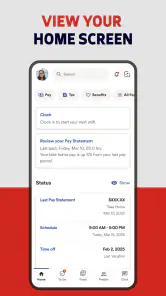
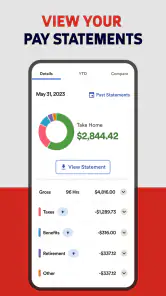
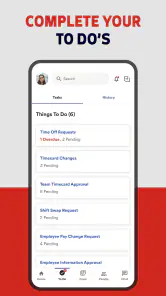
Now, onto the juicy bits – the features. This app is your personal HR assistant. Seriously, it’s like having your HR department right in your pocket. You can access your pay stubs, check your balance, and even manage time cards. It’s all there, laid out in a user-friendly design that doesn’t require a tech guru to navigate. I mean, if I can do it, anyone can!
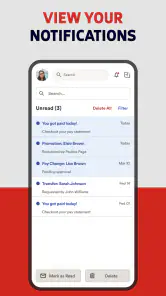
The schedule feature is a lifesaver for those of us who tend to forget when we’re working next. And let’s not forget about the notifications that gently remind you when payday is around the corner. Who doesn’t love a payday reminder?
Making routine checks more useful
A practical habit is to use the app as a quick reference, then save more involved questions for the right person at work. For example, before contacting payroll about a deposit, I’d first open the pay information and compare the available details with the pay period I have in mind. For a time-card issue, checking the entry soon after a shift can make it easier to spot a mistake while the shift is still fresh in your memory. The app’s value here is less about replacing a conversation and more about helping you arrive at one with a clearer question.
It also suits a busy, stop-and-start routine better than a full desktop portal. Imagine checking tomorrow’s shift while waiting for a bus, then looking at a pay stub later during a break. Those are small tasks, but having them within reach can prevent a forgotten schedule check or a needless message to a manager. I would still treat the employer’s official process as the source of truth for changes that require approval; a convenient screen does not necessarily mean a request has been submitted or accepted.
Security and Reliability
Security is always a concern when dealing with sensitive information, but ADP’s got it covered. The app uses multifactor authentication to ensure your data stays safe. Plus, the app is regularly updated to patch any vulnerabilities, which is a relief. You don’t want your payroll info floating around the web, right?
Because payroll details are private, I’d avoid checking them on a shared device and make sure I can complete the sign-in process before I need the app away from home. Multifactor authentication adds a layer of protection, but it can also mean an extra step when logging in, so keeping the relevant sign-in method available is sensible. The current version is 25.49.0, and the app requires Android 10 or later on Android devices; those details are worth checking if you are setting it up on an older phone.
Choosing the right route for a task
Compared with a company intranet or a desktop payroll site, the phone app’s main advantage is quick access while away from a computer. Compared with asking a supervisor for every routine detail, it can give you a more direct way to review information already available to you. But for a complicated payroll correction, benefits question, or a request that needs approval, a direct conversation with HR or a manager is often the better route. I would use the app to inspect and keep track, not assume it can resolve every employment issue.
A useful way to think about the alternatives is by the kind of answer you need. For a quick personal check, the mobile app can be less cumbersome than signing into a portal on a laptop. For a detailed review, a larger screen may make it easier to compare information and keep notes. For a policy interpretation or a change that needs authorization, a person at work is the more appropriate source. The best choice is not always the app; it depends on whether you need access, context, or a decision.
Room for Improvement
Of course, no app is without its quirks. While ADP Mobile Solutions packs a punch with its features, it can occasionally lag, especially during peak usage times. It’s a minor hiccup, but something to keep in mind if you’re planning to check your paycheck during lunch hour.
Also, the initial setup can be a bit intimidating for the less tech-savvy folks. A little hand-holding through the process wouldn’t hurt, but once you’re past that, it’s smooth sailing.
Access depends on the workplace
There is another trade-off: a single app can feel inconsistent if you expect every work function to be available to every employee. Access depends on the employer’s setup, so one person may use it mainly to review pay while another has more work-related options. If you only need a one-time answer, the company’s usual HR contact or payroll portal may be simpler than registering and learning a new app. Likewise, anyone who prefers handling sensitive financial information on a larger screen may find a desktop route more comfortable.
This is also why I would not treat the app as a universal record of everything happening at work. It can be a handy place to check what is presented to you, but workplace instructions and approval processes still matter. If something appears unclear or does not match what you expected, noting the relevant pay period or shift and asking the right contact is more dependable than assuming the screen explains the discrepancy by itself.
Who is most likely to benefit
ADP Mobile Solutions makes the most sense for employees who already have an ADP-supported workplace and expect to make repeated, straightforward checks from a phone. Workers with changing schedules may appreciate having a quick way to look ahead, while anyone who reviews pay information regularly can use it as a convenient first stop. It is less compelling for someone who rarely needs employee self-service or whose employer does not use the platform.
A realistic use case is a worker finishing a shift and checking the time entry before the details blur together. If something looks off, the app helps them notice the issue early and prepare a specific question for a manager or payroll. It does not guarantee that the record can be changed directly or that a correction will be approved; the value is catching and documenting the concern while it is fresh.
I would also recommend setting a simple routine rather than opening the app constantly: check the schedule when planning the week, review time information after work when relevant, and look at pay details when you need to verify a period. That keeps the app useful without turning it into another source of interruptions. Notifications can serve as prompts, but they should not replace checking the actual record when accuracy matters.
Where it falls short of a full HR solution
Employees looking for a general task manager, a personal budgeting app, or a single place to manage every aspect of a job should look elsewhere. This is tied to employer-provided employee services, not a standalone tool for organizing a career or resolving every workplace concern. If your priority is a detailed explanation, an exception, or a formal request, an HR representative or the employer’s established process will be more useful than repeatedly checking a phone screen.
There is a small but meaningful learning curve in understanding what your organization has enabled and where a particular question belongs. I would keep contact details or instructions from the employer handy during initial setup, then learn which items are simply viewable and which require a separate process. That approach avoids the common frustration of mistaking access to information for the ability to change it.
ADP, INC. has focused this app on employee self-service, and its strongest case is everyday convenience rather than a promise to manage an entire working life. Its release dates back to April 1, 2013, and the current version reflects an ongoing product, but I would judge it by whether my own employer makes the information I need available. The useful test is straightforward: can I sign in, find the records I check most, and understand when a question needs to go to a person instead?
In conclusion, ADP Mobile Solutions is a reliable companion for managing work-related tasks right from your smartphone. It’s packed with features that cater to the needs of busy professionals, all wrapped up in a secure and user-friendly package. Sure, there are a few bumps along the way, but the convenience it offers far outweighs these minor setbacks. So, if you’re looking to bring a little more order to your work life, give ADP a whirl. You might just find it’s the app you didn’t know you needed!
I’d recommend it most to employees whose workplace already relies on ADP and who regularly check their pay information, schedule, or time records on the move. If you need a general job tracker, a full personal finance tool, or a way to settle complex HR questions without contacting anyone, this is not the right app for that job. For the right employee, though, it can cut down on small bits of friction during the week. I would install it, confirm what my employer supports, and then use it as a practical reference—not as a replacement for official workplace guidance.
My recommendation
My overall view is positive, with a clear condition: the app earns its place when your employer’s ADP setup matches the tasks you actually need to do. Its biggest strength is reducing the distance between a routine question and the information that may answer it. Its biggest limitation is that it cannot make every workplace process equally available or replace human help when judgment and approval are involved.
For an employee who checks work records on the move, I’d install it, get access working before I need it, and use it for quick reference. For someone who prefers a desktop, rarely checks employment information, or needs a conversation more than a record, another route may be better. That is a modest promise, but a useful one: when the fit is right, ADP Mobile Solutions can make ordinary work administration feel a little less scattered.
ADP Mobile Solutions Frequently Asked Questions
Do I need an employer account to use ADP Mobile Solutions?
Yes. ADP Mobile Solutions is intended for employees whose workplace uses ADP services, and you need the appropriate workplace sign-in details to access your organization’s services. Downloading the app by itself does not create an employee account or grant access. Before installing, check whether your employer uses ADP and whether you have been set up to sign in.
Who develops ADP Mobile Solutions, and what kind of app is it?
ADP Mobile Solutions is a business app developed by ADP, Inc. It is described as an employee self-service app, bringing work-related services to a mobile device. Its practical value depends on your workplace’s ADP setup and the access your employer has arranged for you, so it is most relevant to employees who need to reach their work information through ADP.
Who is ADP Mobile Solutions designed for?
ADP Mobile Solutions is an employee self-service app for people whose employers use ADP services. It is intended to help employees reach work-related information from a mobile device, while managers may also find relevant tools available to them. The app’s usefulness depends on the services and access enabled by an employer, so it is worth checking whether your workplace uses ADP before downloading.
What is ADP Mobile Solutions?
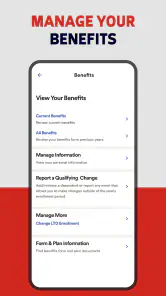
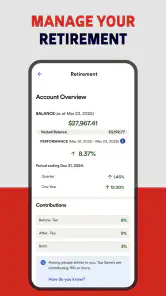
ADP Mobile Solutions is a comprehensive app designed to offer employees and managers easy access to their HR information, including payroll, benefits, time and attendance, and more, directly from their mobile devices. It streamlines workforce management by providing essential HR services on-the-go, ensuring users can manage work-related tasks anytime, anywhere.
Is ADP Mobile Solutions available for both Android and iOS devices?
Yes, ADP Mobile Solutions is available for download on both Android and iOS platforms. Users can find the app on the Google Play Store for Android devices and the Apple App Store for iOS devices, ensuring accessibility across a wide range of smartphones and tablets, making it convenient for diverse users. The Android version requires Android 10 or later.
Pros
- User-friendly interface for quick navigation.
- Secure login with fingerprint authentication.
- Real-time access to pay and tax information.
- Easy management of time-off requests.
- Efficient tracking of work hours and schedules.
Cons
- Limited features compared to desktop version.
- Some functions require stable internet.
- Occasional glitches in updating data.
- In-app support can be slow to respond.
- Customization options are limited.

- Category
- Business
- Version
- 25.49.0













