My Invisalign - Official App
- 1.43K
- 3.9
- Installs
- 1.00M
- Price
- Free

Screenshots
Analysis by Reviewed
If you’ve ever had braces or are currently in the process of aligning your teeth, you know how much of a hassle it can be to keep track of everything. That’s where the My Invisalign - Official App comes in. This app is designed to be your go-to companion throughout your Invisalign journey, streamlining the whole process and making things a lot easier for you.
Getting Started with My Invisalign
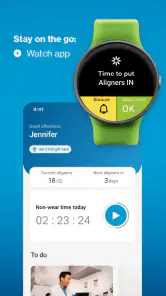
Once you download and open up the My Invisalign - Official App, you’re greeted with a user-friendly interface that’s pretty intuitive. Setting up your account is a breeze, and the app walks you through every step. From entering your treatment details to setting reminders for changing aligners, it’s like having a digital orthodontist in your pocket.
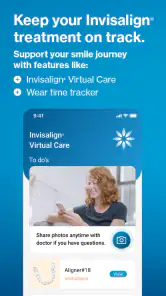
One of the standout features is the treatment calendar. It’s not just any calendar, though. This one’s tailored specifically for your Invisalign treatment plan, making it simple to track your progress. You can mark down when you switch aligners and even note any appointments you have. It’s a lifesaver for someone like me who can never remember which aligner I’m on.
Features that Make Life Easier
The app isn’t just about tracking; it’s packed with features that aim to enhance your Invisalign experience. For one, there are notifications and reminders. If you’re forgetful or just really busy, these reminders ensure you’re swapping out your aligners right on schedule. No more guesswork or worrying if you’ve missed a switch.
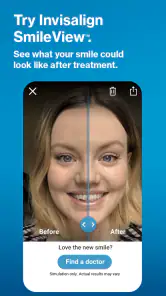
Another cool feature is the smile gallery. This lets you document your progress with pictures. It’s motivating to see how much your teeth have shifted over time. Plus, it’s a great way to share your journey with friends or on social media if that’s your thing.
And let’s not forget the educational resources. The app provides tons of information about Invisalign treatment, tips on maintaining your aligners, and even what to do if you encounter any issues. It’s like having a mini Invisalign library at your fingertips, which is super handy for first-time users.
Why I Recommend It
Overall, the My Invisalign - Official App is a must-have for anyone undergoing Invisalign treatment. It’s like having a personal assistant dedicated to your dental health. The convenience of having all your treatment details in one place, along with the helpful reminders and resources, makes the entire process so much smoother.
I’d say the app is perfect for both the organized and the not-so-organized folks. If you’re like me and need a little nudge now and then to keep on track, this app is a game-changer. Plus, being able to visually track your progress is just the cherry on top. So, if you’re starting your Invisalign journey or are already on it, give this app a shot. You’ll wonder how you ever managed without it!
Pros
- User-friendly interface with intuitive navigation.
- Tracks daily progress with reminders.
- Offers direct communication with orthodontists.
- Provides detailed treatment plans.
- Syncs with Invisalign account for updates.
Cons
- Limited features for non-Invisalign users.
- Occasional app crashes reported.
- Slow loading times on older devices.
- Requires internet for most functionalities.
- Limited customization options for reminders.

- Category
- Medical
- Version
- Varies with device