Modivcare
- 10.76K
- 4.6
- Installs
- 500.00K
- Price
- Free

Screenshots

Analysis by Reviewed
I’d look at Modivcare as a practical tool for a specific problem: getting to a medical appointment when ordinary transport is difficult or unavailable. It is a free medical app from Modivcare, intended for members who need to arrange and manage trips. That membership detail matters: this is not a general ride-hailing service, and simply installing it does not make it a fit for every patient. With an average rating of 4.5 from around 24,000 ratings and over 100,000 installs, it has clearly found an audience, but the useful question is whether its trip process suits your situation.
Check the trip before you start
Before opening the app, I’d get the appointment’s date, time, and destination straight, then check that the trip is something my Modivcare membership can arrange. That small bit of preparation can prevent a frustrating back-and-forth: transport for a medical visit depends on the member’s eligibility and trip arrangements, rather than on the same assumptions you might make when booking a taxi.
For example, imagine a weekday checkup across town, with a family member who cannot leave work to drive. The app’s purpose is to let a member book and manage the trip, making it a more relevant starting point than searching general ride services. I would still keep the clinic’s appointment details handy and allow room for the realities of getting ready and reaching the pickup point. A booked ride can help organize the journey, but it cannot make a late appointment slot or a difficult pickup location disappear.
Your Personal Health Chauffeur
Imagine this: You have a doctor’s appointment, but getting there is a total nightmare because, well, life happens. Enter Modivcare. This app is like having a personal chauffeur dedicated solely to your healthcare needs. Its main gig is to ensure you get to your medical appointments on time, without any drama. It’s designed for those who qualify for non-emergency medical transportation, making it a blessing for many.
Ease of Use
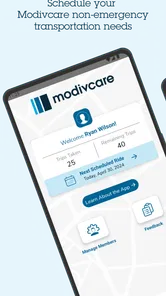
Let’s talk usability. The app is super user-friendly. When you first open it, you’re greeted with a clean interface that’s not cluttered with unnecessary info. Booking your ride is as simple as pie. You just enter your appointment details, confirm your ride, and voilà, you’re all set. It’s designed to be intuitive, so even if you’re not tech-savvy, you’ll have no trouble navigating it.
My practical tip is to treat the booking as the start of a small checklist, not the end of planning. Keep the appointment confirmation accessible, double-check the destination and timing you enter, and make sure anyone helping you knows the agreed plan. Those habits are useful if you are booking on behalf of a relative, too: the person taking the ride should understand where and when to be ready, rather than relying on the app being open on someone else’s phone.
Making the booking work in real life
A useful way to handle a routine visit is to gather the details in one place before you book: the clinic’s address, the appointment time, and the passenger’s pickup instructions. I would also confirm the exact entrance or meeting point with the person taking the ride. A medical campus can have several doors and departments, and a correct street address alone may not tell a driver where a passenger is waiting.
More From Our News Desk

 Block Blast!
 Makes Every Clear Feel Like One More Turn
A clean little block puzzle becomes a study in space, risk, and self-control. Its best moments come from one satisfying clear; its toughest test is knowing when to stop.

 Super Stylist Fashion Makeover
Super Stylist Turns Dress-Up into a Runway Career
Its makeover-to-client loop turns quick outfit decisions into shareable style theater. The question is whether the closet keeps giving players a reason to return.

 Block Craft 3D:Building Game
Block Craft 3D Under Pressure: How Well Does It Recover When Building Goes Wrong?
A failure-focused look at Block Craft 3D’s forgiving building loop, its uncertain recovery edges, and the moments that demand more than a cheerful village.

 Woodturning
 Trades Creative Freedom for a Satisfying Carving Loop
If your usual creative game is about building, decorating, or styling, Woodturning trades open-ended projects for a tactile, tightly guided carving loop. Here is what that switch really costs.

 PUBG MOBILE
 Shows What Battle Royale Must Get Right
PUBG MOBILE shows how battle royale has matured: bigger systems matter less than meaningful choices, readable fights, and a reason to return after every loss.

 Braindom: Brain Games Test
Braindom’s Social Life Happens Between Puzzles
Braindom turns quick logic traps into a personal ritual, but its community value is more about comparing answers than building together.
Latest News



If you are arranging a ride for someone else, decide who owns each part of the day. The member should know the plan, a caregiver can help check the details, and the person at the appointment can be ready at the agreed location. This is a small but important handoff: it reduces the chance that the person who made the booking assumes someone else has explained the pickup plan.
For a regular appointment, I would avoid leaving the booking until the final moment. That is not a promise that early booking guarantees a particular outcome; it is simply a way to give yourself time to check the trip details and resolve any uncertainty before the appointment day. If the visit changes, revisit the arrangement instead of assuming the original plan will automatically match the new time.
Reliability
Now, reliability is where Modivcare shines. The app partners with a network of transportation providers, ensuring that your ride isn’t just available but also punctual. This is crucial because, let’s be honest, no one likes waiting around, especially when it's something as important as a medical appointment. Plus, there’s peace of mind in knowing that the drivers are vetted and trained for such services.
Even with a ride arranged, I would build in a little flexibility around the appointment. A clinic may have its own check-in routine, and a passenger may need extra time to get from the entrance to the right department. The useful outcome is not merely arriving at the address; it is arriving with enough breathing room to complete those steps. That is where planning the whole trip, rather than just the vehicle pickup, makes a real difference.
From pickup to appointment: the handoffs
For someone who has mobility needs or finds unfamiliar trips stressful, the journey is more than the drive. There is a handoff from the person making the arrangement to the passenger, then from the passenger to the transportation provider, and finally from the drop-off point to the clinic. The app can organize the ride, but those transitions still depend on people sharing clear information.
I’d make the pickup instructions practical rather than vague. If the passenger needs time to reach the curb, or a helper will accompany them to the pickup point, agree on that beforehand. Keep the phone used for trip updates accessible, but don’t make the passenger’s entire plan depend on a caregiver being available to check it every minute. A simple written note with the appointment address and agreed pickup details can be useful if the phone is low on battery or the passenger prefers not to navigate screens while getting ready.
After the appointment, the return journey deserves the same attention as the ride there. A visit can run late, and the person leaving the clinic may be tired or distracted. I would make sure the member and any helper understand how the return trip is being handled, rather than treating the outbound ride as the whole task. This is especially worthwhile when the person attending cannot easily make calls or manage changing plans alone.
Features That Stand Out
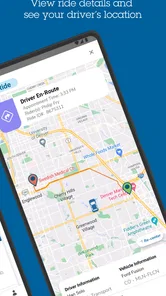
One of the features I found particularly handy was the real-time tracking. You can see where your ride is in real-time, which is great if you’re someone who likes to plan things down to the minute. Additionally, you get notifications about your ride status, which means fewer surprises and more predictability.
Those updates are most helpful when they are treated as a prompt to coordinate, not a reason to stop paying attention. If a relative is taking the trip, agree in advance who will watch for ride messages and who will contact the clinic if plans change. That simple handoff avoids the common confusion of a passenger waiting at one entrance while a helper assumes everything is on schedule.
Another cool aspect is the customer support. If something goes awry, there’s a dedicated support team ready to assist. It’s like having a safety net, which is always reassuring.
For a trip that is time-sensitive, I’d keep the support route in mind before the pickup window rather than looking for it only after a problem occurs. If the appointment time changes or the pickup plan becomes unclear, it is better to address that as soon as you notice. The app can help manage the trip, but the member, any caregiver, the transport provider, and the medical office may each hold a different part of the plan; clear communication between them is still essential.
Where it fits—and where another option may suit you
Compared with a taxi or a general ride-hailing app, Modivcare is aimed at a narrower need: members arranging medical transportation, rather than anyone looking for an everyday ride. That focus is its value when the trip is within the member’s arrangements. It also means it should not be treated as a universal substitute for a car service. If you need a spontaneous ride for errands, a usual taxi or ride app may be the more straightforward choice; if you need emergency help, this is not the right tool.
The app is most useful for members who want to manage a non-emergency appointment trip and can take a little time to verify the plan. It may also help a caregiver who coordinates transportation for a relative, provided the member remains informed and the pickup details are shared clearly. By contrast, someone who is not a Modivcare member, whose trip is not eligible, or who needs transport outside the service’s scope should not assume that downloading it will solve the problem.
One practical trade-off is that a specialized arrangement can involve more coordination than ordering an on-demand car. That extra planning is not automatically a flaw: medical travel often benefits from a known plan and a support route. But if your priority is simply getting the nearest available vehicle immediately, the member-focused process may feel less direct than a general ride service. I would choose based on the kind of trip, not on the assumption that one app is best for every journey.
Room for Improvement
While Modivcare is pretty awesome, it’s not without its quirks. Some users have mentioned occasional glitches with the app’s responsiveness. It’s nothing too crazy, but it’s worth mentioning. A few tweaks here and there could enhance the overall experience.
That makes a backup plan sensible, especially for an appointment that would be difficult to reschedule. I would not assume a screen that is slow to respond means the trip itself has disappeared, nor would I rely on repeated tapping as a substitute for checking the booking. If the app is unresponsive, use the available support channel and keep the essential trip details nearby. Anyone who needs a guaranteed instant car on demand may find a standard taxi or ride-hailing service more familiar, though those alternatives are not the same as a member-focused medical transportation arrangement.
Also, expanding the network of transportation providers could be beneficial. More options mean better service coverage, which is crucial, especially in rural areas where transportation can be tricky.
This is the main trade-off I would weigh before depending on it: specialized medical-trip coordination is valuable when your membership and location are covered, but it is less useful if your area has limited provider availability or your needs are outside the service’s scope. A general ride app may offer a different way to travel, but it does not replace checking eligibility and arranging the right kind of medical transportation. The app is best for members who want one place to manage these trips; it is a poor fit for someone seeking ordinary everyday rides or an emergency response.
Practical checks before relying on it
People often wonder whether they can use the app for a parent or another relative. The sensible answer is to make the booking only as part of a plan the member understands: confirm the trip details together, make sure the passenger knows when and where to be ready, and agree who will monitor updates. A caregiver’s phone can help with coordination, but it should not become a substitute for ensuring the passenger knows what to expect.
Another common concern is what to do when the appointment changes. I would not count on a previously arranged ride matching a new time or destination automatically. Check the trip in the app and use support if the change leaves the arrangement unclear. Similarly, if the app appears slow, avoid making repeated edits without checking what has already been saved; keeping the appointment details close at hand makes it easier to explain the situation if you need assistance.
For a first trip, the most useful test is not just whether you can open the app. Check that you can reach the booking and trip-management steps comfortably, and make sure the phone is charged and available on the day. If the passenger has limited confidence with smartphones, practice the basic routine together while there is no immediate pressure. That preparation can reveal whether the app is manageable for the person who will actually travel, rather than only for the family member who arranged it.
The app is free, carries an Everyone age rating, and is developed by Modivcare. Its current version is 1.5.4, with Android support beginning at version 7.0. Those details make it accessible to many Android users, though an older device can still affect how smoothly any app runs. I’d check that it opens reliably on the phone you plan to use before the morning of an important visit, rather than discovering a compatibility or responsiveness snag while getting out the door.
In conclusion, Modivcare is a solid choice for anyone who needs reliable medical transportation. It’s simple, efficient, and gets the job done. While there’s always room for improvement, the app does a commendable job in making healthcare transportation accessible and straightforward. So, if you’re eligible, give it a whirl and see if it fits your needs. Happy traveling!
Modivcare Frequently Asked Questions
Is Modivcare free to download, and what should members know about transportation costs?
The Modivcare app is free to download, but that does not necessarily mean every transportation service is free. Costs and payment arrangements may depend on a member’s coverage and the services available to them. Before planning a trip, members should check their benefits or contact Modivcare to understand any applicable charges and how transportation is arranged.
What information should I have ready before booking a trip in Modivcare?
It can help to have your appointment and trip details ready before you begin, including the date, time, and locations involved. You will also need to sign in as a member to use the trip-booking features. Having these details at hand can make the process easier and help you review the transportation arrangement associated with your appointment.
What is Modivcare, and who is the app intended for?
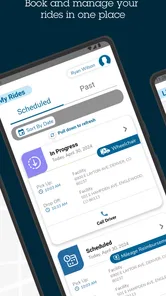
Modivcare is a free medical app developed by Modivcare for members who need to book and manage trips. Its focus is non-emergency transportation connected with medical appointments, so it may be useful to members arranging a ride as part of their care. The app is rated for Everyone and has an average rating of 4.5 from around 24,000 ratings.
1. What is Modivcare and what services does it offer?
Modivcare is a comprehensive healthcare transportation app designed to assist users in scheduling non-emergency medical transportation. It connects patients with reliable transportation providers, ensuring they reach their medical appointments on time. The app also offers features such as real-time tracking, appointment reminders, and support for various transportation needs, including wheelchair and stretcher services.
2. How does the scheduling process work in the Modivcare app?
Scheduling a ride with Modivcare is straightforward. After downloading the app, users can log in and enter their appointment details, such as date, time, and location. The app then matches them with a suitable transportation provider. Users receive a confirmation and can track their ride in real-time, ensuring transparency and peace of mind.
Pros
- User-friendly interface design.
- Comprehensive health service options.
- Reliable appointment scheduling.
- Easy navigation through the app.
- Quick access to customer support.
Cons
- Limited availability in some areas.
- Occasional app crashes reported.
- Booking process can be slow.
- Features depend on location.
- No offline mode available.