Migraine Buddy: Track Headache
- 9.82K
- 4.8
- Installs
- 1.00M
- Price
- Free

Screenshots







Analysis by Reviewed
I find Migraine Buddy: Track Headache most useful when I treat it as a steady record, not a magic answer to why a migraine happens. A few consistent notes can give me something more practical than a hazy recollection when I’m trying to explain a difficult week or spot a recurring situation. That makes it a sensible fit for people who want to observe their headaches over time, while anyone looking for diagnosis or immediate relief should look to a healthcare professional or appropriate care instead.
A routine that holds up on rough days
My baseline approach would be to record an episode as soon as I reasonably can, then add details I remember when I’m feeling better. During pain, filling out every field may be the last thing I want to do; a partial entry is still more useful than abandoning the habit because I can’t produce a perfect account. Later, I can review the calendar and fill in the context that matters to me, such as how the episode felt or what was happening beforehand.
For example, after a rough night, I might log the headache first and make a note of the previous evening’s sleep or meals when I have the energy. If that same kind of entry appears repeatedly, it gives me a question to discuss with my clinician—not proof that a particular food or routine caused the migraine. That distinction is important: tracking can help organize observations, but it cannot establish cause on its own.
Set up the details you will actually use
The app’s breadth is helpful, but it can also make tracking feel like homework if I try to record everything. I’d start with the details I expect to use in a real appointment, then add sleep, medication use, or dietary habits only if those notes answer a question I genuinely have. A smaller, repeatable record is often more useful than an ambitious log that I stop updating.
Reminders can support a routine, but I’d be deliberate about which ones I set. A medication reminder may help me remember a plan I already have, while the app should not be treated as a source of prescribing advice. I’d also check what reminder options suit my schedule rather than assuming every prompt will be useful. If alerts become background noise, fewer and more purposeful reminders are likely to serve me better.
Make the record easier to use
One practical habit is to use the calendar as a review tool rather than checking it after every entry for an explanation. Looking back at a stretch of days can make it easier to notice whether headaches cluster around a routine change, while a single episode rarely tells me much. I’d keep notes factual and brief: what I noticed, what I took, and what seemed different that day. That makes the record easier to scan later.
Before an appointment, I’d review the history and choose the points I want to raise, instead of expecting a clinician to interpret every entry during a short visit. The reports can help communicate the pattern, but I would still explain what feels most disruptive and ask specific questions. This is a useful middle ground between relying on memory alone and bringing an overwhelming pile of unfiltered notes.
More From Our News Desk

Weather by Xiaomi Review: Clear at a Glance, Less Clear Up Close

X Under Pressure: Can It Recover When Posting Goes Wrong?

Clash of Clans Is Won Between the Battles

Android Auto Makes the Case for Quieter Car Software

MobiOffice: Transforming Mobile Productivity with Seamless Integration

EA SPORTS FC™ Mobile Soccer: Redefining Mobile Sports Gaming
Where tracking has limits
A diary can reveal coincidences that look persuasive, especially when I’m searching for a trigger. Sleep, stress, meals, medication, and symptoms may overlap, so I wouldn’t make a major treatment or diet change just because two events appear together in the calendar. The app is a companion for observation, not a clinical decision-maker. If recording symptoms increases worry or makes me focus on every sensation, I’d scale back or choose a simpler method.
Compared with a basic notes app or paper diary, a dedicated migraine tracker offers a more structured place for episode details and a calendar-based history. A plain notebook may be better for someone who wants complete flexibility or dislikes entering health information into an app. The community may feel reassuring to some people, but it is not a substitute for individualized medical advice, and I’d be cautious about applying another person’s experience to my own treatment.
Understanding Your Migraine Patterns
One of the coolest things about this app is how it helps you understand your migraine patterns. The app is designed to make tracking super easy. You can log each time a migraine hits, note down the duration, intensity, and even jot down triggers or symptoms. It’s like having your personal health assistant in your pocket!
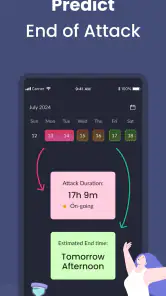
I found the interface pretty user-friendly. You can just tap through the options and it’s really intuitive. Plus, there’s a neat little calendar view where you can see your migraine history at a glance. It’s incredibly useful for spotting trends and seeing if there’s a pattern to when and why your migraines occur.
Comprehensive Features
What I love about this app is the depth of its features. It’s not just about tracking your headaches. You can also monitor your sleep patterns, medication usage, and even your dietary habits. There’s a feature where you can set reminders for medication or doctor appointments, ensuring you never miss a beat. I mean, how cool is that?
There’s also a community aspect to the app. You can connect with other migraine sufferers, share your experiences, and get support. It’s comforting to know you’re not alone in this journey. Plus, there are plenty of tips and tricks shared within the community that can help you manage your migraines better.
Insights and Reports
One of the standout features for me is the insights and reports. The app generates comprehensive reports that you can share with your healthcare provider. It’s a fantastic way to give them a clear picture of what you’re experiencing, making it easier for them to tailor your treatment plan. The visual graphs and charts make the data easy to understand, even if you’re not a numbers person.
Additionally, the app offers personalized insights based on your tracking data. It’s like having a mini-migraine coach that gives you feedback on potential triggers and patterns. This personalized touch can make a huge difference in managing your condition effectively.
Turning a busy week into useful notes
A realistic routine might look like this: I have a headache during a workday, record the main episode details while they’re fresh, and leave optional fields for later. In the evening, if I feel up to it, I add a brief note about sleep or an unusual schedule. At the end of the week, I scan the calendar rather than trying to reconstruct every hour. That sequence respects how hard it can be to concentrate during pain while still preserving the information that may matter later.
I would also avoid turning each entry into a full diary. A short, consistent note is easier to maintain and compare than a detailed account written only on the days I feel well. If I’m trying to understand whether a routine change coincides with more headaches, I’d record that same kind of context on both headache and non-headache days. Otherwise, I risk logging only the difficult days and mistaking incomplete observations for a pattern.
Choose a tracking style you can sustain
People who already know what they want to discuss with a clinician may benefit most from the structured fields and reports. Someone starting from scratch can use the app to build a history gradually, without needing to decide every possible trigger in advance. I’d pick a few observations that are easy to recognize—such as sleep changes or medication use—and resist adding more until the existing routine feels manageable.
By contrast, this is not the best fit for someone who wants nothing beyond a private sentence in a notes app, or who finds health tracking emotionally tiring. Paper can be quicker to open and completely flexible, while a general symptom diary may suit someone recording several unrelated conditions. The trade-off is that those alternatives may require more effort to organize into a migraine-focused view or appointment-ready report.
What to expect before you commit
Migraine Buddy: Track Headache is a free medical app from Aptar Digital Health, with a 4.8 average from around 63,000 ratings and over a million installs. It is rated for Everyone, though the subject matter is naturally aimed at people managing headaches. The app has been available since July 8, 2014, and its current version is 84.0.1764082926; it requires Android 8.0 or later. Optional in-app purchases range from $0.99 to $199.99 per item, so I’d check the purchase details before choosing anything beyond the free experience.
That pricing range is worth keeping in perspective: I wouldn’t assume a paid option is necessary to begin recording episodes, and I’d first see whether the basic workflow fits my needs. The app is a stronger match for someone who wants structured tracking, reports, and a place to revisit patterns than for someone who only wants a quick one-line note. If I were comparing options, I’d choose a plain diary for maximum simplicity, but this app when I wanted migraine-specific fields and a more organized history.
Privacy and practical expectations
Headache logs can contain sensitive details about symptoms, medication, and daily routines. Before making the app part of my long-term health routine, I’d take a moment to review its privacy information and decide what I’m comfortable recording. I’d also keep in mind that an app entry is not automatically a complete medical record; if a detail is important for care, I would bring it up directly with my clinician rather than assume a report tells the whole story.
Another useful boundary is to separate reminders from treatment decisions. A prompt can help me follow a plan that I have already discussed with a professional, but it cannot tell me whether a medication is right for a new or changing symptom. If headaches become unusually severe or concerning, the right next step is medical care, not waiting for enough entries to accumulate.
My take after considering the whole workflow
For an experienced user, the most useful “shortcut” is often a repeatable habit rather than a clever setting: record the essentials during or soon after an episode, keep optional context selective, and review the calendar before a medical conversation. If tracking every symptom feels burdensome, start with duration, intensity, and the notes you know you’ll revisit. If the reports or reminders don’t fit your routine, there is no benefit in forcing them into it.
Overall, I’ve found Migraine Buddy: Track Headache to be an invaluable tool for anyone dealing with migraines. It’s comprehensive, user-friendly, and genuinely helpful in understanding and managing migraine patterns. Whether you’re looking to keep meticulous records or simply want a better understanding of your triggers, this app has got you covered. So, if migraines are a part of your life, give it a try. It might just be the buddy you need.
Migraine Buddy: Track Headache Frequently Asked Questions
Who develops Migraine Buddy, and what kind of app is it?
Migraine Buddy is a medical app developed by Aptar Digital Health. It is built around tracking migraine and headache symptoms, helping users keep a record of what they experience over time. If you want a focused place to organize headache-related notes, its purpose is clear; it is not a substitute for professional assessment or medical care.
Is Migraine Buddy free to download, and are there any in-app purchases?
Migraine Buddy is free to download, so you can start tracking migraine symptoms without paying upfront. The app also offers in-app purchases, with individual items ranging from $0.99 to $199.99. If you are considering a purchase, check its details in the app before confirming, so you know what it includes and whether it suits your needs.
Which devices and operating systems can run Migraine Buddy?
Migraine Buddy is available for Android and iOS users, and the listed Android minimum is version 8.0. Before installing, check your device’s operating system and available storage to make sure the app is compatible. Keeping your device’s software up to date can also help with app compatibility and general performance.
Is Migraine Buddy appropriate for children and families?
Migraine Buddy has an Everyone content rating, making its listed age classification suitable for a broad audience. Its main purpose is tracking migraine and headache symptoms, rather than replacing care from a clinician. Families considering it for a child can use the diary to organize symptom notes, while involving a healthcare professional when decisions about diagnosis or treatment are needed.
What features does Migraine Buddy offer to help manage migraines?
Migraine Buddy provides a comprehensive set of features designed to help users track and manage migraines effectively. It includes a headache diary for documenting migraine patterns, triggers, and symptoms. The app also offers personalized insights and reports that help users understand their migraine patterns better. Additionally, it provides a community platform for sharing experiences and tips with other migraine sufferers, and options for setting medication reminders to manage treatment plans.
Pros
- Comprehensive headache tracking features.
- Customizable triggers and symptoms.
- User-friendly interface.
- Detailed analytical reports.
- Real-time community support.
Cons
- Requires frequent updates.
- Limited free features.
- May drain battery quickly.
- Data entry can be time-consuming.
- Ads in free version.
- Category
- Medical
- Version
- 84.0.1764082926











