Microsoft Defender: Antivirus
- 2.25K
- 4.3
- Installs
- 10.00M
- Price
- Free

Screenshots
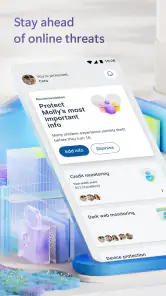
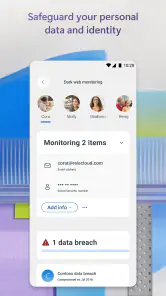
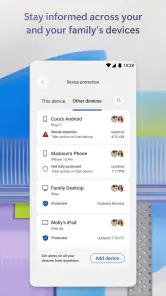
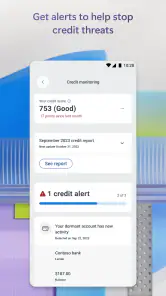
Analysis by Reviewed
I tend to judge a phone security app by the job it does in ordinary life: does it add a useful layer without turning routine phone use into a chore? Microsoft Defender: Antivirus is aimed at people who want ongoing protection and may already use Microsoft services. Its appeal is less about making security feel exciting and more about fitting into a setup you already have. That can be a sensible trade, provided you understand what your account gives you and don’t mistake an antivirus app for a substitute for careful online habits.
What the price does—and doesn’t—tell you
The app is free to download, which makes it easy to try without paying upfront. Microsoft lists in-app purchases ranging from $6.99 to $129.99 per item, so I wouldn’t treat every possible use of Defender as automatically free. The practical value depends on what access you need and what is included with your account or plan; check the purchase details in the app before committing. I see the free entry point as a low-risk way to assess whether its approach suits you, not as proof that every feature or setup costs nothing.
Where the protection fits into daily life
For someone who already uses Microsoft services, having mobile security alongside that wider setup can feel more convenient than juggling unrelated tools. Microsoft Corporation develops the app, and its focus is on keeping watch for threats rather than asking you to run a complicated routine every day. That’s useful if you want a security layer in the background while using your phone for email, browsing, and ordinary tasks.
A realistic example: I might use my phone to check a work message, open a document, then switch to personal browsing while away from home. A security app that stays active can be reassuring across those context switches, because I don’t have to remember to launch a manual check each time. Still, I’d treat it as one part of safer habits: pause before opening unexpected attachments, and don’t assume any antivirus can make every link or download harmless.
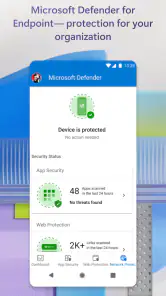
There’s also a practical setup habit I recommend: after installing it, take a moment to confirm that the app is signed in with the account you actually intend to use and that its protection status looks active. This is especially helpful if you switch between personal and work accounts. Security tools can only be useful in the context in which they’re set up, so don’t assume that installing the app alone automatically covers every account, device, or service you use.
How I’d compare it with other mobile security apps
Compared with the usual antivirus alternatives, Defender’s clearest appeal is its connection to Microsoft’s services and its simple, protective role. If you already rely on Microsoft, that may be more useful than choosing an app solely for a long menu of extra tools. If you want a security product centered on a different ecosystem, or you prefer a standalone app with a particular set of controls, another option may fit better. I would compare the exact features and account requirements rather than assume that all antivirus apps cover the same ground.
One useful habit is to review what the app says is protected and whether its status is current, especially after changing accounts or devices. That small check can help you spot a setup issue before you rely on it. Also, consider whether you need protection on just your phone or want a broader Microsoft-centered arrangement; the answer affects whether the app feels like a complete solution or one piece of a larger setup.
More From Our News Desk

Weather by Xiaomi Review: Clear at a Glance, Less Clear Up Close

X Under Pressure: Can It Recover When Posting Goes Wrong?

Clash of Clans Is Won Between the Battles

Android Auto Makes the Case for Quieter Car Software

MobiOffice: Transforming Mobile Productivity with Seamless Integration

EA SPORTS FC™ Mobile Soccer: Redefining Mobile Sports Gaming
When weighing it against a phone’s built-in safeguards, I’d focus on the specific gap you want to address, not on the word “antivirus” alone. Built-in protections may suit someone who wants fewer apps and already feels comfortable with their existing setup. A separate security app can make more sense if you want a dedicated view of protection associated with Microsoft. For a different security app, I’d compare its account requirements and clearly described functions with Defender’s rather than choose by the length of its feature list.
First Impressions Matter
When I first launched Microsoft Defender: Antivirus, I was greeted with a sleek and minimal interface. It’s clean, straightforward, and doesn’t overwhelm you with unnecessary options. Right off the bat, I appreciated how user-friendly it seemed. It’s kind of like having a security guard who’s not just competent but also super approachable. You know, the type who gives you a friendly nod every time you pass by.
Features That Stand Out
Now, let’s talk about what this app brings to the table. One of the standout features is its real-time protection. It’s constantly on the lookout for any suspicious activity that might threaten your device. I found this particularly reassuring. It’s like having a watchdog that never sleeps, ensuring that your phone stays safe from any cyber nasties.
Another cool feature is the integration with other Microsoft 365 services. If you’re already in the Microsoft ecosystem, this app seamlessly fits in, providing centralized threat protection across your devices. This kind of integration is super handy because, honestly, who has the time to manage multiple security solutions?
That ecosystem connection is most valuable when it reduces the number of places you need to check, rather than simply adding another icon to your phone. I’d think of Defender as a companion to the Microsoft services you already use, not as a reason to move everything into one ecosystem. If your household or workplace uses a mix of platforms, decide first whether a Microsoft-centered security view is genuinely convenient for you; otherwise, its main distinction may not matter much.
Performance and Usability
Performance-wise, I didn’t notice any lag or slowdown on my device, which is a huge plus. Some antivirus apps tend to hog resources, but not this one. It’s light and efficient, almost like it’s not even there, but it is, quietly doing its job in the background.
As for usability, the app is incredibly intuitive. Even if you’re not tech-savvy, navigating through its features is a breeze. There are clear instructions for everything, which is a relief because, let's face it, not all of us are cybersecurity experts.
For a less confident phone user, that low-friction feel matters: a security app that is hard to understand can lead to people ignoring alerts or leaving setup unfinished. I’d still read any notice Defender presents instead of dismissing it reflexively. If you’re helping a family member configure a phone, it’s worth showing them where to check the protection status and how to recognize a prompt that needs attention, rather than promising the app will handle every decision for them.
What to check before relying on it
Compatibility is worth checking before you install: the listed minimum operating system is version 10, so an older device may not be a fit. The app is rated for Everyone, and it has an average rating of 4.3 from around 67,000 ratings, with more than 2,000 written reviews and over 10 million installs. Those figures suggest it has broad uptake, but they cannot tell you whether it will suit your particular device or account setup. The current version is 1.0.8321.0101; I’d keep the app updated and make sure it remains active after major changes to your phone or account.
One point people often want settled before installing is whether the free download means every useful part is free. I wouldn’t make that assumption. The app has paid items, and the amount alone doesn’t tell you what a given purchase includes or whether you need it. My advice is to begin with the free access, identify the specific benefit you’re missing, and inspect the in-app purchase details before spending. If the available paid option doesn’t clearly solve a need you have, there’s no reason to buy it just because it appears in the app.
If a phone is shared, or you use separate work and personal accounts, take extra care when checking which account is active. A change of account can make an otherwise familiar setup behave differently, so I wouldn’t treat an old status check as proof that everything is still configured as intended. After reinstalling or changing devices, revisit the app and confirm its current state before relying on it for day-to-day use.
If you are deciding between Defender and a phone’s built-in protections, ask what gap you are trying to close. Defender makes more sense when you want Microsoft’s security layer and already use its services; if you only need basic safeguards and prefer fewer apps or accounts to manage, the built-in option may be enough. I would also avoid installing multiple security apps that try to do the same job unless you understand how they interact, since extra layers can add confusion rather than clarity.
Who gets the most value
I’d recommend trying it if you use Microsoft services regularly, want a straightforward security companion, and are comfortable checking which features are available under your account. It may be a poor fit if you want a completely independent security setup, dislike ecosystem-linked tools, or expect an antivirus app to replace careful browsing and account security. Before paying for anything, confirm what the purchase unlocks for your specific needs; the listed price range alone doesn’t explain which item is right for you.
I can see it being particularly useful for someone who checks work and personal messages on the same phone and wants a security tool that sits alongside familiar Microsoft services. It is also a reasonable candidate for a less technical user who values a simple interface, as long as someone can help them interpret any account or protection prompts. On the other hand, a person who already has a security arrangement they understand, rarely uses Microsoft services, and wants no extra account layer may get little practical value from adding it.
For someone deciding whether to pay, I’d separate “I want the app” from “I need a particular paid option.” Start by using what is available without an in-app purchase, then consider a paid item only if its description answers a concrete need. The available price range includes a substantial spread, so it is especially important not to assume that the least expensive option and the most expensive one provide comparable access. I’d rather keep the setup simple than pay for a package whose relevance I can’t explain.
Final Thoughts
In conclusion, I’d say Microsoft Defender: Antivirus is a solid choice if you’re looking for a reliable and efficient security app. It doesn't bog down your device, integrates well with Microsoft 365, and provides robust protection without much fuss. Plus, it’s free, which is always a bonus in my book.
So, if you’re in the market for a new antivirus solution, give this one a try. It might just be the security companion you never knew you needed!
Microsoft Defender: Antivirus Frequently Asked Questions
What does Microsoft Defender’s “always-on online protection” mean in everyday use?
Microsoft Defender is presented as an app for always-on online protection that proactively detects and blocks threats. In practical terms, that makes it a tool for people who want protection to work in the background while they use online services, rather than relying only on occasional manual checks. Its purpose is security, so consider whether that kind of ongoing protection suits how you use your phone.
Who publishes Microsoft Defender, and what should I check before downloading a security app?
Microsoft Defender is published by Microsoft Corporation. Before installing any security app, it is sensible to confirm that you are choosing the intended app and that your device meets its operating-system requirement. You should also review its purchase details and consider whether an app focused on online protection fits your needs. These basic checks can help you make a more informed choice before downloading.
Is Microsoft Defender: Antivirus compatible with my phone?
Before downloading, check that your device runs Android 10 or later, as this is the stated minimum operating system requirement. Microsoft Defender is a Tools app from Microsoft Corporation, and its short description is simply “Microsoft Defender.” Confirming your phone meets the OS requirement is a practical first step before installing any security app.
Is Microsoft Defender: Antivirus free to download, and are there in-app purchases?
The app is free to download, while in-app purchases are also available, ranging from $6.99 to $129.99 per item. That means downloading it does not necessarily require an upfront payment, but some options may cost extra. Review the purchase details shown in the app before buying anything so you understand the cost and what the selected option includes.
What is Microsoft Defender: Antivirus, and how does it work?
Microsoft Defender: Antivirus is a security app designed to protect your Android or iOS device from malware, viruses, and other online threats. It operates by scanning your device in real-time and offering regular updates to ensure new threats are identified and neutralized. The app integrates seamlessly with your device to provide robust security without affecting performance.
Pros
- Real-time threat detection capabilities.
- Seamless integration with Windows OS.
- Regular updates and support from Microsoft.
- User-friendly interface for easy navigation.
- No additional cost for Windows users.
Cons
- Limited features compared to paid antivirus.
- Occasional false positive detections.
- High system resource utilization.
- Limited cross-platform support.
- Basic features may not satisfy advanced users.
- Category
- Tools
- Version
- 1.0.8321.0101









