Mi LUMA
- 404.00
- 3.7
- Installs
- 500.00K
- Price
- Free

Screenshots

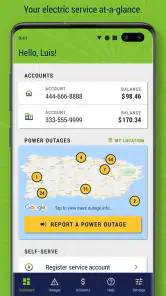
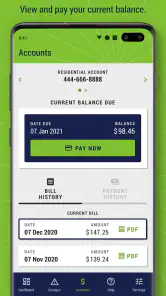
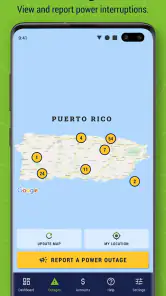
Analysis by Reviewed
Managing a household utility account is rarely difficult because of the bill itself. The trouble usually comes from timing: someone needs to check whether a payment went through, another person notices that the power is out, and the account holder is somewhere else when the information is needed. I found Mi LUMA useful mainly because it brings those routine LUMA tasks into one mobile place instead of making me switch between separate methods of checking a bill, reviewing past payments, or reporting an outage.
This is a free House & Home app from Luma Energy Development, aimed at LUMA customers who want practical account access on an Android phone. Its focus is narrow, which is a strength when I only need to deal with electricity service, but it also means the app is not a general home-management tool. It will not organize rent, internet, maintenance, or shared household expenses. Its value comes from handling a small group of LUMA-related jobs with less friction.
In everyday use, I see the biggest benefit in shared households. The person who normally pays the bill may not be the person who is home when the electricity fails. A roommate may need to tell the account holder whether an outage appears local or whether the service issue has already been reported. A family member may simply want to confirm the latest payment without searching through old messages. The app works best as a coordination point, not as a replacement for household communication.
How Mi LUMA fits into a shared household
A practical scenario for roommates and families
Imagine a weekday evening when the lights go out. One person is at work, another is at home, and the account is normally handled by the person who is away. With Mi LUMA installed on the account holder’s phone, that person can check the account and report the outage remotely. The person at home can provide useful details by phone or message, while the account holder handles the account action from the device already associated with it.
That arrangement is more useful than it may sound. It separates two jobs that are often mixed together: noticing a problem and managing the service account. The person who sees the outage does not necessarily need full control of billing, while the person responsible for the account may not be physically present. Mi LUMA does not magically solve that division, but it gives the account holder a direct way to act without waiting until they return home.
There is a similar advantage with payments. In a shared home, several people may contribute money, but only one person may actually submit the bill payment. I would use the app to check the account history after making a payment, then share the relevant result through the household’s usual messaging channel. That creates a simple record for coordination without asking every resident to manage the same account independently.
I would not treat the app as a multi-user family dashboard. The experience is centered on the LUMA account, not on assigning roles such as parent, roommate, tenant, or emergency contact. If several people need access, the household should agree clearly on who owns the login and who is allowed to use it. Sharing credentials casually can create confusion later, especially when someone moves out or when a phone is replaced.
What the first setup should accomplish
The initial setup is best approached as an account task rather than a casual app download. Before opening it, I would make sure the person responsible for the LUMA account is available and has the information needed to identify that account. That avoids the common household mistake of installing the app on a shared tablet or another person’s phone and then discovering that nobody knows which account details should be used.
Because the app is tied to utility service, I would keep the account boundary clear from the beginning. The account holder should be the person who completes the important sign-in and payment-related steps. Other household members can help with checking the phone, noticing outages, or reading the bill history, but they should not be assumed to have the same authority simply because the app is installed on the same device.
This distinction matters on shared devices. A tablet in a kitchen or living room may be convenient for everyone, yet it is a poor place for an account that can expose billing information. A personal phone is generally easier to keep under one person’s control. If a household must use a shared device, I would avoid leaving the account open when the device is accessible to visitors, children, or temporary residents.
Another sensible setup habit is to decide how the household will communicate app results. For example, one person can be responsible for payments while another reports an outage, but both should know where to confirm the final status. The app can provide access to the LUMA account, but it does not replace an agreed household process for saying, “the payment was checked,” or, “the outage was reported.”
Keeping payment information understandable
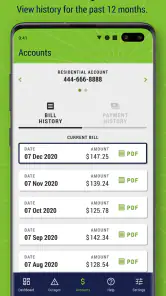
The ability to view a twelve-month bill and payment history is particularly helpful when several people share costs. Instead of relying only on memory or screenshots, I can look back at the account’s recent record and use it to settle practical questions: whether a payment was made, when a previous bill was handled, or whether a household contribution may have been missed.
I would use that history as a reference, not as a complete personal budgeting system. The app is designed around the LUMA account, so it does not automatically explain how roommates divided the amount, which bank account supplied the money, or whether a person reimbursed another household member. Those details still belong in a shared note, spreadsheet, or conversation.
A useful workflow is to check the history immediately after a payment rather than waiting until the next billing question arises. That makes it easier to distinguish a recent action from an older entry. If the household has several people contributing, I would also record the internal split separately, because the LUMA record and the household’s own reimbursement record answer different questions.
This is one of the app’s quieter strengths: it can reduce arguments caused by incomplete information. It cannot determine who owes what, but it gives the account holder a direct place to inspect the service-side record. For a household that often loses confirmation emails or relies on scattered screenshots, that central history is more dependable than informal reminders.
Outage reporting and household coordination
Reporting an outage is the feature that makes the app useful beyond routine bill checking. When the power fails, I would first establish what is actually happening in the home: whether only one appliance is affected, whether nearby areas are also without service, and whether the issue could be inside the property. The app is most useful after that quick reality check, when the household is ready to communicate a service problem through the LUMA account.
There is an important trade-off here. The person reporting the outage needs accurate information, but that person may not be the account holder. A roommate can observe the situation while the account owner submits the report. If the account owner is away, the household should agree in advance on who will contact them and what details will be shared. That simple preparation can save time during an evening outage.
I would also avoid reporting the same incident repeatedly from several household phones unless there is a clear reason to do so. Multiple people acting independently can make coordination harder, particularly when nobody knows which report is the current one. A better approach is for one person to take responsibility, tell the others that the action has been completed, and keep the household updated through its normal communication method.
The app should not be treated as an emergency substitute for common sense. If there is a dangerous electrical situation, damaged equipment, a fire risk, or a medical emergency, the household needs the appropriate emergency response rather than relying only on an app-based outage report. Mi LUMA is a service-management tool; it is not a safety assessment system.
Age, trust, and access on a family phone
The app is rated for Everyone, which makes it broadly suitable from an age-classification perspective. That does not mean every child should be given unrestricted access to the household account. A young family member may be perfectly capable of opening the app to see whether service is available, but billing information and payment actions deserve adult supervision and a clear division of responsibility.
For teenagers, the right arrangement depends more on trust and household rules than on the age label. A parent might allow a teenager to report that the home has lost power while keeping payment responsibilities with the adult account holder. Another family might prefer that the teenager only contact the account holder, who then performs the action. Both approaches can work if everyone understands the boundary.
I would be especially careful with a phone that is passed between family members. Utility details can be personal, and a logged-in account may reveal more than the next user needs to see. When a device changes hands, the account holder should review whether access is still appropriate. This is not a criticism unique to Mi LUMA; it is simply the consequence of putting a household service account on a portable device.
The app’s age rating should therefore be read as a statement about general content suitability, not as a recommendation to share account control with every member of the family. In my view, the best household model is supervised participation: younger users can help observe and communicate, while the trusted account holder remains responsible for billing and account decisions.
Where the app is stronger than usual alternatives
The usual alternative to Mi LUMA is a browser session, a saved email, a paper bill, or contacting LUMA through another channel. Those options can still be useful, especially when a phone is unavailable, but they are less convenient for a quick household check. A dedicated app puts the relevant account actions closer to hand and makes the workflow feel more direct than searching through old correspondence.
The twelve-month history also gives it an advantage over a single notification or payment receipt. A message may confirm one event, while the in-app record lets me look across a longer period when a household question involves more than the latest bill. That is valuable for people who move between homes, share costs, or need to review service payments during a personal budgeting exercise.
Compared with a broad home-finance app, Mi LUMA is more focused. A budgeting app may be better for combining electricity with rent, water, subscriptions, and groceries. Mi LUMA is better when the immediate task is specifically tied to the LUMA account: checking its payment record, handling the bill, or reporting an outage. I would choose the specialized app for service access and another tool for the wider household budget.
Its focused design also creates a limitation. If you manage several utilities from different providers, Mi LUMA will not give you one unified control center. You may still need separate apps, websites, or records for everything else. That is not a reason to avoid it, but it is a reason to set realistic expectations before installing it.
Performance expectations and version context
Mi LUMA has been available since May 2021 and currently appears as version 1.18.8, with Android 7.0 or later required. That makes the compatibility information relevant for households using an older phone as a shared device. Before choosing an unused handset for the app, I would check that it meets the operating-system requirement and still receives ordinary security maintenance.
The app has passed the half-million-install mark and holds an average rating of 3.7 from around 1.7 thousand ratings, alongside 404 written reviews. I read that as evidence of meaningful use, but not as a guarantee that every household will have a smooth experience. Ratings for account apps often reflect login, payment, outage, and device-specific frustrations, so I would judge the app by whether its core tasks fit my needs rather than by the score alone.
For me, the most important test is practical: can the account holder reach the bill and payment record when needed, and can the household use the outage function without confusion? If the answer is yes, the app earns its place even if it is not the most polished tool on the phone. If a household regularly struggles with access, prefers a larger browser interface, or needs consolidated financial management, another method may be more comfortable.
Who should use it and who should skip it
I would recommend Mi LUMA to the person who directly manages a LUMA household account and wants a convenient mobile route for bills, payment history, and outage reporting. It is also a good fit for shared homes where responsibilities are split between the person who pays and the person who notices service problems. The app’s free price removes the financial barrier to trying it, which is useful when the goal is simply to make account access easier.
I would be more cautious about recommending it as the only household system. A family that needs several people to manage the same account may find informal credential sharing confusing. A person who wants detailed expense splitting, automatic household budgets, or all utilities in one place should look beyond this app. Likewise, anyone using a device that cannot meet the Android requirement will need another access method or a newer phone.
One final practical tip is to keep the roles written down somewhere private: who owns the account, who checks payments, who reports outages, and who should be contacted when the account holder is away. Mi LUMA can support each of those tasks, but it does not decide how a household should divide them. The smoother experience comes from combining the app with a small, agreed routine.
After using it as a focused LUMA companion, my view is positive but measured. Mi LUMA is most valuable when a household needs quick, direct access to one electricity account and a reliable way to coordinate routine service tasks. Its free access, bill history, payment tools, and outage reporting cover the essentials without pretending to be a complete home-management platform.
I would install it on the trusted account holder’s personal phone, keep payment responsibility with that person, and let other household members participate through clear communication rather than unrestricted access. Used that way, it can replace a fair amount of searching and guesswork. If your needs extend into full budgeting or multi-provider management, pair it with another tool instead of expecting this specialized app to do everything.
Pros
- Simple interface makes core features easy to find.
- Useful reminders help users stay consistent with daily tasks.
- Content is presented in a clear
- beginner-friendly format.
- Works well for short sessions when you need quick guidance.
- Regular updates may add improvements and new resources.
Cons
- Some features may require an account or personal information.
- The free version may include ads or limit certain tools.
- Performance can vary on older Android and iOS devices.
- Advanced users may find the customization options limited.
- Some content may depend on an active internet connection.

- Category
- House & Home
- Version
- 1.18.8