Messages Text SMS
- 293.00
- 4.2
- Installs
- 1.00M
- Price
- Free

Screenshots
Analysis by Reviewed
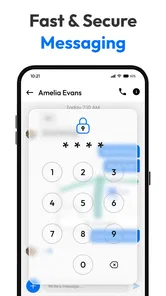
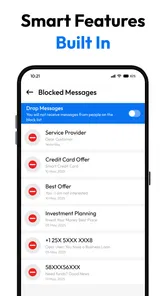
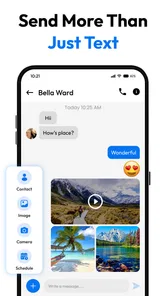
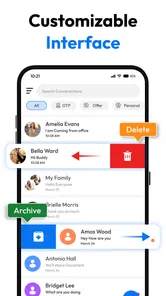
I like a text messaging app most when it makes everyday conversations easier without asking me to change how I communicate. Messages Text SMS is a free communication app from Messages SMS Text Messenger, designed as an alternative to the messaging app already on an Android phone. Its appeal is a mix of practical tools—such as themes, message backup, and scheduling—and the freedom to make SMS feel more personal. Whether that mix is worth switching for depends on how much you want from your texting app beyond sending and receiving messages.
Free to start, with paid extras to weigh
You can install and use the app for free, which makes it straightforward to try before deciding whether it belongs in your daily routine. There are in-app purchases ranging from $0.49 to $99.99 per item, so the free entry point should not be confused with every available option being free. I would explore the features I actually need first and check the price shown in the app before buying anything.
The app is rated for Everyone, and its current version is 1.4.1. It first appeared on July 29, 2024, and requires Android 11 or later. That compatibility requirement matters more than any theme choice: if your phone runs an older Android release, this is not an option for that device. For a compatible phone, the free install gives you a chance to see whether its approach suits you before spending money.
Its average rating is 4.2 from around 4,300 ratings, with 253 written reviews. Those figures offer a useful bit of context, but they cannot tell me whether a particular paid extra is worth its asking price or whether the app will suit your messaging habits. I’d treat the rating as a reason to take a look, not as a substitute for trying the free experience yourself.
What the extra tools can do for a texting routine
The strongest reason to consider this app is not simply that it sends SMS; your phone probably already has an app for that. The more interesting question is whether themes, backup, and scheduled messages solve annoyances you face often enough to justify changing your default. If you have wanted a more personal-looking inbox or a way to prepare a text in advance, those additions give the app a clearer purpose than a basic replacement would.
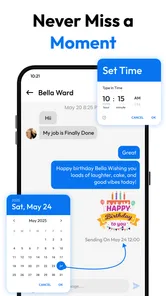
Scheduling is useful in small, ordinary situations. I might write a reminder for a family member while it is fresh in my mind, then arrange for it to go out at a more sensible time rather than sending a late-night message. It can also help me prepare a birthday greeting or a practical check-in in advance. The trade-off is that scheduled sending only helps if I remember to set it up and the message is still relevant when it is due; it is not a replacement for a live conversation.
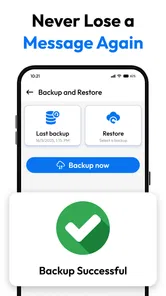
Backup is valuable for a different reason: it makes message history part of the decision instead of an afterthought. Before switching away from a long-used default app, I would check how this app’s backup process works and what steps are needed to restore messages later. A backup feature can reduce the worry of losing useful conversations, but it is only reassuring when you understand where the copy goes and how to retrieve it. I would test that workflow with an unimportant conversation before trusting it with messages I cannot easily replace.
More From Our News Desk

 Remini - AI Photo Enhancer
Remini Is Our App of the Week for Bringing Old Photos Back to Life
A quick AI restoration tool earns its place by making faded portraits and soft, older photos feel vivid again—provided you know where its polish ends.

 PayPal - Pay, Send, Save
PayPal Reviewed: Who Benefits from Its Reach, and Who Should Skip It
PayPal is most useful when its reach and familiar checkout solve a real payment problem. These reader-by-reader recommendations show where it earns a place—and where friction wins.

 Millionaire 2026 Quiz & Trivia
 Makes Every Answer Count
A familiar quiz-show format succeeds or falters on tiny design decisions: how clearly the game guides a first answer, handles hesitation, and invites one more round.

 Decor Life - Home Design Game
Decor Life Turns Short Breaks Into Bite-Sized Decorating Jobs
A room-by-room decorating game built for quick sessions gains from modern phone habits, but its gentle pace still depends on patience, repetition, and a steady stream of design jobs.

 Sniper 3D:Gun Shooting Games
Sniper 3D’s Quick-Shot Appeal Faces the Upgrade Treadmill
The appeal is immediate: line up a target, steady your aim, and fire. The harder question is whether Sniper 3D can keep players returning after the first rush.

 Blockudoku®: Block Puzzle Game
Blockudoku vs. the Puzzle Pack: A Quick Puzzle With a Repetitive Edge
Blockudoku turns a clean grid into a quiet test of foresight. Against match-three polish and head-to-head simplicity, its lasting appeal is also its biggest limitation.
Latest News



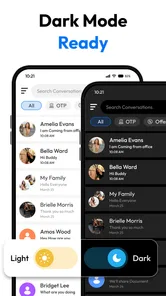
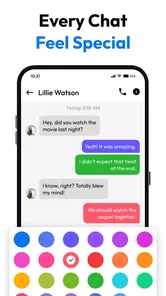
Themes are the most immediately visible extra, but I see them as a comfort feature rather than a reason on their own to switch. A new appearance can make the inbox feel more like yours, especially if you spend a lot of time there. Still, a theme does not improve a message’s delivery or make an unclear conversation easier to manage. I would put reliable everyday use and a backup routine ahead of visual customization when judging the app.
How it compares with the default messaging app
The usual alternative is the SMS app that came with the phone or one already set as the default. That option has a simple advantage: it is already in place, so there is no need to move your habit or learn another layout. If you only send the occasional text and have no interest in themes, scheduled messages, or backup, staying with the built-in choice is probably the easier decision.
Messages Text SMS makes more sense when the default feels too limited for the way you text. Its feature mix gives you reasons to explore another interface rather than switching for the sake of switching. The choice is less about which app can send a basic SMS and more about whether the additional controls are convenient enough to become part of your routine. I would not assume that a replacement automatically improves every part of messaging; the benefit depends on the specific tools you will actually use.
There is also a practical transition cost. Changing a default messaging app means adjusting to a different place for conversations and checking that your normal habits still work as expected. Before relying on it for time-sensitive or important messages, I would try a few ordinary exchanges, explore the settings, and make sure I can find the conversations I use most. That modest trial is more useful than judging the app from its theme options alone.
Where I see friction and limits
The broad feature set is attractive, but it creates a question that every user should answer before paying: which parts are included in the free experience, and which are tied to an in-app purchase? The available purchase prices span from $0.49 to $99.99 per item, a wide range that makes it especially important to inspect an individual purchase rather than infer value from the lowest price. I would not buy an upgrade simply because it appears beside a feature I like; I would first confirm exactly what it unlocks and whether I expect to use it regularly.
That range also makes the app a less obvious pick for someone seeking a no-cost experience with every customization option. The app is free to install, but the existence of paid items means the full set of choices may involve spending. If your goal is simply to send occasional texts without exploring extras, the included app on your phone may deliver better value by requiring no new purchase or change in routine.
Backup is another area where convenience and confidence need to go together. I would not treat the word “backup” as a reason to stop thinking about message history. Before moving all my day-to-day texting over, I would find the relevant controls, understand how to make a copy, and check the restore path. If I cannot make that process clear to myself, I would keep the default app in place until I was comfortable. This is a sensible precaution for any messaging change, but particularly so for conversations I need to preserve.
Scheduling can also be a poor fit for messages that depend on changing circumstances. A reminder or planned greeting is a natural candidate; a message that needs a fresh answer or careful timing is not. I would use scheduling for predictable notes and continue sending sensitive, urgent, or context-dependent messages manually. That distinction keeps a helpful convenience from becoming an avoidable source of confusion.
Who is likely to get the most value
I would recommend trying it if you use SMS regularly, want more control over the look of your inbox, or have a genuine use for planning messages ahead. It may also suit someone who has been meaning to make message backup part of their routine and is willing to inspect how the process works before depending on it. The combination is most compelling when at least two of those needs are real, rather than hypothetical.
A realistic example is someone who texts family throughout the week, wants to send reminders at considerate times, and likes a more personal interface. That person can test the scheduling workflow on a low-stakes message, choose a theme they find comfortable, and investigate backup before moving more conversations into the app. Each step tests a different kind of value: timing, appearance, and preservation. If one turns out not to matter, there is no reason to pay for an associated extra.
I would be less enthusiastic for someone who rarely sends SMS, is happy with the default app, or prefers not to manage a separate backup and customization setup. It is also not suitable for a device running an Android version below 11. In those cases, convenience is likely to matter more than the possibility of extra controls, and the familiar built-in option may be the better choice.
The app has more than 1 million installs, which suggests it has reached a substantial audience, but popularity alone does not decide whether its paid options are worthwhile for you. Its developer is Messages SMS Text Messenger, and the app’s focus remains clear: offer a more customizable SMS experience with practical additions. I would judge it by the quality of those additions in my own routine, not by install totals or a rating alone.
My buy-or-skip verdict
My advice is to try the free version before spending, and buy an extra only when you can name the problem it solves. Messages Text SMS is a reasonable candidate for people who want themes, scheduling, and backup in a replacement texting app, especially if they already know they will use those tools. Its free starting point makes that trial approachable, while the paid items call for a closer look at what each purchase provides.
If you are content with basic texting, I would skip the switch and keep using your current default. If you want the additional controls, have a compatible phone, and are willing to check the backup and purchase workflows before relying on them, this app is worth a careful try. For me, its value is not in replacing SMS for everyone; it is in giving a particular kind of texter useful choices without making those choices mandatory from the outset.
A practical way to test it before committing
I would make the trial deliberate rather than changing every messaging habit at once. First, use it for routine, low-stakes exchanges and notice whether the conversations you need are easy to find. Then try scheduling one message whose timing is predictable, such as a reminder that can still be sent manually if plans change. This reveals whether the extra step fits your habits instead of merely sounding useful in theory.
For backup, I would treat the first test as a small rehearsal: learn the controls, make a copy, and understand the restore route before relying on it for important history. That is a practical safeguard, not a claim that the process is difficult. A messaging app can become the home of details you need later, so knowing how to recover them matters as much as seeing a backup option in the interface.
If you are choosing between this and a more feature-light default, ask yourself whether the extras reduce a recurring annoyance. Someone who frequently drafts messages at awkward hours may appreciate scheduling; someone who never changes themes may not care about customization. The strongest value comes from matching one or more of these tools to an actual pattern, rather than paying for possibilities you may never use.
When another choice makes more sense
This is specifically an SMS-focused replacement, so I would not choose it just because I want every conversation in one place. If most of my daily communication happens in internet-based chat services, a dedicated SMS app may not change much about that routine. Likewise, a person who values the familiarity of the phone’s existing messaging app more than visual options or message planning has a sound reason to stay put.
On the other hand, someone who regularly uses text messages for family logistics, short reminders, and conversations they want to preserve has more to gain from exploring it. The useful distinction is not whether a replacement has more buttons; it is whether those controls make a real difference to the way I communicate. I would keep the default as the better option when simplicity is the priority, and consider this app when customization, advance planning, or backup is a recurring need.
My overall view remains measured: the free install makes it possible to judge the everyday experience without an immediate purchase, while optional spending deserves individual scrutiny. If a feature proves useful over time, its price may be easier to assess in context; if it does not change your routine, there is little reason to buy it. For a compatible Android phone and a texter with a clear use for the extras, it is worth a careful trial. For everyone else, the familiar default may already be the better value.
Messages Text SMS Frequently Asked Questions
What is Messages Text SMS, and what can I use it for?
Messages Text SMS is a messaging app intended for sending and receiving text messages, commonly called SMS, and, where supported, multimedia messages such as photos or videos. Its available features can depend on your phone, carrier, Android or iOS version, and the specific app version. Before downloading, check the app listing to confirm that its messaging features match what you need.
Does Messages Text SMS require an internet connection or a mobile plan?
Traditional SMS messages are generally sent through your mobile carrier and may not require mobile data or Wi-Fi, but your carrier can charge fees or limit messaging under your plan. Sending media or using any internet-based features may require a data connection. Check your carrier’s terms and the app’s description before relying on it, especially when travelling or messaging internationally.
Can I make Messages Text SMS my default messaging app?
On compatible devices, you may be able to choose Messages Text SMS as the default app for handling text messages. This option depends on your operating system and the app’s supported features, and the steps can differ between devices. Review the app’s requirements and your phone’s settings before installing. If you switch apps, check that your existing conversations remain available and that incoming messages are routed as expected.
Is Messages Text SMS safe, and what happens to my messages and personal information?
Privacy and security depend on the app’s permissions, data practices, and how messages are transmitted and stored. SMS is not generally end-to-end encrypted, so do not assume that ordinary text messages offer the same protections as encrypted messaging services. Read the app’s privacy policy and store listing, review requested permissions, and avoid sending sensitive information unless you understand the risks.
Is Messages Text SMS free, and is it available for Android and iOS?
The app’s download price and device compatibility can vary by platform, region, and current store listing. Even if the app itself is free, your mobile carrier may charge for SMS or multimedia messages according to your plan. Check the official Google Play or Apple App Store listing for supported devices, in-app purchases, subscription details, and the latest system requirements before downloading.
Pros
- Simple layout makes everyday texting easy to navigate.
- Supports group conversations for coordinating with multiple people.
- Lets you share photos and other media in text threads.
- Message notifications help you keep up with incoming texts.
- Useful as a straightforward option for SMS and MMS messaging.
Cons
- SMS and MMS availability depends on your carrier and plan.
- Some features may require the app to be set as the default SMS app.
- Texts sent over SMS may not be encrypted end to end.
- Group messaging behavior can vary across devices and carriers.
- Your experience may depend on the Android version and device.