Member Tools
- 6.56K
- 4.3
- Installs
- 1.00M
- Price
- Free

Screenshots
Analysis by Reviewed
I’d choose Member Tools only after asking one practical question: are the people, gatherings, and places I need to find connected to The Church of Jesus Christ of Latter-day Saints? If so, having those tasks together can be more convenient than juggling a general contacts app, a separate calendar, and map searches. If not, most of its value is likely to pass you by. That focus is the app’s main strength, but it also makes it a poor fit for someone looking for a broad personal organizer.
For a member who wants a quick way to look up people, check congregation events, or find a nearby meetinghouse or temple, the appeal is straightforward. I’d treat it as a practical companion for church-related coordination rather than a replacement for every app on a phone. It is free, rated for Everyone, and developed by The Church of Jesus Christ of Latter-day Saints. Its Books & Reference placement makes sense: the day-to-day value is in finding useful community information, not managing a whole work or home life.
Where a focused tool earns its place
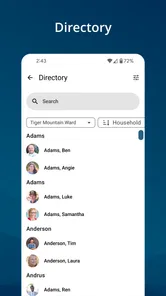
The most useful way to approach Member Tools is to think in terms of a small, repeatable workflow. Before heading out, I can check the event calendar, confirm the location, and look up a relevant contact without starting from scratch in several unrelated apps. That is especially handy when plans involve people I do not message every day. A focused directory can save the awkward step of asking someone else to resend details I already have access to.
There is a trade-off, though: a directory is only helpful when I know what I’m trying to find and have a legitimate reason to contact that person. I would use it for coordination, not as a substitute for a personal address book full of friends, family, and work contacts. Keeping those purposes separate makes the app easier to trust and keeps its role clear.
When another option is better
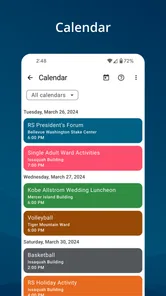
Compared with a standard calendar, Member Tools is more useful when the event itself belongs to the church community and its related location or contacts matter. A general calendar remains the better choice for appointments across work, family, and personal life, where I need one view of everything. Likewise, a maps app is usually the natural choice for turn-by-turn navigation, while Member Tools is valuable for locating the relevant meetinghouse or temple as part of a church-specific task.
If I’m not involved in that community, I would skip it rather than install it in the hope that it will become a general organizer. The audience is deliberately narrower than that of a mainstream productivity app. That is not a flaw so much as a decision point: the app makes the most sense when its directory, calendar, and place-finding tools match regular needs.
What to consider before relying on it
A useful habit is to check the app before leaving for an event, rather than assuming details remembered from an earlier visit are still current. Calendars and contact information are most valuable when I use them as a live reference, not as a reason to stop confirming important arrangements. For a shared plan, I would still send the key time and place directly to anyone who needs it; not everyone will use the same app.
More From Our News Desk

Weather by Xiaomi Review: Clear at a Glance, Less Clear Up Close

X Under Pressure: Can It Recover When Posting Goes Wrong?

Clash of Clans Is Won Between the Battles

Android Auto Makes the Case for Quieter Car Software

MobiOffice: Transforming Mobile Productivity with Seamless Integration

EA SPORTS FC™ Mobile Soccer: Redefining Mobile Sports Gaming
Member Tools has been available since December 10, 2010, and its current version is 5.4.2-(106884.2510228), with Android 8.0 as the minimum operating system. It has an average rating of 4.1 from around 37,000 ratings, alongside roughly 6,500 written reviews and over a million installs. Those figures suggest an established audience, but they do not tell me whether its particular workflow suits someone who rarely attends events or needs broader planning tools.
The First Impressions
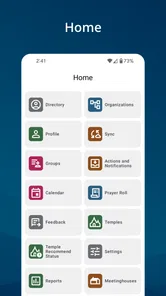
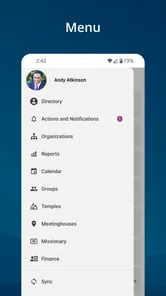
When I first launched Member Tools, I was greeted with a clean, user-friendly interface that didn't require a rocket science degree to navigate. Everything is intuitively laid out, and it's clear that the developers put a lot of thought into making the app accessible for everyone. Right off the bat, I felt like I had a personal assistant in my pocket.
One of the first things I noticed was the app's seamless integration with my calendar and contacts. It’s like having a personal secretary who’s always on call, helping me keep track of my appointments and important contacts. Plus, the syncing feature ensures that I'm always up to date, whether I'm checking my phone or my tablet.
Diving Deeper
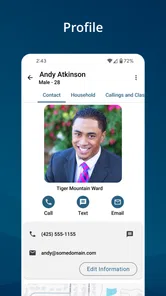
Digging deeper into the app, I discovered a plethora of features designed to make life easier. For instance, the member directory is a goldmine for networking. It allows me to find and connect with fellow members effortlessly. I mean, who doesn’t love a bit of networking without the awkward icebreakers?
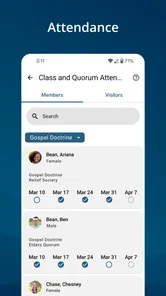
Another feature that caught my eye was the ability to manage events. Whether it's a small meeting or a large conference, organizing and keeping track of events has never been simpler. I could RSVP, check event details, and even receive notifications about any changes. It's like having my own event planner app within an app.
Practical Everyday Use
Using Member Tools in my day-to-day life has been a game-changer. I often find myself relying on it for quick information retrieval, whether it's looking up contact details or checking an event schedule. It’s like having a tiny, efficient assistant who never sleeps.
One practical aspect I particularly appreciate is the app's ability to work offline. I travel frequently, and having access to critical information without needing internet access is a lifesaver. No more frantically searching for Wi-Fi or burning through my data plan just to check a contact’s phone number.
Moreover, the notification system is spot on. I get alerts about upcoming meetings, changes in schedules, or even simple reminders that help keep me on track. It’s the little things that make a big difference, and Member Tools hits the mark.
Choosing a dependable routine
The part I would test early is not how many sections the app contains, but whether the information I need is easy to retrieve at the exact moment I need it. Try a familiar contact search and an upcoming event lookup before relying on it for a time-sensitive plan. If those two tasks feel direct, the app can become a useful reference; if they take too many steps, keep your existing method for urgent arrangements.
I’d also treat notifications as prompts rather than the sole record of a plan. A reminder is convenient, but a busy phone can bury alerts among messages from other apps. For an event that matters, I’d check the details in the app and make sure the people involved have the time and place through whatever channel they actually use. This avoids assuming that everyone shares the same schedule or sees the same change.
Offline access can be especially helpful when I’m already away from a reliable connection, but I would prepare rather than depend on it blindly: open the information I expect to need while online, then confirm it is available before setting out. That small habit matters with any app whose usefulness depends on having current community details. It is a practical safeguard, not a reason to treat a saved screen as guaranteed to reflect a later change.
Where alternatives fit into the same day
The strongest comparison is not that Member Tools replaces a calendar or map, but that it can shorten the handoff between community information and an ordinary day. I might use it to identify an event and its location, then rely on my usual navigation app for the drive and my main calendar for work and family commitments. That division keeps each tool in the job it handles best and avoids expecting a specialized directory to become an all-purpose planner.
For someone choosing between this and a general contact manager, the deciding question is whether church-specific relationships and places are a frequent part of their routine. A general address book is better for a mixed set of personal and professional contacts; Member Tools has a clearer purpose when I need to find someone in the congregation or check a related gathering. I would not copy every contact into both systems just for the sake of duplication.
The same applies to calendars. If a person already has a reliable way to see every commitment in one place, adding a second calendar can create uncertainty about where to look for the latest detail. I’d use the community calendar when I need its context, then keep my overall schedule consolidated in the calendar I already trust. That is less about a technical limitation than about avoiding two competing versions of the same day.
Getting started without creating extra work
When setting up a routine, I’d begin with one real need rather than exploring every available area at once. For example, before a congregation activity, look up the location and the person coordinating it; afterward, decide whether that saved time was enough to make the app worth checking again. This is a simple way to judge practical value without turning a small tool into another system to maintain.
It is also worth being thoughtful about how I use a directory. Finding a contact can make coordination easier, but it does not mean every listed person is an appropriate person to approach for any reason. I’d keep messages relevant, brief, and connected to the shared community purpose. That makes the directory more useful while respecting the fact that it serves real people, not just a searchable list.
For a household or group coordinating attendance, one person can use the app to verify details and then share the essentials in the group’s familiar messaging channel. That hybrid approach avoids requiring everyone to install or learn another tool just to know where to meet. It also gives the app a clear role: finding church-related information, while direct communication handles the practical handoff.
Final Thoughts
In a world where apps are a dime a dozen, finding one that truly stands out can be a challenge. But with Member Tools, I feel like I've stumbled upon a hidden gem. It's more than just an app; it's a comprehensive tool that caters to various aspects of personal and professional management.
Whether you're a busy professional juggling multiple responsibilities or someone who simply likes to stay organized, Member Tools offers something for everyone. It’s practical, efficient, and genuinely enhances productivity. If you haven't already, give it a try. You might just wonder how you ever managed without it.
A sensible way to make the switch
I would not move every reminder or contact into a new routine on day one. First, I’d use Member Tools for one familiar task, such as checking where a gathering is being held, and see whether the information is easy to find when I’m in a hurry. Then I’d add the directory or event calendar to my routine only if it genuinely saves steps. This gradual approach avoids duplicating effort while I learn which details belong here and which are better kept in my usual calendar.
One small but useful trade-off is that a specialized app can reduce searching while also dividing attention across apps. If I put a church event in a general calendar as well, I need to decide which one I’ll check for changes and reminders. I’d avoid maintaining two competing versions of the same plan; use Member Tools to discover and follow community details, and keep a single dependable place for the broader schedule.
Who will get the most from it
I’d recommend it most to people who regularly need to coordinate with fellow members or find church locations and events. A realistic example is leaving work, checking the event details on the way, and confirming the meetinghouse before setting off. That is a more useful test than browsing every screen once: after a week or two, ask whether it has replaced repeated messages and last-minute searches. If it has, the focused setup is earning its space on your phone.
Someone who rarely uses those community details, or who wants one app to manage unrelated appointments and contacts, should probably stick with a general calendar, address book, and maps app. Those alternatives are more flexible for mixed personal and professional life. My recommendation is therefore clear but conditional: for regular church-related coordination, Member Tools is a sensible free addition; for everyone else, its specialized purpose may not justify another app.
Member Tools Frequently Asked Questions
Does Member Tools require an account or sign-in to use its member-focused features?
Member Tools is built around member information, including contacts and community calendars, so its main features are intended for people who can access the relevant member resources. If you are considering installing it, think about whether you need those tools and are part of the community they serve. The app’s purpose is to make those resources easier to reach from a mobile device.
Who develops Member Tools, and what kind of app is it?
Member Tools is developed by The Church of Jesus Christ of Latter-day Saints and is a Books & Reference app. Its practical focus is on helping members access community information, rather than serving as a general-purpose reference library. That makes it most relevant to people who want contact details, event calendars, or locations associated with the Church while using a phone or tablet.
What devices and operating systems can run Member Tools?
The current version is 5.4.2-(106884.2510228), and Android devices need version 8.0 or later. Before installing, check that your device meets this minimum requirement and has enough room for an app. Member Tools is available for Android and iOS, so the appropriate app store is the place to look for the version that matches your device.
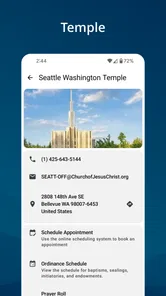
Can I use Member Tools to find nearby meetinghouses and temples?
Yes. Member Tools helps users locate meetinghouses and temples, alongside its contact and calendar features. This can be useful when you need to find a place of worship or check location details while using the app. Its focus is on practical information for members, bringing these location tools together with ways to stay connected to the community.
Who is Member Tools intended for, and can anyone use it?
Member Tools is designed for members of The Church of Jesus Christ of Latter-day Saints who want convenient access to community information. The app is listed for Everyone, but its member-focused tools may be most useful to people who need to contact other members or view relevant calendars and locations. It is a Books & Reference app from The Church of Jesus Christ of Latter-day Saints.
Pros
- User-friendly interface
- Comprehensive toolset
- Regular updates
- Cloud sync available
- Efficient customer support
Cons
- Requires internet access
- Limited offline features
- Subscription may be expensive
- Occasional bugs
- Complex for beginners













