Gospel Library
- 27.62K
- 4.7
- Installs
- 10.00M
- Price
- Free

Screenshots
Analysis by Reviewed
Have you ever wanted to carry your entire church library in your pocket? Well, Gospel Library app might just be the blessing you've been waiting for. As someone who tries to keep up with daily scripture study and church materials on the go, I decided to dive into this app to see if it lives up to the divine expectations.
A routine that makes the library useful
What works best for me is treating the app as a study space rather than a shelf of digital books. I choose the material I need before I begin, read a manageable passage, then use highlights or notes to capture the question or idea I want to revisit. That small routine is more useful than opening several sections at once and hoping something catches my attention.
For a realistic weekday example, I might listen to a talk while travelling, then return to the text later when I have a quiet moment to mark a passage and add a thought. Keeping those steps connected makes the library useful across different parts of the day, without requiring a long uninterrupted study session. If I am preparing to teach, I start with the relevant lesson material and save my notes close to the passages that prompted them.
Make the first session easy to repeat
When I introduce the app to someone else, I suggest beginning with one clear purpose: a passage to read, a talk to hear, or a lesson to prepare. That choice prevents the large collection from becoming a browsing task in itself. I also find it helpful to finish by deciding what I want to return to, rather than trying to make every session comprehensive.
For a family or group discussion, I would choose the reading before people gather and keep the phone focused on that material. The app's range is useful when a conversation moves from scripture to a talk or manual, but too much searching in the moment can interrupt the discussion. A small amount of preparation makes the breadth feel supportive rather than distracting.
All Your Church Materials in One Place
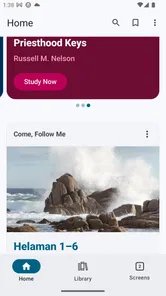
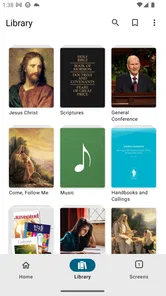
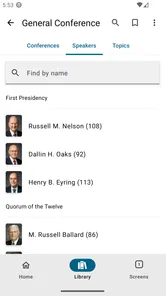
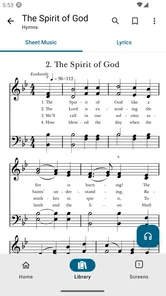
First off, let me just say how convenient it is to have everything in one place. The Gospel Library app houses scriptures, general conference talks, manuals, music, and more. You name it, it's there! I was amazed at how easy it was to navigate through different sections. You just tap on what you want, and boom, you're there. No more lugging around heavy books or trying to remember where you left off.
Features that Stand Out
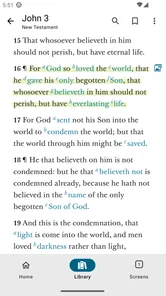
One of the key features that caught my attention is the customizable study plans. Whether you’re preparing for a Sunday lesson or just doing personal study, you can set up your own schedule. And the coolest part? The app sends you reminders to keep you on track. It's like having a spiritual personal trainer. Plus, the ability to highlight passages and make notes is a game-changer for anyone who loves to jot down insights or inspiration.
More From Our News Desk

Weather by Xiaomi Review: Clear at a Glance, Less Clear Up Close

X Under Pressure: Can It Recover When Posting Goes Wrong?

Clash of Clans Is Won Between the Battles

Android Auto Makes the Case for Quieter Car Software

MobiOffice: Transforming Mobile Productivity with Seamless Integration

EA SPORTS FC™ Mobile Soccer: Redefining Mobile Sports Gaming
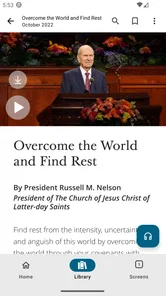
I also have to give a shoutout to the audio features. For those days when reading feels like a chore, you can just listen to your scriptures or conference talks. This is especially handy during my morning commute or evening wind-down. The audio quality is crisp, and the voice options are pleasant to listen to.
Settings and habits worth keeping simple
I get more from study plans when I make them realistic instead of ambitious. A short, repeatable schedule is easier to return to than a plan that turns every missed day into a reason to quit. I also check the reading and audio settings before settling into a session: a comfortable text size and a suitable listening setup can make a bigger difference to consistency than adding more tasks.
One practical habit is to use notes for your own questions, not just polished conclusions. When a passage is unclear, I can write down what I want to compare or ask later, then return to it during lesson preparation. This makes highlights more than decoration and helps prevent a long collection of marked passages from becoming hard to use.
Small adjustments that save attention
I would keep the number of active study goals low. If I am following a plan, I do not also need to turn every spare moment into a separate checklist. I make the reading comfortable first, then decide whether I am in a situation for listening or for careful reading. That distinction matters: audio works well while walking or travelling, while notes and comparisons are easier when I can give the screen my full attention.
For lesson preparation, I use a repeatable sequence: identify the central passage, read the related material, and record only the questions or points I might actually use. This is more effective for me than collecting a large set of highlights and hoping the important ones stand out later. It also makes the app easier to return to after a busy week, because the next action is clear.
Seamless User Experience
Now, I know what you're thinking: "Is it user-friendly?" Absolutely! The interface is intuitive, and even the least tech-savvy among us can navigate it with ease. Switching between different materials and adjusting settings is a breeze. Plus, the syncing feature ensures your progress and notes are consistent across all devices. It's seamless, making it easy to pick up right where you left off, whether you're on your phone, tablet, or computer.
Another impressive aspect is how the app keeps updated with the latest church content. As soon as new talks or materials are released, they're available in the app. You never miss a beat, and it feels like you're always in the loop.
Where a different approach may suit you better
Compared with using printed scriptures or separate reading and audio tools, the main advantage here is having church materials together with your study marks. That is particularly helpful when a talk, manual, and scripture passage all matter to the same lesson. Paper can still be better if you prefer writing in the margins or want a screen-free study session; a general ebook reader may feel simpler if your reading is not focused on Church materials.
I would also avoid turning every talk or passage into a saved note. Too much marking can make it harder to find the few ideas you genuinely need. For someone who wants a broad, customizable religious library, that flexibility is valuable; for a reader who only needs one book and dislikes navigating collections, a focused print copy may be less distracting.
Choosing the right tool for the task
The choice is not simply digital versus paper. I reach for this app when I want Church-specific resources together and expect to move between them; I prefer paper when I want to read without notifications, keep handwritten marginal thoughts, or spend time with one text without browsing. A general ebook app can be a more comfortable home for novels or mixed reading, but it does not replace the convenience of this collection when lesson material and scripture belong in the same session.
Audio has its own trade-off. It lets me use otherwise idle time, but it is not a substitute for every kind of study. If I need to compare wording, capture a question, or prepare a discussion, I have to stop and look at the text. I treat listening as a useful entry point or review, not as proof that I have absorbed details I never paused to consider.
Who will get the most from it
The app is a natural fit for members who regularly study scriptures, prepare lessons, or want talks and manuals nearby. It can also help someone exploring the teachings of The Church of Jesus Christ of Latter-day Saints because the materials are gathered in one place rather than scattered across separate resources. The developer is The Church of Jesus Christ of Latter-day Saints, and the app is free, with an Everyone age rating.
There are a few practical questions worth considering before making it part of your routine. It is available for Android with a minimum operating system requirement of 6.0, and the current version is 7.5.2-(752036.2528246). If you study across devices, syncing is useful; if you rely on one phone, you can still use the app as a personal reading and listening companion. I would check that a selected passage or audio item is ready before a commute rather than assume every situation will have a reliable connection.
Its 4.7 average from around 230,000 ratings and more than 10 million installs suggest it has reached a wide audience, though those figures cannot tell you whether its study style suits you. I would recommend trying a simple reading plan, then adding notes and audio only when they solve a real need. The app has been available since May 28, 2010, and its current scale makes it a familiar option in religious reference apps, but the best test is whether its collection and workflow fit your own habits.
Limits to keep in mind
The same breadth that makes the app useful can create a choice problem. If I open it without a study goal, I can spend more time deciding what to read than reading. That is why I would not recommend it to someone who wants a minimal reader with one book, one screen, and no additional collections. For that person, a print copy or a simpler reading app is likely to feel calmer.
I also would not make a long plan the measure of success. A missed reminder can feel like a failure if the schedule is too demanding, even though the point is to return to the material. Keeping goals modest and using notes selectively are practical ways to avoid turning a helpful reference library into another source of pressure.
Final Thoughts
In conclusion, Gospel Library is an invaluable tool for anyone looking to deepen their spiritual journey. It's compact, comprehensive, and incredibly user-friendly. Whether you're a member of the Church of Jesus Christ of Latter-day Saints or someone curious about their teachings, this app offers a rich, immersive experience. So why not give it a try? It's free, it's fantastic, and it might just become your new favorite app for spiritual growth.
My clearest recommendation is to begin with one repeatable habit: choose a short reading, listen when that suits the moment, and save only the notes you expect to revisit. The app is strongest when its collection supports a real purpose, such as personal scripture study or preparing a lesson, rather than when I try to explore everything at once. With that approach, its breadth feels like a practical advantage; without it, a simpler book or a screen-free routine may be the better fit.
Gospel Library Frequently Asked Questions
Is Gospel Library suitable for children and families?
Gospel Library is rated for Everyone, so its age classification makes it broadly suitable for readers of different ages. Families can use it as a reference for exploring the Church’s religious materials, while individual readers may use it for personal study. As with any reading app, parents can choose which materials and study activities are appropriate for their children.
Who publishes Gospel Library, and what kind of app is it?
Gospel Library is a Books & Reference app published by The Church of Jesus Christ of Latter-day Saints. Its focus is on the Church’s religious materials, making it useful for readers who want a dedicated place to study and consult those resources. The app’s store summary, “Study the word of God,” captures its central purpose.
Which devices can run Gospel Library?
Gospel Library is available for Android and iOS, so you can use it on a compatible phone or tablet. On Android, the current version requires Android 6.0 or later. The app is developed by The Church of Jesus Christ of Latter-day Saints and is rated for Everyone, making it a broadly accessible option for personal scripture study and reference.
What is Gospel Library and what can I use it for?
Gospel Library is a comprehensive app designed for members and followers of The Church of Jesus Christ of Latter-day Saints. It provides access to a wealth of religious texts, including scriptures, general conference talks, manuals, and more. Users can study, annotate, highlight, and access multimedia content, making it a valuable tool for personal study and teaching.
Is Gospel Library free to download and use?
Yes, Gospel Library is completely free to download and use. There are no hidden fees or in-app purchases required to access the core content. It is available on both Android and iOS platforms, ensuring accessibility for a wide range of users who wish to engage with the Church's materials.
Pros
- Extensive library of LDS scriptures.
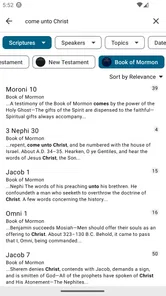
- Easy-to-use search functionality.
- Offline access to content available.
- Frequent updates and improvements.
- Cross-platform sync feature.
Cons
- Limited to LDS-related content.
- Requires registration for full features.
- Occasional app crashes reported.
- Not available in all languages.
- Some features need internet access.













