

Temple Square
- 11.00
- 4.8
- Installs
- 10.00K
- Price
- Free

Screenshots

Analysis by Reviewed
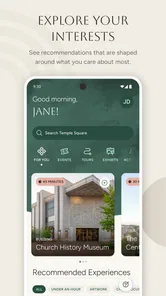
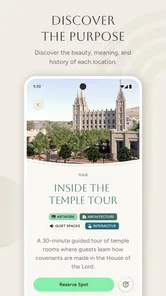
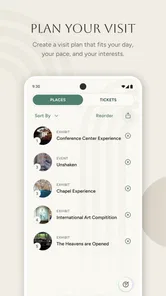
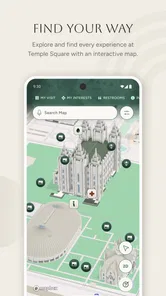
Planning a visit to Temple Square can involve more than deciding when to arrive. One person may be interested in tours, another may want to understand the grounds before walking, and someone else may simply need a clear plan for a shared day out. I found Temple Square most useful as a focused companion for that situation: it is an official visitor guide from The Church of Jesus Christ of Latter-day Saints, built around planning visits, finding tour information, and exploring the site.
That focus matters. This is not a broad travel app for comparing hotels, building a complete city itinerary, or replacing a general map service. It belongs in the Travel & Local category and works best when Temple Square itself is the main destination. My overall impression is that it gives a household or small group a more organized starting point than relying on scattered web searches, while still leaving some practical planning to the people using it.
Using the guide when one device serves the whole group
A realistic use case is a family or group of friends preparing for a visit from home. One person can open the guide and review the available tour information, while others discuss which parts of the visit matter most to them. Instead of passing around several browser tabs, the group has one destination-specific reference point. That makes the early planning conversation easier, especially for visitors who have never been to Temple Square.
I also see value in using it during the trip itself. A shared phone can act as the group’s reference screen when everyone is standing together and deciding what to do next. The person holding the device can check the guide while another family member keeps track of the walking pace or watches younger children. This sounds simple, but a dedicated visitor guide is less distracting than opening a general travel app filled with unrelated recommendations.
The important trade-off is that shared use depends on a little coordination. If one person changes the screen or starts reading tour details, everybody else has to wait or gather around. I would not treat the app as a complete group-management tool. It helps people make decisions together, but it does not replace agreeing on a meeting point, planning breaks, or making sure every member of the group knows the day’s basic plan.
For a couple, this shared approach feels natural. For a larger group, I would suggest reviewing the guide before leaving and deciding which information needs to be remembered. That avoids stopping repeatedly in a busy area just to settle the next step. A useful routine is to use the app for preparation, then consult it only when the group reaches a genuine choice rather than keeping one person permanently responsible for the phone.
What the first setup tells you about the app
The app is free, which makes it easy to recommend as a low-risk addition to a visit plan. It is rated for Everyone, and its minimum operating system is Android 8.0. Those details make it approachable for many shared household devices, although compatibility still depends on the particular phone or tablet and its current software condition.
More From Our News Desk

 Weather - By Xiaomi
Weather by Xiaomi Review: Clear at a Glance, Less Clear Up Close
Xiaomi’s weather app makes everyday forecasts quick to scan, but its calm surface can leave useful details and recovery paths harder to find than they should be.

 X
XX Under Pressure: Can It Recover When Posting Goes Wrong?
A resilience-focused review of X, examining setup, mistaken posts, interruptions, weak connections, and the gaps that matter when recovery needs to be dependable.

 Clash of Clans
Clash of Clans Is Won Between the Battles
Its raids are quick; its community is a long-term project of coordination, teaching, rivalry, and shared responsibility—with all the friction that entails.

 Android Auto
Android Auto Makes the Case for Quieter Car Software
The car interface is no longer judged by how much it can do, but by how quietly it helps. Android Auto shows what drivers now expect—and what still gets in the way.

 MobiOffice: Word, Sheets, PDF
MobiOffice: Transforming Mobile Productivity with Seamless Integration
MobiOffice: Word, Sheets, PDF is redefining mobile productivity with a surprising blend of functionality and innovation.

 EA SPORTS FC Soccer Mobile 26
EA SPORTS FC™ Mobile Soccer: Redefining Mobile Sports Gaming
Dive into EA SPORTS FC™ Mobile Soccer, where immersive gameplay and strategic depth transform mobile sports gaming.
Latest News



I would install it on the device that is most likely to travel with the group, not automatically on every phone in the household. A single prepared device reduces duplicated effort and keeps the planning conversation in one place. If different people prefer to explore independently, installing it on more than one compatible device may be convenient, but the app should not be mistaken for a synchronized family planner.
This is where account boundaries become important. I would not assume that information viewed by one household member automatically becomes visible to everyone else, or that separate devices share the same planning state. The safest approach is to treat each installation as its own copy of the guide unless the app clearly presents a sharing or synchronization option during use. That small distinction prevents confusion when one person expects another phone to show exactly the same screen.
For a child using the household tablet, I would open the app together first and explain what it is for. The Everyone rating supports a broad age range, but an age rating is not the same thing as a complete explanation of a destination. Younger visitors may need an adult to add context, answer questions, and decide which information is relevant to the day. The guide can support that conversation without taking the adult’s place.
Another practical boundary is responsibility for the device. If the phone belongs to a parent, the parent remains in control of what is opened and when it is handed over. If a teenager is doing the research, I would let them lead the planning but still confirm the group’s agreed schedule separately. That division works well because it gives younger users a meaningful role without making the app the only source of decisions.
Turning individual interests into one workable visit
The strongest household benefit is coordination before arrival. Temple Square can mean different things to different visitors: one person may care about tours, another may want to explore at a relaxed pace, and someone else may be looking for a clear introduction. I found the app more helpful when I used it to compare those priorities rather than trying to force everyone into the same style of visit.
A good workflow is to let each person identify one thing they want from the day, then use the guide to shape a shared order. For example, a family could begin by reviewing tour possibilities, agree on which activity deserves the most attention, and leave room afterward for exploring without a strict timetable. This approach turns the app into a conversation tool instead of a checklist that one person controls.
There is also a useful distinction between information gathering and on-site navigation. A visitor guide can help you understand what you want to see, but a group still needs ordinary human coordination. I would decide in advance who keeps the phone charged, who checks the next activity, and where everyone will regroup if the party separates. Those decisions are especially valuable when visitors have different walking speeds or when some members are more interested in quiet exploration than scheduled tours.
For shared devices, I recommend taking a few minutes to show the main information to everyone before the visit. That way, the group does not depend on one person remembering every detail. If a child or older relative later asks what comes next, another member can answer without taking the phone away from the person currently using it.
The app is also a better fit for a focused outing than for a packed day across an entire city. If Temple Square is only a brief stop between unrelated attractions, a general map app and a simple note may be faster. If it is the central destination, the dedicated guide has a clearer purpose and is less likely to bury relevant information under restaurants, transport listings, or broad sightseeing suggestions.
Where the official focus helps, and where it narrows the experience
The developer is The Church of Jesus Christ of Latter-day Saints, and that official connection gives the app a clear identity. Visitors who want information directly connected with Temple Square may appreciate having a source designed specifically for the site rather than assembling details from unrelated travel pages. In my experience, that makes the app feel more appropriate for preparation than a generic city guide.
At the same time, the official focus means I would not use it as my only travel resource. A general travel app remains more suitable for the wider journey: getting to the area, comparing nearby places, checking unrelated attractions, or coordinating the rest of a city visit. Temple Square’s guide should be seen as the destination-specific layer, not the entire travel plan.
This distinction is particularly important for visitors who are unfamiliar with the religious or historical context. The app can help structure a visit, but a respectful and enjoyable experience may still involve questions that depend on conversation, personal background, or broader local information. I would use the guide to decide what to explore and then allow time for the group to discuss what they are seeing.
Its current version is 1.0.9, and the app has reached over ten thousand installs. I read that as a sign that it is established enough to attract real visitor interest, while still being a relatively focused tool rather than a massive all-purpose platform. The average rating is 4.8 from around sixty ratings, with roughly eleven written reviews, so the visible feedback is encouraging but not broad enough for me to treat it as a universal guarantee.
That rating context is worth keeping in mind when recommending it to relatives. A high average can indicate that the app meets the expectations of people looking for an official Temple Square guide, but it does not tell every visitor how well it will suit a large family, a first-time tourist, or someone seeking extensive city-planning features. My recommendation is strongest for the first group of needs: learning about the destination, preparing for tours, and exploring with a clear focus.
Age, trust, and the role of an adult guide
The Everyone content rating makes the app suitable for a household where different ages share the same device. I appreciate that this lowers the barrier to involving children in planning. A young visitor can help choose what to explore, ask questions about tours, or look through the guide with a parent. Giving children that role can make the visit feel more personal than simply bringing them along with an itinerary they never saw.
Still, I would keep expectations realistic. An age rating does not mean every part of a visit will hold the attention of every age group. Children may need short explanations, breaks, and a chance to move at their own pace. The app can introduce the destination, but it cannot decide whether a particular tour or walking plan is comfortable for a child, older adult, or visitor with accessibility needs.
Trust also has two sides here. The official origin may reassure visitors who prefer destination information from the organization connected with the site. On the other hand, some travelers may want an independent perspective before deciding how to spend their time. For them, I would pair the app with a neutral travel source rather than expecting one guide to provide every viewpoint.
In a household, I would also explain the difference between exploring information and making commitments. A child can browse and suggest an activity, but an adult should confirm the group’s timing and practical arrangements. That keeps the experience collaborative without allowing a quick tap or enthusiastic suggestion to become an unplanned obligation for everyone.
Older relatives may benefit from the same shared approach. Instead of asking them to learn the app alone, another family member can review it with them and translate the information into a comfortable plan. This is one of the app’s quieter strengths: it can support a conversation across generations, provided the household treats it as a guide rather than an authority over the entire day.
Who should use it, and who should choose something else
I would recommend Temple Square to first-time visitors who want a direct way to prepare for the site, families deciding how to spend a shared visit, and travelers interested in tours and exploration centered on Temple Square. It is especially sensible when the destination is important enough to deserve its own planning tool but the group does not want to build an elaborate itinerary.
I would be less enthusiastic for someone who wants one app to manage every part of a trip. If your priority is public transport, restaurant discovery, hotel planning, offline city maps, or a long list of unrelated attractions, a general travel platform will probably serve you better. The dedicated guide may still be worth adding, but it should complement that broader tool rather than replace it.
I would also skip it if you are only passing through with no time to explore or learn about the site. In that case, opening a destination-specific guide may add an extra step without changing your day. The app earns its place when you want to make a visit more intentional, not merely when you need a map for a quick stop.
For a household, the best compromise is simple: prepare with the official guide, coordinate with ordinary messages or conversation, and use a general travel app for everything outside Temple Square. That division gives each tool a clear job and avoids expecting the visitor guide to handle tasks it was not designed to handle.
My household verdict after using the guide
I came away viewing Temple Square as a practical, narrowly focused companion rather than a complete travel organizer. Its free price, Everyone rating, official developer, and Android 8.0 minimum make it easy to consider for a shared household device. The strongest reason to install it is not the promise of managing a whole trip; it is the convenience of having destination-specific preparation in one place.
The app works best when one person leads a short planning conversation and then shares the important decisions with the rest of the group. That workflow avoids account confusion, prevents one device from becoming a bottleneck, and gives children or relatives a chance to participate without placing the full responsibility on them. It also makes the visit feel less like a rigid schedule and more like a shared plan.
My main reservation is its narrow scope. Visitors who expect broad local discovery or detailed household coordination may need other tools alongside it. I also would not rely on the app alone for practical arrangements, group safety, or personal comfort. Those limits do not undermine its value; they simply define the right role for it.
My recommendation is to install it when Temple Square is a meaningful part of your day and use it as the group’s shared preparation guide. For a family or mixed-age group, that is enough to make the visit easier to discuss and more purposeful. For a wider city trip, keep your usual travel tools as well, and let this focused guide handle the part of the journey it understands best.
Temple Square Frequently Asked Questions
Who publishes the Temple Square app, and which devices can install it?
Temple Square is an app in the Travel & Local category, published by The Church of Jesus Christ of Latter-day Saints. It is available for Android and iOS users seeking an official visitor guide. The listed minimum operating system is version 8.0, so check your device’s software version before downloading to make sure it meets the requirement.
What is Temple Square, and what can visitors do there?
Temple Square is a well-known historic and religious destination in downtown Salt Lake City, Utah. Visitors can explore landscaped gardens, historic buildings, visitor centers, exhibits, artwork, and information about the Church of Jesus Christ of Latter-day Saints. The experience is generally focused on sightseeing, history, architecture, and learning rather than amusement-park attractions or entertainment.
Is the Temple Square app free to download and use?
The Temple Square app is generally available as a free download, although data charges may apply if you use mobile internet instead of Wi-Fi. Most informational features, maps, stories, and visitor resources can typically be accessed without purchasing a subscription. Before downloading, users should check the current store listing because availability, included content, and optional features may change over time.
Does Temple Square provide maps, tours, or information for planning a visit?
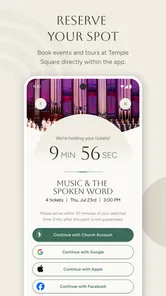
Yes, the app is designed to help visitors understand and navigate the Temple Square area. Depending on the current version, it may include maps, points of interest, historical details, tour information, event updates, and practical guidance. It can be useful before arrival for planning and while exploring the site, but opening hours and tour schedules should still be verified through official sources.
Can I use Temple Square without an internet connection?
Some content may remain available after it has been loaded, but users should not assume that every feature works offline. Maps, updated schedules, multimedia content, and external links may require an active internet connection. For a smoother visit, download the app and open important pages before arriving, and consider using Wi-Fi when possible to reduce mobile data consumption.
Pros
- Clear maps make it easier to explore the complex independently.
- Detailed historical information adds context to the visit.
- Useful event details help visitors plan concerts and activities.
- The app supports self-guided visits at your own pace.
- Practical visitor information can simplify trip planning.
Cons
- Some content may feel focused on the site's religious perspective.
- Information may be less useful outside the Salt Lake City area.
- Certain features may depend on an active internet connection.
- Event listings can become outdated if not refreshed regularly.
- The app may offer limited value after completing your visit.













