MEDITECH MHealth
- 1.10K
- 3.1
- Installs
- 1.00M
- Price
- Free

Screenshots
Analysis by Reviewed
Have you ever found yourself tangled in the web of healthcare apps, each promising to simplify your medical life, but instead just adding more chaos to your phone? Well, let me introduce you to something that might actually deliver on those promises: MEDITECH MHealth. This app is like that reliable friend who always has your back, especially when it comes to managing your health records and appointments.
Where a steady connection matters
Because this is the mobile version of MEDITECH’s Patient and Consumer Health Portal, I’d treat it as a convenient route into that portal rather than as a replacement for every kind of healthcare communication. The experience depends on reaching the service when you need it: checking a result before an appointment or reviewing a detail while away from home is useful, but I would not plan around access being available in places with poor reception. For urgent concerns, the app is not a substitute for contacting a healthcare professional directly.
A practical habit is to check anything important before leaving a reliable connection. If I were heading to an appointment, I’d review the information I expect to discuss ahead of time rather than waiting until I’m in a lobby with crowded Wi-Fi or a weak mobile signal. That small change makes a portal app easier to use without assuming that its content will be available when disconnected.
There is a useful distinction here between an app that stores information for reference and one that retrieves it from a healthcare service. I would approach this one as a connected portal: when a screen takes longer than expected, I’d avoid repeatedly submitting the same action until I know whether it completed. For a routine check, waiting and trying again later may be reasonable; for a time-sensitive appointment change, I’d confirm with the provider rather than let a network delay create uncertainty.
Getting Started with MEDITECH MHealth
First things first, let’s talk about how easy it is to get started with MEDITECH MHealth. Downloading and installing it is a breeze – a few taps on your screen and voilà, you’re in. Once you open the app, you’re greeted with a clean and intuitive interface. It’s like walking into a tidy room where everything is in its place, and you just know it’s going to be a good experience.
Everyday use on a phone
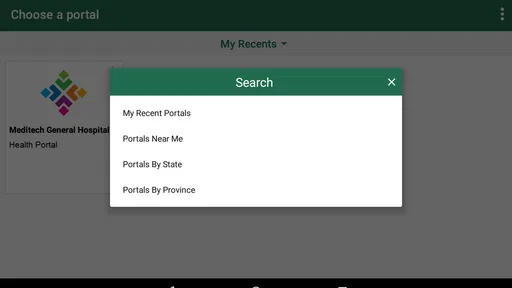
The mobile format suits quick checks between other tasks, but the value depends on whether the healthcare service you use is connected to this portal. I would first confirm that with the clinic or hospital I already visit; installing the app alone does not make it a universal doorway to every provider. That is the key difference from a general health tracker: this is for interacting with a participating care portal, not for logging every wellness habit or replacing all provider-specific services.
Picture a familiar situation: you are on the way to a routine visit and want to remember what result or appointment detail to ask about. A quick review on your phone can help you prepare, while a short note in your own words can keep the conversation focused. I would avoid treating a screen as a diagnosis, though; results need context from a clinician, especially when something looks unexpected.
More From Our News Desk

 Block Blast!
 Makes Every Clear Feel Like One More Turn
A clean little block puzzle becomes a study in space, risk, and self-control. Its best moments come from one satisfying clear; its toughest test is knowing when to stop.

 Super Stylist Fashion Makeover
Super Stylist Turns Dress-Up into a Runway Career
Its makeover-to-client loop turns quick outfit decisions into shareable style theater. The question is whether the closet keeps giving players a reason to return.

 Block Craft 3D:Building Game
Block Craft 3D Under Pressure: How Well Does It Recover When Building Goes Wrong?
A failure-focused look at Block Craft 3D’s forgiving building loop, its uncertain recovery edges, and the moments that demand more than a cheerful village.

 Woodturning
 Trades Creative Freedom for a Satisfying Carving Loop
If your usual creative game is about building, decorating, or styling, Woodturning trades open-ended projects for a tactile, tightly guided carving loop. Here is what that switch really costs.

 PUBG MOBILE
 Shows What Battle Royale Must Get Right
PUBG MOBILE shows how battle royale has matured: bigger systems matter less than meaningful choices, readable fights, and a reason to return after every loss.

 Braindom: Brain Games Test
Braindom’s Social Life Happens Between Puzzles
Braindom turns quick logic traps into a personal ritual, but its community value is more about comparing answers than building together.
Latest News



For households where someone helps coordinate another person’s care, the portal may be most useful as a shared point of reference during planning, provided the relevant account access is arranged through the care provider. I would not assume that a family member can simply view another person’s records; health information should stay under the patient’s control and follow the provider’s access process.
That distinction also helps answer a practical question: can I use it for every doctor I see? I would not count on that. The app’s usefulness follows the care organization connected to the portal, so someone who sees clinicians through unrelated systems may still need those organizations’ own tools or phone lines. Before making it part of a routine, I’d ask the provider which services and records are available through its portal and use that answer to decide what belongs here and what needs another route.
Simplicity at Its Best
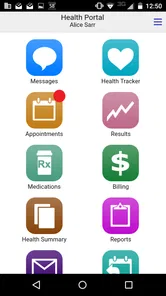
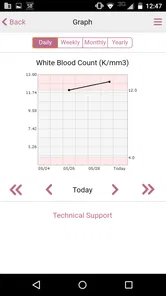
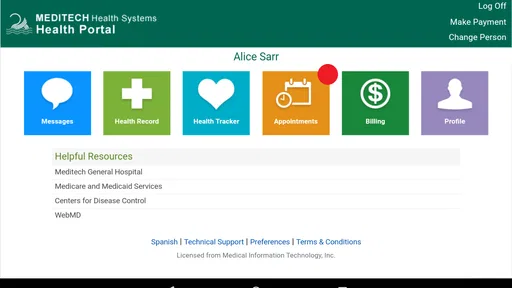
The app is designed to make your life easier with its main features: accessing medical records, managing appointments, and viewing test results. Imagine having all your health information right at your fingertips, neatly organized and accessible. No more flipping through paper records or waiting on hold to get test results. It’s all right there, in real-time.
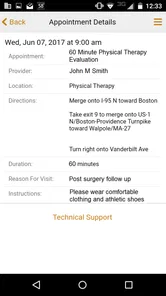
One of the features I love is the appointment scheduling. It’s like having a personal assistant who handles all your health-related meetings. You can book, reschedule, or even cancel appointments without having to make a single phone call. Just a few taps, and you’re done.
That convenience does not remove the need to double-check details that matter, such as the appointment time and location. I’d look at the portal after making a change and keep any provider instructions somewhere easy to find. If an appointment is time-sensitive or a change does not appear as expected, calling the clinic is the safer next step than repeatedly tapping and hoping the request went through.
Compared with calling a reception desk, a portal can save the back-and-forth for straightforward tasks and let you check information at a time that suits you. Compared with a paper folder, it is easier to consult while out, but paper may still be a useful backup for a visit where you expect connectivity to be unreliable. I see the strongest use case as handling routine coordination, not replacing a conversation when a question needs explanation.
A small workflow choice can make those routine tasks clearer: I would check the appointment details after each change, then keep a separate reminder for the date and time rather than relying on memory or a single alert. That way, the portal helps with the administrative step while my own calendar serves as a second prompt. It is a simple trade-off: a little duplication is worthwhile when missing a visit would be more inconvenient than setting one extra reminder.
Staying Secure and Informed
In today’s digital age, keeping your data secure is paramount, and MEDITECH MHealth takes this seriously. They use top-notch security measures to ensure your information is safe. So, you can focus on what’s important – your health, without worrying about the safety of your data.
Since this is sensitive information, I’d use the same care I would with any account that holds medical details: keep access to my phone private and avoid checking records on a shared device. If I use a public network, I would be thoughtful about what I open and make sure I leave the account in a safe state afterward. Convenience is worthwhile, but it should not encourage casual sharing of a screen or login.
Notifications can be helpful prompts, but I would treat them as a cue to open the app rather than as the complete medical message. A result or reminder is easier to understand in its full context, and a notification arriving late because of connectivity should not be the only way I keep track of an important appointment. For something that cannot be missed, I’d also use a dependable personal reminder.
Another useful way to be data-conscious is to decide what you actually need to look up before opening the portal, especially when you are on a shared or public connection. I would check the specific appointment or result I need, avoid leaving medical details visible to people nearby, and close out when finished. The point is not to make ordinary use feel alarming; it is to treat a phone screen as a personal space, not a display to pass around casually.
One useful trade-off is that a portal brings several kinds of care information together, while a provider’s usual phone line remains better for questions that need a person to interpret the situation. If your provider does not use the MEDITECH portal, or you mainly want fitness tracking, medication logging, or a single app that gathers records from unrelated health systems, this is probably not the right tool for that job. I would choose it for access to a participating care relationship, not as a universal medical organizer.
That makes the choice fairly practical rather than technical. Someone who wants general wellness charts or a place to record day-to-day habits is better served by a health tracker designed for those activities. Someone who wants a direct way to deal with routine matters tied to a participating provider may prefer this portal over a generic tracker, because its purpose is connected care rather than personal fitness data. Neither type replaces the other, and trying to force one app to cover both jobs can make the experience more confusing.
Who should try it—and who may prefer another route
MEDITECH MHealth is free, rated for Everyone, and developed by Medical Information Technology, Inc. It has a 3.1 average from around 2,200 ratings, with about 990 written reviews, and has over 1 million installs. It was released on June 12, 2017; version 1.20.0 requires operating system 12 or later. Those figures offer a little context, but they do not tell me whether a particular clinic has enabled the portal or whether its workflow will suit you.
I’d consider it if my care provider already uses MEDITECH’s patient portal and I want a mobile way to handle routine record and appointment checks. I’d skip it if I expected it to connect automatically to every clinic, provide urgent medical advice, or keep me informed without dependable connectivity. If the app seems stuck, I’d first check the connection and try again later; if the matter is important, I’d contact the provider through its normal channel rather than assume a failed screen means the underlying request was completed.
For a realistic day, imagine noticing an appointment reminder while away from home and wanting to check the details before changing plans. I’d open the portal somewhere with a stable connection, confirm what the appointment information says, and then put the time in my calendar. If I wanted to reschedule, I’d verify that the change appeared before treating the matter as settled. If the app cannot load or the result is unclear, I’d switch to the provider’s normal contact route instead of letting a mobile screen dictate what happens next.
That is why I see the strongest audience as people who already have a participating care relationship and prefer to handle simple administrative checks on a phone. It is less compelling for someone who rarely uses digital services, needs one app to combine records from several unrelated providers, or expects immediate answers to medical questions. A person who prefers speaking to clinic staff can still use the usual phone route; the portal is an added option for routine access, not a test of how anyone should manage their care.
Before relying on it, I would ask the provider a few practical questions: whether the organization uses this portal, which parts of care are available through it, and what channel to use if an appointment request or record does not appear as expected. Those answers matter more than installing the app first. They also help set expectations about whether it will be a daily tool or something opened only before appointments.
Final Thoughts
All in all, MEDITECH MHealth is a game-changer for anyone looking to streamline their healthcare management. It’s user-friendly, secure, and incredibly efficient. If you’re tired of juggling multiple apps or dealing with the hassle of traditional healthcare management, give it a try. You might just find that it’s the healthcare companion you never knew you needed.
So, go ahead, dive into the world of modern healthcare with MEDITECH MHealth, and take control of your health journey. Trust me, you’ll wonder how you ever managed without it!
My connectivity verdict
For me, the deciding factor is not simply whether a health app looks convenient on a phone; it is whether my provider’s portal is part of the care I actually receive and whether I can reach it when I need to. I’d use this as a handy route for routine checks, preparation, and appointment coordination, while keeping a phone call available for anything urgent, unclear, or time-sensitive. That balance gives the mobile access real value without asking it to do more than a connected patient portal should.
If your provider uses MEDITECH’s portal and you are comfortable checking sensitive details on your own device, I think it is worth trying as a practical companion to your existing care. If not, or if your main need is broad health tracking across different services, another provider’s portal, a conversation with the clinic, or a dedicated tracker may fit better. My recommendation is conditional but straightforward: use it where your care organization supports it, keep a backup route for important matters, and let the app make routine access easier rather than making it your only source of healthcare guidance.
MEDITECH MHealth Frequently Asked Questions
Do I need an account or a connection to a healthcare organization to use MEDITECH MHealth?
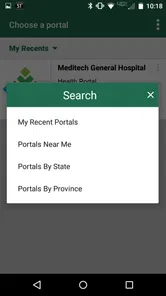
MEDITECH MHealth is the mobile version of MEDITECH’s Patient and Consumer Health Portal, so its usefulness depends on being able to access that portal through your healthcare organization. Before downloading, check whether your provider uses the portal and ask how patients sign in. Having the app installed by itself does not guarantee access to your personal health information.
Is MEDITECH MHealth free to download, and what devices can run it?
MEDITECH MHealth is free to download and is listed for everyone. It is a medical app from Medical Information Technology, Inc., and its current version is 1.20.0. The app requires iOS 12 or later, so check your device’s operating system before installing. A free download does not necessarily mean that every service available through your healthcare organization is free.
What is MEDITECH MHealth and how does it benefit users?
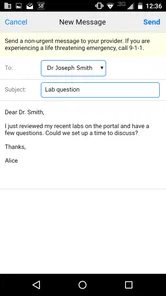
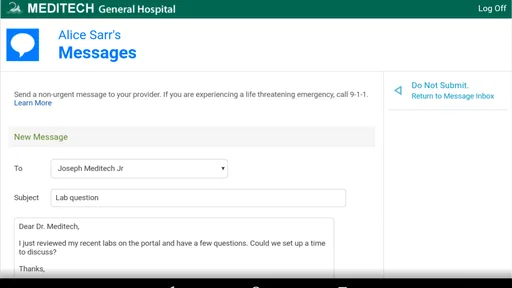
MEDITECH MHealth is a comprehensive mobile health application designed to provide easy access to your medical records, appointments, and communication with healthcare providers. Users benefit from having their health information at their fingertips, enabling better management of their health and quick access to important medical data. The app integrates smoothly with healthcare systems, ensuring users can track their medical history and upcoming appointments efficiently.
How secure is my personal health information on MEDITECH MHealth?
Security is a top priority for MEDITECH MHealth. The app uses advanced encryption methods to protect your personal health information. It complies with all relevant healthcare regulations, including HIPAA, ensuring that your data remains confidential and secure. Users can feel confident that their sensitive information is protected against unauthorized access and breaches.
Is MEDITECH MHealth compatible with all healthcare providers and systems?
While MEDITECH MHealth is designed to be compatible with a wide range of healthcare providers and systems, it is best to check with your specific healthcare provider to ensure compatibility. The app is widely adopted, but integration depends on the healthcare system's infrastructure and support for digital health records. Users should verify with their provider for a seamless experience.
Pros
- Intuitive user interface
- Comprehensive health tracking
- Secure data encryption
- Real-time updates
- Multi-platform support
Cons
- Limited offline functionality
- Subscription-based premium features
- Occasional sync issues
- Requires stable internet connection
- Lacks advanced fitness analytics