MDLIVE: Talk to a Doctor 24/7
- 7.85K
- 4.6
- Installs
- 1.00M
- Price
- Free

Screenshots

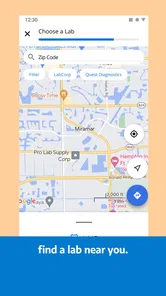

Analysis by Reviewed
For a first-time user, the most reassuring way to approach MDLIVE is to think of it as a starting point for a medical conversation, not a clinic compressed into a phone. I would install it when I have a non-emergency concern and want to ask a clinician what makes sense next. That can be useful when an ordinary appointment is awkward to arrange, but it is not a reason to wait if symptoms are severe or rapidly worsening.
Decide whether remote care fits the problem
Before opening the app, I’d ask myself a simple question: can I explain this concern in a conversation, or does it seem likely to require a hands-on examination? A new, mild issue that I can describe clearly may be a reasonable reason to seek remote advice. A problem that depends on a physical assessment, or one that is getting worse quickly, points toward in-person or urgent care instead.
This is also where MDLIVE differs from searching symptoms online. Search results can offer general possibilities, but they cannot ask follow-up questions about my situation. A remote clinician can discuss the details with me, while still being limited by what can be assessed through a call. I’d use online information to prepare questions, not as a diagnosis or a substitute for professional care.
Make the first visit easier on yourself
I would set up my account before I felt unwell if I expected to use the app. Doing that calmly gives me time to enter information accurately and learn where to begin, rather than trying to manage an unfamiliar screen while distracted by symptoms. MDLIVE is free to download, but I would still check the terms that apply to my care before relying on it for a particular consultation.
For the first conversation, I’d keep a brief note with the main symptom, when it started, what has changed, and what I have already tried. I’d also have my current medicines and relevant health details close by. This is not about preparing a perfect medical history; it is about avoiding the common moment when I forget the detail that seemed important five minutes earlier.
Privacy is part of preparation, too. I’d choose a place where I can speak openly and hear the clinician clearly. If video feels uncomfortable or the surroundings are not suitable, the phone option may be more practical. If I choose video, a steady connection and a well-lit place can make the exchange easier, but I would not delay needed care just to create ideal conditions for a call.
Use the first consultation to get a plan
A useful first success is not necessarily leaving with a prescription. It is understanding what the clinician thinks should happen next: whether home care and observation are reasonable, whether treatment is appropriate, or whether an in-person visit is needed. I’d listen for the reasoning and ask what changes should prompt me to seek further care. That gives the conversation a clear purpose beyond simply connecting.
More From Our News Desk

 Block Blast!
 Makes Every Clear Feel Like One More Turn
A clean little block puzzle becomes a study in space, risk, and self-control. Its best moments come from one satisfying clear; its toughest test is knowing when to stop.

 Super Stylist Fashion Makeover
Super Stylist Turns Dress-Up into a Runway Career
Its makeover-to-client loop turns quick outfit decisions into shareable style theater. The question is whether the closet keeps giving players a reason to return.

 Block Craft 3D:Building Game
Block Craft 3D Under Pressure: How Well Does It Recover When Building Goes Wrong?
A failure-focused look at Block Craft 3D’s forgiving building loop, its uncertain recovery edges, and the moments that demand more than a cheerful village.

 Woodturning
 Trades Creative Freedom for a Satisfying Carving Loop
If your usual creative game is about building, decorating, or styling, Woodturning trades open-ended projects for a tactile, tightly guided carving loop. Here is what that switch really costs.

 PUBG MOBILE
 Shows What Battle Royale Must Get Right
PUBG MOBILE shows how battle royale has matured: bigger systems matter less than meaningful choices, readable fights, and a reason to return after every loss.

 Braindom: Brain Games Test
Braindom’s Social Life Happens Between Puzzles
Braindom turns quick logic traps into a personal ritual, but its community value is more about comparing answers than building together.
Latest News



For example, imagine waking with a familiar but uncomfortable symptom before a busy day. I would note when it began and whether it is changing, then use the consultation to explain that timeline and ask what level of care is appropriate. If the clinician recommends an in-person assessment, I would treat that as a useful result, not a failure of telehealth. The app can help me choose a next step even when it cannot finish the whole episode of care remotely.
After the call, I’d write down any instructions while they are fresh, including what to watch for and what to do if the problem does not improve. If medication is discussed, I would confirm the clinician’s directions rather than relying on memory. This simple follow-through matters because the value of a consultation depends partly on how clearly I understand and act on the plan.
Getting Started with MDLIVE
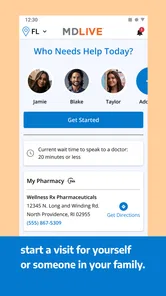
First off, setting up MDLIVE is a breeze. You download the app, create an account, and you're good to go. The interface is straightforward, which means even if you're not tech-savvy, you'll find your way around without breaking a sweat. I found the design to be user-friendly and pretty intuitive, almost like they knew I had zero patience when I'm not feeling well.
What to Expect Before You Start
I’d treat this as a route to a remote consultation, not as a replacement for every part of a clinic visit. The practical benefit is having a place to start when a concern feels worth discussing but does not appear to need emergency attention. A virtual conversation can help you explain what is going on and understand a sensible next step; it cannot provide the hands-on examination that some problems require.
That distinction is useful when comparing telehealth with the usual alternatives. Calling a clinic may be better if you already have a primary-care relationship or need an in-person examination, while urgent or emergency services are the right route for severe or rapidly worsening symptoms. I see this app as most useful in the middle ground: when getting timely advice matters, but travel and a standard appointment feel like unnecessary hurdles.
The 24/7 Doctor Access
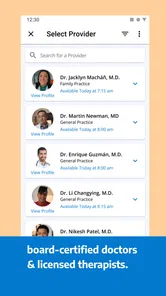
Now, onto the main event: accessing a doctor anytime, anywhere. The app claims you can connect with a board-certified doctor within minutes, and honestly, it delivers on this promise. One night, when I was battling a nasty headache and feeling feverish, I decided to test it out. Within 15 minutes, I was speaking to a doctor who was not only professional but also empathetic—a rare combination these days!
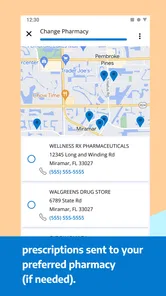
What I loved was the option to choose between a video call or a phone call. It might sound trivial, but when you're not looking your best, having that choice feels like a blessing. Plus, the doctors can prescribe medication directly through the app, which can then be sent to your nearest pharmacy. Talk about convenience!
Making the First Consultation Count
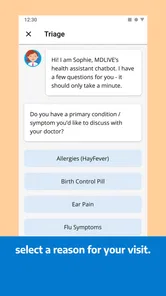
For a first meaningful use, I’d prepare a short, clear account of the problem before starting: when it began, what has changed, and what you have already tried. Keep a list of medicines and relevant health details nearby so you do not have to reconstruct them while you feel unwell. This is especially helpful on a phone call, where you cannot rely on showing the clinician what you mean as easily as you can on video.
A realistic example is waking up with a familiar, uncomfortable symptom before work and wanting guidance on whether to monitor it, seek an in-person visit, or discuss treatment. Rather than opening the app with a vague “I feel bad,” I’d note the symptom’s timing and what makes it better or worse. That small preparation can make a remote conversation more focused and help you leave with a clearer plan.
Choosing the Right Kind of Help
The choice between video and phone is more than a convenience detail. Video can make it easier to communicate a visible concern, while a phone call may feel simpler when you are tired, in a private space without a good camera view, or just need to talk. If the issue depends on a physical examination, however, neither format can provide the same assessment as an in-person clinician. I would use the consultation to clarify what to do next, not assume every concern can be resolved remotely.
Prescription convenience also has a practical limit: a clinician’s decision depends on the consultation and the issue at hand. I would not open the app expecting a particular medication automatically. If a prescription is appropriate, having a pharmacy in mind can help you think through the next step, but treatment still needs to be guided by the clinician rather than by a desired outcome.
Health Services at Your Fingertips
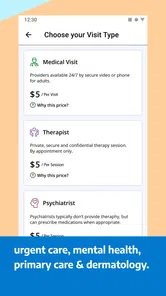
Besides the immediate doctor consultations, MDLIVE offers a bunch of other health services like dermatology consultations, mental health therapy, and more. It's like having a mini-clinic right in your pocket. I tried the dermatology service for a persistent skin issue, and the specialist provided a comprehensive plan that worked wonders.
Having different kinds of care in one app can be handy if your needs change, but it is worth choosing the service that matches the concern instead of treating the menu as interchangeable. A skin problem and a mental health concern call for different conversations and expectations. For something persistent, complex, or difficult to describe remotely, I’d consider whether a clinician who can see me in person is a better fit.
Common Confusion and Real Limits
One point I would keep clear is the difference between access to a clinician and a guarantee of instant resolution. A consultation can provide professional guidance, but it does not remove the need for follow-up or an in-person visit when the situation calls for one. If you are unsure whether your symptoms are an emergency, do not use a virtual appointment as a reason to delay urgent care.
It may also help to think ahead about privacy and setting. Choose a place where you can speak comfortably, especially for a sensitive health or mental health conversation. If you are using video, a quiet spot and enough light can make communication easier; if that is not practical, the phone option gives you another way to talk. These simple choices can reduce friction without turning setup into a project.
MDLIVE has a 4.6 average across roughly 7,500 written reviews, but individual experiences can still vary. I would not judge a telehealth service solely by its rating: the quality of the match depends on the concern, the clarity of the conversation, and whether remote care is suitable in the first place. The app is currently at version 6.6.1.3 and requires Android 8.0 or later, details worth checking against your device before installing.
Who Will Get the Most from It
I think MDLIVE is best suited to people who want a convenient way to discuss a non-emergency concern and are comfortable communicating by phone or video. It can also make sense for someone who has an occasional health question outside the usual rhythm of clinic appointments, or who wants to explore a remote option before deciding whether a face-to-face visit is necessary. Its medical focus is clear, and MDLIVE Inc is the developer behind the app.
It is less compelling for someone who already has a responsive clinician and prefers to keep all care with that person, particularly when continuity and a physical examination are central to the issue. I would also choose another route for emergencies, severe symptoms, or a concern that I cannot explain well without an examination. Remote access is useful, but convenience should not decide the level of care a problem needs.
How It Fits Among Care Options
Compared with calling a local clinic, a telehealth app offers a more direct digital route to a conversation, but it may not connect the consultation to the clinician who knows my history. Compared with an in-person appointment, it avoids travel and can make a short discussion easier to arrange, yet it cannot reproduce examination or on-site testing. Compared with symptom-search tools, it gives me the chance to discuss the situation with a clinician rather than trying to interpret general information alone.
The trade-off is therefore not simply speed versus waiting. It is access and convenience versus the depth and continuity available through familiar, in-person care. I would use MDLIVE when a conversation is likely to help me decide what to do, then move to a local clinician if the issue needs examination, ongoing management, or coordination with care I already receive.
Small Choices That Prevent Friction
A few practical habits can make the experience smoother without assuming anything about how the app works behind the scenes. I’d keep my device charged, choose a quiet place, and have the pharmacy I normally use in mind in case medication becomes part of the discussion. I’d also write down questions in advance; when I’m tired or worried, it is easy to focus on the symptom and forget to ask what would count as a reason to follow up.
If the concern involves a visible issue, I’d decide whether video is likely to help me explain it. If I mainly need to describe how I feel or discuss a sensitive topic, a phone call may feel more comfortable. Neither format guarantees a particular outcome, and the clinician may still recommend an in-person assessment. Thinking through those choices beforehand helps me arrive ready to talk rather than expecting the app to make the decision for me.
Final Thoughts
At the end of the day, MDLIVE: Talk to a Doctor 24/7 is a game-changer for those of us who prefer the convenience of digital health care. It's perfect for managing minor illnesses and health concerns without the hassle of visiting a clinic. The app makes healthcare more accessible, and that's something I can get behind.
If you're someone who values time and needs healthcare at odd hours, this app is definitely worth a try. It's like having a doctor in your pocket, and honestly, who wouldn't want that?
I’d recommend it to someone who wants a convenient way to begin a conversation about a non-emergency concern, especially when timing makes a regular appointment awkward. I’d skip it as the first choice for severe symptoms, problems that clearly need an examination, or anyone who would rather maintain care through a familiar local clinician. Go in prepared, choose the call format that suits the situation, and treat the clinician’s guidance—not the convenience of the app—as the basis for what you do next.
MDLIVE: Talk to a Doctor 24/7 Frequently Asked Questions
What can I use MDLIVE for besides speaking with a doctor?
MDLIVE is a medical app centered on connecting users with a doctor for virtual consultations. It may be useful when you want to discuss a non-emergency health concern without making an in-person visit the first step. Before downloading, consider whether remote care fits the kind of support you are looking for; urgent or life-threatening symptoms need emergency care instead.
Who is MDLIVE intended for, and is it suitable for children?
MDLIVE is listed with an Everyone content rating, so it is presented as suitable for a general audience. The app is a tool for connecting with doctors, rather than a replacement for a parent or guardian’s judgment about a child’s health needs. If you are considering it for a child, think about whether a remote consultation is appropriate for the concern and seek emergency care for severe symptoms.
Do I need to create an account before I can use MDLIVE?
The app’s consultation process includes setting up an account after downloading, before scheduling a virtual visit with a doctor. That makes it sensible to consider whether you are ready to enter the service and use it for a non-emergency health concern. MDLIVE is designed to make connecting with a doctor fast, easy, and convenient, but a virtual appointment is not a substitute for emergency care.
Is MDLIVE free to download, and what devices can I use it on?
MDLIVE is free to download and is designed for connecting with a doctor through a smartphone, tablet, or computer. Its listed minimum operating system is 8.0, so check that your device meets this requirement before installing. The app is rated Everyone, and its purpose is to make connecting with a doctor fast, easy, and convenient.
Who develops MDLIVE, and is it a well-established app?
MDLIVE is developed by MDLIVE Inc and has been available since July 11, 2014. It has more than 1 million installs, with an average rating of 4.6 from around 17,000 ratings and about 7,500 written reviews. Those figures suggest that many people have tried the app, although your own experience can depend on your healthcare needs and access to its services.
Pros
- 24/7 access to doctors
- Convenient virtual consultations
- No waiting room time
- Supports multiple specialties
- Easy prescription management
Cons
- Requires stable internet
- No in-person examination
- Limited for complex cases
- Potential privacy concerns
- Service fees may apply