MaxClean - Cleaner & Manager
- 142.00
- 4.0
- Installs
- 5.00M
- Price
- Free

Screenshots



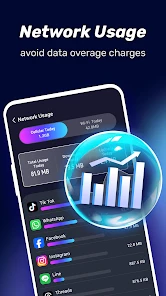
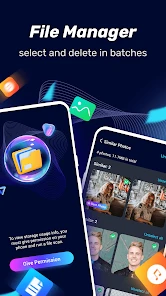
Analysis by Reviewed
On a phone that’s nearly full, deciding what to remove can feel riskier than putting up with a little clutter. MaxClean - Cleaner & Manager is a free Android productivity app from IMPACTSOLTER that brings junk-file cleanup and file management together. I’d treat it as a practical helper for people who want a simpler way to review their phone, not as a magic fix for every slowdown. Its value depends on taking a moment to inspect what it identifies before clearing anything important.
When a cleanup depends on the connection
Cleaning local files is a different job from looking something up online, and I would not assume every part of the experience behaves the same way on a weak connection. In everyday use, the sensible approach is to open the app when you have a stable connection if you expect any screens or information to load from the network, then review files at your own pace. I also wouldn’t start a cleanup while rushing through a patchy commute: the key decision is what to remove, and that deserves attention rather than a quick tap.
That distinction matters because a cleaner can help organize a phone, but it cannot make a poor network faster or recover a file you chose to delete. If your main problem is slow browsing, I’d first check the connection itself. If the issue is limited storage, a careful file review is the more relevant place to start.
A mobile routine that avoids accidental deletion
A useful moment for MaxClean is after a busy week of saving downloads, receiving attachments, and trying several apps. I’d open the file-management tools, look through the items being surfaced, and remove only things I recognize and no longer need. The non-obvious benefit of doing this in short sessions is that familiar files are easier to identify; a large cleanup after months of neglect can make old downloads look unfamiliar and tempting to delete without thought.
For example, after saving a document for a trip, I’d keep it until the journey is over rather than treating every suggested cleanup as an instruction. I’d also check whether a file is already backed up somewhere I can access before removing it. This makes the app most useful as a prompt for better housekeeping, rather than a substitute for deciding what matters.
Where a cleaner helps—and where it doesn’t
The app’s memory booster is presented as a way to free RAM, but I wouldn’t expect that action alone to make every phone consistently faster. Mobile operating systems manage memory themselves, and closing or refreshing apps can sometimes mean they need to load again when reopened. If one app is misbehaving, restarting that app or the phone may be a more direct first step than repeatedly running a boost.
Compared with using Android’s built-in storage controls, a dedicated cleaner can feel more approachable because cleanup and file management are gathered in one place. The trade-off is that built-in settings may be preferable if you want to inspect storage without adding another app or prefer system-level controls. MaxClean makes more sense for someone who values a guided, consolidated routine; it is less compelling for a confident user who already knows exactly where their large files and app settings are.
More From Our News Desk

Weather by Xiaomi Review: Clear at a Glance, Less Clear Up Close

X Under Pressure: Can It Recover When Posting Goes Wrong?

Clash of Clans Is Won Between the Battles

Android Auto Makes the Case for Quieter Car Software

MobiOffice: Transforming Mobile Productivity with Seamless Integration

EA SPORTS FC™ Mobile Soccer: Redefining Mobile Sports Gaming
What the everyday experience is like
First off, MaxClean isn’t just about clearing cache and junk files, though it does that amazingly well. It’s about managing your device more intelligently. Imagine having a buddy who not only cleans up after you but also gives you a heads-up on what’s hogging your phone’s resources. That’s what you get here.
Features That Stand Out
Now, I know what you’re thinking—another cleaner app? But wait, there’s more. The real magic happens with its memory booster feature. This bad boy ensures that your apps run smoother by freeing up RAM. It’s like your phone suddenly had a hearty breakfast and is ready to tackle the day!
And let’s not forget the app manager. It’s like having a personal assistant that helps you manage apps more efficiently, by providing detailed insights into app usage and memory consumption. Plus, it suggests apps you might want to ditch if they’re not pulling their weight.
Performance and Usability
Using MaxClean is a breeze. The interface is intuitive, with just the right amount of flair to make it look sophisticated without being overwhelming. It’s kind of like having that perfect cup of coffee—strong, effective, and keeps things running smoothly.
One thing I noticed is how light it is. It doesn’t feel like it’s adding to the load. Instead, it feels like it’s giving your phone a breather, ensuring that everything runs just a bit more efficiently. It’s like having that friend who knows when to step in and help without making a fuss.
Practical limits and sensible expectations
Cleaner apps work best when they help you make informed choices, and I’d be cautious about removing anything whose purpose is unclear. A file name may not tell the whole story, while an app you rarely open could still hold information you rely on. Before uninstalling something suggested by the app manager, I’d check whether it stores saved work, messages, or settings that matter to me.
MaxClean has an average rating of 4.0 from around 7,300 ratings, and it has been installed over 5 million times. Those figures suggest that many people have tried it, but they don’t tell me whether it will suit a particular phone or cleanup habit. It is free, rated for Everyone, and its current version is 1.0.28; it was released on November 12, 2024, and requires Android 7.0 or later. I’d still make my decision based on whether its combined file and app-management approach fits my routine.
Who I’d recommend it to
If you’re someone who loves keeping their phone in top shape without diving into the technical nitty-gritty, this app is for you. It’s user-friendly, efficient, and does exactly what it promises. Plus, the satisfaction of seeing how much space you’ve freed up? Priceless.
I’d especially consider it if you often run short on storage and want one place to review clutter and installed apps. I’d skip it if you already manage files comfortably through Android settings, or if you expect a cleaner to repair a weak signal, fix a failing battery, or permanently transform an older device’s speed. A cleaner is a maintenance tool, not a diagnosis for every performance problem.
Making the app manager work for your habits
The app manager is most useful when I treat its suggestions as a starting point for a decision, not as a verdict on which apps deserve to stay. An app that looks idle may still be important for occasional tasks: travel tickets, banking, work access, or a household device. Before removing anything, I’d open it and check whether I need to save a login, export a document, or confirm that I can reinstall it and sign in again. This small pause prevents an apparently simple cleanup from turning into an avoidable recovery job.
I’d also use app-management reviews to spot habits rather than chase a perfect list. If I notice several apps I installed for one specific event, I can decide whether they still have a purpose. If I use an app only seasonally, keeping it may be more sensible than deleting it simply because it is not part of my daily routine. The useful question is not just “Do I open this often?” but “Would I be inconvenienced if it were gone?” That distinction makes the manager more valuable to people with a crowded, changing phone than to someone who wants an automatic purge.
A realistic cleanup without losing the important stuff
Picture a day before leaving for a weekend away: I have downloaded a map, saved a confirmation document, and accumulated screenshots from messages. Storage is tight, and I want room for new photos. I’d use MaxClean to review possible clutter, but I would first move through the obvious personal files separately. I’d keep the travel document and anything I might need without a connection, remove only screenshots I recognize as disposable, and postpone uncertain items until I can check them calmly. That is slower than pressing a single broad cleanup button, but it is a much better trade if those files matter.
After the trip, I could revisit the downloads and decide what can go. That two-stage approach is a practical tip for any file manager: make the first pass about immediate space needs, then make a second pass when temporary files have become clearly unnecessary. It avoids treating fresh downloads as clutter just because they are recent, and it keeps the phone usable during the very period when a saved file may be most valuable.
Choosing between MaxClean and built-in tools
Android’s own storage area is the natural alternative for people who want to stay within system settings. It can be a better fit when I only need to see what occupies space or want to make changes through familiar controls. A dedicated file manager, meanwhile, may suit someone whose main job is browsing folders and sorting documents rather than combining that work with cleanup prompts. MaxClean sits between those approaches: the appeal is having file management, junk cleanup, and app oversight together, not necessarily doing every one of those tasks more deeply than a specialist tool.
That distinction helps set expectations. If you want a clear, manual process and already know which folders to inspect, built-in controls may be enough. If you want a central place to check clutter and installed apps without navigating several settings screens, MaxClean is easier to justify. I wouldn’t install it just to fix a single persistent problem, though. When the phone is slow because of a particular app, a system update, poor reception, or another issue, a cleaner may not address the cause. The right tool depends on whether your need is routine organization or troubleshooting.
Small habits that make cleanup safer
I’d make a quick review part of a regular phone routine rather than waiting until storage is almost exhausted. Short sessions make file names and recent downloads easier to recognize, and they reduce the temptation to delete a whole category in frustration. Before a larger cleanup, I’d make sure important files exist somewhere else I can reach. I’d also avoid deleting a document merely because I have not opened it recently; some files are valuable precisely because they are needed only once in a while.
There is a useful trade-off here: the more automated a cleanup feels, the less attention it seems to require, but the more important it becomes to understand what is being removed. I’d use any suggested action as a prompt to inspect, then confirm only what I understand. If a screen or suggestion seems unclear, waiting and checking the file through another route is safer than guessing. This approach is especially helpful for people who share a phone with family members or keep work and personal material on the same device, since an unfamiliar file may belong to someone else’s routine.
Connectivity, patience, and recovery
Network conditions shape when I’d choose to do maintenance, even though file decisions themselves are not the same as browsing the web. If I’m using the app while moving between Wi-Fi and mobile coverage, I’d avoid interpreting a delayed screen as proof that a cleanup action failed or succeeded. I’d pause, check what the app is showing, and try again only when the display is clear. Repeated tapping during a slow response can make it harder to know which action actually happened.
If I remove the wrong file, I would first check the places where I normally keep copies, such as a backup or another device, rather than assuming a cleaner can restore it. That is why I would separate cleanup from backup: a file-management tool can help me review what is on the phone, but it should not be my only protection for irreplaceable material. For app changes, I’d also consider whether saved information or sign-in access might need attention before uninstalling. A calm sequence—inspect, protect what matters, then delete—makes recovery less likely to become part of the process.
Who should pass, and what to expect
MaxClean is a reasonable choice for someone who wants a guided, approachable way to keep an Android phone tidier and prefers seeing cleanup and app-management tasks in one place. It is less suited to people who want detailed control over every folder, already feel comfortable with Android’s own tools, or expect a cleaner to increase available network bandwidth. Users who need a specialist file-browsing workflow may prefer a dedicated file manager, while anyone investigating a serious performance issue should look for the specific cause instead of relying on repeated memory boosts.
A common question is whether the app is worth trying if the phone is not currently full. I’d say it can still support occasional housekeeping, but there is no reason to create extra work by cleaning for its own sake. Another practical question is whether its suggestions should be accepted automatically: my answer is no. I’d inspect them, especially when personal downloads, documents, or unfamiliar app data are involved. The safest benefit comes from making clutter visible and helping you choose, not from removing everything that looks unnecessary at first glance.
My connectivity verdict
For a useful routine, I’d connect when convenient, take time to understand the cleanup suggestions, and keep a separate backup of files I can’t afford to lose. If a screen does not load as expected, I’d wait for a steadier connection and try again rather than repeatedly tapping cleanup controls. That cautious habit matters more than chasing a one-touch fix.
In conclusion, MaxClean - Cleaner & Manager isn’t just an app; it’s an experience. It’s about maintaining that smooth, buttery operation of your device while giving you peace of mind. So, if you’re looking for a reliable companion to help keep your phone clean and efficient, give it a try. Trust me, your phone will thank you!
MaxClean - Cleaner & Manager Frequently Asked Questions
Who develops MaxClean - Cleaner & Manager, and what kind of app is it?
MaxClean - Cleaner & Manager is a productivity app from IMPACTSOLTER, intended for junk file removal and file management. Its focus makes it relevant to people who want a single place to review cleaning and file-management tools. The app is free to download and is rated for Everyone, so it is presented for a broad audience.
Which devices can run MaxClean - Cleaner & Manager?
MaxClean - Cleaner & Manager requires Android 7.0 or later. Before downloading, check your device’s Android version in its settings to make sure it meets that requirement. The app is available for Android, and its version is 1.0.28. Confirming compatibility first can help avoid installing an app your device cannot run.
What features does MaxClean - Cleaner & Manager offer?
MaxClean - Cleaner & Manager is equipped with a variety of features aimed at optimizing your device's performance. It offers cache cleaning, junk file removal, and memory boost functions, ensuring your device runs smoothly. Additionally, it provides battery management tools, real-time device monitoring, and app management capabilities, making it a comprehensive solution for maintaining your device's health.
Is MaxClean - Cleaner & Manager free to use?
MaxClean - Cleaner & Manager is available as a free download, offering a robust set of basic features at no cost. However, for users seeking enhanced functionality, there is a premium version available. This paid version includes additional features such as advanced cleaning options, ad-free experience, and priority customer support, providing value for those willing to invest.
How does MaxClean help in improving device performance?
MaxClean - Cleaner & Manager improves device performance by efficiently removing junk files and clearing cache, which frees up storage space and reduces system clutter. It also optimizes RAM usage, leading to faster app launches and smoother multitasking. Additionally, its battery management feature helps extend battery life by identifying and closing power-draining apps.
Pros
- Efficiently frees up storage space.
- Improves phone performance.
- User-friendly interface.
- Quick junk file removal.
- Battery optimization feature.
Cons
- Contains in-app ads.
- Limited features in free version.
- May require unnecessary permissions.
- Occasional crashes reported.
- No real-time monitoring.
- Category
- Productivity
- Version
- 1.0.28











