Magic Cross Stitch: Pixel Art
- 3.45K
- 4.8
- Installs
- 10.00M
- Price
- Free
Screenshots
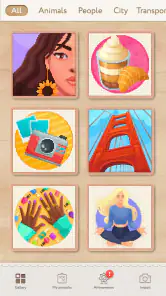
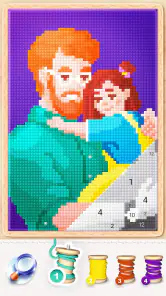
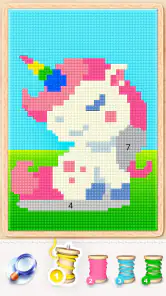
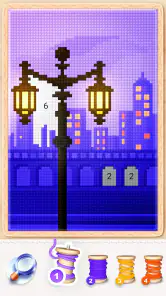
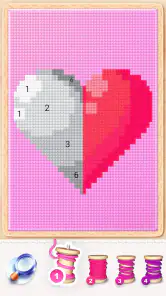
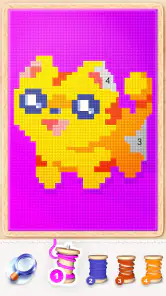
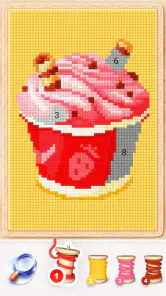
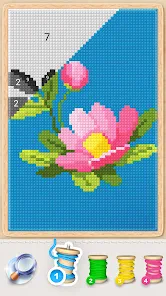
Analysis by Reviewed
When I first opened Magic Cross Stitch: Pixel Art, I liked that its creative idea is easy to understand: fill a picture one small section at a time and watch it take shape. The cross-stitch look gives the familiar color-by-number routine a distinctive, crafty feel. I would not mistake it for a substitute for making something by hand, but it offers a relaxed way to spend a short break without needing to plan a drawing or gather supplies.
Getting Started with Your First Stitch
Setting up the app is a breeze. From the moment you download Magic Cross Stitch: Pixel Art, you're greeted with a user-friendly interface that's as colorful as a rainbow. The app guides you through selecting your first design, making the whole process as easy as pie. Whether you're a newbie or a seasoned cross-stitcher, you'll find the navigation intuitive and straightforward.
What the Coloring Routine Feels Like
Magic Cross Stitch is an art and design app from ZiMAD, and its appeal is easy to understand once you settle into the basic rhythm: choose a picture, work through its colored spaces, and watch a detailed image emerge gradually. I find that small, repeated actions are the point rather than a stepping stone to professional drawing tools. If you want to sketch freely, mix colors, or build an illustration from a blank canvas, a conventional drawing app is a better fit.
The app is free to download, is rated for Everyone, and has reached over 10 million installs. Its average rating is 4.8 from around 47,000 ratings, which suggests that the relaxing, guided format has found a broad audience. The current version is 2.29.1, and it runs on Android 8.0 or later. Optional in-app purchases range from $0.99 to $99.99 per item, so I would treat the free experience as a chance to see whether the routine suits you before spending anything.
Choosing a Picture That Fits Your First Session
The app’s appeal depends less on artistic skill than on whether you enjoy following a picture’s small color spaces. I would start with a design that looks clear and manageable, not simply the one with the most eye-catching thumbnail. A less complicated image lets you learn the rhythm without feeling that you have committed to a long project. Once you know you enjoy the tapping and gradual reveal, a more detailed pattern can become a satisfying longer-term choice.
There is a small but useful difference between browsing for inspiration and actually getting started. When I am short on time, I choose a picture before settling in, rather than scrolling through options until the break is nearly over. If I am unsure what I want, I give myself a moment to browse, then pick one image and stick with it for that session. That simple choice makes the first completed section feel like progress instead of another round of indecision.
A Palette of Possibilities
The app offers an extensive library of patterns that range from cute animals to intricate mandalas. There's something for everyone, and the best part is that new patterns are added regularly, keeping the app fresh and exciting. I found myself spending hours browsing through the collection, my imagination running wild with possibilities.
More From Our News Desk

Weather by Xiaomi Review: Clear at a Glance, Less Clear Up Close

X Under Pressure: Can It Recover When Posting Goes Wrong?

Clash of Clans Is Won Between the Battles

Android Auto Makes the Case for Quieter Car Software

MobiOffice: Transforming Mobile Productivity with Seamless Integration

EA SPORTS FC™ Mobile Soccer: Redefining Mobile Sports Gaming
For a first session, I recommend choosing a design that looks inviting rather than the most intricate one on the screen. A simpler picture gives you a quick sense of how the color-by-number flow works and whether you enjoy filling small areas one at a time. If you have only a few spare minutes, it is also easier to pause with a clear sense of progress than it is with a dense design that still has many tiny spaces left.
From the First Tap to a Finished Section
My practical advice is to treat the first design as a trial of the interaction, not a test of patience. Tap through a few areas, notice how the picture changes, and decide whether the repeated action feels calming or tedious to you. The first useful success is simply seeing a recognizable part of the image appear. You do not have to finish an entire pattern in one sitting for the activity to feel worthwhile.
The numbered, guided approach can also help if you like creative activities but hesitate when faced with a blank page. It removes the question of what to draw and which color to use, leaving you with a small, clear next action. That is a real strength for a tired evening or a short pause between chores. The trade-off is that the finished result follows the pattern rather than expressing a personal choice at every step.
A Palette of Possibilities
The app offers an extensive library of patterns that range from cute animals to intricate mandalas. There's something for everyone, and the best part is that new patterns are added regularly, keeping the app fresh and exciting. I found myself spending hours browsing through the collection, my imagination running wild with possibilities.
What truly sets this app apart is the interactive coloring experience. As you tap to add colors to your canvas, the app provides a satisfying haptic feedback that mimics the feel of real stitching. It's oddly soothing and addictive, a perfect way to unwind after a long day.
Making Small Sessions Work
I like this kind of activity for an ordinary transition in the day: waiting for a kettle, taking a quiet break between tasks, or winding down on the sofa when I do not want another fast-moving game. The steady tapping gives my attention one simple job, and a picture slowly becoming complete makes the session feel purposeful. It is less suited to a commute or a noisy waiting room if you find screen focus difficult there, and anyone sensitive to repeated tapping or vibration may prefer to adjust their device settings or take breaks.
A useful habit is to pick one image and return to it rather than browsing the catalogue every time you open the app. Browsing can be part of the fun, but it can also consume the whole break before you have started coloring. I also avoid judging a pattern by its thumbnail alone: a more detailed design may be satisfying over several short visits, while a simpler one can be a better choice when I want a quick finish.
For example, if I have a few minutes between finishing work and making dinner, I can open the same design, fill a small patch, and stop when I need to move on. That gives the break a natural endpoint and avoids turning the app into another task I feel obliged to complete. If I have more time, I might choose a denser picture and let the gradual reveal carry the session. Matching the design to the time available is more useful than trying to make every visit equally productive.
Understanding the Limits of the Routine
The guided format is relaxing for me when I want low-pressure focus, but it can also become repetitive. If you need a lot of variety within each minute, or enjoy making constant creative decisions, tapping through preset spaces may feel restrictive. It is also not the same as learning real needlework: the visual theme borrows from cross-stitch, while the activity remains on-screen coloring. I would choose a physical kit if the materials, hand movements, and finished fabric are the part of crafting I care about most.
It helps to distinguish the app’s different kinds of appeal. Some people will come for the calm routine, others for the pixel-art appearance, and some for the collection of pictures. Those are related, but they are not identical reasons to keep using it. If browsing patterns is your favorite part, you may enjoy exploring even when you do not finish many. If you mainly want a completed image, choosing simpler designs and returning to one project is likely to suit you better.
Unlocking Your Creative Potential
One of the standout features is the ability to create your own patterns. You can convert your favorite photos into cross-stitch patterns, allowing you to immortalize cherished memories in thread and pixel. This feature adds a personal touch to the app, making it more than just a game or a pastime.
Turning a personal photo into a pattern is most appealing when the image has a clear subject that will still be recognizable as blocks of color. I would start with a picture where the main subject stands out from its background, rather than a busy group photo with many competing details. That makes the result easier to read as pixel art and helps set realistic expectations: a stitched-style conversion simplifies a photo instead of reproducing every fine detail.
For a first attempt with a personal image, I would choose a close-up with a simple background and a strong contrast between the subject and its surroundings. This is a more dependable starting point than a dim photo or a scene full of small objects, where the blocky treatment may blur distinctions that matter in the original. Think of the result as a stylized interpretation rather than a precise copy. That mindset makes the process more enjoyable and helps you decide whether a personal pattern adds enough value for your own use.
Sharing, Competition, and Choosing Your Fit
And for those who love a little competition, the app includes a community feature where you can share your creations and see what others are stitching up. It's a vibrant community of fellow cross-stitch enthusiasts who inspire and motivate each other. Plus, there's a leaderboard for those who thrive on a bit of friendly rivalry.
The social side is a bonus, not a requirement for enjoying the central coloring activity. If you prefer keeping a creative hobby private, you can focus on the patterns without making community participation the reason to install it. On the other hand, if feedback and seeing other people’s work help you stay motivated, sharing gives the routine a more social dimension than a typical solo coloring app.
The presence of community and competition may change the mood for different people. Seeing other creations can spark ideas, but a leaderboard can make a restful activity feel more goal-oriented if you start comparing your pace with someone else’s. I would use the social features when they add inspiration and ignore them when I want a quiet, private break. You do not need to turn every hobby into a contest for the app’s basic coloring loop to make sense.
How It Compares with Other Creative Apps
Compared with a paper coloring book, this is tidier and easier to pick up for a few minutes, but it cannot offer the tactile feel or material choices of real needlework. Compared with a free-drawing app, it is more guided and less demanding, though that structure also limits spontaneous experimentation. I would recommend it to someone who wants calm, incremental progress; I would skip it if I wanted a serious cross-stitch planning tool or full control over every mark.
It also occupies a different niche from puzzle games. The pleasure here is watching a picture develop through small, deliberate actions, not solving a complicated challenge or racing a timer. Someone who wants constant new mechanics may prefer a conventional game, while someone who finds open-ended art intimidating may appreciate having a defined pattern to follow. For me, that middle ground is the point: it feels creative without asking me to arrive with an idea of my own.
Because it is free to install but includes optional purchases, I would try the regular activity before deciding whether spending makes sense. The item prices span a wide range, so it is worth checking each purchase choice carefully rather than assuming every option costs the same. If the core routine is not enjoyable on its own, paying is unlikely to fix that mismatch. If it does suit you, you can decide on your own terms whether any extra is worth it.
Who Will Enjoy It, and Who Might Pass
I think this is a good fit for someone who wants a calm, guided creative pastime, likes pixel-style pictures, or needs an activity that can be picked up and set down without much preparation. It may also suit people who enjoy completing small portions of a larger image, because progress is visible even when a session is brief. The Everyone age rating makes its intended audience broad, though a parent should still choose apps and screen activities in a way that suits their child.
I would pass if I were looking for unrestricted drawing, a detailed tool for planning physical cross-stitch, or a social game where interaction is the main event. It may also be a poor match if repetitive taps frustrate you or if you need an activity that keeps your hands away from a screen. Those are not flaws that a different pattern can necessarily solve; they are differences in what the app asks you to enjoy.
Final Thoughts
In a world where digital experiences often feel disconnected, Magic Cross Stitch: Pixel Art offers something refreshingly different. It bridges the gap between traditional crafting and modern technology, creating a unique space where creativity can flourish. Whether you're looking to relax, unleash your artistic side, or connect with a community of like-minded individuals, this app has something for you.
My recommendation is to begin with a straightforward pattern, try a short session, and see whether the repeated coloring feels soothing rather than like busywork. If it does, you have a low-pressure activity that can fit naturally into small pockets of the day; if it does not, a paper coloring book, hands-on stitching, or a free-drawing app may be a better match. It is free to try, but optional purchases are available, so I would only spend after I know the basic experience works for me.
So, if you're ready to embark on a colorful journey of creativity and relaxation, give Magic Cross Stitch: Pixel Art a try. It's like having a virtual cross-stitch kit in your pocket, ready to whisk you away into a world of vibrant colors and endless possibilities. Happy stitching!
Magic Cross Stitch: Pixel Art Frequently Asked Questions
What age rating does Magic Cross Stitch: Pixel Art have?
Magic Cross Stitch: Pixel Art is rated Everyone, making it suitable for a broad audience. Its focus is on coloring, stitching-inspired patterns, and pixel art, so it can appeal to people looking for a gentle creative activity. As with any app, parents may want to review its features and in-app purchase options before younger family members use it.
Who develops Magic Cross Stitch: Pixel Art, and what kind of app is it?
Magic Cross Stitch: Pixel Art is an Art & Design app developed by ZiMAD. Its store description presents it as a way to relax through stitching, pixel art, painting, and color-by-number activities. That mix makes it a digital creative pastime rather than a traditional cross-stitch kit, with designs completed on a mobile device.
What is Magic Cross Stitch: Pixel Art?
Magic Cross Stitch: Pixel Art is a creative and relaxing mobile application that allows users to engage in pixel art by coloring and designing beautiful cross-stitch patterns. It combines the traditional art of cross-stitching with modern technology, offering a variety of templates and designs for users to complete using digital tools.
Is Magic Cross Stitch: Pixel Art free to use?
Yes, Magic Cross Stitch: Pixel Art is free to download and use. However, it may offer in-app purchases for additional features, designs, or tools. Users can enjoy a wide range of free templates, but premium content might require a purchase. Its in-app purchases range from $0.99 to $99.99 per item, so check the price shown in the app before confirming a purchase.
What devices are compatible with Magic Cross Stitch: Pixel Art?
Magic Cross Stitch: Pixel Art is available on both Android and iOS platforms. It can be downloaded from the Google Play Store for Android devices and the Apple App Store for iOS devices. Compatibility may vary depending on the operating system version; the app requires version 8.0 or later, so check your device’s software before downloading.
Pros
- Extensive library of patterns.
- User-friendly interface.
- Soothing coloring experience.
- Offline access available.
- Regular updates with new content.
Cons
- Ads can be disruptive.
- Limited free patterns.
- Requires in-app purchases.
- Occasional app crashes.
- Large storage requirement.
- Category
- Art & Design
- Version
- 2.29.1













