LiveHealth Online Mobile
- 3.80K
- 3.7
- Installs
- 500.00K
- Price
- Free

Screenshots
Analysis by Reviewed
When it comes to healthcare, convenience is key. Enter LiveHealth Online Mobile, an app that's reshaping how we access medical services. I recently had the chance to explore this app, and let me tell you, it's like having a doctor in your pocket! Imagine needing medical advice while sipping coffee at home—this app makes it possible.
A sensible place for a video visit
I find this kind of service most useful when a health concern needs timely professional attention but does not seem to call for an in-person visit. A parent trying to decide what to do about a child’s mild, familiar symptom, or an adult who cannot easily leave work, may value being able to speak with a clinician from home. That convenience has limits: a video appointment is not a substitute for emergency care, a physical examination when one is needed, or a clinician who can assess a serious or rapidly worsening problem in person.
A practical habit is to prepare before starting a visit. I would write down when the issue began, what has changed, any medicines I take, and the questions I most want answered. Keeping those details nearby helps me use limited consultation time well and reduces the chance that I remember an important point only after the call ends. If I am helping a family member, I would make sure that person can describe their symptoms directly whenever possible.
Choose the right moment and the right person
For a realistic example, imagine I wake up with a familiar, non-emergency concern on a day when getting to a clinic would disrupt work or caregiving. I would first consider whether a video clinician could reasonably assess it, then gather my symptom notes and medicines before opening the app. If the problem were severe, changing quickly, or likely to require a hands-on examination, I would skip the video route and seek appropriate in-person care instead. The useful decision is not “Can I make a call?” but “Is a remote conversation suitable for this particular problem?”
This distinction also helps families use the service more thoughtfully. An adult can help a child explain what is wrong, but should avoid answering every question for them when the child can speak. For an older relative, I would make sure they are comfortable participating and can hear the clinician. Those small choices can make the conversation clearer without assuming the app has a special family-management feature.
The First Steps: Getting Started
Setting up LiveHealth Online Mobile is as easy as pie. Once you download the app, the registration process is straightforward. You just need to provide some basic information and voilà, you're in! The interface is user-friendly, with everything neatly organized. It's designed to make you feel comfortable even if you aren't tech-savvy.
Make the call easier before it begins
Before relying on any telehealth app, I would check that my phone is running a compatible system and that I can use its camera, microphone, and internet connection. A quiet, well-lit place makes a video conversation easier for both sides; a stable connection matters more than trying to find a perfect background. I would also keep a charger close by if I expect a longer conversation. These are simple preparations, but they prevent avoidable interruptions when the reason for opening the app is already stressful.
More From Our News Desk

 Block Blast!
 Makes Every Clear Feel Like One More Turn
A clean little block puzzle becomes a study in space, risk, and self-control. Its best moments come from one satisfying clear; its toughest test is knowing when to stop.

 Super Stylist Fashion Makeover
Super Stylist Turns Dress-Up into a Runway Career
Its makeover-to-client loop turns quick outfit decisions into shareable style theater. The question is whether the closet keeps giving players a reason to return.

 Block Craft 3D:Building Game
Block Craft 3D Under Pressure: How Well Does It Recover When Building Goes Wrong?
A failure-focused look at Block Craft 3D’s forgiving building loop, its uncertain recovery edges, and the moments that demand more than a cheerful village.

 Woodturning
 Trades Creative Freedom for a Satisfying Carving Loop
If your usual creative game is about building, decorating, or styling, Woodturning trades open-ended projects for a tactile, tightly guided carving loop. Here is what that switch really costs.

 PUBG MOBILE
 Shows What Battle Royale Must Get Right
PUBG MOBILE shows how battle royale has matured: bigger systems matter less than meaningful choices, readable fights, and a reason to return after every loss.

 Braindom: Brain Games Test
Braindom’s Social Life Happens Between Puzzles
Braindom turns quick logic traps into a personal ritual, but its community value is more about comparing answers than building together.
Latest News



Because healthcare access can depend on personal circumstances, I would check the app’s current sign-in and appointment steps before assuming a visit is immediately available. I would also confirm any costs and coverage that apply to me rather than treating online care as automatically free. The app itself is free to download, but that does not mean every consultation has no charge. That distinction is worth understanding before choosing a visit, especially if cost is part of the decision.
Settings and small checks that matter
I would treat the phone’s basic setup as part of preparing for a medical conversation. Before a visit, I’d check that the camera and microphone are available to the app through the device settings, that the phone is not set to silence the conversation unexpectedly, and that I can move somewhere private. These are ordinary device checks, not hidden tools inside the service, but they can save time when I am trying to connect with a clinician.
I would also keep the sign-in details somewhere secure and make sure I can access them when I need care. That is especially useful if I usually rely on a password manager or if I am setting up the app for a family member who may not remember account details under stress. I would avoid sharing a device account casually, since health conversations are personal. A little preparation makes the app easier to use without confusing convenience with guaranteed instant access.
Features that Stand Out
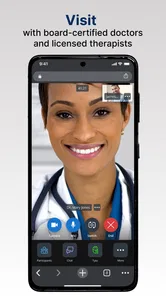
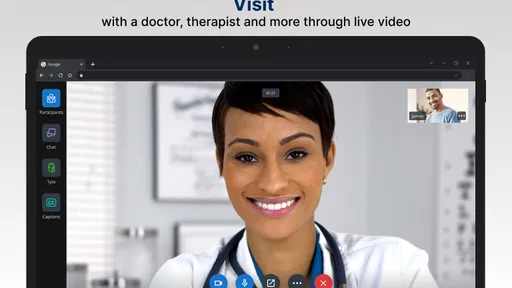
What really caught my attention were the app's features. Firstly, the video chat function is stellar. You can have a face-to-face consultation with a licensed doctor without leaving your couch. It works smoothly, and I experienced no lag during my session. This feature alone is a game-changer for those with busy schedules or mobility issues.
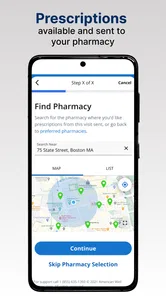
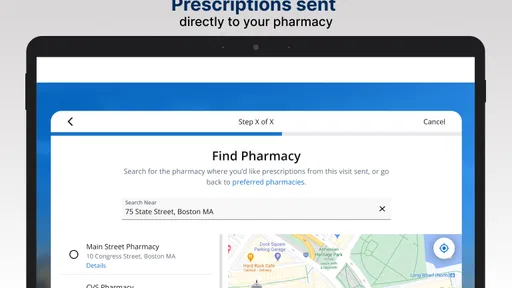
Another fantastic feature is the ability to get prescriptions sent directly to your pharmacy. Need a refill? No problem! The app seamlessly connects you to doctors who can prescribe medications, which can then be picked up at your local pharmacy. This level of integration is incredibly convenient.
Use the visit as part of a repeatable routine
The prescription option can be useful when a clinician decides medication is appropriate, but I would not treat a video visit as a guaranteed refill service. A clinician needs to assess the situation and decide what is suitable. For a recurring concern, I would bring the name and dose of any current medicine and explain what has changed since the last review. That gives the conversation a clearer starting point without assuming that a previous prescription will simply be repeated.
After a consultation, I would note the clinician’s guidance and any next steps while they are fresh in my mind. If symptoms continue or become more serious, that record can help me explain what has already been discussed when I seek further care. This is a useful personal habit rather than a special app feature, and it keeps an online appointment connected to the rest of my healthcare instead of treating it as an isolated chat.
Make repeat visits more focused
Experienced use is less about tapping through the app faster and more about arriving prepared. If I have consulted a clinician before about a recurring concern, I would jot down what has changed since that conversation, what advice I followed, and whether it helped. That gives the next discussion a useful timeline instead of relying on memory. It also prevents me from assuming that a prior assessment automatically applies to a new or worsening symptom.
I would keep a simple personal note of follow-up instructions outside the call, especially if there are several steps to remember. I would not assume that the app is a complete medical record or that every clinician can see all details from every other care setting. When continuity matters, I would bring the relevant information into the conversation and share it with my usual healthcare provider as appropriate. This is a practical habit, not a claim about a particular syncing or record feature.
Is It Worth Your Time?
I was initially skeptical about receiving medical advice through an app, but my doubts were quickly put to rest. The doctors are professional, knowledgeable, and genuinely care about your health concerns. The app also stores your medical history, so you don't have to repeat yourself every time you have a consultation. It feels like a personalized healthcare service tailored just for you.
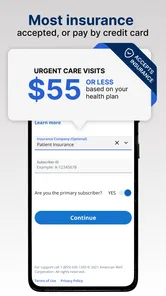
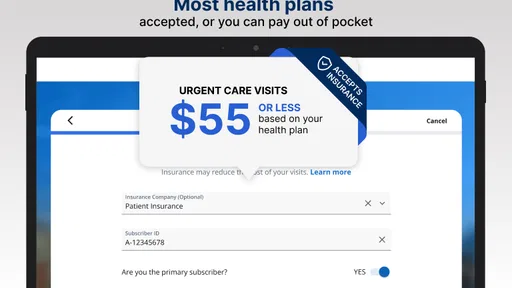
One noteworthy mention is the cost-effectiveness of LiveHealth Online Mobile. The consultations are priced reasonably, and when compared to traditional visits, it's a bargain. Plus, many insurance plans cover the costs, which is a huge relief for regular users like myself.
Where it fits among other care options
Compared with searching symptoms online, a clinician can respond to the details of an individual concern rather than leaving me to sort through generic possibilities alone. Compared with a clinic visit, an online consultation can save travel and waiting when a remote assessment is appropriate. The trade-off is that a clinician on video cannot perform every examination or test, and some concerns are better handled face to face. I see this as one route into care, not a replacement for a regular doctor or urgent services.
The app may suit people who are comfortable discussing health over video and want a convenient way to speak with a doctor. It is less suitable for someone who needs hands-on examination, has an urgent emergency, or cannot reliably use a phone and connection for a conversation. If access to a familiar in-person clinician is important for a complex or ongoing condition, I would keep that relationship central and use online care only when it fits the situation.
Questions I would settle before depending on it
Would I use it for every health problem? No. I would reserve a video visit for concerns that seem appropriate for remote assessment and seek emergency or in-person care when the situation calls for it. Can I assume a prescription will be issued? No; the clinician decides whether medication is appropriate after assessing the concern. Those expectations make the service more useful because they avoid treating a convenient format as a promise of a particular outcome.
Would I rely on it instead of my regular doctor? Not if I had a complex condition that needs ongoing monitoring or a physical examination. Could the app be helpful when leaving home is difficult? Yes, provided I can use video comfortably and the concern is suitable for remote care. I would also check the current appointment process and any personal costs before I count on a visit, rather than discovering those details when I am already in a hurry.
Who is behind the app
LiveHealth Online Mobile is a medical app from American Well Corporation. It is free to install, is rated for Everyone, and has been available since Oct 9, 2013. Its current version is 20.03.0000, with Android 8.0 as the minimum operating system. The app has a 3.9 average from around 6.9 thousand ratings, with about 3.8 thousand written reviews and over 500 thousand installs. Those figures suggest it has reached many users, though an average rating is only a broad snapshot; I would still judge whether its approach suits my own needs.
The Final Verdict
All in all, LiveHealth Online Mobile is a must-have app for anyone looking to simplify their healthcare routine. It's efficient, reliable, and incredibly user-friendly. Whether you're tech-savvy or a newbie to online healthcare, this app bridges the gap between you and professional medical advice without the hassle of appointments and waiting rooms.
So, if you're on the lookout for an app that brings healthcare to your fingertips, this is it. LiveHealth Online Mobile is not just an app; it's a revolution in how we approach our health. Give it a try, and you might just find it’s exactly what the doctor ordered!
LiveHealth Online Mobile Frequently Asked Questions
Is LiveHealth Online Mobile free to download, and what should I know before using it?
LiveHealth Online Mobile is free to download, and it is a medical app from American Well Corporation. Its age rating is Everyone, so it is suitable for a broad audience. Before using it, consider whether you have a reliable internet connection and a private place for a video consultation. The app is intended to connect mobile users with a live doctor.
What is LiveHealth Online Mobile?
LiveHealth Online Mobile is a telehealth app that allows you to consult with board-certified doctors, therapists, and other medical professionals through live video calls. It provides a convenient way to access healthcare from the comfort of your home, saving you time and travel expenses typically associated with in-person visits.
How does LiveHealth Online Mobile work?
LiveHealth Online Mobile works by connecting you with healthcare professionals through secure, high-quality video conferencing. After signing up and creating an account, you can schedule appointments or have on-demand consultations with doctors. The app also allows for prescription management and lab test ordering, making it a comprehensive telehealth solution.
Is LiveHealth Online Mobile covered by insurance?
Many major health insurance plans cover telehealth visits conducted through LiveHealth Online Mobile. However, coverage can vary based on your specific insurance provider and plan. It's advisable to check with your insurance company or review your plan details to understand any potential out-of-pocket costs you might incur when using the app.
What types of medical professionals can I consult with on LiveHealth Online Mobile?
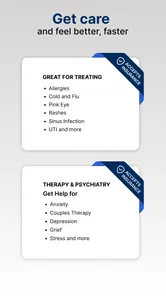
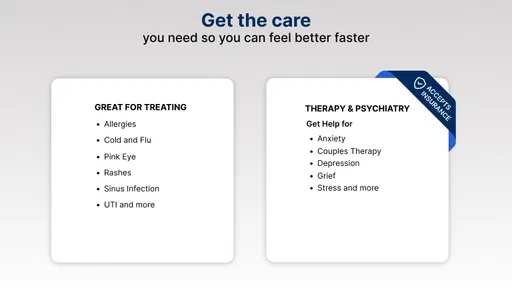
LiveHealth Online Mobile offers access to a wide range of medical professionals, including general physicians, pediatricians, therapists, and psychiatrists. This variety ensures that you can receive appropriate care for different health issues ranging from minor ailments to mental health support, all through a single platform.
Pros
- Easy access to healthcare professionals 24/7.
- User-friendly interface with intuitive navigation.
- Secure and confidential video consultations.
- Affordable consultation fees compared to in-person visits.
- No need to travel for medical consultations.
Cons
- Requires stable internet for seamless video calls.
- Limited specialist availability during odd hours.
- Can lack personalized in-person doctor interaction.
- Some users report occasional app glitches.
- Not suitable for emergency medical situations.