Weather Forecast & Live Radar
- 4.03K
- 4.7
- Installs
- 1.00M
- Price
- Free
Screenshots
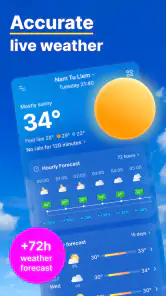
Analysis by Reviewed
I judge a weather app less by how much information it can display than by whether it helps me make a better decision before I leave home. Weather Forecast & Live Radar is built around a useful pairing: forecasts at different time scales alongside local and national air-quality information. That makes it relevant not only when I am deciding whether to carry an umbrella, but also when I want to think about the conditions for a walk, commute, or outdoor plan.
My overall impression is practical rather than flashy. This is a free weather app from Weather 365 Days, and its central appeal is having everyday forecast checks and air-quality context together. It is aimed at people who want to consult the weather regularly without turning that simple habit into a project. The important question is whether the combination fits your routine; it will not replace every specialist forecast tool.
Forecasts are more useful when the timing is clear
Why hourly and daily views matter
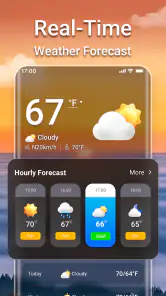
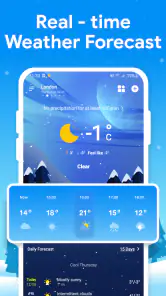
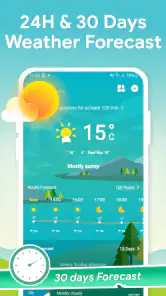
A daily forecast is a convenient starting point, but it can flatten a changing day into one broad impression. The ability to check both daily and hourly forecasts is the most useful part of this app’s stated offering. In practice, I would use the daily view to get a general sense of the day, then look at the hourly outlook when deciding whether a particular trip or activity should happen now or later.
That small change in how I check the weather can prevent a common mistake: treating a morning glance as a promise about the whole afternoon. If I am planning a walk after work, the daily picture helps me decide whether the plan sounds sensible, while the hourly view gives me a reason to check the timing more closely. It is not a guarantee that conditions will unfold exactly as forecast, but it is a more helpful planning habit than relying on a single snapshot.
The app also brings local and national air-quality information into the weather context. That matters because “good weather” is not always the same as “comfortable outdoor conditions.” If I am choosing between a short outdoor break and an indoor alternative, air quality is another consideration I can check instead of judging the day only by temperature or rain. The national view can also give useful context when I am comparing my area with a place I may visit.
The practical advantage is having forecast timing and air-quality context in the same weather routine, rather than treating every outdoor decision as a question about rain alone. This is especially useful for people who plan around more than one condition, including families, commuters, and anyone who spends a meaningful part of the day outside.
A realistic way to use it during a busy day
Imagine I have errands in the morning and an outdoor appointment later. I can start with the daily forecast to understand the broad outlook, then check the hourly view before setting off for the later plan. If air quality is also part of my decision, I can consult that information before deciding whether to walk, take another route, or move the activity indoors. The value is not that the app makes the choice for me; it brings together details that can make the choice more informed.
You May Like

Clash of Clans Is Won Between the Battles

Android Auto Makes the Case for Quieter Car Software

MobiOffice: Transforming Mobile Productivity with Seamless Integration

EA SPORTS FC™ Mobile Soccer: Redefining Mobile Sports Gaming

How Microsoft OneDrive Became a Mobile Productivity Giant

How Google Translate Breaks Language Barriers Effortlessly
A useful habit is to check at the point when the decision is still flexible. Looking at the forecast before leaving home gives me more options than discovering changing conditions once I am already out. For plans that can be shifted, I would compare the relevant hours rather than treating the whole day as uniformly suitable or unsuitable. For plans that cannot move, I would use the forecast as preparation, not as certainty.
Air-quality information is most helpful when I give it a specific purpose. For example, I might check it before planning a longer outdoor activity rather than opening it automatically every time I look at the weather. That keeps the app’s extra context useful instead of turning a quick forecast check into unnecessary scrolling. The local and national perspectives also serve different needs: local information is the natural choice for a nearby decision, while national information is more relevant when I am thinking about conditions beyond my immediate area.
These are modest workflows, but they are the sort of small decisions a weather app should support well. I would not treat any single forecast glance as a firm guarantee, especially when plans depend on precise timing. A sensible routine is to check the relevant hours closer to the activity and leave room to adjust if conditions change.
Where it fits among weather alternatives
Compared with a phone’s built-in weather display, Weather Forecast & Live Radar is worth considering if you want to make hourly planning and air quality part of the same check. A built-in forecast may be enough if all you need is a quick glance at the day. The reason to use this app instead is not simply to see another weather screen; it is to have the daily and hourly outlooks alongside local and national air-quality information.
It also occupies a different role from a specialist air-quality service. Someone whose decisions are primarily about air conditions may prefer a dedicated tool focused on that subject. Here, air quality sits within a broader weather routine, which is convenient for general planning but may not satisfy a user looking for a deeply specialized resource. Likewise, people who want detailed storm tracking or advanced meteorological analysis should compare it with apps built specifically around those tasks rather than assuming a general forecast app covers every need.
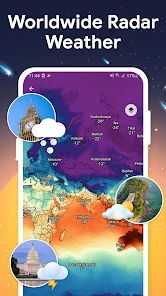
The word “radar” in the app’s name may also shape expectations. I would choose it for the confirmed combination of weather forecasts and air-quality information, not on the assumption that every advanced radar function is available. If live map detail is the deciding feature for you, check the app’s current screens and capabilities before making it your main tool. That is a fair distinction between a useful everyday forecast companion and a dedicated radar product.
The tradeoffs I would keep in mind
The first tradeoff is that a forecast is a planning aid, not a promise. Hourly detail can help me choose when to leave, but it should not be treated as exact certainty for an important outdoor event. If timing is critical, I would check again nearer the event and keep a backup plan. That advice applies particularly to activities where a change in conditions could disrupt the whole day.
The second tradeoff is breadth versus depth. Combining forecasts with air-quality information is convenient, but users with a very specific need may want more specialized tools. A runner who wants a focused training environment, a traveler who needs extensive location comparisons, or a user who prioritizes detailed radar layers may reasonably prefer an app designed around that particular workflow. Weather Forecast & Live Radar makes most sense when your needs are broad and everyday, rather than technical or highly specialized.
There is also a practical distinction between checking information and acting on it. Air-quality figures can inform whether an outdoor plan feels appropriate, but the app cannot decide what level of exposure is acceptable for every person. Individual needs differ. I would treat the information as context for a personal decision, not as a substitute for health advice or a reason to ignore how I feel.
Finally, a weather app only becomes useful if its presentation suits the way you check your phone. If you want nothing beyond a glance at a basic daily forecast, an existing default app may already do the job. Installing another app makes more sense when the hourly view and air-quality context are things you expect to use. That is the key test I would apply before adding it to my routine.
Who is likely to get the most from it?
I would recommend giving it a try if you regularly decide when to commute, run errands, walk, or spend time outside and want to consider both forecast timing and air quality. It is also a reasonable choice for someone who checks weather for more than one place and finds local and national context useful. Its straightforward purpose is easy to understand: help with ordinary weather planning while keeping air quality in view.
It is less compelling for someone who rarely checks beyond the general conditions for the day, or for a user whose main requirement is a specialized map or expert-level atmospheric detail. In those cases, the extra information may not change any decisions, and a simpler built-in forecast or a more focused specialist app could be a better fit.
The app is free, rated for Everyone, and has a 4.7 average from around 46,000 ratings, with more than a million installs. Those figures suggest that it has found a substantial audience, but I would weigh them less heavily than whether its hourly and air-quality checks match your habits. It was released on September 23, 2022, and version 1.8.0 is the current version. On Android, it requires version 6.0 or later.
My recommendation is to treat Weather Forecast & Live Radar as an everyday planning companion rather than a specialist instrument. I like the logic of checking the day, narrowing the decision to the relevant hours, and considering air quality before committing to an outdoor plan. If those are decisions you make often, the app’s combination is useful. If you only want a quick temperature glance or need highly detailed radar analysis, another option may suit you better.
For me, its strongest role is helping turn “What will the weather be like?” into a more practical question: “When should I go, and are the conditions suitable for being outside?” That is a real improvement to a daily routine, as long as I use the forecast as guidance and keep expectations realistic. Weather Forecast & Live Radar earns a place on my shortlist for people who want those checks together without paying for the app.
Weather Forecast & Live Radar Frequently Asked Questions
What can I do with Weather Forecast & Live Radar?
Weather Forecast & Live Radar is designed to help you check current conditions, view upcoming forecasts, and follow weather patterns on a radar map. Depending on the version and your location, it may show details such as temperature, precipitation, wind, and severe-weather alerts. Forecast coverage and available features can vary, so check the app’s listing and settings to see what is offered in your region.
Does the app provide live weather alerts and radar updates?
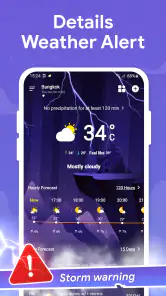
The app’s radar and alert features are intended to help you monitor changing weather, including rain or storms, but “live” does not necessarily mean every display updates instantly. Refresh timing and alert availability can depend on data providers, internet access, device settings, and local coverage. For urgent hazards, use official local weather services or emergency alerts as well as any notifications from the app.
Is Weather Forecast & Live Radar free to download?
The app may be available to download without an upfront charge, but free access does not always mean every feature is free. Some versions of weather apps include advertisements, optional purchases, or subscriptions for expanded forecasts or other tools. Review the current store listing and in-app purchase details before subscribing, and check the renewal terms if you choose a paid plan.
Does Weather Forecast & Live Radar need my location?
Location access can help the app display local conditions, forecasts, and relevant alerts automatically. You may be able to enter a city manually instead, depending on the app’s features. If you enable location, review whether access is requested only while using the app or in the background, and adjust permissions in your device settings if you prefer to limit location sharing.
Can I rely on the app’s forecasts when planning travel or outdoor activities?
The app can be useful for checking weather trends and preparing for the day, but forecasts are estimates and can change, especially further into the future or in areas with rapidly changing conditions. Compare the forecast with official sources before making important travel or safety decisions. Radar images and alerts can also be delayed or affected by limited data coverage or connectivity.
Pros
- Clear hourly and multi-day forecasts make it easy to plan ahead.
- Live radar helps track approaching rain and storms.
- Weather alerts can provide useful warnings about changing conditions.
- Useful details such as wind
- humidity
- and feels-like temperature are included.
- A location-based forecast is convenient when traveling or checking local conditions.
Cons
- Forecast accuracy can vary by location and weather conditions.
- Frequent alerts may become distracting if notification settings are not adjusted.
- Radar updates can lag behind rapidly changing conditions.
- Some features or information may require an internet connection.
- Ads or upgrade prompts may interrupt the experience
- depending on the version.
- Category
- Weather
- Version
- 1.8.0